
1. Уводзіны
Дзякуй за пакупкуasing the Axess SPBT1041 Portable Bluetooth Speaker. This device is designed to provide high-quality audio playback from various sources, including Bluetooth-enabled devices, USB drives, SD cards, and auxiliary input. It also features an FM radio function and a built-in microphone for hands-free calls. Its portable design with an adjustable strap makes it suitable for both indoor and outdoor use.
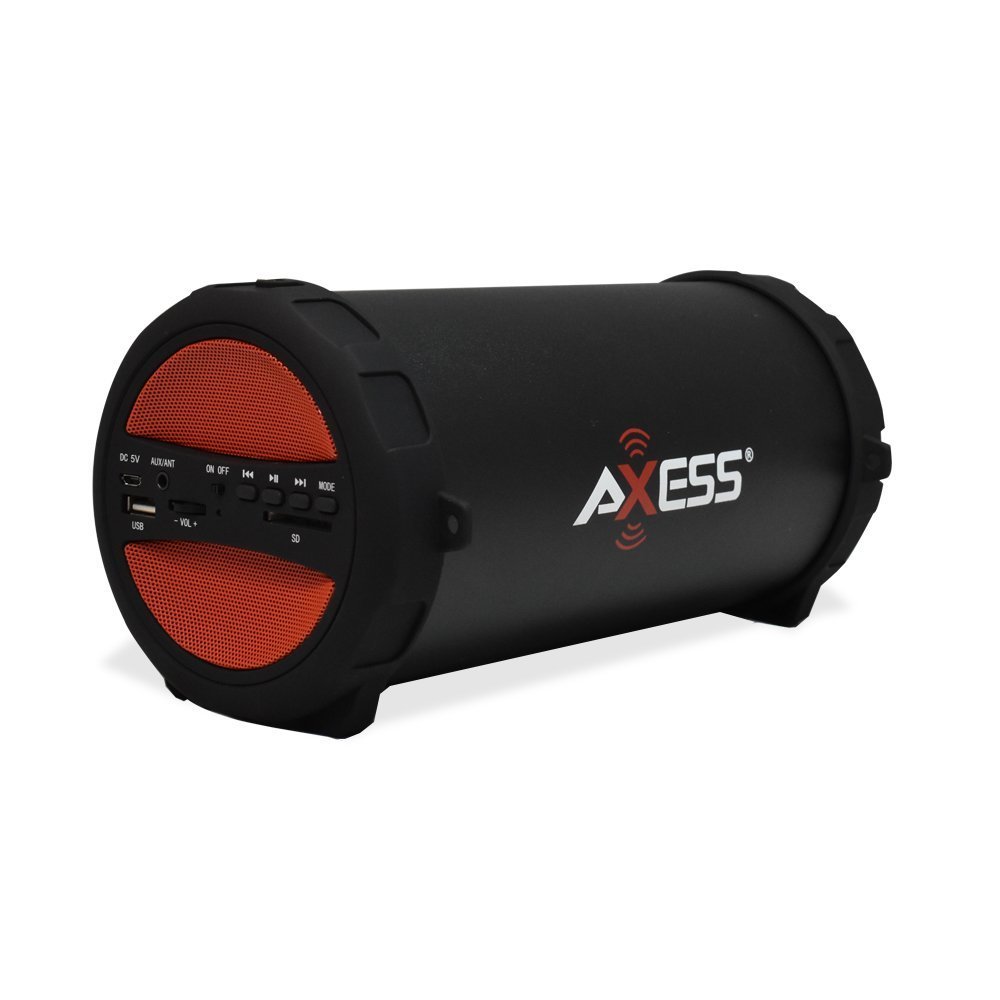
Figure 1: Axess SPBT1041 Portable Bluetooth Speaker (Red variant).

Figure 2: Key features of the SPBT1041 speaker, including FM Radio, USB Input, and AUX Input.
2. Змесціва ўпакоўкі
Калі ласка, праверце ўпакоўку на наяўнасць наступных прадметаў:
- Axess SPBT1041 Portable Bluetooth Speaker
- USB-кабель для зарадкі
- Дапаможны аўдыёкабель
- Рэгуляваны плечавы рэмень
- Кіраўніцтва па эксплуатацыі
3. Прылада скончанаview
Азнаёмцеся з элементамі кіравання і партамі дынаміка.

Figure 3: Control panel and ports of the Axess SPBT1041 speaker.
- Порт DC 5V: Для зарадкі калонкі.
- AUX/ANT Port: For auxiliary audio input or connecting an external FM antenna.
- Пераключальнік уключэння/выключэння: Уключае або выключае дынамік.
- Порт USB: Для прайгравання аўдыё з USB-флэшкі.
- Слот для SD-карты: For playing audio from an SD memory card.
- Volume Control (-VOL +): Рэгулюе гучнасць дынаміка.
- Previous Track/Rewind Button: Пераход да папярэдняй кампазіцыі або перамотка назад.
- Кнопка прайгравання/паўзы: Plays or pauses audio. Also answers/ends calls in Bluetooth mode.
- Next Track/Fast Forward Button: Пераход да наступнай кампазіцыі або перамотка наперад.
- Кнопка MODE: Switches between Bluetooth, FM Radio, USB, SD, and AUX input modes.
4. Настройка
4.1 Зарадка дынаміка
Before first use, fully charge the speaker. Connect the provided USB charging cable to the DC 5V port on the speaker and the other end to a USB power source (e.g., computer USB port, USB wall adapter). The charging indicator light will illuminate during charging and turn off when fully charged.

Figure 4: The speaker can be played while charging, featuring a 1500 mAh battery.
4.2 Уключэнне/выключэнне
Ссуньце ВКЛ/ВЫКЛ switch to the 'ON' position to power on the speaker. Slide it to 'OFF' to power off.
5. Інструкцыя па эксплуатацыі
5.1 Рэжым Bluetooth
- Power on the speaker. It will automatically enter Bluetooth pairing mode, indicated by an audible prompt.
- Уключыце Bluetooth на мабільнай прыладзе (смартфоне, планшэце і г.д.).
- Пошук available Bluetooth devices and select "SPBT1041" from the list.
- Once paired, the speaker will confirm with an audible sound. You can now play audio from your device through the speaker.
- To disconnect, disable Bluetooth on your device or press the MODE button on the speaker to switch modes.
5.2 USB/SD Card Mode
- Устаўце флэш-назапашвальнік USB у порт USB або SD-карту ў слот для SD-карты.
- Дынамік аўтаматычна распазнае прыладу захоўвання дадзеных і пачне прайграваць аўдыё fileс. Калі не, націсніце кнопку РЭЖЫМ button to switch to USB or SD mode.
- Use the Previous/Next Track buttons to navigate and the Play/Pause button to control playback.
5.3 Рэжым FM-радыё
- Уключыце дынамік і націсніце РЭЖЫМ button until you hear the FM radio prompt.
- For better reception, connect the auxiliary audio cable to the AUX/ANT port; it acts as an external antenna.
- Націсніце і ўтрымлівайце Прайграванне/Паўза кнопку для аўтаматычнага сканавання і захавання даступных FM-станцый.
- Use the Previous/Next Track buttons to switch between saved stations.
5.4 Рэжым AUX-уваходу
- Connect one end of the auxiliary audio cable to the AUX/ANT port on the speaker and the other end to the audio output of your external device (e.g., MP3 player, laptop).
- Націсніце РЭЖЫМ button until the speaker enters AUX mode.
- Кіруйце прайграваннем і гучнасцю з вашай знешняй прылады.
5.5 Call Function (Bluetooth Mode)
- When a call comes in during Bluetooth mode, press the Прайграванне/Паўза кнопку, каб адказаць.
- Націсніце Прайграванне/Паўза яшчэ раз націсніце кнопку, каб завяршыць выклік.
Video 1: Demonstration of the Axess Portable Bluetooth Speaker's portability and ease of use in an outdoor setting. This video showcases the speaker's design and how it can be carried with its strap, highlighting its suitability for various activities.
6. Тэхнічнае абслугоўванне
6.1 Ачыстка
Wipe the speaker with a soft, dry cloth. Do not use abrasive cleaners or solvents. Avoid exposing the speaker to excessive moisture.
6.2 Сыход за акумулятарам
To prolong battery life, avoid fully discharging the speaker frequently. Recharge the battery when the low battery indicator or audible prompt is heard. If storing the speaker for an extended period, charge it to approximately 50% every few months.
6.3 Захоўванне
Захоўвайце дынамік у прахалодным, сухім месцы, удалечыні ад прамых сонечных прамянёў і экстрэмальных тэмператур.
7. Выпраўленне непаладак
- Няма харчавання: Ensure the speaker is charged. Connect the USB charging cable and try again.
- Няма гуку: Check the volume level on both the speaker and your connected device. Ensure the correct input mode is selected (Bluetooth, USB, SD, AUX).
- Bluetooth не падключаецца: Ensure the speaker is in Bluetooth pairing mode. Disable and re-enable Bluetooth on your device, then search for "SPBT1041" again. Make sure the speaker is within the 30-foot operating range.
- Слабы прыём FM-станцыі: Extend the auxiliary audio cable and position it for better signal reception. Try scanning for stations again.
- USB/SD-карта не прайграваецца: Ensure the USB drive or SD card is inserted correctly and contains compatible audio files (напрыклад, фармат MP3).
8. Тэхнічныя характарыстыкі
| Асаблівасць | Дэталь |
|---|---|
| Назва мадэлі | СПБТ1041 |
| Тып дынаміка | Вулічны, партатыўны |
| Тэхналогія падлучэння | Bluetooth |
| Тэхналогія бесправадной сувязі | Bluetooth |
| Максімальная выхадная магутнасць дынаміка | 10 ват |
| Дыяметр сабвуфера | 3 цалі |
| Ёмістасць батарэі | 1500 Міліamp Гадзіны (літый-іённы) |
| Крыніца харчавання | Харчаванне ад батарэі |
| Памеры прадукту | 7" Г x 8" Ш x 12" У |
| Вага прадмета | 2.1 фунта |
| Матэрыял | Пластыкавыя |
| Узровень воданепранікальнасці | Не воданепранікальны |
| Уключаныя кампаненты | акумулятар |
9. Гарантыя
The Axess SPBT1041 Portable Bluetooth Speaker comes with a Full Warranty. Please refer to the warranty card included in your package or contact Axess customer support for details regarding warranty terms and conditions.
10. Падтрымка
For further assistance, technical support, or inquiries regarding your Axess SPBT1041 speaker, please visit the official Axess webсайт або звярніцеся ў службу падтрымкі кліентаў. Кантактную інфармацыю звычайна можна знайсці на ўпакоўцы прадукту або на сайце вытворцы webсайт.