
Yaheetech YT-00009601
Yaheetech Mobile Computer Desk Instruction Manual
Мадэль: YT-00009601
Уводзіны
Дзякуй за пакупкуasing the Yaheetech Mobile Computer Desk. This manual provides detailed instructions for assembly, operation, and maintenance to ensure safe and efficient use of your new desk. Please read this manual thoroughly before assembly and retain it for future reference.
Інфармацыя па бяспецы
Каб пазбегнуць траўмаў і пашкоджання вырабу, калі ласка, выконвайце наступныя правілы бяспекі:
- Ensure proper assembly of all components before use.
- Do not exceed the maximum weight limits for each shelf:
- Top: 30 kg (66.1 lb)
- Drawer: 2 kg (4.4 lb)
- Middle Shelf: 20 kg (44.1 lb)
- Bottom Shelf: 10 kg (22 lb)
- Use the locks on the casters to stabilize the desk when it is in place.
- Трымайце дробныя дэталі далей ад дзяцей падчас зборкі.
- Не кладзіце гарачыя прадметы непасрэдна на паверхню стала без абароны.
- Не сядзіце і не стойце на стале.
Змест пакета
Please verify that all components listed in your product's included parts list are present before beginning assembly. If any parts are missing or damaged, please contact customer support.
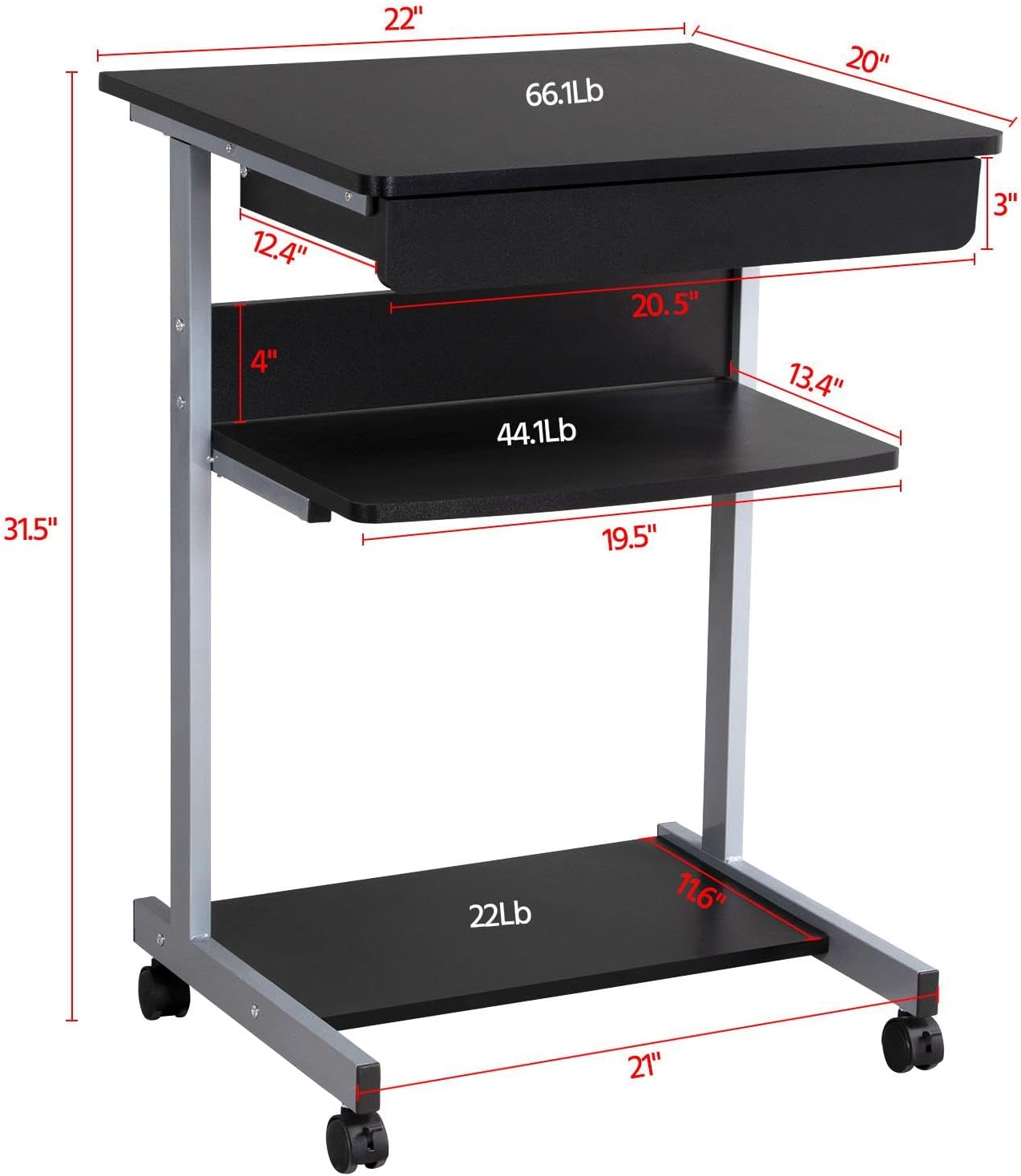
Image: Diagram showing the dimensions and weight capacities of the desk components.
Ўстаноўка і зборка
Assembly is designed to be straightforward. It is recommended to have a clear, spacious area for assembly. All necessary tools are included.
Этапы зборкі:
- Attach the side frames: Secure the horizontal bars to the vertical support frames using the provided screws.
- Install casters: Screw the four rolling casters into the bottom of the desk frame. Ensure the two lockable casters are placed at the front for easy access.
- Mount the bottom shelf: Attach the bottom shelf to the lower section of the frame using the designated screws.
- Attach the middle shelf: Secure the middle shelf to the frame at the desired height.
- Install the keyboard tray slides: Attach the drawer slides to the desk frame. Ensure they are correctly oriented for smooth operation.
- Assemble the keyboard tray: Connect the sides and back of the keyboard tray, then slide the bottom panel into place. Attach the remaining drawer slides to the keyboard tray.
- Insert the keyboard tray: Carefully slide the assembled keyboard tray into the installed drawer slides on the desk frame.
- Attach the top desktop panel: Secure the main desktop panel to the top of the frame.
Video: Detailed installation instructions for the Yaheetech Mobile Computer Desk.

Выява: Крупны план view highlighting the heavy MDF boards, thickened frame, smooth steel ball drawer, open middle shelf, open bottom shelf, and lockable casters.
Інструкцыя па эксплуатацыі
Мабільнасць і стабільнасць:
- The desk is equipped with four rolling casters for easy movement.
- To secure the desk in place, engage the locks on the two front casters. Push the lever down to lock and up to unlock.
Using the Keyboard Tray:
- The keyboard tray slides smoothly on metal runners. Gently pull the tray outwards to extend it for use.
- Push the tray inwards until it is fully retracted when not in use to save space.
Паліцы для захоўвання:
- The top surface is suitable for a laptop or monitor, with a maximum load of 30 kg (66.1 lb).
- The middle shelf can hold items up to 20 kg (44.1 lb), such as books or accessories. The back plate helps prevent items from falling.
- The bottom shelf is designed for a printer or other larger items, with a maximum load of 10 kg (22 lb).
Video: Demonstration of the small rolling computer desk cart for home office use, highlighting mobility and storage.

Image: The desk in use with a laptop, showing its compact design and functionality.
Тэхнічнае абслугоўванне
To maintain the appearance and longevity of your Yaheetech Mobile Computer Desk:
- Уборка: Працярыце паверхні аб'явайamp тканінай. Пазбягайце агрэсіўных хімічных рэчываў або абразіўных ачышчальнікаў.
- агляд: Перыядычна правярайце ўсе шрубы і злучэнні, каб пераканацца ў іх зацягнутасці. Пры неабходнасці падцягвайце.
- Ролікі: Трымайце колы чыстымі ад смецця, каб забяспечыць плаўнае кочэнне.
Ліквідацыю непаладак
If you encounter any issues with your desk, please refer to the following common solutions:
- Стол хістаецца: Ensure all screws are securely tightened. Check that the desk is on a flat, even surface. Engage the locks on the casters.
- Keyboard tray not sliding smoothly: Check the drawer slides for any obstructions or debris. Ensure the slides are properly aligned and lubricated if necessary.
- Адсутныя часткі: Калі пасля прыбыцця якіх-небудзь дэталяў не хапае, неадкладна звярніцеся ў службу падтрымкі кліентаў.
For issues not covered here, please contact Yaheetech customer support.
Тэхнічныя характарыстыкі
| Марка | Yaheetech |
| Нумар мадэлі | YT-00009601 |
| Памеры прадукту (Д х Ш х У) | 20" Г х 22" Ш х 31.1" В (56 х 51 х 79 см) |
| Вага прадмета | 24.3 фунта |
| Колер | Чорны |
| Тып матэрыялу | Engineered Wood (MDF), Metal (Iron) |
| Рэкамендаваная максімальная вага (верхняя) | 30 Kilograms (66.1 lb) |
| Рэкамендаваная максімальная вага (шуфляда) | 2 Kilograms (4.4 lb) |
| Maximum Weight Recommendation (Middle Shelf) | 20 Kilograms (44.1 lb) |
| Maximum Weight Recommendation (Bottom Shelf) | 10 Kilograms (22 lb) |
| Колькасць скрынь | 1 |
| Колькасць паліц | 2 (адкрытыя паліцы) |
| Асаблівасць | Compact, Mobile with Lockable Casters |
| Неабходная зборка | так |
| Уключае ўсе інструменты для зборкі | так |
Гарантыя і падтрымка
For warranty information, please refer to the documentation included with your purchase or contact Yaheetech directly. Yaheetech aims to provide quality products and customer satisfaction.
If you require further assistance, have questions about assembly, or need to report missing/damaged parts, please contact Yaheetech customer support through their official webсайт або прадаўца, дзе быў набыты тавар.
Ask a question about this manual
Ask about setup, troubleshooting, compatibility, parts, safety, or missing instructions. Manuals+ will review the question and use this page’s manual context to help answer it.