
Важныя інструкцыі па бяспецы
ПЕРАД ВЫКАРЫСТАННЕМ УВАЖЛІВА ПРАЧЫТАЦЬ УСЕ ІНСТРУКЦЫІ.
- Заўсёды адключайце вентылятар ад разеткі перад чысткай, абслугоўваннем або перамяшчэннем.
- Не ўстаўляйце пальцы ці якія-небудзь іншыя прадметы праз рашотку падчас працы вентылятара.
- Не выкарыстоўвайце вентылятар з пашкоджаным шнуром або вілкай. Выкіньце вентылятар або вярніце яго ў аўтарызаваны сэрвісны цэнтр для агляду і/або рамонту.
- Не пракладвайце шнур пад дывановым пакрыццём. Не накрывайце шнур дыванкамі, дарожкамі або падобнымі пакрыццямі. Размясціце шнур далей ад зоны руху і так, каб аб яго не спатыкнуцца.
- Не выкарыстоўвайце вентылятар у вільготных або damp такіх месцах, як ванныя пакоі або пральні.
- Гэты вентылятар прызначаны толькі для выкарыстання ў памяшканні. Не выкарыстоўвайце яго на вуліцы.
- Keep the fan away from curtains, drapes, or any objects that may get caught in the fan blades.
- Сачыце за дзецьмі падчас выкарыстання вентылятара.
Прадукт скончаныview
The Optimus 18-inch High Velocity Industrial Floor Fan is designed to provide powerful air circulation in various indoor environments. Its robust construction and high-velocity motor make it suitable for workshops, garages, and large rooms.
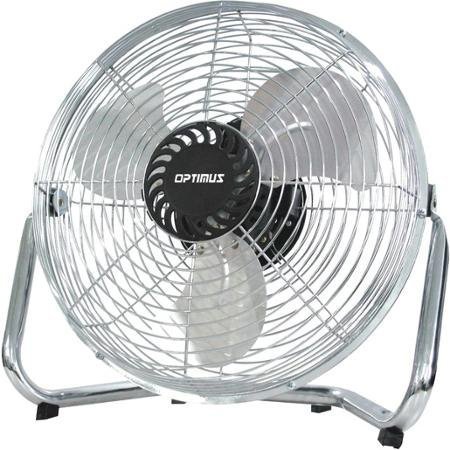
Image: Optimus 18-inch High Velocity Industrial Floor Fan. This image shows the fan with its silver metallic finish and sturdy floor stand.
Асноўныя характарыстыкі:
- 18-inch diameter for wide air distribution.
- Industrial-grade high velocity airflow.
- Durable metallic finish.
- Floor standing design for stable placement.
- Multiple power levels for adjustable airflow.
Інструкцыя па наладзе
- Распакуйце вентылятар: Carefully remove the fan and all components from the packaging. Retain packaging for future storage or transport.
- Assemble the Floor Stand:
- Attach the fan head to the floor stand using the provided screws and tools. Ensure all connections are secure.
- Verify the fan head can pivot smoothly on the stand.
- Размяшчэнне: Place the fan on a firm, level surface. Ensure there is adequate space around the fan for proper air circulation and to prevent obstruction of the air intake/output. Keep the fan at least 3 feet away from walls or furniture.
- Падключэнне сілкавання: Ensure the fan is in the "OFF" position before plugging it into a standard 120V AC electrical outlet.
Інструкцыя па эксплуатацыі
This fan features push-button controls for easy operation. A remote control may also be included for convenience.
- Уключэнне/выключэнне харчавання: Locate the power button on the control panel. Press the button once to turn the fan ON. Press it again to turn the fan OFF.
- Рэгуляванне хуткасці вентылятара: The fan has 4 power levels. After turning the fan ON, repeatedly press the speed control button to cycle through the available speed settings (Low, Medium, High, Max). The fan will operate at the selected speed.
- Рэгуляванне напрамку паветранага патоку: The fan head can be tilted manually to direct airflow upwards or downwards. Gently tilt the fan head to the desired angle. Do not force the fan head beyond its intended range of motion.
Тэхнічнае абслугоўванне
Рэгулярная чыстка і абслугоўванне забяспечаць аптымальную прадукцыйнасць і падоўжаць тэрмін службы вашага вентылятара.
- Ачыстка вентылятара:
- Заўсёды адключайце вентылятар ад крыніцы сілкавання перад чысткай.
- Выкарыстоўвайце мяккі, damp тканінай для працірання вонкавых паверхняў вентылятара. Не выкарыстоўвайце абразіўныя ачышчальнікі або агрэсіўныя хімікаты, бо яны могуць пашкодзіць пакрыццё.
- To clean the fan blades, carefully remove the front grille (if detachable, refer to assembly instructions for details). Wipe the blades with a soft cloth. Ensure the grille is securely reattached before operating the fan.
- Перад тым, як зноў падключыць вентылятар, пераканайцеся, што ўсе дэталі цалкам сухія.
- захоўванне: Калі вентылятар не выкарыстоўваецца працяглы час, захоўвайце яго ў прахалодным, сухім месцы. Рэкамендуецца захоўваць яго ў арыгінальнай упакоўцы, каб абараніць ад пылу і пашкоджанняў.
Ліквідацыю непаладак
| праблема | Магчымая прычына | Рашэнне |
|---|---|---|
| Вентылятар не ўключаецца. | Не падключаны да сеткі; разетка не працуе; вентылятар выключаны. | Ensure fan is securely plugged into a working outlet. Check household fuse/circuit breaker. Press the power button to turn the fan on. |
| Нізкі паток паветра. | Fan speed set too low; obstructed intake/output; dirty blades. | Increase fan speed. Clear any obstructions. Clean fan blades and grilles as per maintenance instructions. |
| Незвычайны шум або стук. | Loose parts; fan not on a level surface; foreign object in blades. | Unplug the fan and check for any loose screws or components. Place the fan on a stable, level surface. Carefully inspect for and remove any foreign objects. |
Тэхнічныя характарыстыкі
| Асаблівасць | Дэталь |
|---|---|
| Марка | Оптимус |
| Назва мадэлі | Высокая хуткасць |
| Нумар мадэлі тавару | 306c1b92-f36b-4ccc-ac62-2ad33d5c9efb |
| Дыяметр | 18 цалі |
| Колер | Серабро |
| стыль | Прамысловы |
| Крыніца харчавання | Правадная электрычная |
| Колькасць узроўняў магутнасці | 4 |
| Метад кантролю | Кіраванне кнопкамі |
| Выкарыстанне ў памяшканні/на вуліцы | У памяшканні |
| Уключаныя кампаненты | Floor Stand, Remote Control |
| Спецыфікацыя Met | OSHA |
Гарантыя і падтрымка
Optimus products are manufactured to high-quality standards. This product is covered by a limited warranty against defects in materials and workmanship from the date of purchase. Please refer to the warranty card included with your product for specific terms and conditions.
For technical support, troubleshooting assistance, or warranty claims, please contact Optimus customer service. Contact information can typically be found on the product packaging or the official Optimus webсайт.
Калі ласка, захавайце пацвярджэнне пакупкі для гарантыйных мэт.