
AT&T EL52345
AT&T EL52345 Cordless Phone System User Manual
Model: EL52345 | Brand: AT&T
Прадукт скончаныview
The AT&T EL52345 is an expandable cordless phone system featuring three handsets, an integrated digital answering system, and Caller ID/Call Waiting functionality. Designed for home or small office use, this system provides clear, interference-free communication using DECT 6.0 technology. The digital answering system offers up to 22 minutes of recording time, ensuring you never miss an important message. Each handset includes a backlit LCD screen for easy viewing of Caller ID entries and menu navigation.
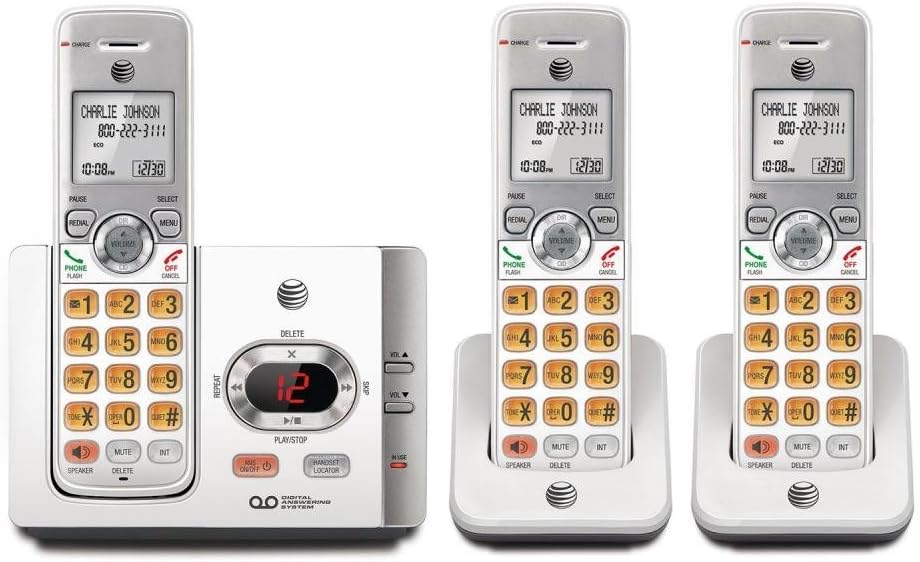
This image displays the complete AT&T EL52345 cordless phone system. It includes the main base unit with an integrated digital answering system, and three cordless handsets. Two of the handsets are shown in their individual charging cradles, while the third is docked in the main base unit. The handsets feature a backlit LCD screen, a full numeric keypad, and dedicated buttons for call functions, menu navigation, volume control, speakerphone, mute, and intercom. The main base unit has controls for the answering system, including message playback, skip, repeat, and volume adjustment, along with a message counter display.
Кіраўніцтва па ўстаноўцы
Follow these steps to set up your AT&T EL52345 cordless phone system:
- Ўстаноўка батарэі: Open the battery compartment on each handset. Insert the supplied AAA batteries, ensuring correct polarity. Close the compartment cover.
- Зарадныя тэлефоны: Place each handset in its respective charging cradle or the main base unit. The CHARGE indicator on the handset will illuminate. Allow at least 16 hours for the initial charge before first use.
- Падключэнне базавага блока:
- Падключыце адзін канец тэлефоннага шнура да раздыма TEL LINE на задняй панэлі базавага блока.
- Падключыце другі канец тэлефоннага шнура да тэлефоннай разеткі.
- Plug the large end of the power adapter into an electrical outlet not controlled by a wall switch.
- Plug the small end of the power adapter into the POWER jack on the back of the base unit.
- Handset Registration: Handsets are pre-registered to the base unit. If a handset displays "To register HS..." or similar, refer to the troubleshooting section for manual registration instructions.
- Усталяваць дату і час: After the initial charge, the handset will prompt you to set the date and time. Follow the on-screen instructions using the MENU and SELECT buttons.
Інструкцыя па эксплуатацыі
Здзяйсненне і прыём званкоў
- Каб зрабіць званок: Прэса ТЕЛЕФОН / ФЛЕШ or СПІКЕР, а затым набярыце нумар.
- Каб адказаць на званок: Прэса ТЕЛЕФОН / ФЛЕШ or СПІКЕР калі званіць тэлефон.
- Каб завяршыць выклік: Прэса ВЫКЛ/АДМЕНА or place the handset in the charging cradle.
- Паўторны набор: Прэса ПЕРАСУД to call the last dialed number.
Аўтаадказчык
The digital answering system records messages when you are away or unable to answer calls.
- Уключыць/выключыць: Прэса ANS ВКЛ/ВЫКЛ на базавым блоку.
- Прайграванне паведамленняў: Прэса ПРАЙГРАЦЬ/СТОП on the base unit to listen to new messages.
- Skip Message: Падчас прайгравання націсніце ПРАПУСЦІЦЬ (right arrow) to skip to the next message.
- Repeat Message: Падчас прайгравання націсніце Паўтор (left arrow) to repeat the current message. Press twice to go to the previous message.
- Выдаліць паведамленне: Падчас прайгравання націсніце ВЫДАЛІЦЬ на базавым блоку.
- Наладзіць гучнасць: Выкарыстоўвайце VOL ▲ or VOL ▼ on the base unit to adjust playback volume.
Ідэнтыфікатар абанента
The Caller ID feature displays the caller's name and number (if available) on the handset screen.
- Review Журнал выклікаў: Прэса CID on the handset to scroll through the call log.
- Ператэлефанаваць: Пакуль viewing a Caller ID entry, press ТЕЛЕФОН / ФЛЕШ каб патэлефанаваць на нумар.
Тэхнічнае абслугоўванне
- Уборка: Clean the phone and base unit with a soft, slightly damp тканінай. Не выкарыстоўвайце ачышчальныя спрэі або агрэсіўныя хімікаты.
- Сыход за батарэяй: To ensure optimal battery life, fully charge the handsets for 16 hours before first use. If the phone will not be used for an extended period, remove the batteries.
- Размяшчэнне: Place the base unit in a central location away from other electronic devices (e.g., microwaves, Wi-Fi routers) to minimize interference.
Ліквідацыю непаладак
| праблема | Рашэнне |
|---|---|
| Няма нумара набору. | Ensure the telephone line cord is securely plugged into the base unit and the wall jack. Check if the power adapter is properly connected to the base unit and a working electrical outlet. |
| Handset displays "To register HS..." | To manually register a handset: Place the handset in the base unit. Press and hold the ЛАКАЦЭР СЛУШАК button on the base unit for about 4 seconds until the IN USE light flashes. The handset will display "Registering..." and then "Handset Registered" when successful. |
| Дрэнная якасць гуку або статычныя перашкоды. | Move the handset closer to the base unit. Ensure the base unit is not near other electronic devices that may cause interference. Check the telephone line cord for damage. |
| Handset battery does not hold a charge. | Ensure the handset is properly seated in the charging cradle. Clean the charging contacts on both the handset and cradle with a dry cloth. If the issue persists, the battery may need replacement. |
| Answering system not recording messages. | Ensure the answering system is turned ON. Check if the memory is full; delete old messages if necessary. |
Тэхнічныя характарыстыкі
| Асаблівасць | Дэталь |
|---|---|
| Нумар мадэлі | EL52345 |
| Тып тэлефона | Бесправадная |
| Колькасць тэлефонаў | 3 (з магчымасцю пашырэння) |
| Тып аўтаадказчыка | Лічбавы |
| ёмістасць запісу | Да 22 хвілін |
| Caller ID / Call Waiting | так |
| Тэхналогіі | DECT 6.0 |
| Патрабуюцца батарэі | 3 AAA batteries (per handset) |
| Колер | Серабро, белы |
| Матэрыял | Пластыкавыя |
| Product Dimensions (Base Unit) | 11.1 х 6.9 х 5.5 цалі |
| Вага прадмета | 1.3 фунта |
| Сумяшчальныя прылады | PSTN Networks |
Падтрымка і гарантыя
For further assistance, technical support, or warranty information regarding your AT&T EL52345 cordless phone system, please refer to the official AT&T product support channels. Typically, warranty details are provided with the product packaging or can be found on the manufacturer's official webсайт.
Note: No official product videos were provided in the source data for embedding in this manual.
Ask a question about this manual
Ask about setup, troubleshooting, compatibility, parts, safety, or missing instructions. Manuals+ will review the question and use this page’s manual context to help answer it.