
1. Прадукт скончыўсяview
The Paddsun AW-NU231 is a Wireless USB Wi-Fi Adapter designed to provide wireless internet connectivity to compatible devices, primarily certain LG TV models and desktop computers. This adapter supports the IEEE 802.11n standard, operating on the 2.4GHz frequency band with a maximum data transfer rate of 300Mbps. It enables your device to connect to a wireless network for streaming content, browsing, and other internet-dependent functions.
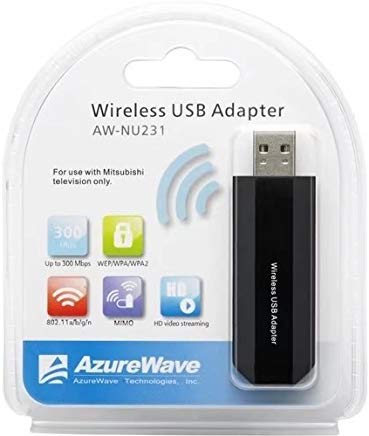
Image: The Paddsun AW-NU231 Wireless USB Wi-Fi Adapter, a compact dongle designed for easy connectivity.
2. Інструкцыі па ўсталёўцы
- Прылада адключэння: Ensure your television or desktop computer is powered off before proceeding with the installation.
- Устаўце адаптар: Locate an available USB port on your compatible device. Carefully insert the Paddsun AW-NU231 USB Wi-Fi Adapter into the USB port.
- Прылада ўключэння: Power on your television or desktop computer.
- Driver Installation (for Desktops):
- For most modern operating systems, the adapter may be recognized automatically (plug-and-play).
- If not, you may need to install drivers. Refer to your operating system's device manager or the manufacturer's support webСайт для загрузкі драйвераў.
- Налады сеткі доступу:
- For LG TVs: Navigate to the TV's settings menu, usually found under "Network" or "Connection" settings.
- For Desktops: Access your operating system's network settings.
- Падключыцеся да Wi-Fi: Select "Wireless Connection" or "Wi-Fi" from the network options. Your device should scan for available wireless networks. Select your desired network from the list and enter the Wi-Fi password if prompted.
- Праверце злучэнне: Once connected, your device should indicate a successful internet connection.
3. Інструкцыя па эксплуатацыі
Once the Paddsun AW-NU231 adapter is successfully installed and connected to a Wi-Fi network, your device will have internet access. The operation of the Wi-Fi connection is managed through your device's operating system or TV interface.
- Аўтаматычнае паўторнае падключэнне: The adapter is designed to automatically reconnect to the last known Wi-Fi network when the device is powered on, provided the network is available and the password has not changed.
- Changing Networks: To connect to a different Wi-Fi network, navigate to your device's network settings and select a new network from the available list.
- Сумяшчальнасць: This adapter is specifically designed for compatibility with various LG TV models including LM6200-CE, LA6200-CN, LM6400-CE, LM6400-CA, LM6450-CA, LA6500-CC, LM6600-CE, LW5500, LV5700, LW6500, and can also be used with desktop computers.
4. Тэхнічнае абслугоўванне
Proper care ensures the longevity and optimal performance of your Paddsun AW-NU231 Wi-Fi adapter.
- Уборка: Gently wipe the adapter with a soft, dry cloth. Avoid using liquid cleaners or solvents, which can damage the device.
- захоўванне: Калі адаптар не выкарыстоўваецца, захоўвайце яго ў прахалодным, сухім месцы, удалечыні ад прамых сонечных прамянёў і экстрэмальных тэмператур.
- Апрацоўка: Avoid dropping the adapter or subjecting it to strong impacts. Do not bend or force the USB connector.
- Абнаўленні праграмнага забеспячэння: For desktop use, ensure your operating system and any relevant drivers are kept up-to-date to maintain compatibility and performance. For TVs, ensure your TV's firmware is updated.
5. Выпраўленне непаладак
If you encounter issues with your Paddsun AW-NU231 Wi-Fi adapter, refer to the following common solutions:
- Адаптар не выяўлены:
- Пераканайцеся, што адаптар цалкам устаўлены ў порт USB.
- Паспрабуйце іншы USB-порт на вашай прыладзе.
- Restart your television or computer.
- For desktops, check Device Manager to see if the adapter is listed and if there are any driver issues.
- Не ўдаецца падключыцца да сеткі Wi-Fi:
- Verify that your Wi-Fi network is active and broadcasting.
- Двойчы праверце пароль Wi-Fi на дакладнасць.
- Ensure the adapter is within range of your wireless router.
- Перазагрузіце бесправадны маршрутызатар і мадэм.
- Павольная хуткасць Інтэрнэту:
- Ensure the adapter is not obstructed and has a clear line of sight to the router if possible.
- Праверце, ці іншыя прылады спажываюць прапускную здольнасць у вашай сетцы.
- Перазагрузіце маршрутызатар і мадэм.
- Update drivers for desktop computers.
- Перарывістае злучэнне:
- Move the device closer to the wireless router.
- Праверце наяўнасць крыніц перашкод (напрыклад, мікрахвалевых печаў, бесправадных тэлефонаў).
- Пераканайцеся, што прашыўка вашага маршрутызатара абноўлена.
6. Тэхнічныя характарыстыкі
| Асаблівасць | Дэталь |
|---|---|
| Марка | Падсун |
| мадэль | AW-NU231 |
| Абсталяванне інтэрфейсу | USB |
| Сумяшчальныя прылады | Desktop, Specific LG TV Models (e.g., LM6200-CE, LA6200-CN, LM6400-CE, LM6400-CA, LM6450-CA, LA6500-CC, LM6600-CE, LW5500, LV5700, LW6500) |
| Хуткасць перадачы даных | 300 мегабіт у секунду (Мбіт/с) |
| бесправадной стандарт | IEEE 802.11n |
| Дыяпазон частот | 2.4 ГГц |
| Памеры ўпакоўкі | 12.2 х 10.2 х 1.4 см |
| Вага прадмета | 20 г |
7. Інфармацыя аб гарантыі
The Paddsun AW-NU231 Wireless USB Wi-Fi Adapter comes with a 1 год гарантыі з даты пакупкі. Гэтая гарантыя распаўсюджваецца на вытворчыя дэфекты і няспраўнасці пры нармальным выкарыстанні. Яна не распаўсюджваецца на пашкоджанні, выкліканыя няправільным выкарыстаннем, аварыямі, несанкцыянаванымі мадыфікацыямі або няправільнай устаноўкай.
Please retain your proof of purchase for warranty claims. For detailed terms and conditions, refer to the warranty card included with your product or contact customer support.
8. Падтрымка
For further assistance, technical support, or warranty inquiries regarding your Paddsun AW-NU231 Wireless USB Wi-Fi Adapter, please refer to the following resources:
- Вытворцы Webсайт: Visit the official Paddsun website for updated drivers, FAQs, and support contact information.
- Абслугоўванне кліентаў: Contact the retailer or manufacturer's customer service department directly.
- Інтэрнэт-рэсурсы: Search online forums or support communities for solutions to common issues.