
TRAKK TR812
TRAKK GO Portable Bluetooth Speaker User Manual
Марка: ТРАКК
мадэль: TR812
Уводзіны
Дзякуй за пакупкуasing the TRAKK GO Portable Bluetooth Speaker. This manual provides detailed instructions for setting up, operating, and maintaining your speaker. The TRAKK GO is designed for robust indoor and outdoor use, featuring IP67 waterproof, dustproof, and shockproof capabilities, ensuring high-quality audio in various environments.

Пярэдні кут view of the TRAKK GO portable Bluetooth speaker, showcasing its black rubberized exterior, silver trim, and mesh grille with the 'TRAKK' logo. Control buttons are visible on the top panel.
Змест пакета
Калі ласка, пераканайцеся, што ўсе пералічаныя ніжэй прадметы ўваходзяць у ваш пакет:
- TRAKK GO Portable Bluetooth Speaker
- USB-кабель для зарадкі
- Аўдыёкабель 3.5 мм (AUX)
- Адаптар сілкавання
- Сумка для пераноскі
- Кіраўніцтва карыстальніка (гэты дакумент)

Накладныя выдаткі view displaying all items included in the TRAKK GO speaker package: the speaker itself, a USB charging cable, a 3.5mm audio cable, a power adapter, a black carrying bag, and the printed owner's guide.
Асаблівасці прадукту
- Пашыраныя магчымасці падлучэння: Bluetooth 4.0 for instant pairing with smartphones, tablets, and computers. Features NFC functionality and a 3.5mm AUX port.
- Пашыраны дыяпазон: Wireless connection range of up to 33 feet (10 meters).
- Убудаваны мікрафон: Allows for hands-free phone calls directly through the speaker.
- Трывалы дызайн: IP67 rated for waterproof, dustproof, and shockproof protection. Features a coated rubberized exterior and aluminum grill.
- Доўгі тэрмін службы батарэі: Equipped with a 4400mAh battery, providing up to 12 hours of playtime.
- Функцыянальнасць Power Bank: Can be used to charge other USB devices.
- Інтуітыўнае кіраванне: LED Power and Charging Status Indicator, with LED button backlights activated by a thermal sensor.
- Высокая якасць гуку: 20W output with MaxBass Technology for superior sound.

The TRAKK GO speaker resting on a muddy, wet surface, demonstrating its rugged and waterproof design. Water droplets are visible on its surface, highlighting its IP67 rating.

An artistic representation of the TRAKK GO speaker with musical notes and sound waves emanating from it, symbolizing its powerful sound and MaxBass technology.
Кіраўніцтва па ўстаноўцы
1. Зарадка дынаміка
Before first use, fully charge the TRAKK GO speaker. Connect the provided USB charging cable to the speaker's charging port and the other end to the power adapter. Plug the adapter into a wall outlet. The LED indicator will show charging status and turn off when fully charged.
2. Уключэнне / выключэнне харчавання
Націсніце і ўтрымлівайце Магутнасць button (usually marked with a power symbol) located on the top panel of the speaker until you hear an audible prompt or see the LED indicator light up.
Каб выключыць харчаванне, націсніце і ўтрымлівайце Магутнасць button again until the speaker powers down.
3. Спарванне Bluetooth
- Пераканайцеся, што дынамік уключаны і знаходзіцца ў рэжыме спалучэння Bluetooth (гэта пазначана міргаючым святлодыёдам).
- На вашай прыладзе (смартфоне, планшэце, камп'ютары) уключыце Bluetooth і знайдзіце даступныя прылады.
- Select "TRAKK GO" from the list of found devices.
- Пасля спалучэння дынамік падасць гукавое пацверджанне, а святлодыёдны індыкатар пачне гарэць пастаянна.
- Калі будзе запытаны пароль, увядзіце «0000».
4. Спалучэнне NFC (блізкая бесправадная сувязь)
If your device supports NFC, simply tap your NFC-enabled device against the NFC area on the TRAKK GO speaker to initiate pairing. Follow any on-screen prompts on your device.
5. Падключэнне AUX
For non-Bluetooth devices, use the provided 3.5mm audio cable. Connect one end to the AUX port on the speaker and the other end to the audio output jack of your device. The speaker will automatically switch to AUX mode.
Інструкцыя па эксплуатацыі
Кнопкі кіравання зверхуview
The TRAKK GO speaker features intuitive controls located on its top panel:
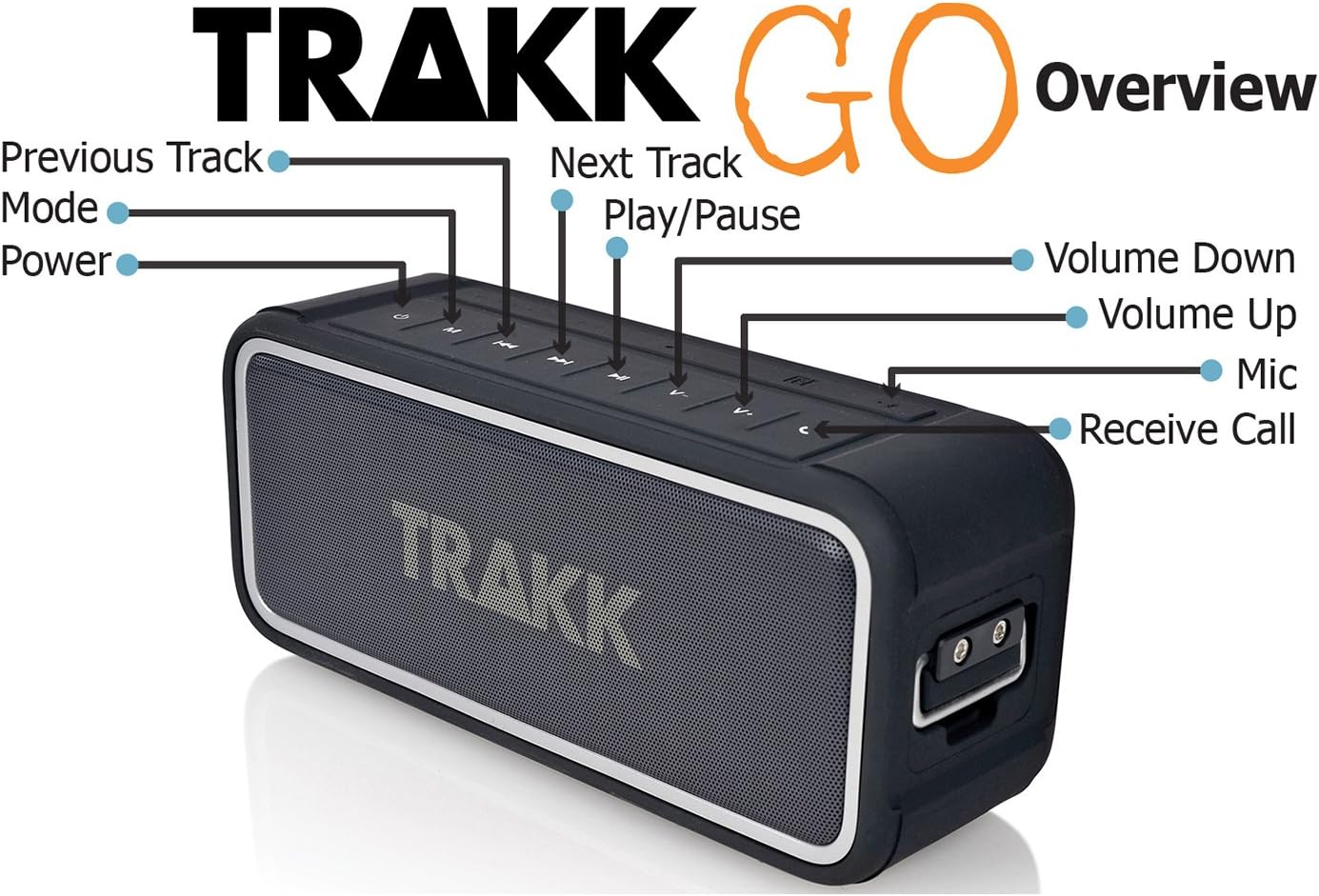
Накладныя выдаткі view of the TRAKK GO speaker, clearly labeling its control buttons: Power, Mode, Previous Track, Next Track, Play/Pause, Volume Down, Volume Up, Mic, and Receive Call.
- Кнопка харчавання: Націсніце і ўтрымлівайце, каб уключыць/выключыць харчаванне.
- Кнопка рэжыму: Short press to switch between Bluetooth and AUX modes.
- Кнопка прайгравання/паўзы: Націсніце, каб прайграць або прыпыніць гук.
- Кнопка папярэдняга трэка: Кароткае націсканне, каб перайсці да папярэдняга трэка.
- Кнопка наступнага трэка: Кароткае націсканне для пераходу да наступнага трэка.
- Кнопка павелічэння гучнасці: Націсніце, каб павялічыць гучнасць.
- Кнопка памяншэння гучнасці: Націсніце, каб паменшыць гучнасць.
- Receive Call Button: Press to answer or end a phone call. Press and hold to reject a call.
Здзяйсненне і прыём званкоў
When paired via Bluetooth, the TRAKK GO speaker can be used as a hands-free speakerphone:
- Адказ на званок: Націсніце Прымаць званок кнопка.
- Завяршэнне выкліку: Націсніце Прымаць званок кнопка.
- Адхіленне званка: Націсніце і ўтрымлівайце Прымаць званок кнопка.
- Паўторны набор апошняга нумара: Двойчы націсніце Прымаць званок кнопка.
Using as a USB Power Bank
The TRAKK GO speaker can charge other USB-powered devices. Connect your device's USB charging cable to the USB output port on the speaker. The speaker's internal battery will then provide power to charge your device.
Тэхнічнае абслугоўванне і догляд
Уборка
Для чысткі дынаміка выкарыстоўвайце мяккую губкуamp cloth. Do not use abrasive cleaners, alcohol, or chemical solvents, as these may damage the surface or internal components. Ensure all ports are dry before charging or connecting cables.
Waterproof and Dustproof Care (IP67)
The TRAKK GO is IP67 rated, meaning it is protected from dust ingress and can withstand immersion in water up to 1 meter for 30 minutes. While highly durable, follow these guidelines:
- Ensure the rubber flap covering the charging and AUX ports is securely closed before exposing the speaker to water or dust.
- Не апускайце дынамік наўмысна на працяглы час або на глыбіню большую за пазначаную.
- After exposure to saltwater or chlorinated water, rinse the speaker with fresh water and allow it to air dry completely before charging or using the ports.
- Пазбягайце ўздзеяння на дынамік экстрэмальных тэмператур.

The TRAKK GO speaker covered in water droplets, illustrating its waterproof capabilities. The speaker's black rubberized body and mesh grille are clearly visible.
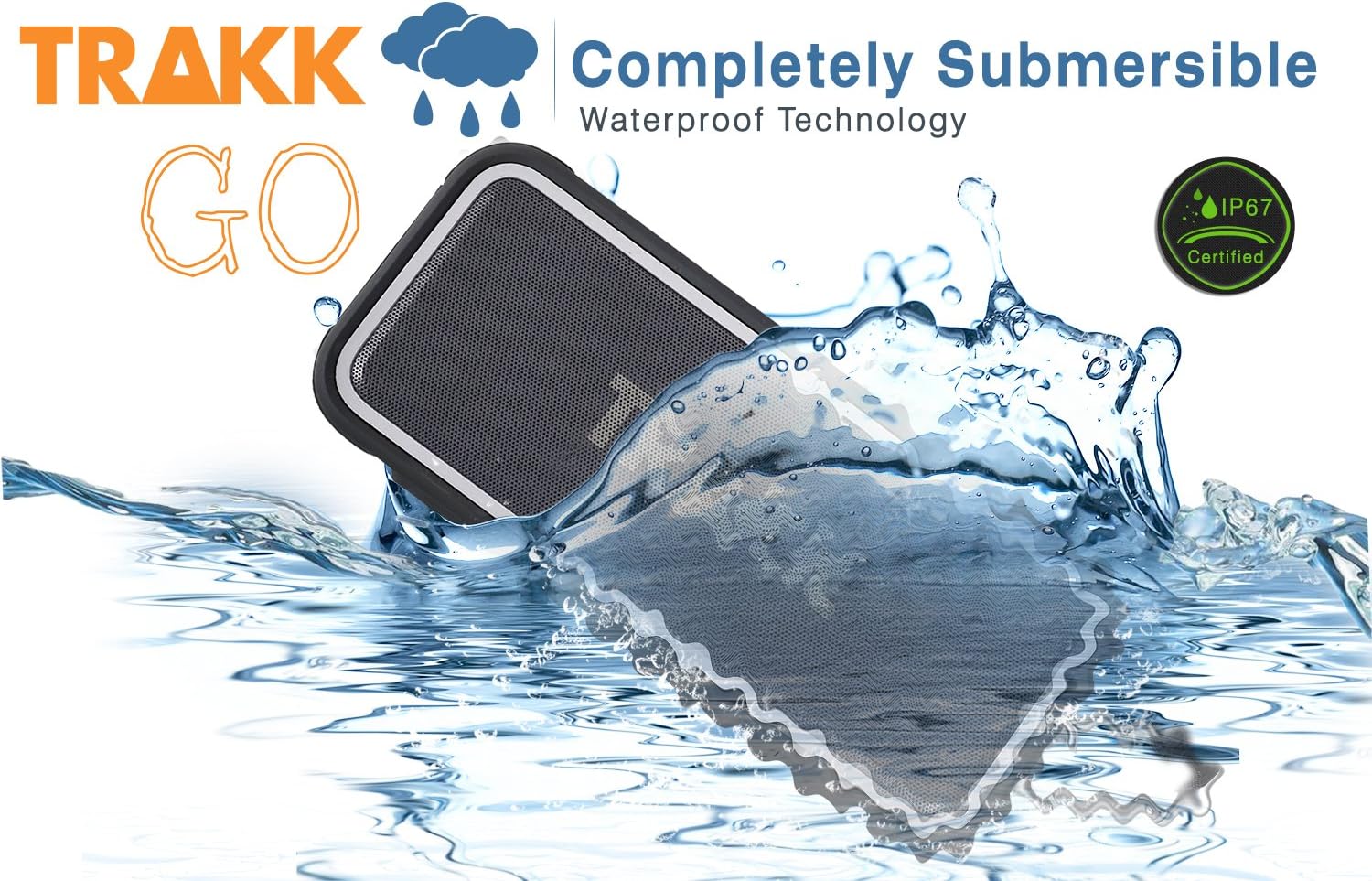
The TRAKK GO speaker partially submerged in water with a splash, emphasizing its completely submersible waterproof technology and IP67 certification.

The TRAKK GO speaker placed on a sandy beach with ocean waves gently washing over it, showcasing its suitability for outdoor and water-adjacent environments.
Захоўванне
When not in use for extended periods, store the speaker in a cool, dry place, away from direct sunlight and extreme temperatures. It is recommended to charge the battery at least once every three months to maintain battery health.
Ліквідацыю непаладак
| праблема | Магчымая прычына | Рашэнне |
|---|---|---|
| Дынамік не ўключаецца. | Акумулятар разраджаны. | Charge the speaker fully using the provided USB cable and power adapter. |
| Немагчыма падключыцца праз Bluetooth. | Speaker is not in pairing mode; device Bluetooth is off; speaker is too far from device; interference. | Ensure speaker is in pairing mode (flashing LED). Turn Bluetooth off/on on your device. Move speaker closer to device. Avoid strong electromagnetic interference. |
| Няма гуку з дынаміка. | Занадта нізкая гучнасць; няправільны рэжым уводу; прылада не прайгравае аўдыё. | Increase speaker and device volume. Press the Mode button to switch to the correct input (Bluetooth/AUX). Ensure audio is playing on your connected device. |
| Дрэнная якасць/скажэнне гуку. | Low battery; device too far; audio source quality. | Charge the speaker. Move device closer to speaker. Try a different audio source or file. |
| Speaker not charging other devices. | Speaker battery too low; incorrect cable; device not compatible. | Ensure speaker has sufficient charge. Use the correct USB cable for your device. Some devices may draw too much power. |
Тэхнічныя характарыстыкі
| Асаблівасць | Дэталь |
|---|---|
| Нумар мадэлі | TR812 |
| Тып дынаміка | Бесправадны партатыўны дынамік Bluetooth |
| Сувязь | Bluetooth 4.0, NFC, 3.5mm AUX |
| Далёкасць бесправадной сувязі | Да 33 футаў (10 метраў) |
| Выходная магутнасць | 20 ват |
| Ёмістасць батарэі | 4400mAh літый-іённы |
| Тэрмін службы батарэі | Да 12 гадзін (пры гучнасці 50%) |
| Рэйтынг воданепранікальнасці | IP67 (Waterproof, Dustproof, Shockproof) |
| Убудаваны мікрафон | так |
| Памеры (Д х Ш х У) | 18.54 х 6.35 х 7.62 см |
| Вага | 816 грам |
| Матэрыял | Rubberized exterior, Aluminum grill |
Гарантыя і падтрымка
Інфармацыя аб гарантыі
The TRAKK GO Portable Bluetooth Speaker comes with a 1-гадовая абмежаваная гарантыя з даты пакупкі. Гэтая гарантыя распаўсюджваецца на вытворчыя дэфекты матэрыялаў і вырабу пры нармальным выкарыстанні. Яна не распаўсюджваецца на пашкоджанні, выкліканыя няправільным выкарыстаннем, аварыяй, несанкцыянаванай мадыфікацыяй або знешнімі прычынамі.
Калі ласка, захавайце доказы пакупкі для прэтэнзій па гарантыі.
Падтрымка кліентаў
For technical assistance, warranty claims, or general inquiries, please contact TRAKK Customer Support. Refer to the contact information provided on the TRAKK official webсайт або ўпакоўку вашага прадукту.
Каб атрымаць найноўшую інфармацыю і рэсурсы падтрымкі, наведайце: www.trakk.com
Ask a question about this manual
Ask about setup, troubleshooting, compatibility, parts, safety, or missing instructions. Manuals+ will review the question and use this page’s manual context to help answer it.