
UNIC UC46 IDSP-011
Кіраўніцтва карыстальніка міні-праектара UNIC UC46
Model: UC46 IDSP-011
1. Уводзіны
This user manual provides detailed instructions for the operation, setup, and maintenance of your UNIC UC46 Mini Projector. Please read this manual thoroughly before using the product to ensure proper and safe operation. Keep this manual for future reference.
Інфармацыя па бяспецы
- Не глядзіце непасрэдна ў аб'ектыў праектара, калі ён уключаны.amp уключаны.
- Ensure proper ventilation around the projector to prevent overheating. It is recommended to rest the projector after 4-5 hours of continuous operation.
- Трымайце праектар далей ад вады або любых вадкасцей.
- Выкарыстоўвайце толькі адаптар сілкавання, які пастаўляецца з праектарам.
- Не спрабуйце разбіраць або рамантаваць праектар самастойна. Звярніцеся па дапамогу да кваліфікаванага абслугоўваючага персаналу.
- This projector is designed for home entertainment and is not suitable for professional teaching, meetings, or business presentations.
2. Асаблівасці прадукту
- Партатыўны дызайн: Compact and lightweight, ideal for home use, camping, and outdoor parties.
- Высокая яркасць: 1200 lumens LED lamp for clear and vibrant images.
- Уласнае раздзяленне: 800x480 pixels, supporting up to 1920x1080 (Full HD) via input.
- Вялікі памер праекцыі: Projects images from 34 to 130 inches.
- Некалькі варыянтаў падключэння: HDMI, VGA, USB, AV, SD Card, and IR.
- Бесправаднае падключэнне: Supports WiFi, Miracast, and DLNA for seamless smartphone integration (iOS, Android, Windows).
- Доўгі тэрмін службы святлодыёдаў: Lamp тэрмін службы каля 20,000 гадзін.
3. Змесціва ўпакоўкі
Калі ласка, пастаўце галачку для наступных пунктаў:
- Міні-праектар UNIC UC46
- Сілавы кабель
- AV-кабель 3-у-1
- Пульт дыстанцыйнага кіравання
- Кіраўніцтва карыстальніка (гэты дакумент)
4. Прадукт скончыўсяview
Familiarize yourself with the different parts and controls of your UNIC UC46 Mini Projector.
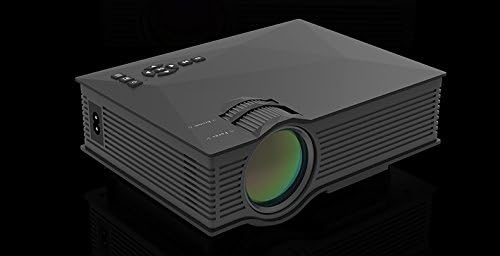
Малюнак 4.1: Пярэдняя і бакавая часткі View of the UNIC UC46 Mini Projector. Shows the main lens, focus wheel, and ventilation grilles.

Малюнак 4.2: Задняя частка View of the Projector. Displays various input ports including HDMI, USB, AV, SD card slot, and audio output.

Малюнак 4.3: Верх View of the Projector. Shows the control panel buttons for navigation, power, and input selection.

Figure 4.4: Lens Focus and Keystone Adjustment Diagram. Illustrates the location of the lens focus and keystone correction wheels, along with a diagram of the remote control functions.
5. Настройка
5.1 Размяшчэнне
Place the projector on a stable, flat surface. Ensure there is adequate space around the projector for ventilation. The projection distance will determine the screen size. Refer to the specifications for recommended distances.
5.2 Падключэнне харчавання
- Connect the power cable to the projector's AC power input port.
- Plug the other end of the power cable into a standard electrical outlet (100-240V, 50/60Hz).
- Індыкатар харчавання на праектары загарыцца.
5.3 Першапачатковае ўключэнне
- Націсніце кнопку харчавання на праектары або на пульце дыстанцыйнага кіравання, каб уключыць прыладу.
- The projector will display the startup screen.
5.4 Налада відарыса
- Фокус: Rotate the focus wheel (located near the lens) until the projected image is clear and sharp.
- Карэкцыя трапецеідальных скажэнняў: If the image appears trapezoidal, adjust the keystone correction wheel (usually next to the focus wheel) to square the image.
6. Інструкцыя па эксплуатацыі
6.1 Падключэнне прылад
The UNIC UC46 projector supports various input sources:
- HDMI: Connect a PC, laptop, DVD player, game console (PS3, PS4), or Smart TV box using an HDMI cable. Select "HDMI" as the input source.
- VGA: Connect a PC or laptop using a VGA cable. Select "VGA" as the input source.
- USB: Устаўце флэш-назапашвальнік USB для прайгравання медыяфайлаў files (videos, photos, music, text). Select "USB" as the input source and navigate through the files.
- АВ: Use the included 3-in-1 AV cable to connect devices with AV output (e.g., older DVD players, VCRs). Select "AV" as the input source.
- SD-карта: Insert an SD card into the slot to play media files. Select "SD" as the input source.
6.2 Бесправадное падключэнне (Wi-Fi)
The projector supports WiFi connectivity for screen mirroring from smartphones (iOS, Android, Windows) and DLNA.
- Go to the "WiFi" or "Wireless" menu on the projector.
- Select your WiFi network and enter the password to connect the projector to your home network.
- For screen mirroring (Miracast/AirPlay):
- Ensure your smartphone and the projector are connected to the same WiFi network.
- On your smartphone, enable screen mirroring (e.g., "Screen Mirroring," "Smart View," "AirPlay," "Wireless Display").
- Выберыце праектар са спісу даступных прылад.
- For DLNA:
- Ensure your smartphone and the projector are connected to the same WiFi network.
- Use a DLNA-compatible app on your smartphone to stream media to the projector.
6.3 Аўдыёвыхад
The projector has a built-in speaker. For enhanced audio, you can connect external speakers or a sound system via the 3.5mm audio output port.
7. Тэхнічнае абслугоўванне
7.1 Ачыстка аб'ектыва
Use a soft, lint-free cloth specifically designed for optical lenses to gently wipe the projector lens. Do not use abrasive cleaners or solvents.
7.2 Ачыстка корпуса праектара
Працярыце знешнія паверхні праектара мяккай сухой тканінай. Для выдалення ўстойлівага бруду злёгкуamp можна выкарыстоўваць тканіну, а затым сухую тканіну.
7.3 Вентыляцыя
Regularly check that the ventilation grilles are not blocked by dust or debris. Use a soft brush or compressed air to clean them if necessary. Proper airflow is crucial for preventing overheating and extending the projector's lifespan.
7.4 лamp жыццё
Святлодыёд lamp has an estimated life of 20,000 hours. To maximize lamp life, avoid frequent on/off cycles and allow the projector to cool down properly after use.
8. Выпраўленне непаладак
| праблема | Магчымая прычына | Рашэнне |
|---|---|---|
| Няма праецыравання выявы | Power cable not connected; Projector not turned on; Incorrect input source selected; Input device not connected or powered on. | Check power connection; Press power button; Select correct input source (HDMI, VGA, USB, AV, SD); Ensure input device is connected and powered on. |
| Відарыс размыты | Lens out of focus; Incorrect projection distance. | Adjust the focus wheel; Adjust the projection distance. |
| Выява мае трапецападобную форму | Праектар не перпендыкулярны экрану. | Адрэгулюйце кола карэкцыі трапецападобнага скажэння. |
| Няма гуку | Volume too low; Muted; External audio device not connected or powered on; Audio format not supported. | Increase volume; Unmute; Check external audio connection; Ensure audio format is supported. |
| Пульт дыстанцыйнага кіравання не працуе | Batteries dead or incorrectly inserted; Obstruction between remote and IR receiver. | Замяніце батарэйкі; Забяспечце прамую бачнасць ІЧ-прыёмніка праектара. |
| Overheating / Shuts down automatically | Blocked ventilation; Prolonged use. | Ensure ventilation grilles are clear; Allow projector to rest after 4-5 hours of use. |
9. Тэхнічныя характарыстыкі

Figure 9.1: Detailed Specifications of the UNIC UC46 Mini Projector.
| Асаблівасць | Дэталь |
|---|---|
| Выява сістэмы | ВК |
| Lamp | святлодыёд |
| Роднае дазвол | 800 х 480 пікселяў |
| Падтрымліваецца максімальнае дазвол | 1920 x 1080 пікселяў (Full HD) |
| Яркасць | 1200 люмен |
| Каэфіцыент кантраснасці | 800:1 |
| Энергаспажыванне | 50-55 Вт |
| Электразабеспячэнне | 100-240 В, 50/60 Гц |
| Узровень шуму | <25 дБ |
| Памер праекцыі | 34 - 130 цалі |
| Дыстанцыя кідка | Ад 1.07 да 3.8 метраў (3.51 да 12.47 футаў) |
| Суадносіны бакоў | 4:3 / 16:9 |
| Вага нета | 1 кг |
| Аб'ектыў | Multi-layer coated glass lens |
| Уваходныя тэрміналы | USB, SD, HDMI, AV, VGA, IR |
| Выхадны тэрмінал | Навушнікі, спікер |
| Бесправадная сувязь | Wi -Fi 2.4G |
| Памеры прадукту | 201 мм х 153 мм х 67.5 мм |
10. Гарантыя і падтрымка
Каб атрымаць інфармацыю аб гарантыі і тэхнічнай падтрымцы, звярніцеся да ўпакоўкі прадукту або да прадаўца. Захоўвайце чэк аб куплі як пацверджанне пакупкі.
Ask a question about this manual
Ask about setup, troubleshooting, compatibility, parts, safety, or missing instructions. Manuals+ will review the question and use this page’s manual context to help answer it.