
1. Уводзіны
The Centralite Pearl Thermostat is designed to provide precise temperature control with an intuitive touch interface. It integrates seamlessly with various smart home platforms using ZigBee connectivity, offering efficient management of residential HVAC systems. This manual provides essential information for installation, operation, and maintenance of your Pearl Thermostat.
2. Асноўныя магчымасці
- Compatible with SmartThings, Spectrum, Cox, Time Warner Cable, Vera, and ZigBee platforms.
- Supports up to 2-stagе цяпло і 2-сtage cool HVAC systems.
- Designed for quick installation, typically within 15 minutes.
- Features a built-in power amplifier for extended wireless range.
- Equipped with responsive touch controls for user interaction.
3. Змесціва ўпакоўкі
Праверце, ці ёсць усе прадметы ў вашай упакоўцы:
- Pearl Thermostat
- Мантажныя шрубы (4)
- Батарэі АА (4)
- Кароткае кіраўніцтва
- Этыкеткі праводкі
4. Ўстаноўка
Перад пачаткам усталёўкі пераканайцеся, што сістэма ацяплення, вентыляцыі і кандыцыянавання паветра адключана з дапамогай аўтаматычнага выключальніка, каб пазбегнуць паражэння электрычным токам.
4.1 Mounting the Backplate
- Carefully remove your old thermostat from the wall. Note the wiring connections before disconnecting.
- Mount the Pearl Thermostat backplate to the wall using the provided mounting screws. Ensure it is level.
4.2 Электраправодка
The Pearl Thermostat features quick-connect terminals for tool-free wiring. Match the wires from your HVAC system to the corresponding terminals on the thermostat backplate. Use the included wiring labels for identification.

Малюнак 1: Задняя частка view of the Pearl Thermostat backplate, illustrating battery compartments and quick-connect wiring terminals for HVAC system connection.
Common wiring configurations include:
- П/Пр/Р: 24V AC power (usually red wire)
- C: Common wire (for continuous 24V power, often blue or black)
- З/З1: Heat (usually white wire)
- Г/Г1: Cool (usually yellow wire)
- G: Fan (usually green wire)
- O/B: Reversing valve for heat pumps
Insert each stripped wire end into its corresponding terminal until it is securely held.
4.3 Устаноўка батарэі
Insert the four AA batteries into the designated compartments on the back of the thermostat unit. Ensure correct polarity.
4.4 Attaching the Thermostat
Align the thermostat unit with the mounted backplate and gently push until it clicks into place. Restore power to your HVAC system at the circuit breaker.
5. Інструкцыя па эксплуатацыі
The Pearl Thermostat features a clear LCD display and intuitive touch controls for easy operation.

Малюнак 2: Спераду view of the Pearl Thermostat, highlighting the digital display and touch-sensitive buttons for Mode, Hold, and Fan functions.
5.1 Рэгуляванне тэмпературы
Выкарыстоўвайце + і - touch areas on the right side of the thermostat to increase or decrease the desired temperature set point.
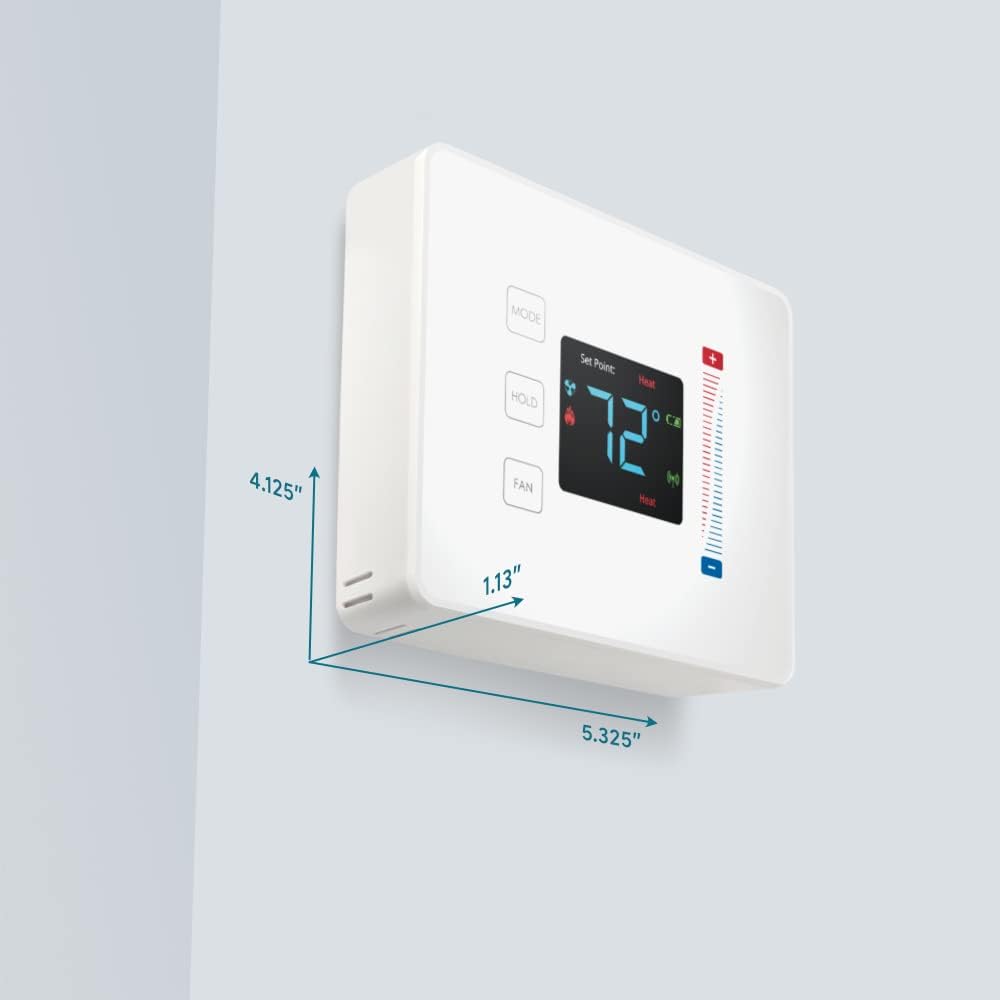
Figure 3: User interaction with the Pearl Thermostat's touch screen to modify temperature settings.
5.2 Выбар рэжыму
Націсніце РЭЖЫМ button to cycle through available operating modes: Heat, Cool, Auto, Off.
5.3 Функцыя ўтрымання
Націсніце ТРЫМАЦЬ button to maintain the current temperature setting indefinitely, overriding any programmed schedules. Press again to release the hold and resume the schedule.
5.4 Кіраванне вентылятарам
Націсніце FAN button to cycle through fan settings: Auto (fan runs only when heating or cooling) or On (fan runs continuously).
6. Тэхнічнае абслугоўванне
6.1 Замена батарэі
The Pearl Thermostat is powered by four AA batteries. When the battery level is low, a low battery indicator will appear on the display. To replace batteries:
- Gently pull the thermostat unit off its backplate.
- Remove the old AA batteries and dispose of them properly.
- Устаўце чатыры новыя шчолачныя батарэйкі тыпу АА, сачыце за правільнай палярнасцю.
- Reattach the thermostat unit to the backplate.
Regular battery replacement ensures uninterrupted operation and maintains ZigBee connectivity.
6.2 Ачыстка
Wipe the thermostat's surface with a soft, damp cloth. Avoid using abrasive cleaners or solvents, as these can damage the display and finish.
7. Выпраўленне непаладак
If you encounter issues with your Pearl Thermostat, refer to the following common troubleshooting steps:
- Няма дысплея/харчавання: Check if the AA batteries are correctly installed and fully charged. Ensure power to the HVAC system is on at the circuit breaker.
- Сістэма ацяплення, вентыляцыі і кандыцыянавання паветра не рэагуе: Verify that the wiring connections to the backplate are secure. Confirm the thermostat is in the correct operating mode (Heat/Cool/Auto).
- Connectivity Issues (ZigBee): Ensure your smart home hub is powered on and within range. Refer to your smart home hub's instructions for device pairing. You may need to initiate a re-pairing process.
- Няправільныя паказанні тэмпературы: Пераканайцеся, што тэрмастат не падвяргаецца ўздзеянню прамых сонечных прамянёў, скразнякоў або крыніц цяпла, якія могуць паўплываць на яго ўнутраны датчык.
- Thermostat Not Responding to Touch: Gently clean the screen surface. If the issue persists, try removing the thermostat from its backplate, waiting 30 seconds, and reattaching it to perform a soft reset.
8. Тэхнічныя характарыстыкі

Figure 4: Dimensions of the Centralite Pearl Thermostat.
| Спецыфікацыя | Дэталь |
|---|---|
| Марка | Цэнтраліт |
| Назва мадэлі | Centralite Pearl Thermostat |
| Нумар мадэлі | 3000-wC |
| Тып кантролера | SmartThings, Вера |
| Колер | Белы |
| Тып кантролю тэмпературы | Праграмуемы, лічбавы |
| Тэхналогія падлучэння | ZigBee |
| Крыніца харчавання | Battery Powered (4 AA batteries, included) |
| Вага прадмета | 0.97 фунта (прыблізна 15.5 унцыі) |
| тtage | 230 Volts (HVAC system) |
| Матэрыял | Жамчужны |
| Тып дысплея | ВК |
| Тып аздаблення | Сацін |
| Тып кіравання | Упраўленне сэнсарнай панэллю |
| Метад кантролю | дадатак |
| Тып мацавання | Насценнае мацаванне |
| Падсвятленне | так |
| Памеры прадукту (Д х Ш х У) | 5.33 х 1.13 х 4.13 цалі |
| UPC | 812489022264 |
9. Гарантыя і падтрымка
For warranty information and technical support, please refer to the documentation included with your product or visit the official Centralite webсайт. Захоўвайце чэк аб куплі як пацверджанне пакупкі.