
1. Уводзіны
Welcome to the instruction manual for your Sphero Special Edition Battle-Worn BB-8 App-Enabled Droid with Force Band. This guide provides essential information for setting up, operating, maintaining, and troubleshooting your BB-8 Droid and Force Band. The BB-8 Droid is an app-enabled device featuring authentic movements and personality. It responds to voice commands, explores autonomously, and can be guided manually. The Force Band allows you to control your BB-8 Droid through gestures, expanding your interaction with Force Training, Combat Training, and Force Awareness features.
2. Што ў скрынцы
Your Sphero Special Edition Battle-Worn BB-8 Droid with Force Band package includes the following items:
- Battleworn BB-8 Droid
- Force Band
- Collector's Tin
- Induction Charging Base
- Universal USB Cable
- Кабель Micro USB
- Кароткае кіраўніцтва
- Юрыдычны даведнік
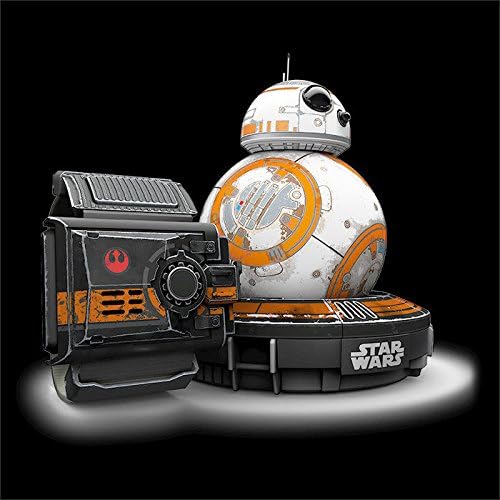
Image: The Battle-Worn BB-8 Droid and Force Band are neatly packaged within a collector's tin, alongside their charging accessories and documentation.
3. Настройка
3.1 Charging BB-8 Droid and Force Band
Before first use, fully charge your BB-8 Droid and Force Band. The BB-8 Droid charges wirelessly on its induction charging base. The Force Band charges via the included Micro USB cable. Connect the Universal USB Cable to a power source (e.g., computer USB port or USB wall adapter).
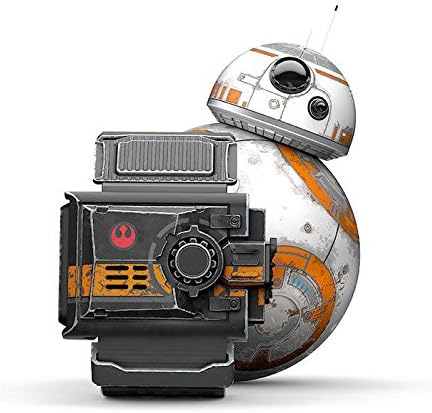
Image: The BB-8 Droid rests on its orange-themed induction charging base, while the Force Band is shown nearby, ready for charging.
3.2 Загрузка і ўстаноўка праграмы
Download the official Sphero BB-8 App from your device's app store. The app is compatible with both iOS and Android devices.
3.3 Connecting BB-8 Droid and Force Band
Ensure Bluetooth is enabled on your smartphone or tablet. Open the Sphero BB-8 App and follow the on-screen instructions to connect your BB-8 Droid and Force Band. The connection is established via Bluetooth Smart technology, offering a range of up to 30 meters.
4. Інструкцыя па эксплуатацыі
4.1 BB-8 Droid Operation
The BB-8 Droid offers multiple modes of interaction:
- Autonomous Exploration: Allow BB-8 to explore its environment independently.
- Галасавыя каманды: Interact with BB-8 using specific voice commands, prompting a range of expressions and movements.
- Кіраванне ўручную: Guide BB-8 directly using the app's joystick or other drive modes.
- Holographic Recordings: Стварыць і view holographic messages within the app, projected by BB-8.

Image: The BB-8 Droid is shown in motion, demonstrating its ability to roll and navigate its environment.
4.2 Force Band Operation
The Force Band allows for intuitive gesture-based control of your BB-8 Droid:
- Force Push/Pull/Drive: Use specific hand gestures to command BB-8's movement.
- Combat Training: Engage in simulated combat scenarios, expanding your abilities as a Jedi Knight.
- Force Awareness: Discover and collect digital holocrons hidden in your surroundings.
Video: This video demonstrates the Star Wars Force Band by Sphero, showcasing its gesture-based control capabilities for the BB-8 Droid.
4.3 App Features and Drive Modes
The Sphero BB-8 App provides various drive modes and interactive features:
- Adaptive Personality: BB-8's personality evolves based on your interactions.
- The Force Training: Guided activities to master Force Band controls.
- Рэжымы кіравання: Includes Joystick, Slingshot, Tilt, Scream Drive, Kick, Golf, and Blocks for diverse control experiences.
Відэа: Гэта відэа дае агульнае ўяўленнеview of the Special Edition Battle-Worn BB-8 by Sphero with Force Band, highlighting its key features and app integration.
5. Тэхнічнае абслугоўванне
To ensure the longevity and optimal performance of your BB-8 Droid and Force Band, follow these maintenance guidelines:
- Уборка: Wipe the BB-8 Droid and Force Band with a soft, dry cloth. Avoid using harsh chemicals or abrasive materials.
- захоўванне: Store the devices in their collector's tin in a cool, dry place when not in use.
- Сыход за батарэяй: Recharge the devices regularly, even if not used frequently, to maintain battery health. The BB-8 Droid has a 60-minute battery life on a full charge.
- Паверхня выкарыстання: For best performance, use BB-8 on smooth, flat surfaces.
6. Выпраўленне непаладак
If you encounter issues with your BB-8 Droid or Force Band, try the following:
- Праблемы з падключэннем: Ensure Bluetooth is on and the devices are fully charged. Try restarting the app and your device.
- Unresponsive Droid/Band: Fully charge the device. If the issue persists, try resetting the device (refer to the Quick Start Guide for specific instructions).
- Функцыянальнасць прыкладання: Ensure your app is updated to the latest version. Check for any available firmware updates for your BB-8 Droid and Force Band within the app.
7. Тэхнічныя характарыстыкі
| Асаблівасць | Дэталь |
|---|---|
| Нумар мадэлі | R001SUS |
| Марка | Сфера |
| Сувязь | Bluetooth Smart (30m range) |
| Battery Life (BB-8) | 60 minutes (Induction Charging) |
| Максімальная хуткасць | 4.5 міль у гадзіну |
| Тып матэрыялу | Полікарбанат |
| Памеры прадмета (Д х Ш х У) | 2.7 см Д х 2.7 см Ш х 4.5 см В |
| Вага прадмета | 7 унцыі |
| Рэкамендаваны ўзрост | 8 гады і вышэй |
8. Гарантыя і падтрымка
For warranty information and customer support, please refer to the Legal Guide included in your product package or visit the official Sphero website. Ensure you register your product for any applicable warranty benefits.