
Уводзіны
Дзякуй за пакупкуasing the QUMOX L165U 2.4GHz Wireless Gamepad. This high-quality game controller is designed for use with PC and Android devices, offering a reliable 2.4GHz wireless connection for an enhanced gaming experience. Please read this manual carefully to ensure proper setup and operation of your new gamepad.

Figure 1: QUMOX L165U Gamepad with included USB adapter and OTG connection kit.
Змест пакета
Пераканайцеся, што ўсе прадметы прысутнічаюць у вашай упакоўцы:
- 1x QUMOX L165U Gamepad
- 1x 2.4GHz USB Wireless Adapter
- 1x OTG Connection Kit (Micro USB to USB-A adapter)
Настройка
1. Устаноўка батарэі
The QUMOX L165U Gamepad is powered by 2 AAA batteries (not included). To install the batteries:
- Знайдзіце адсек для батарэі на задняй панэлі геймпада.
- Адчыніце крышку батарэі.
- Устаўце 2 батарэйкі тыпу ААА, сачыце за правільнай палярнасцю (+/-).
- Надзейна зачыніце крышку батарэі.

Малюнак 2: Адкрыйце батарэйны адсек для ўстаноўкі батарэек тыпу AAA.
2. Падключэнне да ПК
- Plug the 2.4GHz USB Wireless Adapter into an available USB port on your PC.
- Turn on the gamepad by pressing the 'START' button. The gamepad will automatically attempt to connect.
- The PC should recognize the gamepad and install necessary drivers automatically.
- If the gamepad does not connect, press the 'MODE' button on the gamepad to cycle through connection modes until it is recognized by your PC.
3. Connecting to an Android Device (with OTG support)
- Connect the OTG Connection Kit to your Android device's Micro USB port.
- Plug the 2.4GHz USB Wireless Adapter into the USB-A end of the OTG Connection Kit.
- Turn on the gamepad by pressing the 'START' button. The gamepad will automatically attempt to connect.
- Your Android device should recognize the gamepad.
- If the gamepad does not connect, press the 'MODE' button on the gamepad to cycle through connection modes until it is recognized by your Android device.
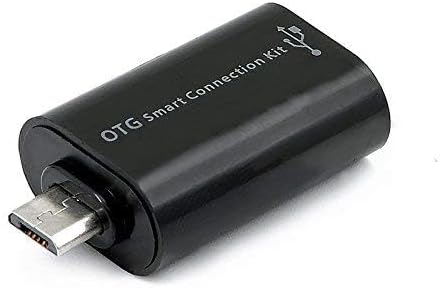
Figure 3: OTG Connection Kit for Android device connectivity.
Інструкцыя па эксплуатацыі
Once connected, your QUMOX L165U Gamepad is ready for use. The layout is standard for most game controllers.
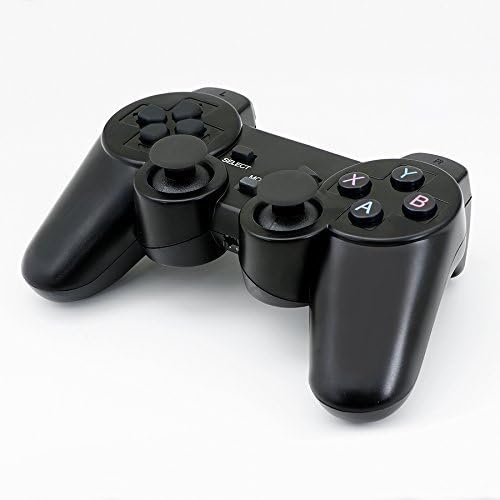
Малюнак 4: Верх view of the QUMOX L165U Gamepad, highlighting button layout.
- Кіруючы джойсцік (D-Pad): Для дакладнага накіраванага ўводу.
- Аналагавыя джойсцікі: Два аналагавыя джойсцікі для кручэння на 360 градусаў і кіравання камерай.
- Кнопкі дзеянняў (A, B, X, Y): Стандартныя кнопкі дзеянняў для гульнявых каманд.
- Плечавыя кнопкі (L1, R1) і трыгеры (L2, R2): Located on the top of the gamepad for additional actions.
- Кнопка ВЫБРАЦЬ/НАЗАД: Typically used for menu navigation or specific in-game functions.
- Кнопка ПУСК: Used to pause games or confirm selections.
- Кнопка MODE: Cycles through different operating modes (e.g., Android, PC) if automatic detection fails.
Дэманстрацыя відэа
Video 1: A seller-provided overview of a 2-pack wireless controller, demonstrating its features and compatibility. While showing a similar product, it illustrates general wireless controller usage and setup.
Тэхнічнае абслугоўванне
- Уборка: Для чысткі геймпада выкарыстоўвайце мяккую сухую тканіну. Пазбягайце выкарыстання агрэсіўных хімічных рэчываў або абразіўных матэрыялаў.
- захоўванне: Захоўвайце геймпад у прахалодным, сухім месцы, удалечыні ад прамых сонечных прамянёў і экстрэмальных тэмператур.
- Сыход за батарэяй: Remove batteries if the gamepad will not be used for an extended period to prevent leakage.
Ліквідацыю непаладак
| праблема | Магчымая прычына | Рашэнне |
|---|---|---|
| Gamepad does not connect. | Low batteries, incorrect mode, adapter not properly inserted. | Replace batteries. Press the 'MODE' button to cycle through modes. Ensure USB adapter is fully inserted into PC or OTG adapter. |
| Кнопкі або джойсцікі не рэагуюць. | Connection issue, game incompatibility, physical damage. | Reconnect the gamepad. Check game settings for controller support. If issue persists, contact support. |
| Android device does not recognize gamepad. | Android device lacks OTG support, OTG adapter issue. | Verify your Android device supports OTG. Ensure OTG adapter is functioning correctly. |
Тэхнічныя характарыстыкі
| Асаблівасць | Дэталь |
|---|---|
| Нумар мадэлі | L165U |
| Тэхналогія падлучэння | 2.4GHz Wireless (via USB Adapter) |
| Сумяшчальныя прылады | PC, Android (with OTG support) |
| Крыніца харчавання | 2 батарэйкі AAA |
| Вага прадмета | 5.3 унцыі |
| Памеры ўпакоўкі | 8.07 х 5.63 х 2.95 цалі |
| Колер | Чорны |
Гарантыя і падтрымка
For warranty information or technical support, please refer to the contact details provided with your purchase or visit the official QUMOX webсайт. Захоўвайце пацвярджэнне пакупкі для любых гарантыйных прэтэнзій.