
1. Прадукт скончыўсяview
The D-Link DFE-530TX+ is a 10/100BASE-TX Fast Ethernet PCI Adapter designed to provide high-speed network connectivity for desktop computers. This adapter supports both 100BASE-TX (Category 5 UTP cable) and 10BASE-T (Category 3/4/5 UTP cable) connections, operating at speeds of 10Mbps or 100Mbps. It features full-duplex capability, effectively doubling the network speed to 20/200Mbps, and includes Plug-and-Play functionality for simplified installation.
Асноўныя функцыі ўключаюць у сябе:
- PCI interface for desktop computer compatibility.
- Supports a wide range of operating systems.
- Full Duplex Mode support for 20/200Mbps operation.
- Half Duplex Mode support for 10/100Mbps operation.
- Compliant with PCI 2.1/2.2 ACPI Power Management.
- Wake-On-LAN (WOL) functionality, including Magic Packet, LinkChg, and Microsoft wake-up frame.
- Compliant with PC 99 Standard.
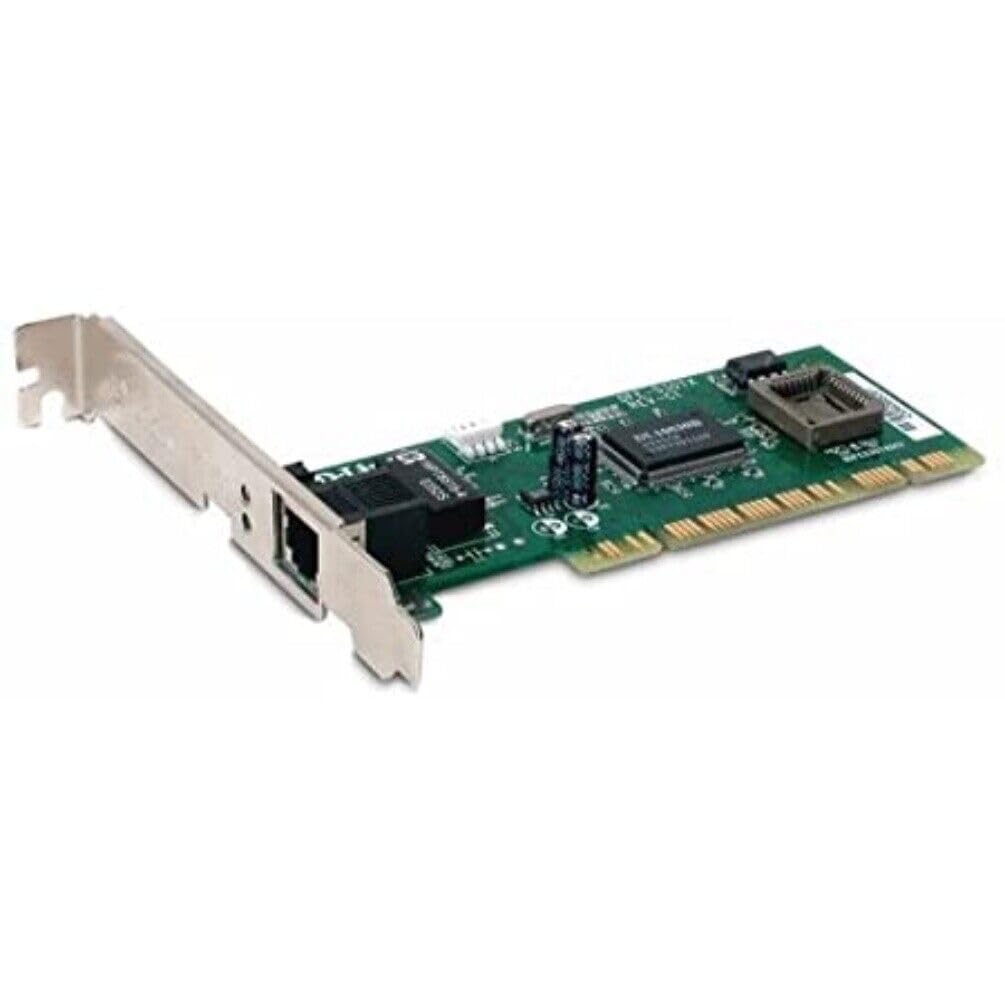
Малюнак 1: D-Link DFE-530TX+ Fast Ethernet PCI Adapter. This image shows the green circuit board with various electronic components, including chips and capacitors, and a silver PCI bracket with an RJ-45 Ethernet port.
2. Настройка і ўстаноўка
Follow these steps to install your D-Link DFE-530TX+ PCI Adapter into your desktop computer.
- Падрыхтуйце свой камп'ютар:
- Power off your computer and unplug the power cord from the electrical outlet.
- Адкрыйце корпус кампутара. Звярніцеся да кіраўніцтва карыстальніка кампутара, каб атрымаць інструкцыі па бяспечным адкрыцці корпуса.
- Install the PCI Adapter:
- Locate an available PCI slot on your computer's motherboard.
- Remove the metal bracket cover from the chosen PCI slot on the back of your computer case.
- Carefully insert the DFE-530TX+ adapter into the PCI slot, ensuring it is firmly seated. Apply even pressure to both ends of the card.
- Secure the adapter with the screw removed from the metal bracket cover.
- Зачыніце корпус кампутара:
- Replace the computer case cover and secure it.
- Plug the power cord back into the electrical outlet and power on your computer.
- Ўстаноўка драйвера:
- The DFE-530TX+ supports Plug-and-Play. Most modern operating systems (e.g., Windows 10) will automatically detect and install the necessary drivers upon startup.
- If drivers are not automatically installed, refer to the driver CD (if included) or download the latest drivers from the official D-Link support webсайт.
3. Эксплуатацыя адаптара
Once the adapter is physically installed and drivers are loaded, you can connect it to your network.
- Падключэнне кабеля Ethernet:
- Connect one end of a standard Ethernet cable (Category 5 or higher for 100Mbps) to the RJ-45 port on the DFE-530TX+ adapter.
- Connect the other end of the Ethernet cable to an available port on your network switch, router, or hub.
- Святлодыёдныя індыкатары:
The DFE-530TX+ features three on-board LEDs for diagnostics:
- Святлодыёд спасылкі: Indicates a successful network connection.
- Цвёрды зялёны: Усталявана сапраўднае сеткавае злучэнне.
- Выключана: No network link detected.
- Святлодыёд актыўнасці: Indicates network data transmission.
- Міргае зялёным: Дадзеныя перадаюцца або прымаюцца.
- Выключана: Няма сеткавай актыўнасці.
- 10/100Mbps LED: Indicates the current connection speed.
- Цвёрды зялёны: Connected at 100Mbps.
- Выключана: Connected at 10Mbps.
- Святлодыёд спасылкі: Indicates a successful network connection.
Verify that the Link LED is solid green and the Activity LED flashes when network traffic is present. The 10/100Mbps LED will indicate your current connection speed.
4. Тэхнічнае абслугоўванне
The D-Link DFE-530TX+ adapter requires minimal maintenance. To ensure optimal performance and longevity:
- Keep the computer's interior clean and free of dust to prevent overheating of components, including the network adapter.
- Ensure proper airflow within the computer case.
- Пазбягайце ўздзеяння экстрэмальных тэмператур або вільготнасці на адаптар.
- Periodically check for updated drivers on the D-Link support website to ensure compatibility and performance enhancements.
5. Выпраўленне непаладак
If you encounter issues with your D-Link DFE-530TX+ adapter, refer to the following troubleshooting tips:
- Няма індыкатара сувязі:
- Ensure the Ethernet cable is securely connected to both the adapter and the network device (switch/router).
- Паспрабуйце іншы кабель Ethernet.
- Verify that the network device (switch/router) is powered on and functioning correctly.
- Check if the adapter is properly seated in the PCI slot.
- Перазагрузіце кампутар.
- Павольная хуткасць сеткі:
- Check the 10/100Mbps LED. If it's off, the connection is at 10Mbps. Ensure your network device supports 100Mbps and the cable is Category 5 or higher.
- Пераканайцеся, што драйверы адаптара на вашым кампутары абноўленыя.
- Праверце з іншым кабелем Ethernet.
- Verify that other devices on your network are not consuming excessive bandwidth.
- Adapter Not Detected by Operating System:
- Ensure the adapter is correctly installed in the PCI slot.
- Check Device Manager (Windows) to see if the adapter is listed, possibly with a yellow exclamation mark. If so, reinstall or update the drivers.
- Try installing the adapter in a different PCI slot.
- Перарывістае падключэнне:
- Праверце наяўнасць аслабленых злучэнняў кабеляў.
- Ensure there is no electromagnetic interference from other devices.
- Update the adapter drivers.
- Consider replacing the Ethernet cable.
6. Тэхнічныя характарыстыкі
| Нумар мадэлі | DFE-530TX+ |
| Тып сеткі | Сеткавы адаптар |
| Формаў-фактар | Устаўная карта |
| Сеткавы інтэрфейс | PCI |
| Колькасць партоў | 1 x RJ-45 (Ethernet 10Base-T/100Base-TX) |
| Хуткасць перадачы даных | 100 Мбіт/с |
| Пратакол перадачы дадзеных | Ethernet, хуткі Ethernet |
| Тэхналогія падлучэння | Правадная |
| Адпаведнасць стандартам | IEEE 802.3, IEEE 802.3U |
| Тып кабеля | Ethernet 10BASE-T, Ethernet 100Base-TX (Category 3/4/5 UTP) |
| Сумяшчальнасць з ПК | PC, Mac, Unix |
| Асаблівасці | Auto-negotiation, Full duplex capability, Wake on LAN (WOL) |
| Памеры прадукту | 9.4 х 6.7 х 1.5 цалі |
| Вага прадмета | 181 грам (6.38 унцый) |
| UPC | 790069220333 |
7. Гарантыя і падтрымка
The D-Link DFE-530TX+ Fast Ethernet PCI Adapter comes with a 2-гадовая абмежаваная гарантыя з дня пакупкі. Гэтая гарантыя распаўсюджваецца на дэфекты матэрыялаў і вырабу пры звычайным выкарыстанні.
For technical support, driver downloads, or further information, please visit the official D-Link support webсайт. Там вы таксама можаце знайсці дадатковыя рэсурсы і часта задаваныя пытанні.
Калі ласка, захавайце доказы пакупкі для прэтэнзій па гарантыі.