
1. Прадукт скончыўсяview
The ADATA HM900 (model AHM900-6TU3-CEUBK) is a 6TB external hard disk drive designed for high-capacity data storage and transfer. This mechanical hard disk drive offers ample space for extensive data needs and supports simultaneous operations without compromising performance. It connects via USB, making it compatible with various devices, including personal computers and televisions.

Малюнак 1: Пярэдняя частка view of the ADATA HM900 External Hard Drive.
2. Інструкцыі па ўсталёўцы
2.1 Змест пакета
Перад тым, як працягнуць, пераканайцеся, што ўсе прадметы прысутнічаюць у камплекце:
- ADATA HM900 External Hard Disk Drive
- USB-кабель для даных
- Адаптар сілкавання
- Кароткае кіраўніцтва карыстальніка (калі ўключана)
2.2 Connecting the Hard Drive
- Падключыце адаптар сілкавання: Plug the power adapter into the DC IN port on the back of the ADATA HM900. Connect the other end of the power adapter to a wall outlet. The device requires 12 Watts of power.
- Падключыце USB-кабель: Insert one end of the provided USB data cable into the USB port (marked 'SS' for SuperSpeed USB) on the back of the hard drive.
- Падключыцеся да вашай прылады: Plug the other end of the USB cable into an available USB port on your computer, television, or other compatible device.
- Уключэнне: The drive should power on automatically. A status indicator light will typically illuminate to show it is active.
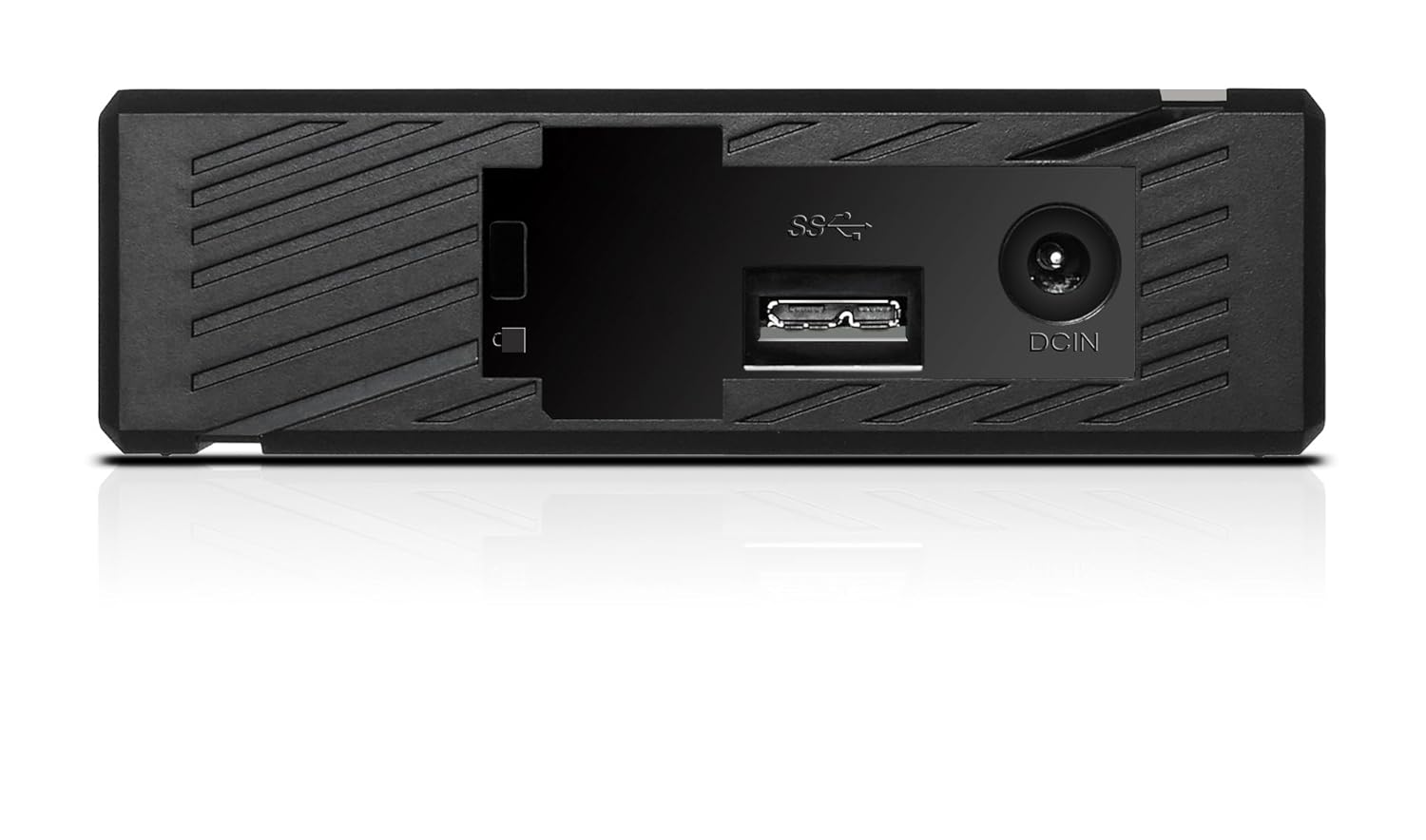
Малюнак 2: Задняя частка view of the ADATA HM900, highlighting the USB and DC IN ports for connection.
3. Праца з жорсткім дыскам
3.1 Першапачатковае прызнанне
Upon first connection, your operating system (Windows, macOS, Linux) or compatible device (e.g., smart TV) should automatically detect the ADATA HM900. For computers, it may appear as a new drive letter or volume in 'My Computer'/'This PC' or 'Finder'.
3.2 Перадача дадзеных
Перадаць files, simply drag and drop them to and from the HM900 drive icon. For larger transfers, it is recommended to use your operating system's copy/paste functions or dedicated backup software.
3.3 Using with a Television
The ADATA HM900 is compatible with televisions that support external storage devices. Connect the drive as described in Section 2.2. Refer to your television's user manual for specific instructions on how to access and play media files from an external USB drive.
4. Тэхнічнае абслугоўванне і догляд
Proper care ensures the longevity and reliability of your ADATA HM900 external hard drive:
- Бяспечнае адключэнне: Always safely eject or unmount the hard drive from your operating system before physically disconnecting the USB cable or power. This prevents data corruption.
- Фізічная абарона: Avoid dropping or subjecting the drive to strong impacts, as it contains a mechanical hard disk that can be damaged.
- Умовы навакольнага асяроддзя: Store and operate the drive in a cool, dry environment, away from direct sunlight, extreme temperatures, and high humidity.
- Уборка: Для чысткі вонкавага боку дыска выкарыстоўвайце мяккую сухую тканіну. Не выкарыстоўвайце вадкія ачышчальнікі або растваральнікі.
5. Выпраўленне непаладак
5.1 Дыск не выяўлены
- Праверце злучэнні: Ensure both the power adapter and USB cable are securely connected to the drive and your device.
- Паспрабуйце іншы порт USB: Connect the drive to a different USB port on your computer or device.
- Праверце магутнасць: Confirm the power adapter is plugged into a working electrical outlet and the drive's indicator light is on.
- Перазагрузка прылады: Restart your computer or television and try connecting the drive again.
- Праверце Кіраванне дыскамі (Windows) / Дыскавую ўтыліту (macOS): For computers, check if the drive appears in disk management tools, even if it doesn't have a drive letter assigned.
5.2 Павольная хуткасць перадачы дадзеных
- Выкарыстоўвайце порт USB 3.0: Ensure the drive is connected to a USB 3.0 (or higher) port on your device for optimal speeds. USB 2.0 ports will result in slower transfers.
- Пазбягайце іншых USB-прылад: Адключайце іншыя высокапрапускныя USB-прылады падчас вялікіх перадач дадзеных.
- Праверце стан дыска: Run a disk check utility on your computer to ensure the drive is healthy.
6. Тэхнічныя характарыстыкі
| Асаблівасць | Спецыфікацыя |
|---|---|
| Марка | ADATA |
| Нумар мадэлі | AHM900-6TU3-CEUBK |
| Ёмістасць лічбавай памяці | 6 ТБ |
| Апісанне жорсткага дыска | Механічны жорсткі дыск |
| Форм-фактар жорсткага дыска | 2.5 цалі |
| Тэхналогія падлучэння | USB |
| Памеры прадмета (ДxШxВ) | 19 х 12.1 х 3.65 сантыметраў |
| Вага прадмета | 998 г |
| Ватtage | 12 ват |
| Сумяшчальныя прылады | Television, Personal Computers |
| Першая даступная дата | 11 лістапада 2016 г |
7. Гарантыя і падтрымка
For detailed warranty information, please refer to the warranty card included with your product or visit the official ADATA website. Support resources, including drivers and firmware updates, may also be available on the ADATA support portal.