
1. Важныя інструкцыі па бяспецы
Please read all safety instructions carefully before using the Vivitek Qumi Q3 Plus-RD projector. Failure to follow these instructions may result in electric shock, fire, or damage to the device.
- Крыніца харчавання: Use only the supplied AC power adapter. Ensure the voltagадпавядае патрабаванням праектара.
- Вентыляцыя: Не блакуйце вентыляцыйныя адтуліны. Захоўвайце дастатковую прастору вакол праектара для належнай цыркуляцыі паветра і прадухілення перагрэву.
- Вільготнасць: Do not expose the projector to rain, moisture, or operate it near water.
- Цяпло: Avoid placing the projector near heat sources such as radiators, heat registers, stoves, or other apparatus that produce heat.
- Уборка: Unplug the projector from the power outlet before cleaning. Use a dry cloth for cleaning. Do not use liquid cleaners or aerosol cleaners.
- Абслугоўванне: Не спрабуйце самастойна абслугоўваць гэты прадукт. Звярніцеся да ўсіх абслугоўванняў кваліфікаванага абслуговага персаналу.
- Бяспека вачэй: Не глядзіце непасрэдна ў аб'ектыў праектара, калі ён уключаны.amp уключаны. Яркае святло можа пашкодзіць вочы.
2. Змесціва ўпакоўкі
Verify that all items listed below are included in your Vivitek Qumi Q3 Plus-RD package:
- Vivitek Qumi Q3 Plus-RD Projector
- AC Power Adapter with Cable
- Кабель HDMI
- Documentation Kit (Quick Start Guide, Warranty Card)

Image: The AC power adapter and cable for the Vivitek Qumi Q3 Plus-RD projector.
3. Прадукт скончыўсяview
Familiarize yourself with the components and ports of your Vivitek Qumi Q3 Plus-RD projector.
3.1 фронт View

Выява: спераду view of the Vivitek Qumi Q3 Plus-RD projector, showing the projection lens and speaker grille.
3.2 Ззаду View (Парты і падключэнні)

Выява: Задняя частка view of the Vivitek Qumi Q3 Plus-RD projector, displaying various input/output ports including AV IN, USB 1, USB 2, HDMI, DC IN power input, microSD card slot, and the power button.
3.3 бок View

Выява: Збоку view of the Vivitek Qumi Q3 Plus-RD projector, showing the ventilation grilles and the integrated kickstand for angle adjustment.
3.4 Пульт дыстанцыйнага кіравання
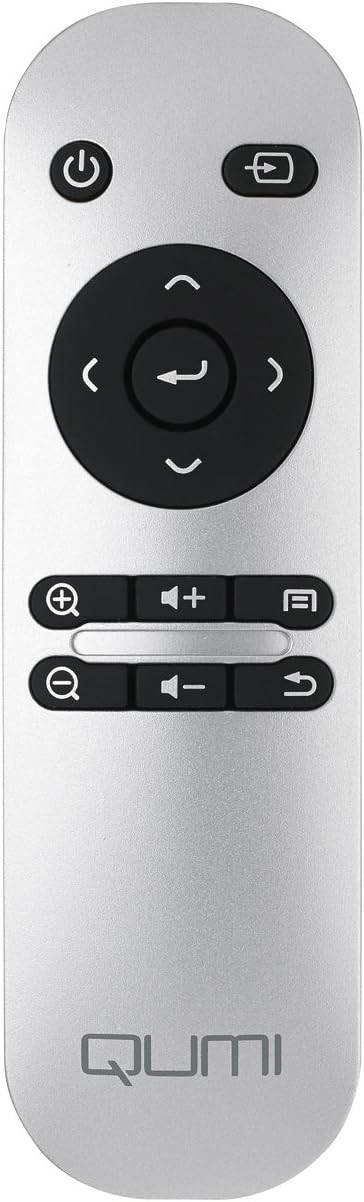
Image: The remote control for the Vivitek Qumi Q3 Plus-RD projector, featuring power, navigation, volume, and focus adjustment buttons.
4. Настройка
Follow these steps to set up your Vivitek Qumi Q3 Plus-RD projector for first use.
- Падключэнне сілкавання: Connect the supplied AC power adapter to the 'DC IN' port on the projector and then plug it into a power outlet. The projector can also operate on its internal battery.
- Размяшчэнне: Place the projector on a stable, flat surface. Use the integrated kickstand to adjust the projection angle if needed. Ensure there are no obstructions to the lens or ventilation openings.
- Уключэнне: Press and hold the power button on the projector or the remote control to turn on the device.
- Рэгуляванне фокусу: Once powered on, use the focus buttons on the remote control to adjust the image sharpness. The Qumi Q3 Plus-RD features motorized focus for precise adjustment.
- Карэкцыя трапецеідальных скажэнняў: The projector features digital auto keystone correction. If the image appears trapezoidal, the projector will automatically adjust it. Manual adjustment options may be available in the settings menu.
5. Інструкцыя па эксплуатацыі
This section details how to operate your Vivitek Qumi Q3 Plus-RD projector.
5.1 Уключэнне/выключэнне
- Каб уключыць: Press and hold the power button on the projector or the remote control until the device starts.
- Каб выключыць: Press the power button on the projector or the remote control. A shutdown prompt will appear. Select 'Power Off' to shut down the system safely.
5.2 Навігацыя па аперацыйнай сістэме Android
The Qumi Q3 Plus-RD runs on an Android operating system. Use the remote control's navigation buttons (up, down, left, right, OK) to move through menus and select options. A Bluetooth keyboard/mouse can also be paired for easier navigation.
5.3 Прайграванне медыяфайлаў
- USB-дыск: Insert a USB flash drive into one of the USB ports. The system will typically detect it and prompt you to open the file браўзэр або медыяплэер.
- Карта MicroSD: Insert a microSD card into the microSD slot. Similar to USB, the system will allow you to access its contents.
- Унутраная памяць: The projector has 5.1 GB of available on-board memory for storing files і прыкладанняў.
5.4 Connecting External Devices (HDMI)
To connect an external device such as a laptop, Blu-ray player, or gaming console:
- Connect one end of an HDMI cable to the HDMI port on the projector.
- Connect the other end of the HDMI cable to the HDMI output port on your external device.
- On the projector's home screen, navigate to the input selection and choose 'HDMI'.
6. Сувязь
The Vivitek Qumi Q3 Plus-RD offers various connectivity options for seamless integration with your devices.
6.1 Налада Wi-Fi
- На галоўным экране перайдзіце ў раздзел «Налады».
- Выберыце «Wi-Fi» і ўключыце яго.
- Выберыце патрэбную сетку Wi-Fi са спісу даступных сетак.
- Увядзіце пароль сеткі, калі будзе прапанавана, і падключыцеся.
6.2 Спалучэнне па Bluetooth
You can pair Bluetooth devices such as external speakers, headphones, or a keyboard/mouse with your projector.
- На галоўным экране перайдзіце ў раздзел «Налады».
- Выберыце «Bluetooth» і ўключыце яго.
- Перавядзіце прыладу Bluetooth у рэжым спалучэння.
- Select your device from the list of available devices on the projector and confirm pairing.
6.3 Wireless Content Sharing
The projector supports wireless content sharing from Android and iOS devices. Refer to the projector's specific application (e.g., HappyCast or similar pre-installed app) for detailed instructions on mirroring your device's screen.
7. Тэхнічнае абслугоўванне
Правільнае абслугоўванне забяспечвае даўгавечнасць і аптымальную прадукцыйнасць вашага праектара.
- Ачыстка аб'ектыва: Акуратна працярыце аб'ектыў праектара мяккай тканінай без ворса, спецыяльна прызначанай для аптычных паверхняў. Не выкарыстоўвайце абразіўныя матэрыялы або агрэсіўныя хімічныя рэчывы.
- Вентыляцыя: Regularly check that the ventilation openings are clear of dust and debris. Use a soft brush or compressed air to clean them.
- Сыход за батарэяй: For models with an internal battery, avoid fully discharging the battery frequently. If storing the projector for an extended period, charge the battery to approximately 50% to prolong its lifespan.
- захоўванне: Захоўвайце праектар у прахалодным, сухім месцы, удалечыні ад прамых сонечных прамянёў і экстрэмальных тэмператур.
8. Выпраўленне непаладак
If you encounter issues with your Vivitek Qumi Q3 Plus-RD, refer to the following common problems and solutions.
- No Image Projected:
- Ensure the projector is powered on and the lens cap is removed.
- Check the input source selection to ensure it matches the connected device (e.g., HDMI, USB).
- Verify that the external device is powered on and outputting a signal.
- Няма гуку:
- Адрэгулюйце гучнасць на праектары і падлучанай прыладзе-крыніцы.
- Check if external speakers are connected via Bluetooth or AV IN, and ensure they are powered on and functioning.
- Ensure the audio output settings on the source device are correctly configured.
- Пульт дыстанцыйнага кіравання не адказвае:
- Ensure there are no obstructions between the remote and the projector's IR receiver (located at the rear).
- Replace the remote control battery (typically a coin cell battery).
- Праблемы з падключэннем Wi-Fi/Bluetooth:
- Ensure Wi-Fi/Bluetooth is enabled in the projector's settings.
- Restart the projector and the device you are trying to connect.
- Праверце перашкоды ад іншых бесправадных прылад.
- Выява размытая:
- Use the remote control's focus buttons to adjust the image sharpness.
- Пераканайцеся, што паверхня праекцыі роўная, а праектар устойлівы.
9. Тэхнічныя характарыстыкі
Key technical specifications for the Vivitek Qumi Q3 Plus-RD projector:
| Асаблівасць | Спецыфікацыя |
|---|---|
| Нумар мадэлі | Q3 PLUS-RD |
| Тып дысплея | DLP |
| Уласнае дазвол дысплея | 1280 x 720 (HD 720p) |
| Яркасць | Да 500 люмен |
| Каэфіцыент кантраснасці | 5,000:1 |
| Тэхналогія падлучэння | Bluetooth, HDMI, Wi-Fi |
| Асаблівасці | Bluetooth, Portable, Android OS |
| Аперацыйная сістэма | Android V.4.42 |
| працэсар | Quad-core CPU at 1.5GHz |
| Унутраная памяць | 5.1 GB available |
| акумулятар | 1 літый-палімерная батарэя (у камплекце) |
| Памеры прадукту | 6.9 х 4 х 1.1 цалі |
| Вага прадмета | 1 фунт |
10. Гарантыя і падтрымка
The Vivitek Qumi Q3 Plus-RD projector comes with a standard manufacturer's warranty. For detailed warranty information, please refer to the documentation kit included with your product or visit the official Vivitek webсайт.
For technical support, troubleshooting assistance, or service inquiries, please contact Vivitek customer support through their official channels. Keep your product's model number (Q3 PLUS-RD) and serial number handy when contacting support.