
Уводзіны
This manual provides detailed instructions for the safe operation and maintenance of your Contixo F3 RC Drone. Please read this manual thoroughly before operating the drone to ensure proper use and to prevent damage or injury. The Contixo F3 features an integrated 720p WiFi FPV camera, Altitude Hold, 2.4GHz control, 6-Axis Gyro, and One-Key Landing/Take-Off functions.
Інструкцыі па бяспецы
- Заўсёды кіруйце дронам на адкрытай прасторы, далей ад людзей, жывёл і перашкод.
- Do not fly near airports, power lines, or restricted airspace.
- Перад кожным палётам пераканайцеся, што акумулятар дрона цалкам зараджаны.
- Трымайце пальцы і валасы далей ад круцячыхся прапелераў.
- За карыстальнікамі ва ўзросце да 14 гадоў рэкамендуецца нагляд дарослых.
- Не працуйце пры моцным ветры або неспрыяльных умовах надвор'я.
- Turn off the drone and remote control when not in use.
Змест пакета
Праверце наяўнасць усіх кампанентаў у вашай упакоўцы:
- Contixo F3 RC Drone
- Пульт дыстанцыйнага кіравання
- USB-кабель для зарадкі
- Запасныя прапелеры
- Ахоўнікі вінтоў
- Шасі
- Адвёртка
- Кіраўніцтва карыстальніка

Image: Contixo F3 Drone, remote control, and packaging. This image shows the drone, its remote, and the retail box, indicating the main components included.
Настройка
1. Drone Battery Installation & Charging
- Locate the battery compartment on the underside of the drone.
- Insert the drone battery, ensuring correct polarity.
- Надзейна зачыніце батарэйны адсек.
- Connect the USB charging cable to the drone battery and a USB power source (e.g., computer, USB adapter).
- Перад першым выкарыстаннем дайце акумулятару цалкам зарадзіцца. Час зарадкі можа адрознівацца.
2. Устаноўка батарэі пульта дыстанцыйнага кіравання
- Адкрыйце крышку батарэйнага адсека на задняй частцы пульта дыстанцыйнага кіравання.
- Insert 3 AAA batteries (not included) according to the polarity markings.
- Зачыніце крышку батарэйнага адсека.
3. Propeller Guard and Landing Gear Installation
- Attach the propeller guards to each motor arm for protection.
- Securely attach the landing gear to the drone's underside.

Image: Contixo F3 Drone with propeller guards and landing gear installed. This image displays the drone fully assembled with its protective propeller guards and landing gear.
4. Pairing the Drone and Remote Control
- Пастаўце беспілотнік на роўную роўную паверхню.
- Уключыце дрон. Індыкатары будуць міргаць.
- Уключыце пульт дыстанцыйнага кіравання.
- Націсніце левы джойсцік (дросель) цалкам уверх, затым цалкам уніз. Агні дрона загаряцца пастаянна, што сведчыць аб паспяховым спалучэнні.
5. App Download and FPV Setup
- Download the Contixo FPV app from your smartphone's app store (iOS or Android).
- Turn on the drone and connect your smartphone to the drone's Wi-Fi network (usually named "Contixo-F3-XXXX").
- Open the Contixo FPV app to view the live camera feed and access advanced controls.

Image: Contixo F3 Drone, remote control, and a smartphone showing the FPV app interface. This image illustrates the complete setup for FPV flight.
Інструкцыя па эксплуатацыі
Асноўныя элементы кіравання (пульт дыстанцыйнага кіравання)
- Левы джойсцік (дросель): Up/Down for altitude, Left/Right for yaw (rotation).
- Правы джойсцік: Up/Down for forward/backward flight, Left/Right for left/right sideward flight.
- One-Key Take-Off/Landing Button: Press once to automatically take off or land.
- Кнопкі абрэзкі: Adjust for stable hovering if the drone drifts.
- Speed Mode Button: Cycle through different flight speeds (beginner, intermediate, advanced).
- Кнопка павароту на 360°: Press and then move the right joystick in the desired direction to perform a flip.

Image: Contixo F3 Drone remote control. This image shows the layout of the remote control with its various buttons and joysticks.
Пашыраныя магчымасці
- Утрыманне вышыні: The drone maintains its current altitude automatically, allowing for easier control and stable video recording.
- FPV (ад першай асобы) View) Camera: Stream live 720p video to your smartphone via the Contixo FPV app. Record videos and capture photos directly to your device.
- G-Sensor Control (via App): Use your smartphone's accelerometer to control the drone's flight direction by tilting your phone.
- Track-Controlled Flight (via App): Draw a flight path on your smartphone screen, and the drone will follow the designated route automatically.
Тэхнічнае абслугоўванне
- Уборка: Выкарыстоўвайце мяккую сухую тканіну для чысткі корпуса дрона і аб'ектыва камеры. Пазбягайце выкарыстання вадкасцей.
- Замена прапелера: If a propeller is damaged, carefully remove it and replace it with a new one, ensuring the correct propeller type (A or B) is installed in the corresponding position.
- Сыход за батарэяй: Захоўвайце акумулятары ў прахалодным, сухім месцы. Не перазараджайце і не разраджайце занадта шмат.
- захоўванне: When not in use for extended periods, remove batteries from both the drone and remote control.
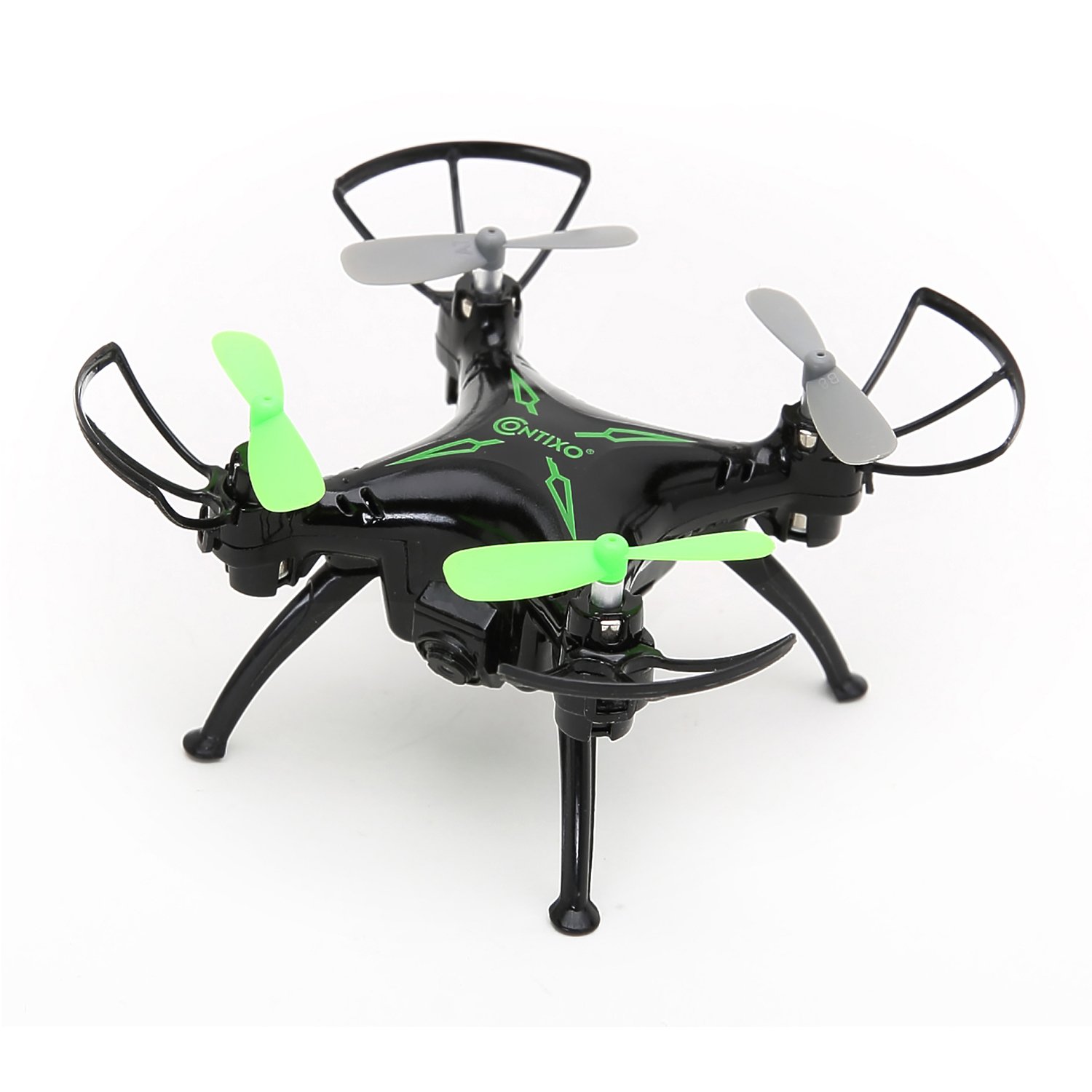
Выява: Уверсе view of the Contixo F3 Drone. This image provides a clear view of the drone's propellers and body for maintenance reference.
Ліквідацыю непаладак
| праблема | Магчымая прычына | Рашэнне |
|---|---|---|
| Дрон не рэагуе на пульт. | Не спалучаны; нізкі зарад батарэі; перашкоды. | Re-pair the drone and remote; charge batteries; move to an open area. |
| Дрон дрэйфуе падчас палёту. | Not calibrated; trim settings incorrect. | Calibrate the drone on a flat surface; use trim buttons to adjust. |
| FPV video is choppy or disconnected. | Weak Wi-Fi signal; too far from drone; app issue. | Ensure strong Wi-Fi connection; fly closer to the drone; restart app/drone. |
| Drone does not take off. | Low battery; propellers blocked; not paired. | Charge battery; check for obstructions; re-pair drone. |
Тэхнічныя характарыстыкі
- Марка: Contixo
- мадэль: F3
- колер: Чорны
- Узровень навыку: Beginner, Professional
- Вага прадмета: 3.52 унцыі (прыблізна 100 грамаў)
- Ёмістасць батарэі: 220 Міліamp Гадзіны (літый-палімерны)
- Тып кіравання: Пульт дыстанцыйнага кіравання
- Дазвол відэавываду: 1280x720 Pixels (720p HD FPV)
- Падключэнне: 2.4GHz (Remote Control), Wi-Fi (FPV)
- Гіраскоп: 6-восевы гіраскоп
- Асаблівасці: Altitude Hold, One-Key Landing/Take-Off, FPV Camera, G-Sensor Control, Track-Controlled Flight
Гарантыя і падтрымка
For warranty information, technical support, or replacement parts, please visit the official Contixo webсайт або звярніцеся ў службу падтрымкі кліентаў. Захоўвайце чэк аб куплі як пацверджанне пакупкі.
Contixo Official Webсайт: www.contixo.com
Заўвага: Канкрэтныя гарантыйныя ўмовы могуць адрознівацца ў залежнасці ад рэгіёна і прадаўца.