
1. Уводзіны
The Imperial DABMAN i400 is a versatile audio adapter designed to enhance your existing stereo system with modern radio and streaming capabilities. It provides access to thousands of internet radio stations, digital radio (DAB+), and traditional FM radio. Additionally, it supports audio streaming via Bluetooth, UPnP/DLNA, and USB, offering a comprehensive listening experience.
2. Інструкцыі па тэхніцы бяспекі
- крыніца харчавання: Выкарыстоўвайце толькі адаптар сілкавання, які ўваходзіць у камплект. Пераканайцеся, што гучнасцьtage адпавядае вашай мясцовай крыніцы харчавання.
- Вада і вільгаць: Не падвяргайце прыладу ўздзеянню дажджу, вільгаці або кропель/пырскаў вадкасцей. Не стаўце на прыладу прадметы, напоўненыя вадкасцямі, такія як вазы.
- Вентыляцыя: Забяспечце належную вентыляцыю. Не блакуйце вентыляцыйныя адтуліны. Пазбягайце размяшчэння прылады на мяккіх паверхнях, якія могуць перашкаджаць цыркуляцыі паветра.
- Крыніцы цяпла: Трымайце прыладу далей ад крыніц цяпла, такіх як радыятары, абагравальнікі, пліты або іншыя прыборы, якія выпрацоўваюць цяпло.
- Уборка: Адключыце сілкаванне перад чысткай. Выкарыстоўвайце мяккую сухую тканіну. Не выкарыстоўвайце вадкія або аэразольныя ачышчальнікі.
- Абслугоўванне: Не спрабуйце самастойна абслугоўваць гэты прадукт. Звярніцеся да ўсіх абслугоўванняў кваліфікаванага абслуговага персаналу.
3. Змесціва ўпакоўкі
Калі ласка, праверце наяўнасць усіх прадметаў у камплекце:
- Imperial DABMAN i400 Internet Digital Radio
- Адаптар сілкавання
- Telescopic Antenna with F-connector
- Wire Antenna with F-connector
- RCA кабель
- Аўдыёкабель (раздым 3.5 мм)
- Пульт дыстанцыйнага кіравання
- Кіраўніцтва карыстальніка (гэты дакумент)

Image: Imperial DABMAN i400 with its power adapter, telescopic antenna, wire antenna, RCA cable, 3.5mm audio cable, and remote control.
4. Прадукт скончыўсяview
Фронт View

Image: The front of the Imperial DABMAN i400, showing its display and control buttons on the top edge.
The front of the DABMAN i400 features a clear 3.2-inch LCD display for navigation and information. Control buttons are located on the top edge of the device for easy access to functions like power, mode selection, volume, and station presets.
Тыл View і сувязі
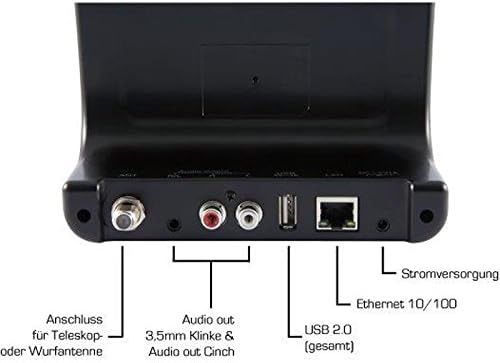
Image: The rear panel of the Imperial DABMAN i400, detailing its various connection ports. From left to right: Antenna connection (ANT), Audio output (RCA L/R and 3.5mm jack), USB 2.0 ports, Ethernet 10/100 (LAN), and Power supply (DC 5V/1A).
- Мурашка: F-connector for connecting the telescopic or wire antenna for DAB+/FM reception.
- Аўдыёвыхад (правы/левы): RCA (Cinch) stereo audio output for connecting to an amplifier або стэрэасістэма.
- Аўдыёвыхад (раздым 3.5 мм): 3.5mm stereo audio output for connecting to other audio devices.
- USB 2.0: USB port for playing media from a USB storage device.
- LAN: Ethernet port (RJ45) for wired network connection.
- DC 5V/1A: Power input for the included power adapter.
5. Настройка
- Падключэнне антэны: Screw the telescopic antenna or connect the wire antenna to the МУРАШКА F-connector on the rear panel. Extend the telescopic antenna for optimal reception.
- Падключэнне да аўдыёсістэмы: Use the provided RCA cable to connect the Audio Output (R/L) on the DABMAN i400 to an available audio input (e.g., AUX, CD, LINE IN) on your amplifier or stereo system. Alternatively, use the 3.5mm audio cable if your system has a compatible input.
- Падключэнне да сеткі:
- Правадная (LAN): Падключыце кабель Ethernet ад маршрутызатара да лакальная сетка port on the rear of the DABMAN i400.
- Wireless (WLAN): The device will prompt you to set up Wi-Fi during the initial startup wizard. Select your network and enter the password.
- Падключыце харчаванне: Падключыце адаптар сілкавання да Пастаянны ток 5 В/1 А input on the rear panel, then plug the adapter into a wall outlet. The device will power on automatically or enter standby mode.
- Майстар пачатковай налады: Upon first power-on, the device will guide you through an initial setup process, including language selection, time/date settings, and network configuration. Follow the on-screen instructions.
6. Інструкцыя па эксплуатацыі
Базавая навігацыя
Use the control buttons on the top of the device or the remote control to navigate menus, select options, adjust volume, and change modes.
Выбар рэжыму
Press the 'Mode' button (or equivalent on remote) to switch between available modes:
- Інтэрнэт-радыё: Access thousands of online radio stations worldwide. Browse by genre, location, or search for specific stations.
- Лічбавае радыё DAB+: Enjoy high-quality digital radio broadcasts. The device will scan for available stations in your area.
- FM-радыё: Tune into traditional analog FM radio stations.
- Bluetooth: Stream audio wirelessly from your Bluetooth-enabled smartphone, tablet, or computer.

Image: Bluetooth connectivity icon.
To pair: Select Bluetooth mode on the DABMAN i400. On your external device, search for available Bluetooth devices and select 'DABMAN i400'.
- UPnP/DLNA: Паток музыкі files from compatible devices on your local network (e.g., a network-attached storage (NAS) drive or a computer running a media server).

Image: UPnP (Universal Plug & Play) icon.
- Прайграванне праз USB: Прайграванне аўдыё files (e.g., MP3) from a USB flash drive connected to the USB port on the rear of the device.

Image: MP3 music file значок.
Прасэты
Save your favorite stations as presets for quick access. Refer to the on-screen menu for instructions on how to save and recall presets.
Air Music Control App
Control your DABMAN i400 using the Air Music Control App available for smartphones and tablets. This app allows for convenient remote control and browsing of stations.

Image: Air Music Control App icon.
7. Тэхнічнае абслугоўванне
- Уборка: Wipe the device with a soft, dry, lint-free cloth. Do not use abrasive cleaners, waxes, or solvents.
- Абнаўленні праграмнага забеспячэння: Periodically check for available software updates through the device's system settings menu to ensure optimal performance and access to new features.
- захоўванне: Калі прылада захоўваецца працяглы час, адключыце яе ад сеткі і захоўвайце ў прахалодным, сухім месцы.
8. Выпраўленне непаладак
- Няма харчавання:
- Пераканайцеся, што адаптар сілкавання надзейна падключаны да прылады і да спраўнай разеткі.
- Паспрабуйце іншую разетку.
- Няма гуку:
- Check the volume level on both the DABMAN i400 and your connected audio system.
- Ensure the audio cables are correctly connected to the appropriate input on your audio system.
- Verify that your audio system is set to the correct input source.
- Не ўдаецца падключыцца да Wi-Fi/інтэрнэту:
- Пераканайцеся, што ваш Wi-Fi-роўтар уключаны і працуе належным чынам.
- Двойчы праверце пароль Wi-Fi.
- Try moving the device closer to your Wi-Fi router or use a wired LAN connection.
- Restart your router and the DABMAN i400.
- Слабы прыём DAB+/FM:
- Ensure the antenna is fully extended and positioned for optimal reception.
- Try repositioning the device or antenna.
- Check if you are in an area with good DAB+ or FM coverage.
- Праблемы спалучэння Bluetooth:
- Ensure the DABMAN i400 is in Bluetooth pairing mode.
- Make sure your external device's Bluetooth is enabled and discoverable.
- Move your external device closer to the DABMAN i400.
- Паспрабуйце адлучыць прылады і зноў падключыць іх.
9. Тэхнічныя характарыстыкі
| Асаблівасць | Спецыфікацыя |
|---|---|
| Марка | Імператарскі |
| Нумар мадэлі | 22-241-00 |
| Колер | Чорны |
| Памер экрана | 3.2 цалі |
| Тэхналогія падлучэння | Bluetooth, LAN (Ethernet), WLAN (Wi-Fi), RCA (Cinch) L/R, 3.5mm Audio Jack |
| Асаблівасці | Portable (as an adapter), Internet Radio, DAB+, FM, UPnP/DLNA |
| Усяго партоў USB | 1 |
| Сумяшчальныя прылады | Bluetooth devices, UPnP/DLNA compatible devices |
| Крыніца харчавання | AC (via power adapter) |
| Падтрымліваемыя радыёдыяпазоны | FM, DAB, DAB+, Internet Radio |
| Памеры прадукту | 15 Д х 8.1 Ш х 14 У сантыметраў |
| Уключаныя кампаненты | Power Adapter, Telescopic Antenna, Wire Antenna, RCA Cable, Audio Cable, Remote Control, User Manual |
| Падтрымліваюцца мовы | German, English, French, Dutch |
10. Гарантыя і падтрымка
Гарантыя вытворцы
The Imperial DABMAN i400 comes with a manufacturer's warranty. Please refer to the warranty card included in your package or the manufacturer's official website for specific terms and conditions. Spare parts availability is guaranteed for 1 year.
Падтрымка кліентаў
For technical assistance, troubleshooting beyond this manual, or warranty claims, please contact Imperial customer support. Contact information can typically be found on the manufacturer's webсайце або ва ўпакоўцы прадукту.