
Уводзіны
Thank you for choosing the KINGONE K5 Portable Wireless Bluetooth Speaker. This manual provides essential information for the proper setup, operation, and maintenance of your device. Please read it thoroughly before use to ensure optimal performance and longevity of your speaker.
Інфармацыя па бяспецы
- Не падвяргайце дынамік уздзеянню экстрэмальных тэмператур, прамых сонечных прамянёў або высокай вільготнасці.
- Пазбягайце падзення дынаміка і не падвяргайце яго моцным ударам.
- Не разбірайце і не спрабуйце рамантаваць дынамік самастойна. Гэта прывядзе да анулявання гарантыі.
- Keep the speaker away from water and liquids. While it is waterproof, prolonged submersion or exposure to high-pressure water jets should be avoided.
- Выкарыстоўвайце толькі пазначаны аб'ём зарадкіtagе (пастаянны ток 5 В).
Змест пакета
- KINGONE K5 Portable Wireless Bluetooth Speaker
- USB-кабель для зарадкі
- Кіраўніцтва карыстальніка
Прадукт скончаныview
Азнаёмцеся з элементамі кіравання і партамі дынаміка.
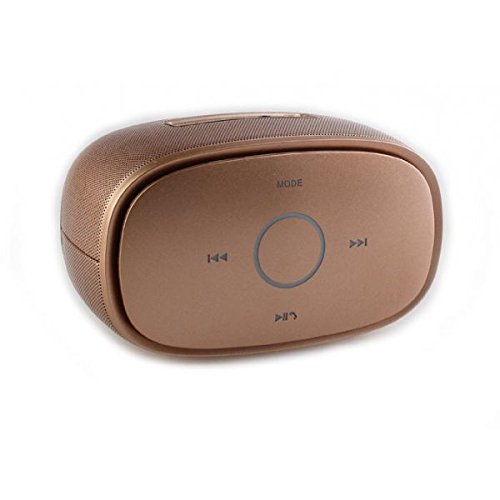
выява: Топ view of the KINGONE K5 Portable Wireless Bluetooth Speaker. The image displays the speaker's top panel, which features a central circular play/pause button, surrounded by four other buttons: 'MODE' at the top, 'previous track' (left), 'next track' (right), and 'volume down/call answer' (bottom). The speaker has a metallic brown finish with a textured grille on the sides.
Кнопкі кіравання:
- Рэжым: Press to switch between Bluetooth, AUX, and other available modes.
- Previous Track (<<): Кароткае націсканне, каб перайсці да папярэдняга трэка.
- Next Track (>>): Кароткае націсканне для пераходу да наступнага трэка.
- Прайграванне/Паўза (►▮▮): Press to play or pause music. Long press for power on/off.
- Volume Down/Call Answer (▼): Short press to decrease volume. During an incoming call, press to answer.
- Volume Up/Call End (▲): Short press to increase volume. During a call, press to end. (Note: Volume Up button is not explicitly visible in the provided image but is a standard function for such devices, assuming it's paired with Volume Down or integrated.)
парты:
- Порт для зарадкі Micro USB: Для зарадкі калонкі.
- Порт AUX-in: Для праваднога падключэння аўдыё.
Настройка
1. Зарадка дынаміка
- Падключыце меншы канец USB-кабеля для зарадкі да порта Micro USB на дынаміку.
- Connect the larger end of the USB cable to a USB power adapter (DC 5V, not included) or a computer's USB port.
- Індыкатар зарадкі загарыцца. Пасля поўнай зарадкі ён выключыцца або зменіць колер.
- Поўная зарадка звычайна займае каля 3-4 гадзін і забяспечвае да 7 гадзін прайгравання.
2. Уключэнне / выключэнне харчавання
- Каб уключыць: Long press the Play/Pause button until you hear an audible prompt or see an indicator light.
- Каб выключыць: Long press the Play/Pause button again until you hear an audible prompt or the indicator light turns off.
3. Спарванне Bluetooth
- Ensure the speaker is powered on and in Bluetooth mode. If not, press the 'MODE' button to switch to Bluetooth mode. The indicator light will flash, indicating it's ready for pairing.
- Уключыце Bluetooth на вашым смартфоне, планшэце або іншай прыладзе з падтрымкай Bluetooth.
- Пошук available Bluetooth devices. You should see "KINGONE K5" in the list.
- Select "KINGONE K5" to connect. Once paired, you will hear a confirmation sound, and the indicator light will stop flashing and remain solid.
- Пры ўключэнні дынамік аўтаматычна паспрабуе падключыцца да апошняй спалучанай прылады.
4. Connecting via AUX (Audio Input)
- Connect one end of a 3.5mm audio cable (not included) to the AUX-in port on the speaker.
- Connect the other end of the audio cable to the headphone jack of your audio device.
- The speaker will automatically switch to AUX mode, or you may need to press the 'MODE' button to select AUX.
Аперацыйная
Прайграванне музыкі
- Прайграванне/Паўза: Націсніце кнопку Прайграванне/Паўза, каб пачаць або прыпыніць прайграванне.
- Наступны трэк: Press the Next Track (>>) button to skip to the next song.
- Папярэдні трэк: Press the Previous Track (<<) button to go back to the beginning of the current song or to the previous song.
- Рэгулятар гучнасці: Use the Volume Down (▼) and Volume Up (▲) buttons on the speaker to adjust the volume. You can also control the volume from your connected device.
Званок па гучнай сувязі
Пры падключэнні праз Bluetooth дынамік можна выкарыстоўваць для званкоў у рэжыме hands-free.
- Адказаць на званок: Press the Volume Down (▼) button once to answer an incoming call.
- Завяршыць выклік: Press the Volume Up (▲) button once to end an ongoing call.
- Адхіліць выклік: Long press the Volume Down (▼) button to reject an incoming call.
Тэхнічнае абслугоўванне
Уборка
- Працярыце дынамік мяккай, сухой або злёгку змочанай тканінайamp тканіна.
- Не выкарыстоўвайце абразіўныя ачышчальнікі, спірт або хімічныя растваральнікі.
Захоўванне
- Захоўвайце дынамік у прахалодным, сухім месцы, удалечыні ад прамых сонечных прамянёў і экстрэмальных тэмператур.
- Калі вы захоўваеце акумулятар працяглы час, перыядычна зараджайце яго (напрыклад, кожныя 3 месяцы), каб падтрымліваць яго ў працоўным стане.
Сыход за батарэяй
- Пазбягайце частай поўнай разрадкі акумулятара.
- Do not leave the speaker connected to a charger for excessively long periods after it is fully charged.
Ліквідацыю непаладак
| праблема | Магчымая прычына | Рашэнне |
|---|---|---|
| Дынамік не ўключаецца. | Батарэя разраджаная або разраджаная. | Зараджайце дынамік не менш за 30 хвілін. |
| Немагчыма спалучыцца з прыладай Bluetooth. | Speaker is not in pairing mode. Bluetooth is off on your device. Speaker is already connected to another device. | Ensure speaker is in Bluetooth pairing mode (flashing indicator). Turn on Bluetooth on your device. Disconnect from other devices or restart the speaker. |
| Няма гуку або нізкі ўзровень гучнасці. | Volume is too low on speaker or device. Incorrect mode selected. | Increase volume on both the speaker and your connected device. Press the 'MODE' button to select the correct input (Bluetooth/AUX). |
| Скажэнне гуку. | Volume too high. Device too far from speaker. | Reduce volume on speaker and/or device. Move the device closer to the speaker (within 10 meters). |
Тэхнічныя характарыстыкі
- Назва мадэлі: KINGONE K5
- Нумар мадэлі тавару: KNG006
- Тэхналогія бесправадной сувязі: Bluetooth
- Версія Bluetooth: V2.0 (as per product title)
- Тып дынаміка: Кніжная паліца (партатыўная)
- Памер дынаміка: 2 цаляў
- Рэжым вываду гуку: Стэрэа (2.0-канал)
- Крыніца харчавання: Battery Powered (Built-in Li-ion battery)
- Намінальны выпtage: 5 В пастаяннага току
- АЧХ: 3 дБ
- Frequency Scope: 170-15 кГц
- Метад кантролю: Дакранацца
- Воданепранікальны: так
- Тэрмін службы батарэі: Да 7 гадзін (прыблізна)
- Сумяшчальныя прылады: Смартфон, планшэт
Гарантыя і падтрымка
Каб атрымаць інфармацыю аб гарантыі або тэхнічнай падтрымцы, звярніцеся да дакументацыі, прадстаўленай пры куплі, або звярніцеся да прадаўца. Захоўвайце пацвярджэнне пакупкі для прэтэнзій па гарантыі.