
Instapark PWT-07
Instapark PWT-07 Digital Programmable Water Timer User Manual
Model: PWT-07
Уводзіны
This manual provides detailed instructions for the setup, operation, maintenance, and troubleshooting of your Instapark PWT-07 Digital Programmable Water Timer. Please read this manual thoroughly before using the device to ensure proper function and longevity.
Інфармацыя па бяспецы
- Use only 1.5V AA alkaline batteries. Do not mix old and new batteries, or different battery types.
- Ensure the battery compartment is securely closed to maintain the IP66 waterproof rating.
- Do not expose the timer to extreme temperatures or direct sunlight for prolonged periods, which may affect battery life and device performance.
- Disconnect the timer from the faucet and drain it before freezing temperatures to prevent damage.
- This device is designed for outdoor use with standard ¾” (GHS) threaded faucets.
Змест пакета
Праверце наяўнасць усіх прадметаў у камплекце:
- Instapark PWT-07 Water Timer
- Кіраўніцтва карыстальніка (гэты дакумент)
- Гарантыйны талон
Note: 2 AA alkaline batteries are required and not included.
Асаблівасці прадукту
- Single-station digital programmable faucet water timer.
- Impulse solenoid valve for reliable operation.
- Compatible with standard ¾” (GHS) threaded outdoor hose faucets.
- User-friendly interface with a single oversized rotary dial and 4 pushbuttons.
- Large, easy-to-read LCD display (2.1” x 1”).
- Клас воданепранікальнасці: IP66.
- Built-in rain delay function (24, 48, or 72 hours).
- Manual watering option without interrupting programmed schedules.
- Detachable battery compartment for easy battery replacement.
- Low power consumption, up to 4,000 on/off cycles per battery set.
Настройка
1. Устаноўка батарэі
The Instapark PWT-07 requires two (2) 1.5V AA alkaline batteries (not included).
- Знайдзіце батарэйны адсек на задняй панэлі таймера.
- Slide the battery compartment cover downwards to open.
- Устаўце дзве новыя шчолачныя батарэйкі тыпу АА, сачыце за правільнай палярнасцю (+/-).
- Засуньце вечка батарэйнага адсека на месца, пакуль яна надзейна не зашчоўкне.
- The LCD display should illuminate, indicating successful battery installation. If the display shows a low battery indicator, remove the batteries, wait for the screen to go completely dark, then reinsert them.
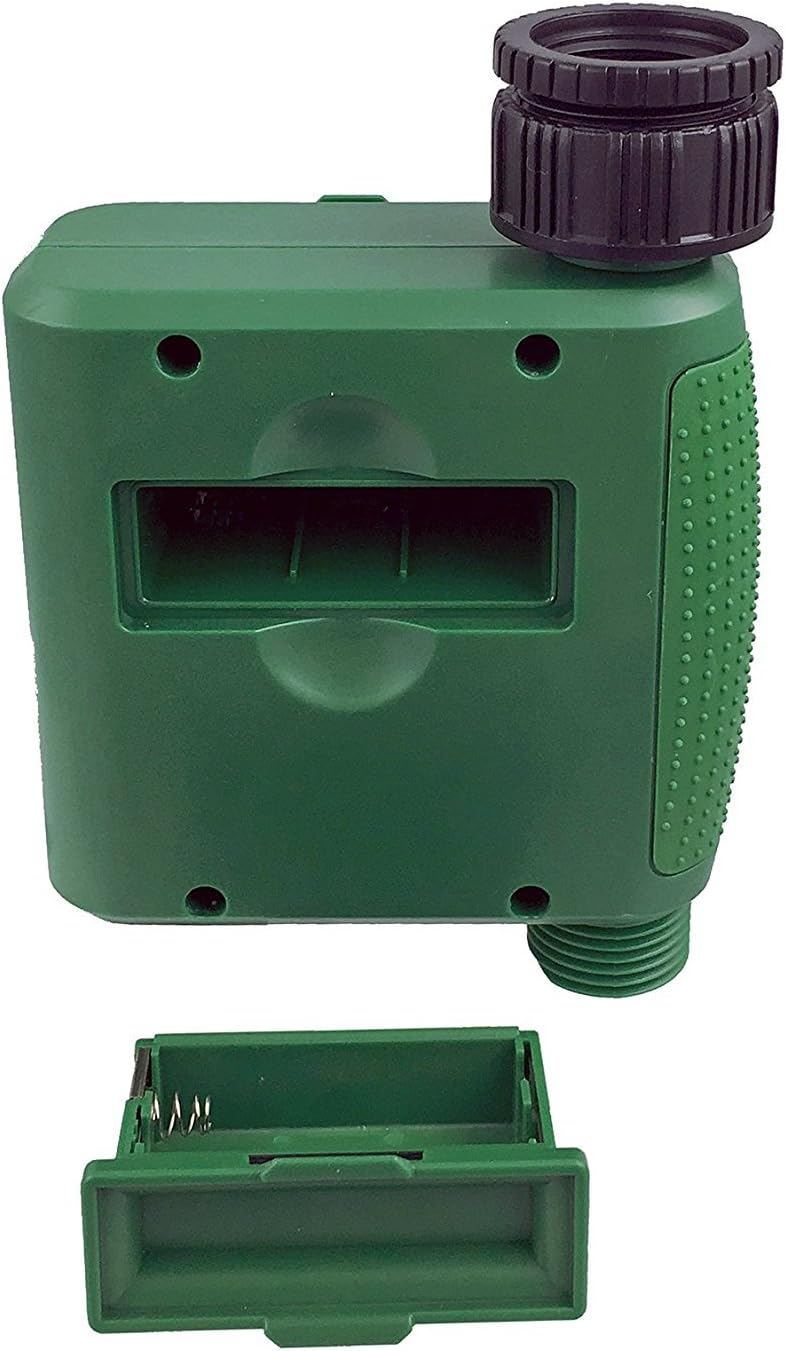
Малюнак 1: Адсек для батарэек са знятай вечкам.
2. Mounting the Timer
Attach the timer to your outdoor faucet:
- Ensure the faucet is clean and free of debris.
- Screw the timer's inlet (top connector) onto a standard ¾” (GHS) outdoor hose faucet. Hand-tighten only to prevent damage. Do not overtighten.
- Connect your garden hose or irrigation system to the timer's outlet (bottom connector). Hand-tighten securely.
- Turn on the faucet fully. The timer is designed to operate under pressure.

Figure 2: Instapark PWT-07 mounted on a faucet.
Інструкцыя па эксплуатацыі
The timer features a large rotary dial and four buttons: НАБОР, +, -, і КІРАЎНІЦТВА.

Figure 3: Control panel and LCD display.
1. Налада бягучага часу
- Павярніце паваротны дыск у становішча УСТАНОВІЦЬ ГАДЗІННІК.
- Выкарыстоўвайце + і - buttons to adjust the current hour. Press НАБОР каб пацвердзіць.
- Выкарыстоўвайце + і - buttons to adjust the current minute. Press НАБОР каб пацвердзіць.
2. Programming Watering Schedule
The timer allows you to set a start time, duration, and frequency for watering.
Задаць час пачатку:
- Павярніце паваротны дыск у становішча ЧАС ПАЧАТКУ.
- Выкарыстоўвайце + і - buttons to set the desired watering start hour. Press НАБОР каб пацвердзіць.
- Выкарыстоўвайце + і - buttons to set the desired watering start minute. Press НАБОР каб пацвердзіць.
Set How Long (Duration):
- Павярніце паваротны дыск у становішча КОЛЬКІ.
- Выкарыстоўвайце + і - buttons to set the watering duration (from 5 seconds to 360 minutes). Press НАБОР каб пацвердзіць.
Set How Often (Frequency):
- Павярніце паваротны дыск у становішча ЯК ЧАСТА.
- Выкарыстоўвайце + і - buttons to select the watering frequency (e.g., every 10 seconds, 30 seconds, 1 minute, 3 minutes, 5 minutes, 1 hour, 2 hours, 4 hours, 12 hours, 1 day, 2 days, 3 days, 4 days, 5 days, 6 days, 7 days). Press НАБОР каб пацвердзіць.
After setting all parameters, turn the rotary dial to БЕГАЦЬ каб актываваць запраграмаваны графік.
3. Ручны паліў
To water manually without affecting your programmed schedule:
- Пераканайцеся, што цыферблат усталяваны ў становішча БЕГАЦЬ or ВЫКЛ.
- Націсніце КІРАЎНІЦТВА button. The display will show a default manual watering duration.
- Выкарыстоўвайце + і - buttons to adjust the desired manual watering duration.
- Прэса НАБОР to start manual watering. The timer will run for the selected duration and then automatically shut off.
- Каб заўчасна спыніць ручны паліў, націсніце кнопку КІРАЎНІЦТВА кнопку зноў.
4. Функцыя затрымкі дажджу
The rain delay function allows you to pause your watering schedule for a set period without losing your program settings.
- Пераканайцеся, што цыферблат усталяваны ў становішча БЕГАЦЬ.
- Націсніце і ўтрымлівайце - button for 3 seconds. The display will show "DELAY" and a default delay duration.
- Выкарыстоўвайце + і - buttons to select a delay duration of 24, 48, or 72 hours.
- Прэса НАБОР to activate the rain delay. The timer will resume its programmed schedule after the delay period ends.
- Каб адмяніць затрымку дажджу, націсніце і ўтрымлівайце - зноў націсніце кнопку на 3 секунд.
Тэхнічнае абслугоўванне
- Замена батарэі: Replace batteries when the low battery indicator appears on the LCD. Always use new AA alkaline batteries.
- Уборка: Працярыце таймер рэкламайamp тканіна. Не выкарыстоўвайце абразіўныя ачышчальнікі або растваральнікі.
- Зімоўка: Before the first frost, disconnect the timer from the faucet. Remove the batteries and store the timer indoors in a dry, frost-free location. Failure to do so may result in damage from freezing water.
- Экран фільтра: Periodically check the filter screen inside the inlet connector for debris. Clean if necessary to ensure proper water flow.
Ліквідацыю непаладак
| праблема | Магчымая прычына | Рашэнне |
|---|---|---|
| Timer does not turn on / LCD is blank. | Разраджаныя або няправільна ўсталяваныя батарэйкі. | Replace with new AA alkaline batteries, ensuring correct polarity. If still blank, remove batteries, wait for screen to fully clear, then reinsert. |
| Water does not turn on at scheduled time. |
|
|
| Water does not turn off. |
|
|
| Працякае вада з злучэнняў. |
|
|
| Low battery indicator flashes even with new batteries. | Firmware not booting correctly after battery change. | Remove batteries, wait for the LCD screen to go completely dark (may take a few minutes), then reinsert new batteries. |
Тэхнічныя характарыстыкі
| мадэль | PWT-07 |
| Крыніца харчавання | 2 шчолачныя батарэйкі тыпу АА 1.5 В (не ўключаны) |
| Тып клапана | Імпульсны электрамагнітны клапан |
| Працоўны ціск вады | Ад 14.5 да 116 psi |
| Ток у рэжыме чакання | <100 мкА |
| Watering Frequency Settings | 10s, 30s, 1m, 3m, 5m, 1h, 2h, 4h, 12h, 1d, 2d, 3d, 4d, 5d, 6d, 7d (16 settings) |
| Watering Duration Settings | 5s, 10s, 15s, 20s, 25s, 30s, 35s, 40s, 45s, 50s, 55s, 1-360m |
| Фармат адлюстравання часу | 24-гадзінны |
| Рэйтынг воданепранікальнасці | IP66 |
| Матэрыял | АБС-пластык |
| Памеры прадукту | 4.25" Г x 6" Ш x 2.6" У |
| Вага прадмета | 14.2 унцый |
Гарантыя і падтрымка
The Instapark PWT-07 Digital Programmable Water Timer is backed by a standard 1-year manufacturer's warranty from the date of purchase. This warranty covers defects in materials and workmanship under normal use.
For warranty claims, technical support, or any questions regarding your product, please contact Instapark customer service. Please have your purchase receipt and product model number (PWT-07) available when contacting support.
Contact information for Instapark customer service can typically be found on the manufacturer's webсайт або дакументы аб куплі.