
1. Уводзіны
This manual provides comprehensive instructions for the installation, operation, and maintenance of your Mitsubishi NR-MZ033-2 In-Dash Navigation System. Please read this manual thoroughly before using the product to ensure correct operation and to prevent damage.
2. Інфармацыя па бяспецы
Observe the following safety precautions to prevent injury or damage to the device.
- Always operate the vehicle safely. Distraction from the navigation system can lead to accidents.
- Do not attempt to install or service the unit yourself. Professional installation is recommended.
- Ensure all wiring is correctly connected to prevent electrical hazards or malfunction.
- Keep the unit free from moisture and extreme temperatures.
- Не перакрывайце вентыляцыйныя адтуліны.
3. Прадукт скончыўсяview
3.1 Асноўныя магчымасці
- 7V type WVGA Monitor for clear display.
- Integrated DVD and CD mechanism for media playback.
- Built-in Bluetooth for connectivity.
- Features a multi-way scroll function for map screen navigation, similar to smartphone operation.
- Supports VICS WIDE for traffic and road information, utilizing FM multi-broadcast transmission.
- Provides a straight-line display from the current location to the destination for clear directional guidance.
- Navigation panel with incurve and outcurve buttons designed for ease of operation.
- Intuitive menu design for straightforward function selection.
3.2 Відарыс прадукту
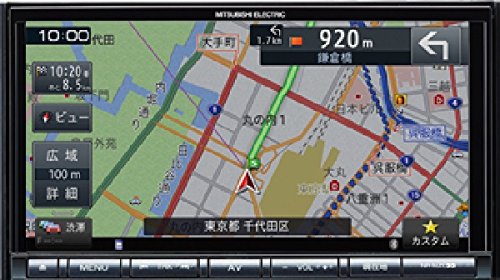
Выява: спераду view of the Mitsubishi NR-MZ033-2 In-Dash Navigation System, showing the 7V WVGA monitor and control buttons.
4. Настройка
4.1 Ўстаноўка
The Mitsubishi NR-MZ033-2 is designed for in-dash installation. Due to the complexity of vehicle electrical systems, professional installation by a qualified technician is strongly recommended. The product dimensions are approximately 178 mm (W) x 100 mm (H) x 164 mm (D).
4.2 Першапачатковае ўключэнне
After installation, turn on your vehicle's ignition. The system should power on automatically. Follow any on-screen prompts for initial setup, such as language selection or time zone settings.
5. Інструкцыя па эксплуатацыі
5.1 Navigation Functions
- Map Screen Navigation: Use the multi-way scroll function on the touch screen to pan and zoom the map.
- Пункт прызначэння: Access the navigation menu to input destinations via address, points of interest, or recent history.
- Кіраўніцтва па маршруце: The system provides turn-by-turn directions and a straight-line display to your destination.
- VICS WIDE: Access real-time traffic and road information through the VICS WIDE feature to optimize your route.
5.2 Media Playback (DVD/CD)
- Inserting Discs: Gently insert a DVD or CD into the disc slot. The system will automatically detect and begin playback.
- элементы кіравання: Use the on-screen touch controls or physical buttons for play, pause, skip, and volume adjustment.
5.3 Злучэнне Bluetooth
- Спалучэнне прылады: Go to the Bluetooth settings menu on the navigation system and enable pairing mode. On your mobile device, search for available Bluetooth devices and select 'NR-MZ033-2'. Follow the on-screen prompts to complete pairing.
- Паток аўдыё: Once paired, you can stream audio from your mobile device to the navigation system.
5.4 Дысплей і элементы кіравання
- Сэнсарны экран: The 7-inch WVGA monitor is a touch screen interface for most operations.
- Фізічныя кнопкі: Incurve and outcurve buttons provide tactile control for frequently used functions.
- Menu Layout: The menu system is designed for clarity, allowing quick access to navigation and AV functions.
5.5 Налады гуку
Access the audio settings menu to adjust sound parameters. This includes adjusting the sound image position relative to the listening position and fine-tuning sound quality to suit your preferences within the vehicle environment.
6. Тэхнічнае абслугоўванне
Рэгулярнае тэхнічнае абслугоўванне забяспечвае аптымальную прадукцыйнасць і даўгавечнасць вашай навігацыйнай сістэмы.
- Ачыстка экрана: Выкарыстоўвайце мяккую тканіну без ворса, каб акуратна працерці экран. Для выдалення ўстойлівых плям злёгку працярыцеampen the cloth with water or a screen-safe cleaner. Do not use abrasive cleaners.
- Ачыстка прылады: Wipe the exterior of the unit with a dry, soft cloth. Avoid using solvents or harsh chemicals.
- Слот для дыска: Трымайце дыскавод чысцінёй ад пылу і смецця. Не ўстаўляйце староннія прадметы.
7. Выпраўленне непаладак
Звярніцеся да табліцы ніжэй, каб азнаёміцца з распаўсюджанымі праблемамі і іх магчымымі рашэннямі.
| праблема | Магчымая прычына | Рашэнне |
|---|---|---|
| Няма ўлады | Няправільная праводка; перагарэлы засцерагальнік; выключана запальванне аўтамабіля | Check wiring connections; Replace fuse; Turn vehicle ignition on |
| Няма сігналу GPS | GPS antenna obstructed; Poor satellite reception | Пераканайцеся, што ясна view of sky for GPS antenna; Move to an open area |
| Няма гуку | Volume too low; Mute activated; Incorrect audio source; Speaker wiring issue | Increase volume; Deactivate mute; Select correct audio source; Check speaker connections |
| Сэнсарны экран не рэагуе | System freeze; Screen calibration needed | Restart the unit (refer to installation manual for reset procedure); Recalibrate touch screen via settings |
8. Тэхнічныя характарыстыкі
| Асаблівасць | Спецыфікацыя |
|---|---|
| Марка | Міцубісі |
| Назва мадэлі | NR-MZ033-2 |
| Тып абслугоўвання аўтамабіля | Аўтамабіль |
| Памер экрана | 7 цалі |
| Асаблівасці | VICS/VICS WIDE |
| Тэхналогія падлучэння | Bluetooth |
| Тып карты | вул |
| дазвол | WVGA |
| Увод чалавечага інтэрфейсу | Гузікі |
| Метад кантролю | Дакранацца |
| Памеры прадукту (Ш х В х Г) | Прыблізна 178 х 100 х 164 мм |
| Батарэі ўваходзяць у камплект | няма |
9. Гарантыя і падтрымка
This product is covered by a manufacturer's warranty. Please refer to the warranty card included with your purchase for specific terms and conditions. For technical support or service inquiries, please contact your authorized Mitsubishi dealer or the customer support provided in your warranty documentation.