
1. Уводзіны
The Amkette Trubeats S50 is a versatile smart wireless Bluetooth speaker designed to enhance your audio experience. It features multiple connectivity options including Bluetooth, USB, Micro SD card, and AUX input, along with an integrated FM radio. The speaker also includes a digital clock with alarm functions and can be controlled via a dedicated smartphone application. Additionally, it can function as a power bank to charge your mobile devices.
2. Змесціва ўпакоўкі
Калі ласка, пастаўце галачку для наступных пунктаў:
- Amkette Trubeats S50 Smart Wireless Bluetooth Speaker
- USB-кабель для зарадкі
- Кабель AUX
- Кіраўніцтва карыстальніка (гэты дакумент)
3. Прадукт скончыўсяview
Familiarize yourself with the various parts and controls of your Amkette Trubeats S50 speaker.
3.1 фронт View

Малюнак 1: Спераду view of the Amkette Trubeats S50 speaker, showing the speaker grille and LED display.
3.2 Верхняя панэль кіравання

Figure 2: Labeled diagram of the Amkette Trubeats S50 speaker's top control buttons: Mode, Volume Down/Previous, Play/Pause/Answer Call, Volume Up/Next, Clock, and Microphone.
- Кнопка MODE: Press to switch between Bluetooth, FM, AUX, USB, and Micro SD modes.
- K-/ Button: Press to decrease volume; long press for previous track/station.
- Play/Pause/Answer Call Button: Press to play/pause audio; press to answer/end calls.
- +/N Button: Press to increase volume; long press for next track/station.
- Кнопка ГАДЗІННІКА: Press to set time and alarms.
- Мікрафон: Для званкоў па гучнай сувязі.
3.3 Rear Ports and Switch

Figure 3: Labeled diagram of the Amkette Trubeats S50 speaker's rear ports: AUX, Micro SD, USB Host, USB DC, and On/Off switch.
- Уваход AUX: Падключыце знешнія аўдыёпрылады з дапамогай кабеля AUX 3.5 мм.
- Слот для карты Micro SD: Insert a Micro SD card for audio playback.
- Хост-порт USB: Insert a USB drive for audio playback or use as a power bank.
- USB DC Input: Connect the USB charging cable to power the speaker.
- Пераключальнік уключэння/выключэння: Уключыць або выключыць дынамік.
4. Настройка
4.1 Зарадка дынаміка
- Connect the small end of the USB charging cable to the USB DC Input порт на задняй панэлі дынаміка.
- Падключыце большы канец USB-кабеля для зарадкі да USB-адаптара харчавання (не ўваходзіць у камплект) або USB-порта кампутара.
- Святлодыёдны індыкатар будзе паказваць стан зарадкі. Поўная зарадка звычайна займае прыблізна 4 гадзіны.
Заўвага: The speaker does not have a visible battery level indicator. It is recommended to charge fully before first use and when the battery is low.
4.2 Уключэнне/выключэнне
- Каб уключыць, перасуньце Пераключальнік ON/OFF on the rear of the speaker to the 'ON' position.
- Каб выключыць харчаванне, перасуньце Пераключальнік ON/OFF у становішча «ВЫКЛ.».
5. Інструкцыя па эксплуатацыі
5.1 Спалучэнне па Bluetooth

Figure 4: Speaker in Bluetooth pairing mode, indicated by 'BT' on the display.
- Power on the speaker. It will automatically enter Bluetooth pairing mode, indicated by 'BT' flashing on the LED display.
- Уключыце Bluetooth на вашым смартфоне або іншай прыладзе.
- Пошук available devices and select "Amkette S50" from the list.
- Once paired, the speaker will emit a confirmation tone, and 'BT' will stop flashing.
- Цяпер вы можаце прайграваць аўдыё з прылады праз дынамік.
5.2 Выкарыстанне ўваходу AUX

Figure 5: Speaker connected to a smartphone via AUX cable for wired audio playback.
- Падключыце адзін канец кабеля AUX 3.5 мм да AUX ўваход порт на задняй панэлі дынаміка.
- Connect the other end of the AUX cable to the audio output jack of your external device (e.g., smartphone, MP3 player, laptop).
- Націсніце Кнопка MODE repeatedly until the speaker enters AUX mode.
- Прайгравайце аўдыё з падлучанай прылады.
5.3 Using USB/Micro SD Card
- Устаўце USB-назапашвальнік у USB-хост-порт або карту Micro SD у Слот для карты Micro SD на задняй панэлі дынаміка.
- Пераканайцеся, што ваш аўдыя files (MP3 format recommended) are stored on the drive/card.
- Націсніце Кнопка MODE repeatedly until the speaker enters USB or Micro SD mode. Playback will begin automatically.
- Выкарыстоўвайце K-/ і +/N кнопкі для навігацыі па трэках і рэгулявання гучнасці.
Праца з радыё 5.4 FM

Figure 6: Speaker displaying FM frequency, with app control for station selection.
- Націсніце Кнопка MODE repeatedly until the speaker enters FM radio mode.
- Аўтаматычнае сканаванне: У рэжыме FM доўга націсніце кнопку Прайграванне/Паўза button to initiate an automatic scan for available FM stations. The speaker will save detected stations.
- Ручная настройка: Выкарыстоўвайце K-/ і +/N кнопкі для навігацыі па захаваных станцыях.
- For precise tuning and station management, use the Amkette Trubeats Smart Speaker App (see section 5.7).
5.5 Digital Clock and Alarm Setup

Figure 7: Speaker displaying the current time on its LED screen.
- Час застывання: Націсніце і ўтрымлівайце Кнопка ГАДЗІНЫ. The hour display will flash. Use the K-/ і +/N кнопкі для налады гадзіны. Націсніце Кнопка ГАДЗІНЫ again to set minutes, and adjust with K-/ і +/N. Прэса Кнопка ГАДЗІНЫ once more to confirm.
- Налада будзільнікаў: Каротка націсніце Кнопка ГАДЗІНЫ to cycle through Alarm 1 and Alarm 2 settings. When an alarm time is displayed, long press the Кнопка ГАДЗІНЫ to enter alarm setting mode. Adjust hour and minute using K-/ і +/N, confirming each with a short press of the Кнопка ГАДЗІНЫ. You can also set the alarm source (FM/SD Card/USB) via the app.
5.6 Выкарыстанне ў якасці паўэрбанка
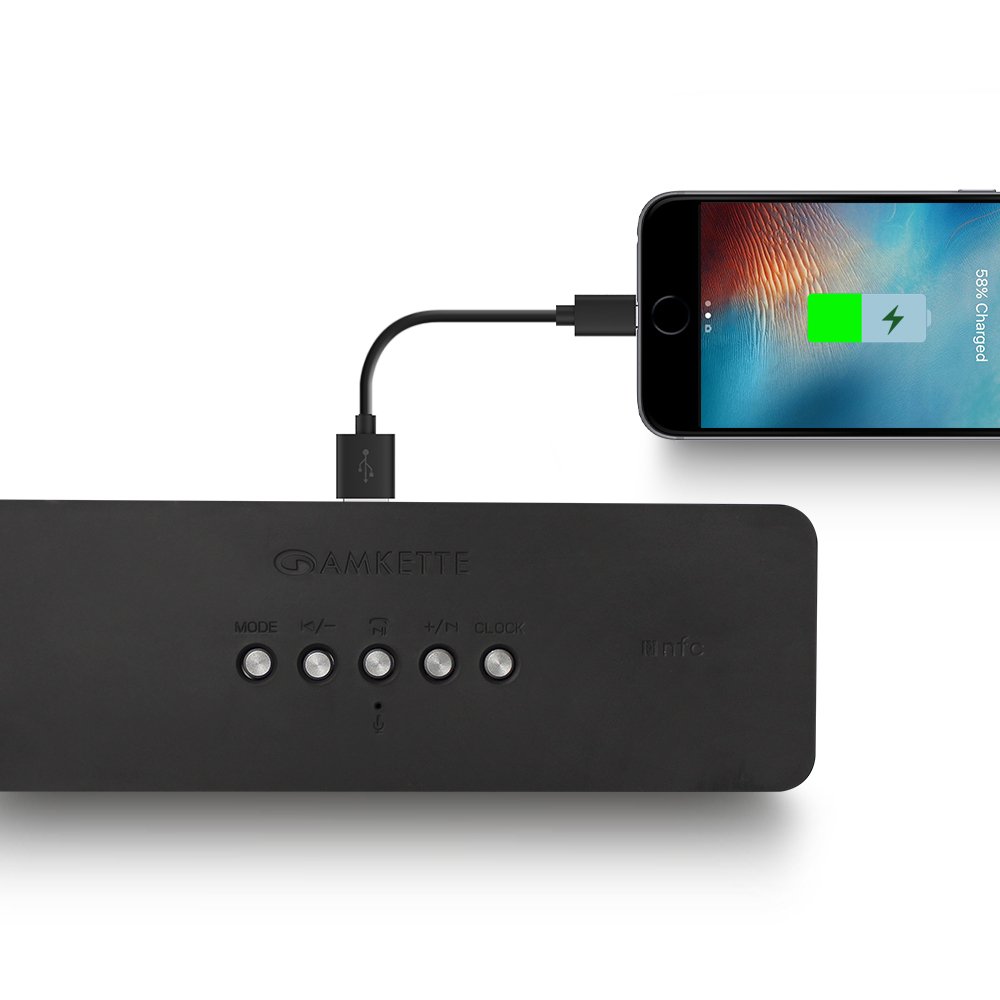
Figure 8: Speaker providing power to a smartphone through its USB Host port.
The Amkette Trubeats S50 can charge your smartphone or other USB-powered devices. Connect your device's charging cable to the USB-хост-порт on the rear of the speaker. The speaker's internal battery will then supply power to your device.
5.7 App Control (Android Only)

Figure 9: Smartphone displaying the Amkette Trubeats Smart Speaker App interface.
For enhanced control, download the Amkette Trubeats Smart Speaker App from the Google Play Store (for Android phones). The app allows you to:
- Switch between different audio modes.
- Control volume and track playback.
- Manage FM radio stations and perform precise tuning.
- Set and customize alarms, including alarm source.
Ensure your speaker is connected via Bluetooth to your smartphone for app functionality.
5.8 Апрацоўка выклікаў
When connected via Bluetooth to a smartphone, the speaker can be used for hands-free calling:
- Адказаць на званок: Націсніце Play/Pause/Answer Call Button адзін раз.
- Завяршыць выклік: Націсніце Play/Pause/Answer Call Button адзін раз падчас званка.
- Адхіліць выклік: Доўгі націск Play/Pause/Answer Call Button.
6. Тэхнічнае абслугоўванне
- Трымайце дынамік далей ад экстрэмальных тэмператур, прамых сонечных прамянёў і вільгаці.
- Працірайце дынамік мяккай сухой тканінай. Не выкарыстоўвайце абразіўныя ачышчальнікі або растваральнікі.
- Пазбягайце падзення дынаміка або моцных удараў.
- Калі дынамік не выкарыстоўваецца працяглы час, захоўвайце яго ў прахалодным, сухім месцы і перыядычна зараджайце, каб падтрымліваць яго працаздольнасць.
7. Выпраўленне непаладак
| праблема | Магчымая прычына | Рашэнне |
|---|---|---|
| Дынамік не ўключаецца. | Акумулятар разраджаны. | Цалкам зарадзіце дынамік. |
| Няма гуку з дынаміка. | Гучнасць занадта нізкая; выбраны няправільны рэжым; прылада падключана няправільна. | Increase speaker and source device volume. Ensure correct mode (Bluetooth, AUX, etc.) is selected. Reconnect the device. |
| Збой спалучэння Bluetooth. | Дынамік не ў рэжыме спалучэння; прылада занадта далёка; перашкоды. | Ensure speaker is in pairing mode ('BT' flashing). Move device closer to speaker. Turn off other Bluetooth devices. |
| Слабы прыём FM-радыё. | Слабы сігнал; перашкоды ад навакольнага асяроддзя. | Перанясіце дынамік у месца з лепшым прыёмам. Зноў выканайце аўтаматычнае сканаванне. |
| Праграма не падключаецца да дынаміка. | Bluetooth not connected; app issue. | Ensure speaker is paired via Bluetooth to your phone. Restart the app and try again. |
8. Тэхнічныя характарыстыкі
- мадэль: S50
- Марка: Амкет
- Тып дынаміка: Portable Bluetooth Speaker (Outdoor)
- Падключэнне: Bluetooth, USB, Micro SD, AUX, FM-радыё
- Тэхналогія бесправадной сувязі: Bluetooth
- Метад кантролю: Buttons, App (Android)
- Рэжым вываду гуку: Стэрэа
- Аўдыё Wattage: 10 ват
- Крыніца харчавання: Харчаванне ад батарэі
- Тэрмін службы батарэі: Да 12 гадзін (у сярэднім)
- Час зарадкі: Прыкладна 4 гадзіны
- Сумяшчальныя прылады: Laptop, Mobile, Tablet
- Памеры (ДхШхВ): 26.7 х 10.9 х 7.9 см
- Вага прадмета: 703 грам
- Воданепранікальны: так
- Тып мацавання: Настольнае мацаванне
9. Гарантыя і падтрымка
The Amkette Trubeats S50 Smart Wireless Bluetooth Speaker comes with a Гарантыя 1 год з даты пакупкі. Гэтая гарантыя распаўсюджваецца на вытворчыя дэфекты пры нармальным выкарыстанні.
For warranty claims, technical assistance, or any other support inquiries, please contact Amkette customer support through their official webсайт або кантактную інфармацыю, указаную ў дакументах па куплі.
Калі ласка, захавайце чэк аб куплі ў якасці пацверджання пакупкі для гарантыйных мэт.