
MIDAS DM16
Кіраўніцтва карыстальніка MIDAS DM16
16 уваходаў аналагавы жывы і студыйны мікшер
1. Уводзіны
This manual provides comprehensive instructions for the operation and maintenance of your MIDAS DM16 16 Input Analogue Live and Studio Mixer. The DM16 is designed for both live performance and studio recording environments, featuring award-winning MIDAS microphone preamplifiers and robust construction.
Please read this manual thoroughly before operating the device to ensure proper usage and to maximize its lifespan.
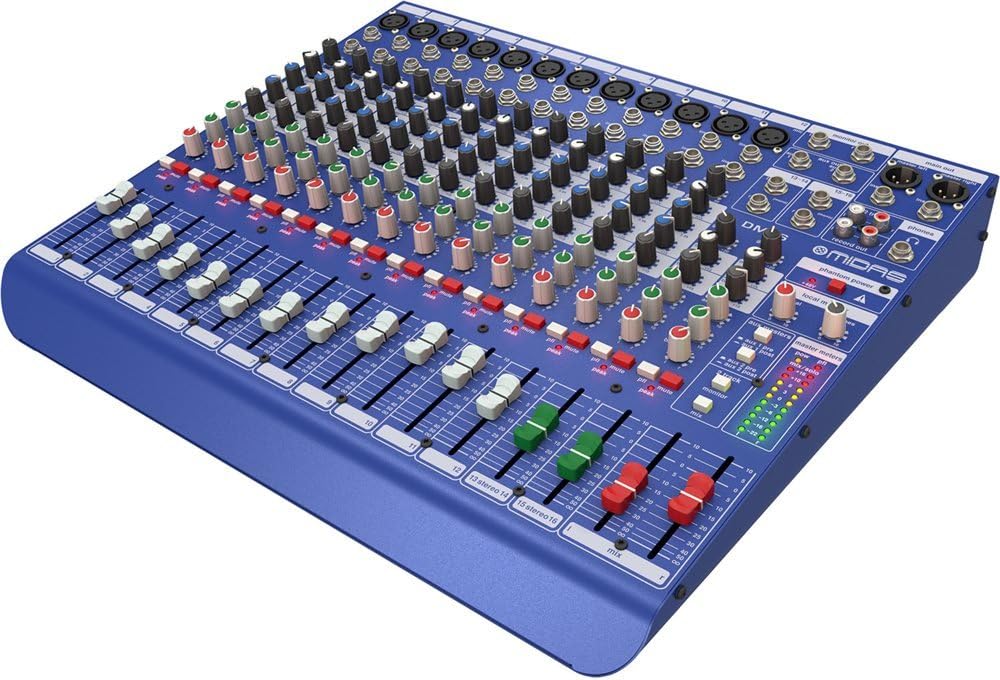
Малюнак 1.1: Пярэдні кут view of the MIDAS DM16 mixer.
2. Настройка
2.1 Распакаванне і праверка
Upon receiving your MIDAS DM16, carefully unpack the unit and inspect it for any signs of damage that may have occurred during transit. Retain the original packaging materials for future transport or storage.
У камплекце:
- MIDAS DM16 16-уваходны аналагавы жывы і студыйны мікшер
- Шнур харчавання
- Кіраўніцтва карыстальніка (гэты дакумент)
2.2 Падключэнне харчавання
The DM16 operates on a standard AC power supply. Connect the provided power cord to the AC inlet on the rear panel of the mixer and then to a suitable power outlet. Ensure the power switch is in the 'Off' position before connecting to power.
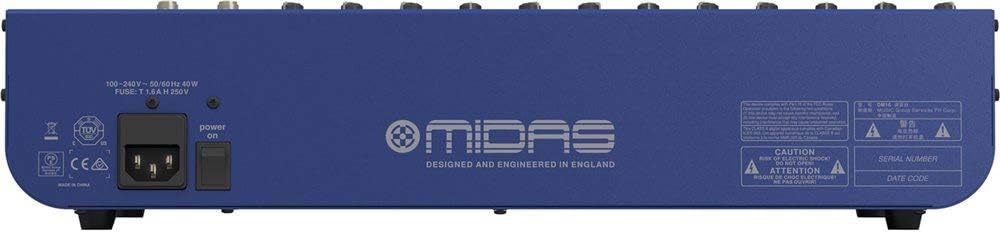
Figure 2.1: Rear panel of the MIDAS DM16 showing power input and warnings.
2.3 Уваходныя і выходныя злучэнні
The DM16 features a variety of input and output options for connecting microphones, instruments, and other audio devices.
- Мікрафонныя ўходы: 12 mono input channels with XLR connectors for microphones. These channels feature MIDAS microphone preampасаднікі.
- Лінейныя ўваходы: 2 electronically-balanced stereo line input channels on 1/4" TRS connectors for instruments or line-level devices.
- Асноўныя выхады: Падключыцеся да асноўнай сістэмы гучнагаварыцеля або інтэрфейсу запісу.
- Дапаможныя пасылы: For monitor mixes or effects sends.
- Выхад для навушнікаў: For monitoring audio.
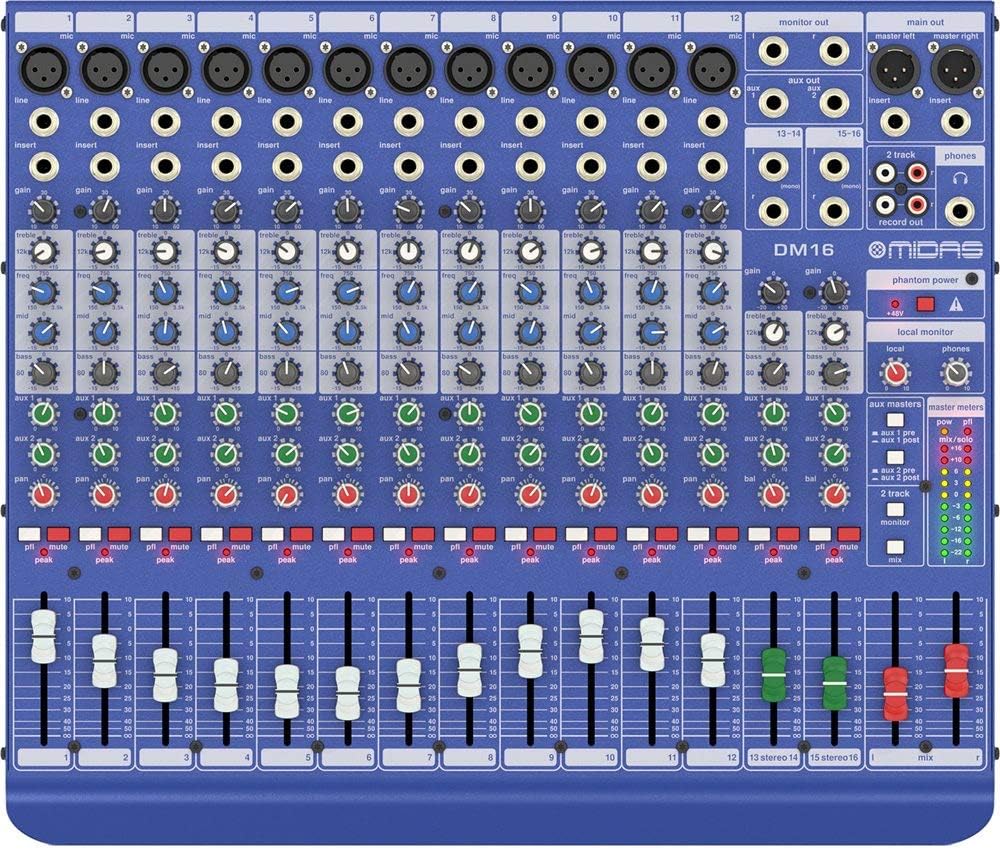
Малюнак 2.2: Верх view of the MIDAS DM16 showing all input/output connections and controls.
3. Інструкцыя па эксплуатацыі
3.1 Элементы кіравання каналам
Each mono input channel on the DM16 features the following controls:
- УЗБЕГАЦЬ: Adjusts the input sensitivity for the microphone preampзадымнік.
- EQ: A 3-band equalizer with a swept mid-band for precise tone shaping.

Малюнак 3.1: падрабязна view of the 3-band EQ section on a mono channel.
- AUX 1/2: Controls the level sent to the auxiliary outputs. These can be switched pre/post fader.

Figure 3.2: Aux masters section with pre/post fader switching.
- ПАН: Рэгулюе стэрэагучванне канала.
- МУК: Адключае гук канала.
- Пікавы святлодыёд: Indicates when the input signal is clipping.
- ФАДЭР: Controls the output level of the channel to the main mix.

Figure 3.3: Channel faders for precise level control.
3.2 Фантомная сіла
The DM16 provides +48V phantom power for condenser microphones. This is a global switch, meaning it applies to all microphone inputs simultaneously. Ensure all connections are made before activating phantom power to prevent damage to non-phantom powered devices.

Figure 3.4: Phantom power switch.
3.3 Маніторынг
Use the headphone output and monitor controls to listen to the main mix or specific auxiliary sends. The monitor section includes controls for local monitor and phones output levels.

Figure 3.5: Monitor and headphone controls.
4. Тэхнічнае абслугоўванне
Proper maintenance ensures the longevity and optimal performance of your MIDAS DM16 mixer.
- Уборка: Use a soft, dry cloth to clean the exterior of the mixer. Avoid abrasive cleaners or solvents that could damage the finish or controls.
- Абарона ад пылу: Keep the mixer covered when not in use to prevent dust accumulation, especially around faders and knobs.
- Вентыляцыя: Забяспечце дастатковую цыркуляцыю паветра вакол прылады, каб прадухіліць перагрэў. Не блакуйце вентыляцыйныя адтуліны.
- захоўванне: Захоўвайце міксер у прахалодным, сухім месцы, удалечыні ад прамых сонечных прамянёў і экстрэмальных тэмператур.
5. Выпраўленне непаладак
This section addresses common issues you might encounter with your DM16 mixer.
- Няма харчавання:
- Check if the power cord is securely connected to both the mixer and the power outlet.
- Пераканайцеся, што разетка працуе.
- Ensure the power switch on the rear panel is in the 'On' position.
- Няма выхаду гуку:
- Праверце ўсе злучэнні ўваходных і выходных кабеляў.
- Ensure channel faders and the main mix fader are raised.
- Verify that the MUTE buttons on active channels are not engaged.
- Check the gain settings for each channel.
- Confirm that your connected speakers or monitoring system are powered on and functioning correctly.
- Скажоны гук:
- Reduce the GAIN setting on the input channel if the PEAK LED is frequently illuminating.
- Lower the output level of the connected source device.
- Праверце наяўнасць няспраўных кабеляў.
- Гул або шум:
- Пераканайцеся, што ўсе кабелі належным чынам экранаваныя і ў добрым стане.
- Check for ground loops; try connecting all audio equipment to the same power strip.
- Трымайце аўдыёкабелі далей ад сілавых кабеляў.
If you encounter issues not covered here, please refer to the support section.
6. Тэхнічныя характарыстыкі
| Асаблівасць | Дэталь |
|---|---|
| Тып прадукту | Аналагавы жывы і студыйны мікшер |
| Ўваходныя каналы | 16 (12 мона, 2 стэрэа) |
| Папярэдне мікрафонampасаднікі | Award-winning MIDAS preampасаднікі |
| EQ on Mono Channels | 3-band with swept mid band |
| Окс адпраўляе | 2 (with pre/post fader switching) |
| Крыніца харчавання | Правадная электрычная |
| Вага прадмета | 11.02 фунта (5.0 кг) |
| Памеры прадукту (Д х Ш х У) | 17.24 х 14.57 х 3.74 цалі (438 х 370 х 95 мм) |
| Краіна паходжання | Кітай |
| Нумар мадэлі | DM16 |
| Тэхналогія падлучэння | Дапаможны |
7. Гарантыя і падтрымка
7.1 Інфармацыя аб гарантыі
Your MIDAS DM16 mixer is covered by a limited warranty against defects in materials and workmanship. Please refer to the warranty card included with your product or visit the official MIDAS webсайт для атрымання падрабязных гарантыйных умоў.
Заўвага: The warranty may not cover damage caused by improper use, unauthorized modifications, or natural disasters.
7.2 Падтрымка кліентаў
For technical assistance, troubleshooting, or service inquiries, please contact MIDAS customer support through their official webсайт або кантактную інфармацыю, указаную ў дакументацыі да прадукту.
Інтэрнэт-рэсурсы:
- Official MIDAS Webсайт: www.midasconsoles.com
- Product Support Page: (Specific link if available, otherwise general webсайт)
When contacting support, please have your product model number (DM16) and serial number ready.
Ask a question about this manual
Ask about setup, troubleshooting, compatibility, parts, safety, or missing instructions. Manuals+ will review the question and use this page’s manual context to help answer it.