
Уводзіны
This manual provides detailed instructions for the use and maintenance of your Strong SRT 7404 HD remote control. This remote is designed as an original replacement for the Strong SRT 7404 HD FRANSAT receiver, ensuring full compatibility and functionality.
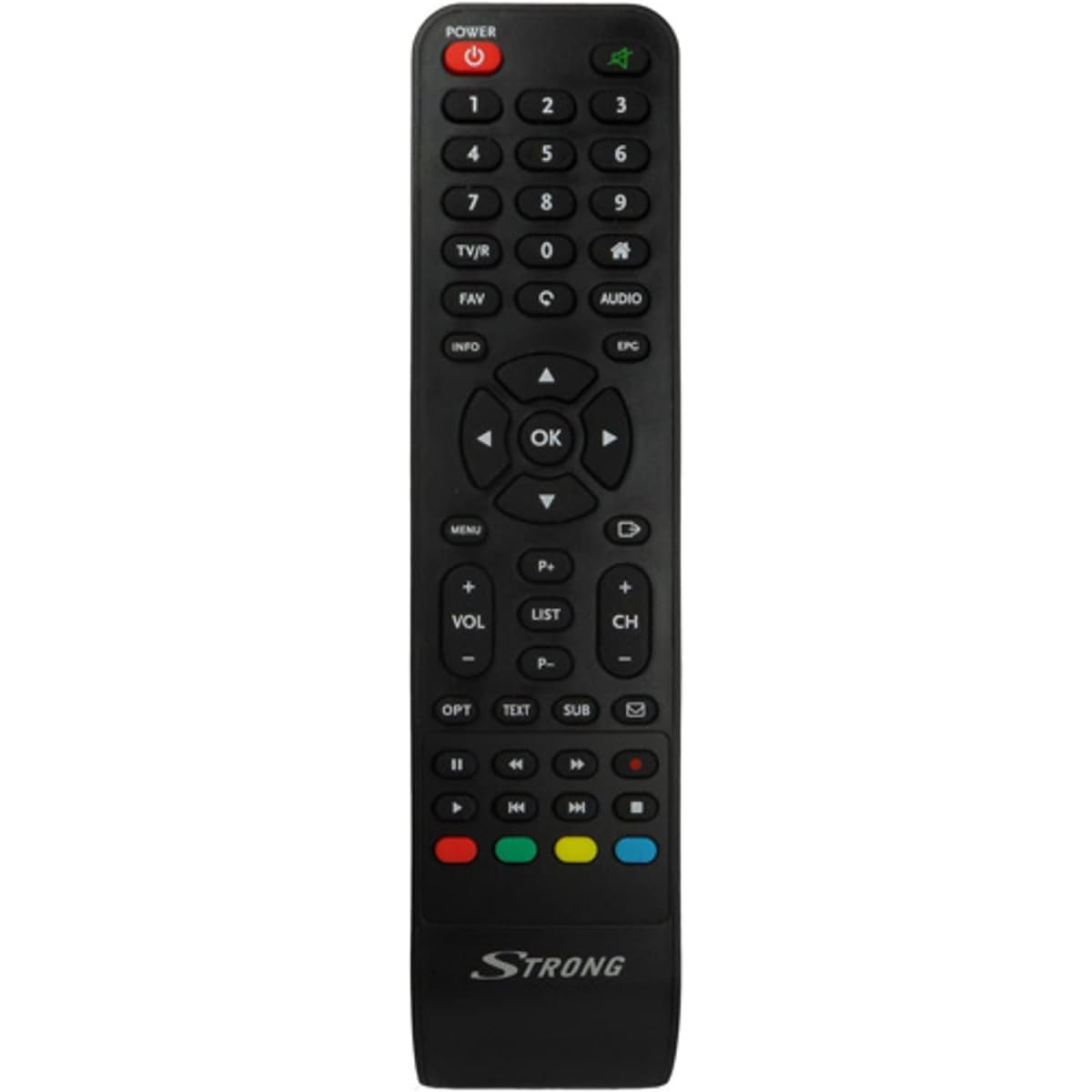
Image: The Strong SRT 7404 HD remote control, black in color, featuring various control buttons for television and receiver functions.
Настройка
1. Устаноўка батарэі
- Знайдзіце батарэйны адсек на задняй частцы пульта дыстанцыйнага кіравання.
- Зрушыце вечка батарэйнага адсека ўніз або ў кірунку, паказаным стрэлкай, каб адкрыць яго.
- Устаўце дзве шчолачныя батарэйкі тыпу AAA (не ўключаны ў камплект), пераканаўшыся, што станоўчая (+) і адмоўная (-) клемы правільна сумяшчаюцца з пазнакамі ўнутры адсека.
- Устаўце вечка батарэйнага блока на месца, зрушыўшы яе назад да шчоўкнення.
Note: Always use new alkaline batteries for optimal performance. Do not mix old and new batteries, or different types of batteries.
2. Першапачатковае выкарыстанне
The Strong SRT 7404 HD remote control is an original replacement and is pre-programmed for the Strong SRT 7404 HD FRANSAT receiver. No additional setup or pairing is typically required. Simply install the batteries and point the remote control towards your receiver to begin operation.
Інструкцыя па эксплуатацыі
This section outlines the basic functions of the remote control buttons.
- Кнопка харчавання: Уключае або выключае прыёмнік.
- Канал уверх/уніз: Navigates through television channels.
- Павялічыць/паменшыць гучнасць: Рэгулюе гучнасць гуку.
- Кнопка адключэння: Аднаўляе або выключае гук.
- Лічбавыя кнопкі (0-9): Directly selects channels or enters numerical data.
- Кнопка меню: Accesses the receiver's main menu.
- Кнопкі навігацыі (Уверх, Уніз, Улева, Управа, ОК): Выкарыстоўваецца для навігацыі па меню і пацверджання выбару.
- Кнопка выхаду/назад: Вяртанне да папярэдняга экрана або выхад з меню.
- Інфармацыйная кнопка: Адлюстроўвае інфармацыю аб праграме.
- Каляровыя кнопкі (чырвоны, зялёны, жоўты, сіні): Functions vary depending on the on-screen menu or application.
Refer to your Strong SRT 7404 HD FRANSAT receiver's manual for specific functions related to its menu system and advanced features.
Тэхнічнае абслугоўванне
Уборка
Каб ачысціць пульт дыстанцыйнага кіравання, акуратна працярыце яго паверхню мяккай сухой тканінай. Для выдалення ўстойлівых забруджванняў злёгкуampen the cloth with water. Avoid using abrasive cleaners, solvents, or alcohol, as these can damage the remote's finish or internal components.
Замена батарэі
Replace batteries when the remote control becomes unresponsive or its range decreases significantly. Follow the battery installation steps outlined in the "Setup" section. Dispose of used batteries according to local regulations.
Захоўванне
Калі пульт не выкарыстоўваецца працяглы час, выміце батарэйкі, каб прадухіліць іх уцечку, якая можа пашкодзіць яго. Захоўвайце пульт у прахалодным, сухім месцы, удалечыні ад прамых сонечных прамянёў і экстрэмальных тэмператур.
Ліквідацыю непаладак
- Пульт дыстанцыйнага кіравання не адказвае:
- Check if the batteries are correctly inserted with the correct polarity (+/-).
- Замяніце старыя батарэйкі новымі шчолачнымі батарэйкамі.
- Пераканайцеся, што паміж пультам дыстанцыйнага кіравання і інфрачырвоным датчыкам прымача няма перашкод.
- Make sure you are within the effective operating range (up to 10 meters).
- Накіруйце пульт непасрэдна на прыёмнік.
- Не працуюць пэўныя кнопкі:
- Clean the remote control surface, especially around the unresponsive buttons, to remove any dirt or debris that might be preventing proper contact.
- If cleaning and battery replacement do not resolve the issue, the button or remote may be faulty.
Тэхнічныя характарыстыкі
| Асаблівасць | Дэталь |
|---|---|
| Марка | МОЦНЫ |
| Назва мадэлі | 7404 |
| Асаблівасць | Лёгкі |
| Колер | Чорны |
| Максімальная колькасць падтрымоўваных прылад | 1 |
| Сумяшчальныя прылады | TV Decoder (Strong SRT 7404 HD FRANSAT Receiver) |
| Тэхналогія падлучэння | радыёчастотныя |
| Колькасць кнопак | 5 |
| Тып кантролера | Пульт дыстанцыйнага кіравання |
| Максімальны дыяпазон | 10 метраў |
| Тып батарэі | Шчолачныя (AAA, не ўключаны ў камплект) |
| Краіна паходжання | Кітай |
Гарантыя і падтрымка
Інфармацыя аб гарантыі
This Strong SRT 7404 HD remote control comes with a 2-year warranty from the date of purchase. This warranty covers manufacturing defects under normal use. Please retain your proof of purchase for warranty claims.
Падтрымка кліентаў
For further assistance, technical support, or warranty inquiries, please contact Strong customer service. Contact details can typically be found on the official Strong webна сайце або праз прадаўца вашага прадукту.
You can visit the official Strong brand store for more information: Strong Brand Store