
1. Важныя інструкцыі па бяспецы
Please read all instructions carefully before using this projector. Keep this manual for future reference.
- Не блакуйце вентыляцыйныя адтуліны. Забяспечце дастатковую цыркуляцыю паветра вакол праектара.
- Не падвяргайце праектар уздзеянню дажджу або вільгаці, каб прадухіліць узгаранне або паражэнне электрычным токам.
- Пазбягайце глядзець прама ў аб'ектыў праектара, калі lamp уключаны, бо яркае святло можа пашкодзіць вочы.
- Выкарыстоўвайце толькі адаптар сілкавання, які пастаўляецца з праектарам.
- Размясціце праектар на ўстойлівай роўнай паверхні, каб прадухіліць яго падзенне.
- Do not attempt to open or service the projector yourself. Refer all servicing to qualified personnel.
2. Прадукт скончыўсяview
2.1 Кампаненты праектара
Азнаёмцеся з рознымі часткамі праектара UNIC UC36.
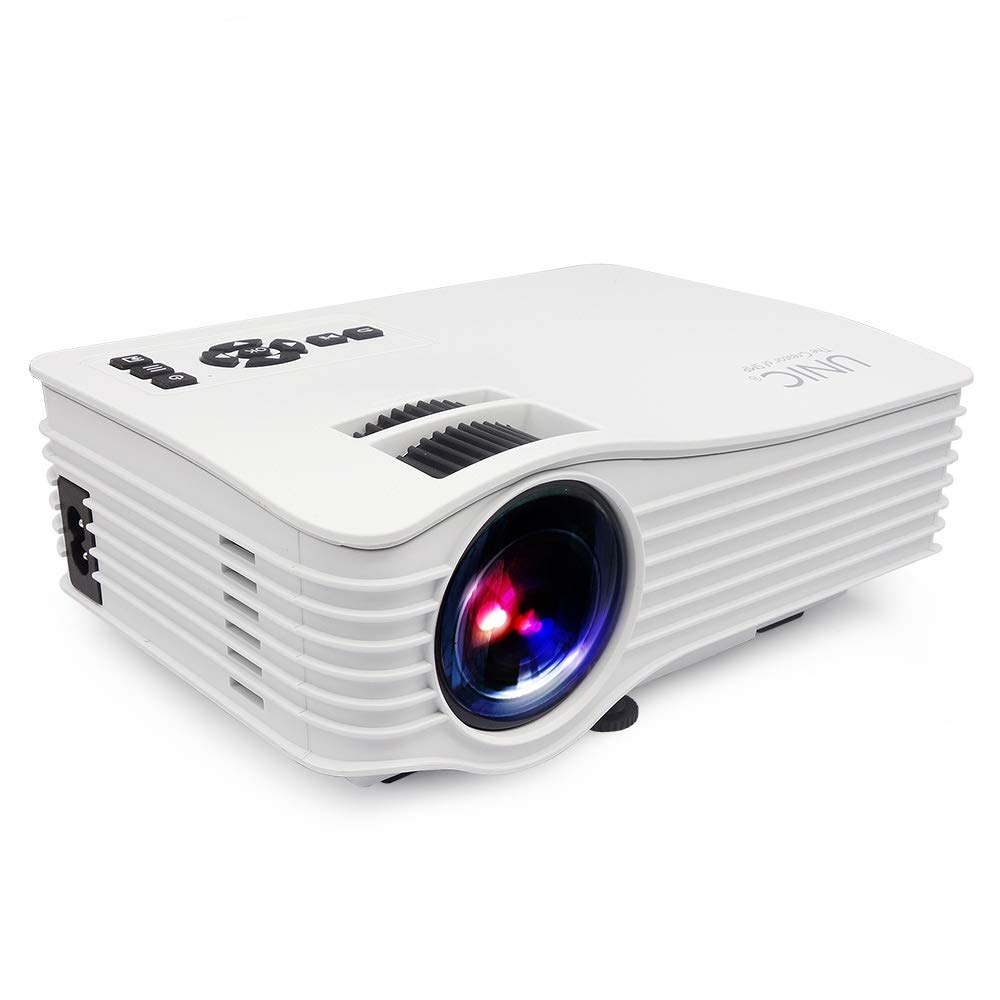
выява: Фронт view of the UNIC UC36 Mini LED Portable Projector, showing the lens and overall compact design.
Элементы кіравання на верхняй панэлі

выява: Топ view of the UNIC UC36 projector, highlighting the control panel. This includes buttons for Menu, Signal Source, Power On/Off, directional navigation (Up/Down/Left/Right/OK), Exit/Return, and Play/Pause. Below the control panel are the Focus and Keystone adjustment wheels.
Парты падключэння

выява: Збоку view of the UNIC UC36 projector, detailing the input/output ports. From left to right, these include a 3.5mm earphone jack, AV input, HDMI port, USB port, 5V USB power output, SD card slot, and IR receiver.
Фокус і карэкціроўка трапецеідальных скажэнняў

выява: Крупны план view of the UNIC UC36 projector, showing the two adjustment wheels for focus and keystone correction, located near the lens.
Схема злучэння

выява: Diagram illustrating various devices that can be connected to the UNIC UC36 projector, including U disk, TV Box, Camera, Computer, HD Player, PS4, Laptop, and DVD player, demonstrating its versatile input options.
3. Настройка
3.1 Падключэнне харчавання
- Падключыце кабель харчавання да ўваходнага порта харчавання праектара.
- Plug the other end of the power cable into a standard electrical outlet (100-240V, 50/60Hz).
3.2 Падключэнне крыніц уваходнага сігналу
The UC36 projector supports multiple input sources:
- HDMI: Connect an HDMI cable from your device (e.g., laptop, gaming console, Blu-ray player) to the projector's HDMI port.
- USB: Insert a USB flash drive into the USB port for direct media playback.
- АВ: Use the provided AV cable to connect to devices with AV output (e.g., older DVD players, set-top boxes).
- SD-карта: Insert an SD card into the SD card slot for direct media playback.
- Аўдыявыхад: Падключыце знешнія дынамікі або навушнікі да раздыма для навушнікаў 3.5 мм для палепшанага гуку.
3.3 Размяшчэнне праектара
Place the projector on a stable, flat surface. Ensure the projection distance is between 1.07m and 3.8m to achieve a screen size of 34 to 130 inches.
3.4 Рэгуляванне фокусу і трапецападобнага скажэння
- Фокус: Rotate the focus wheel (the larger wheel) until the projected image is clear and sharp.
- Каменны камень: If the projected image appears trapezoidal (wider at the top or bottom), rotate the keystone correction wheel (the smaller wheel) to adjust the image geometry until it is rectangular.
4. Інструкцыя па эксплуатацыі
4.1 Уключэнне/выключэнне
- Уключэнне: Press the 'On/Off' button on the top panel or the remote control. The indicator light will turn on.
- Выключэнне: Press the 'On/Off' button again. Allow the projector to cool down before unplugging it.
4.2 Выбар крыніцы
After powering on, press the 'Signal Source' button on the top panel or the remote control to cycle through available input sources (HDMI, USB, AV, SD). Select the desired input source.
4.3 Навігацыя па меню
Press the 'Menu' button to access the projector's settings. Use the directional arrows (Up/Down/Left/Right) to navigate through options and 'OK' to confirm selections. Press 'Exit/Return' to go back or exit the menu.
4.4 Прайграванне медыяфайлаў (USB/SD)
When a USB drive or SD card is inserted and selected as the source, the projector will display a file browser. Navigate to your desired media file (videos, photos, music, text) and press 'OK' to play. Use 'Play/Pause' for media control.
5. Тэхнічнае абслугоўванне
5.1 Ачыстка аб'ектыва
Use a soft, lint-free cloth or lens cleaning paper to gently wipe the projector lens. Do not use abrasive cleaners or excessive force, as this can scratch the lens.
5.2 Ачыстка корпуса праектара
Працярыце знешнія паверхні праектара мяккай сухой тканінай. Для выдалення ўстойлівага бруду злёгкуamp cloth can be used, followed by a dry cloth. Avoid using chemical cleaners.
5.3 лamp жыццё
Святлодыёд lamp in your UC36 projector has an estimated life of 20,000 hours (minimum). This means the lamp is designed to last for a significant period under normal usage conditions and typically does not require replacement.
6. Выпраўленне непаладак
- Няма выявы:
- Пераканайцеся, што праектар уключаны, а кабель харчавання надзейна падключаны.
- Пераканайцеся, што выбрана правільная крыніца ўваходнага сігналу.
- Check the connection cable (HDMI, AV) between the projector and the source device.
- Размытая выява:
- Паварочвайце кола факусоўкі, пакуль выява не стане рэзкай.
- Ensure the projection distance is within the recommended range (1.07m - 3.8m).
- Выява мае трапецападобную форму:
- Adjust the keystone correction wheel to square the image.
- Няма гуку:
- Праверце налады гучнасці як на праектары, так і на прыладзе-крыніцы.
- Ensure external speakers or headphones are properly connected to the 3.5mm earphone jack if used.
- If using HDMI, ensure the source device is sending audio through HDMI.
7. Тэхнічныя характарыстыкі
| мадэль | UC36 |
| Выява сістэмы | ВК |
| Lamp | святлодыёд |
| Яркасць | 150 люмен (150 люменаў ANSI) |
| Каэфіцыент кантраснасці | 500:1 |
| Роднае дазвол | 640x480с |
| Максімальнае дазвол, якое падтрымліваецца | 1920x1080p (Full HD via HDMI) |
| Уваходныя парты | AV, USB, SD, HDMI, IR |
| Выхадныя парты | 3.5mm Earphone, 5V USB Power |
| Lamp жыццё | 20,000 гадзін (мінімум) |
| Projecting Distance | 1.07m - 3.8m (3.5 feet - 3.8 meters) |
| Projecting Size | 34 - 130 цалі |
| Суадносіны бакоў | 4:3 / 16:9 |
| Электразабеспячэнне | 100-240 В, 50/60 Гц |
| Энергаспажыванне | 50 Вт (макс.) |
| Вага нета | 0.85 сома |
| Памеры | 190 х 132 х 69 мм |
8. Гарантыя і падтрымка
8.1 Інфармацыя аб гарантыі
This UNIC UC36 projector comes with a 1-year complete warranty from the date of purchase. Please retain your proof of purchase for warranty claims. The warranty covers manufacturing defects and malfunctions under normal use.
8.2 Падтрымка кліентаў
For technical assistance, troubleshooting, or warranty inquiries, please contact UNIC customer support. Refer to the contact information provided with your purchase documentation or visit the official UNIC webсайт.