
Уводзіны
The Lomography Lomo'Instant Automat Glass Magellan is an advanced instant camera designed for capturing moments with a unique aesthetic. It features a wide-angle glass lens for sharp images and offers various creative controls. This manual provides essential information for setting up, operating, and maintaining your camera.
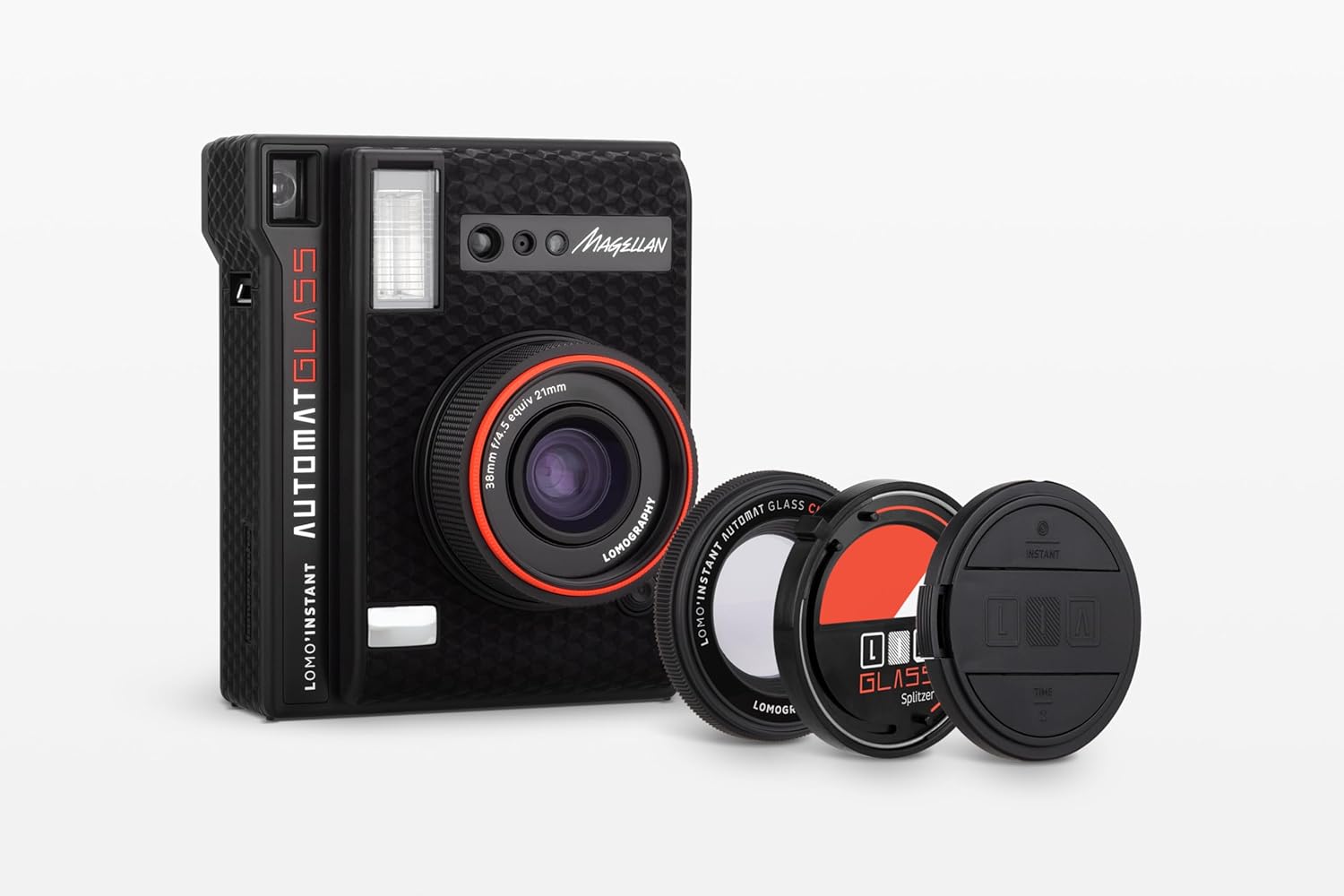
Image: The Lomo'Instant Automat Glass Magellan camera shown with its included accessories, highlighting its compact design and the glass lens.
Асноўныя характарыстыкі
- Шкляная лінза: Ensures sharper instant photos.
- Сумяшчальнасць з фільмамі: Uses Fujifilm Instax Mini film.
- Automatic Settings: Features automatic aperture, shutter speed, and flash output for ease of use.
- Creative Accessories: Includes a close-up lens, Splitzer, and color filters for experimental photography.
- Пульт дыстанцыйнага кіравання: Lens cap doubles as a remote control shutter release for convenient selfies and group shots.
- Close-up Capability: Capture subjects as close as 10 cm with the close-up attachment.
- Display Accessories: Comes with clips and stands to showcase your instant photos.
Настройка
1. Устаноўка батарэі
The camera requires two CR2 batteries. To install or replace them:
- Знайдзіце адсек для батарэі на бакавой панэлі камеры.
- Адкрыйце крышку адсека.
- Insert two CR2 batteries, ensuring correct polarity.
- Надзейна зачыніце вечка аддзялення.
2. Загрузка плёнкі
The Lomo'Instant Automat Glass Magellan uses Fujifilm Instax Mini film. To load a film pack:
- Open the film door on the back of the camera.
- Сумясціце жоўтую адзнаку на ўпакоўцы плёнкі з жоўтай адзнакай унутры адсека для плёнкі камеры.
- Gently push the film pack in until it clicks into place. Do not press on the film surface.
- Close the film door. The camera will automatically eject the dark slide.
3. Attaching the Lens Cap Remote
The lens cap serves as a remote control. It contains a small battery. Ensure the battery is correctly inserted into the lens cap for remote functionality.

Выява: спераду view of the camera, showing the lens and flash unit.
Кіраванне камерай
1. Уключэнне / выключэнне харчавання
To power on the camera, simply pop out the lens by rotating it. To power off, push the lens back into the camera body.
2. Спуск засаўкі
The main shutter button is located on the front of the camera. Press it to take a photo. The lens cap also functions as a remote shutter release.
3. Film Counter and Status Indicators
On the side of the camera, a series of flashing lights indicates the remaining film count. On the back, additional indicators show current settings such as flash mode and exposure compensation.
4. Exposure and Creative Modes
The camera offers various settings to control exposure and achieve creative effects:
- Кіраванне ўспышкай: Toggle the flash on or off as needed.
- Кампенсацыя экспазіцыі: Adjust for brighter or darker backgrounds to achieve desired lighting.
- Multiple Exposure Mode: Allows for layering multiple shots onto a single frame.
- Рэжым лямпачкі: Keeps the shutter open for extended periods, ideal for light painting or low-light photography.
5. Выкарыстанне аксесуараў
- Close-up Lens: Attach this lens to focus on subjects as close as 10 cm.
- Splitzer: Use the Splitzer to divide your frame into multiple sections for unique compositions.
- Каляровыя фільтры: Experiment with different color filters to add creative tints to your photos.

Выява: Спіна view of the camera, illustrating the film ejection port and control panel for settings.
Тэхнічнае абслугоўванне
1. Уборка
To ensure optimal performance and image quality, keep your camera clean:
- Gently wipe the camera body with a soft, dry cloth.
- Use a lens cleaning cloth or brush to carefully clean the lens surface. Avoid touching the lens with your fingers.
- Трымайце шчыліну для выкіду плёнкі чыстай ад пылу і смецця.
2. Захоўванне
When not in use, store the camera in a cool, dry place away from direct sunlight and extreme temperatures. Ensure the lens is retracted and the lens cap is on.
Ліквідацыю непаладак
- Камера не ўключаецца: Праверце, ці правільна ўстаўлены батарэйкі і ці дастаткова яны зараджаныя. Пры неабходнасці замяніце іх.
- Film not ejecting: Ensure a fresh film pack is loaded correctly. If the dark slide did not eject upon loading, try opening and closing the film door again.
- Photos are too dark/bright: Adjust the exposure compensation settings on the camera. Ensure the flash is enabled in low-light conditions.
- Пульт дыстанцыйнага кіравання не працуе: Check the battery in the lens cap remote. Replace if needed.
- Blurred photos: Ensure the lens is clean. Hold the camera steady during exposure. For close-up shots, ensure the close-up lens attachment is used and the subject is within the correct focus range.
Тэхнічныя характарыстыкі
| Асаблівасць | Спецыфікацыя |
|---|---|
| Назва мадэлі | Lomo'Instant Automat Glass Magellan |
| Нумар мадэлі тавару | li870b |
| Марка | Ламаграфія |
| Тып фармату фільма | Instant (Fujifilm Instax Mini) |
| Мінімальная вытрымка | 1 Другое |
| Максімальная вытрымка | 1s seconds |
| Тып засаўкі | Затвор у факальнай плоскасці |
| Вага прадмета | 1.1 фунта (0.5 кілаграма) |
| Памеры ўпакоўкі | 10.39 х 6.54 х 3.46 цалі |
Гарантыя і падтрымка
Інфармацыя аб гарантыі
Lomography products typically come with a manufacturer's warranty covering defects in materials and workmanship. For specific warranty terms and conditions, please refer to the documentation included with your product or visit the official Lomography webсайт.
Падтрымка кліентаў
For further assistance, technical support, or inquiries regarding your Lomo'Instant Automat Glass Magellan camera, please contact Lomography customer service through their official webсайт або кантактную інфармацыю, указаную на ўпакоўцы прадукту.
Наведайце ст Lomography Store каб атрымаць больш прадуктаў і інфармацыі.