
1. Уводзіны
Thank you for choosing the Oasser Dash Cam U1. This manual provides detailed instructions for the proper installation, operation, and maintenance of your dash camera. Please read this manual thoroughly before using the device to ensure optimal performance and longevity. The Oasser Dash Cam U1 is designed to record your driving journey in Full HD 1080p, offering features like a wide viewing angle, G-Sensor for emergency recording, loop recording, and smart parking monitoring.
2. Змесціва ўпакоўкі
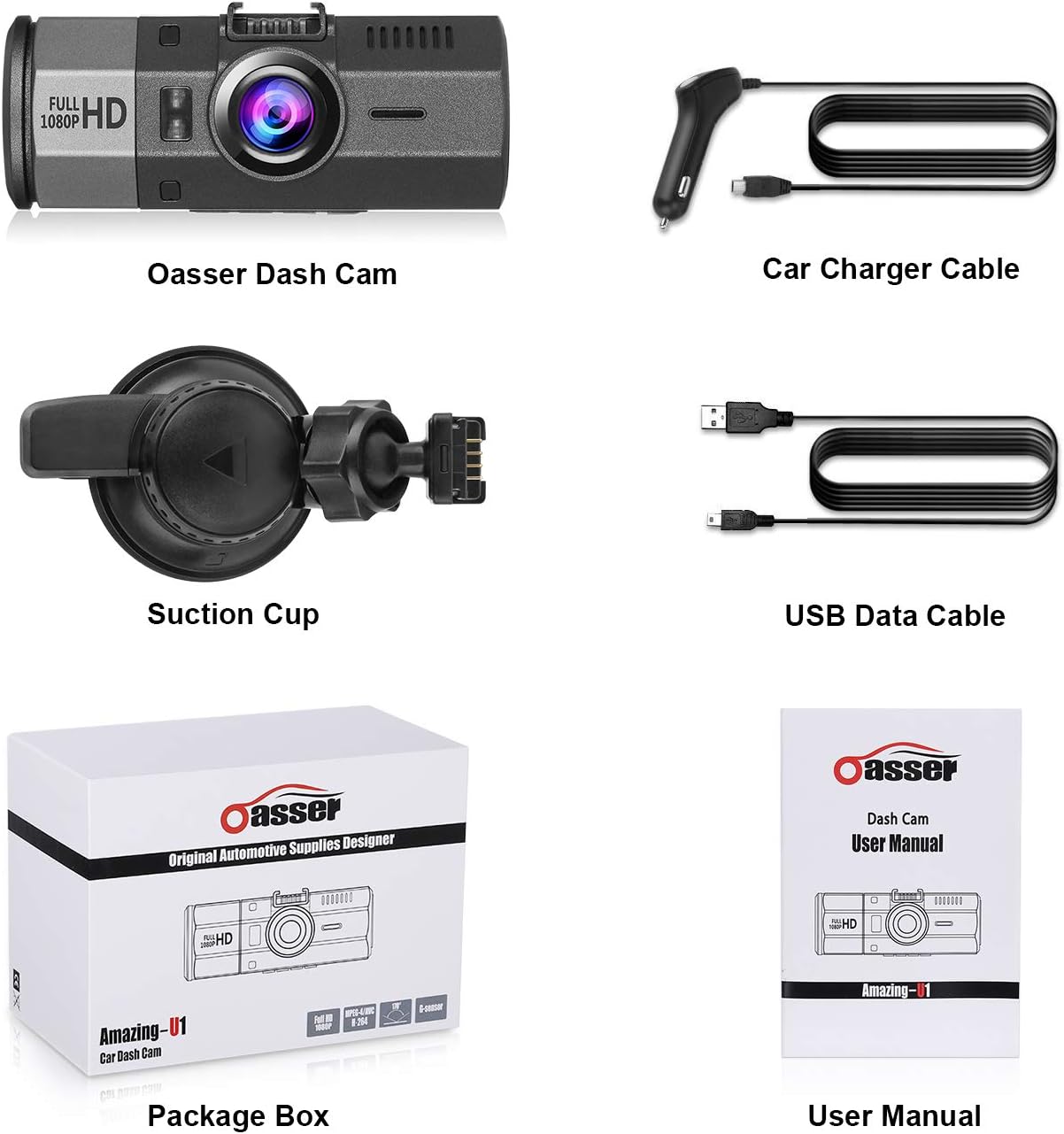
Калі ласка, пераканайцеся, што ўсе пералічаныя ніжэй прадметы ўваходзяць у камплект. Калі якія-небудзь прадметы адсутнічаюць або пашкоджаныя, звярніцеся ў службу падтрымкі кліентаў.
- Oasser Dash Cam U1 Unit
- Аўтамабільны кабель для зараднай прылады
- Мацаванне прысоскі
- USB-кабель для даных
- Кіраўніцтва карыстальніка
- Скрынка пакета

Image 2.1: Contents of the Oasser Dash Cam U1 package, including the dash cam, car charger, suction cup mount, USB cable, and user manual.
3. Прадукт скончыўсяview
The Oasser Dash Cam U1 features a compact design with a 1.5-inch LCD screen for easy navigation and playback. It is equipped with a high-resolution lens and various ports for connectivity.

Выява 3.1: Спераду view of the Oasser Dash Cam U1 with the suction cup mount attached, showcasinаб'ектыў і асноўны корпус.

Малюнак 3.2: Зверху ўніз view of the Oasser Dash Cam U1 showing both the front lens and the rear LCD screen with control buttons.
3.1. Кампаненты прылады
- Пярэдняя лінза: Захоплівае відэа footage.
- ВК-экран: Паказвае ў прамым эфіры view, menu, and playback.
- Кнопкі кіравання: For navigation and function selection.
- Порт USB: For power and data transfer.
- Порт HDMI: Для вываду відэа.
- Слот для карты MicroSD: Для ўстаўкі карты памяці.
- Дынамік/мікрафон: Для запісу і прайгравання аўдыё.
Малюнак 3.3: Крупны план view of the Oasser Dash Cam U1's side, showing the USB port, HDMI port, and the slot for a MicroSD card. Note that the SD card is not included with the product.
4. Настройка
Follow these steps to properly set up your Oasser Dash Cam U1.
4.1. Устаўка карты MicroSD
- Пераканайцеся, што відэарэгістратар выключаны.
- Locate the MicroSD card slot on the side of the device.
- Insert a Class 10 or higher MicroSD card (not included) into the slot until it clicks into place.
- Каб выняць, акуратна націсніце на карту, пакуль яна не выскочыць.
Важна: For optimal performance, it is recommended to format the MicroSD card within the dash cam's settings before first use and periodically thereafter.
4.2. Мантаж Dash Cam
- Старанна ачысціце патрэбную вобласць на лабавым шкле.
- Прымацуйце прысоску да відэарэгістратара.
- Press the suction cup firmly against the windshield and rotate the locking mechanism clockwise to secure it.
- Адрэгулюйце кут відэарэгістратара, каб забяспечыць выразнасць view дарогі наперадзе.

Image 4.1: Diagram illustrating the attachment of the suction cup mount to the windshield and the connection of the car charger cable to the dash cam.
4.3. Падключэнне сілкавання
- Connect the car charger cable to the dash cam's USB port.
- Падключыце другі канец аўтамабільнай зараднай прылады да гнязда прыпальвальніка вашага аўтамабіля.
- Відэарэгістратар аўтаматычна ўключыцца і пачне запіс пры ўключэнні запальвання аўтамабіля.
5. Інструкцыя па эксплуатацыі
Understand the various functions and modes of your Oasser Dash Cam U1.
5.1. Запіс відэа
The dash cam records video in Full HD 1080p resolution at 30 frames per second, capturing a wide 170-degree viewкут нахілу.

Image 5.1: Comparison of video recording quality during day and night conditions, demonstrating the FHD 1080P capability of the Oasser Dash Cam U1.

Image 5.2: Illustration of the 170-degree ultra-wide viewing angle, showing how it captures a broader perspective of the road.
5.2. Цыкл запісу
The dash cam continuously records video in segments (e.g., 1, 3, or 5 minutes). When the MicroSD card is full, the oldest unlocked video segments are automatically overwritten by new recordings. This ensures continuous recording without manual intervention.
5.3. G-сенсор (датчык гравітацыі)
The built-in G-Sensor detects sudden movements or impacts, such as collisions. When an event is detected, the current video segment is automatically locked and saved to prevent it from being overwritten by loop recording. This ensures critical footagе захавана.

Image 5.3: Visual representation of the G-Sensor automatically locking video files during an impact event, indicated by a padlock icon on the screen.
5.4. Smart Parking Monitoring
When enabled, the parking monitor feature uses motion detection to record any moving objects close to your parked car. It can also utilize time-lapse recording, taking photos at set intervals to record changes, which are then compiled into a video clip. This provides surveillance when your vehicle is stationary.

Image 5.4: The Oasser Dash Cam U1 mounted in a vehicle, demonstrating its smart parking monitoring feature in a parking garage setting.
5.5. Начное бачанне
The dash cam is equipped with night vision capabilities to enhance video clarity in low-light conditions. While it improves visibility, it is not military-grade night vision and relies on available ambient light sources.
5.6. Функцыя адключэння гуку
The dash cam includes a mute function, allowing you to disable audio recording when desired. This can be useful for privacy or to reduce file памер.
6. Тэхнічнае абслугоўванне
Proper maintenance ensures the longevity and reliable operation of your dash cam.
- Уборка: Use a soft, dry cloth to clean the lens and screen. Avoid abrasive cleaners or solvents.
- Фарматаванне SD-карты: Regularly format your MicroSD card (at least once a month) through the dash cam's settings. This helps prevent data corruption and ensures smooth recording.
- Абнаўленні прашыўкі: Check the official Oasser website periodically for firmware updates. Updating the firmware can improve performance and address known issues. Follow the instructions provided with the firmware update carefully.
- тэмпература: Avoid exposing the dash cam to extreme temperatures for extended periods, especially direct sunlight in a parked car, as this can affect battery life and internal components.
7. Выпраўленне непаладак
If you encounter issues with your Oasser Dash Cam U1, refer to the following common problems and solutions.
| праблема | Магчымая прычына / рашэнне |
|---|---|
| Відэарэгістратар не ўключаецца. | Check the car charger connection and ensure the vehicle's cigarette lighter socket is functional. The dash cam requires continuous power from the car charger to operate. |
| Запіс спыняецца або завісае. | Ensure you are using a Class 10 or higher MicroSD card. Format the MicroSD card regularly. The card may be full or corrupted. Try a different MicroSD card. |
| Video segments have gaps or transitions issues. | Ensure the latest firmware is installed. Formatting the MicroSD card can also resolve this. |
| G-Sensor is too sensitive or not sensitive enough. | Adjust the G-Sensor sensitivity setting in the dash cam's menu. A lower setting will trigger less frequently, while a higher setting will trigger more easily. |
| Suction cup mount does not stay in place. | Ensure the windshield surface is clean and dry. Apply firm pressure and rotate the locking mechanism fully. If the mount is old, the suction cup material may have degraded and require replacement. |
| Night vision quality is poor. | Night vision enhances low-light recording but does not create light. Performance depends on ambient light. Ensure the windshield is clean and free of obstructions. |
| License plates are difficult to read in recordings. | While the dash cam records in 1080p, factors like speed, distance, lighting conditions, and reflections can affect license plate readability. Ensure the lens is clean. |
| Camera reboots or shuts down unexpectedly. | This can occur if the power supply is unstable or if the internal battery is low. Ensure a stable power connection. If the issue persists, the internal battery may need service. |
8. Тэхнічныя характарыстыкі
Key technical specifications for the Oasser Dash Cam U1.
| Асаблівасць | Спецыфікацыя |
|---|---|
| мадэль | Amazing-U1 |
| Тып дысплея | ВК |
| Visible Screen Area Size | 1.5 цалі / 4 см |
| Дазвол відэазахопу | 1080p (поўны HD) |
| Рэальны View Вугал | 170 градусаў |
| Асаблівасці | G-Sensor, Loop Recording, Mute Function, Night Vision, Parking Monitoring |
| Тэхналогія падлучэння | HDMI, USB |
| Склад батарэі | Літый-іённы |
| Памеры прадукту | 9.5 х 3.91 х 3.91 см |
| Вага прадукту | 520 г |
9. Гарантыя і падтрымка
Oasser products are designed for reliability and performance. For warranty information, technical support, or any inquiries regarding your Oasser Dash Cam U1, please refer to the contact details provided in your product packaging or visit the official Oasser webсайт. Калі ласка, захавайце пацвярджэнне пакупкі для прэтэнзій па гарантыі.