
1. Прадукт скончыўсяview
The Miditech Audiolink III is a versatile USB audio interface designed for recording and monitoring audio. It features two microphone preamps with phantom power, instrument/line inputs, and a class-compliant USB connection for easy setup across various operating systems. This device is USB bus powered, eliminating the need for an external power supply.
Асноўныя функцыі ўключаюць у сябе:
- 16-bit / 48 kHz USB Stereo Interface
- 2 x XLR/TRS Combo Inputs
- 2 x HI-Z (Guitar/Bass) Inputs
- Папярэдне мікрафонamps with 48V Phantom Power
- Adjustable Headphone Output
- Signal and Peak LEDs
- USB bus powered, Class Compliant (driverless operation)
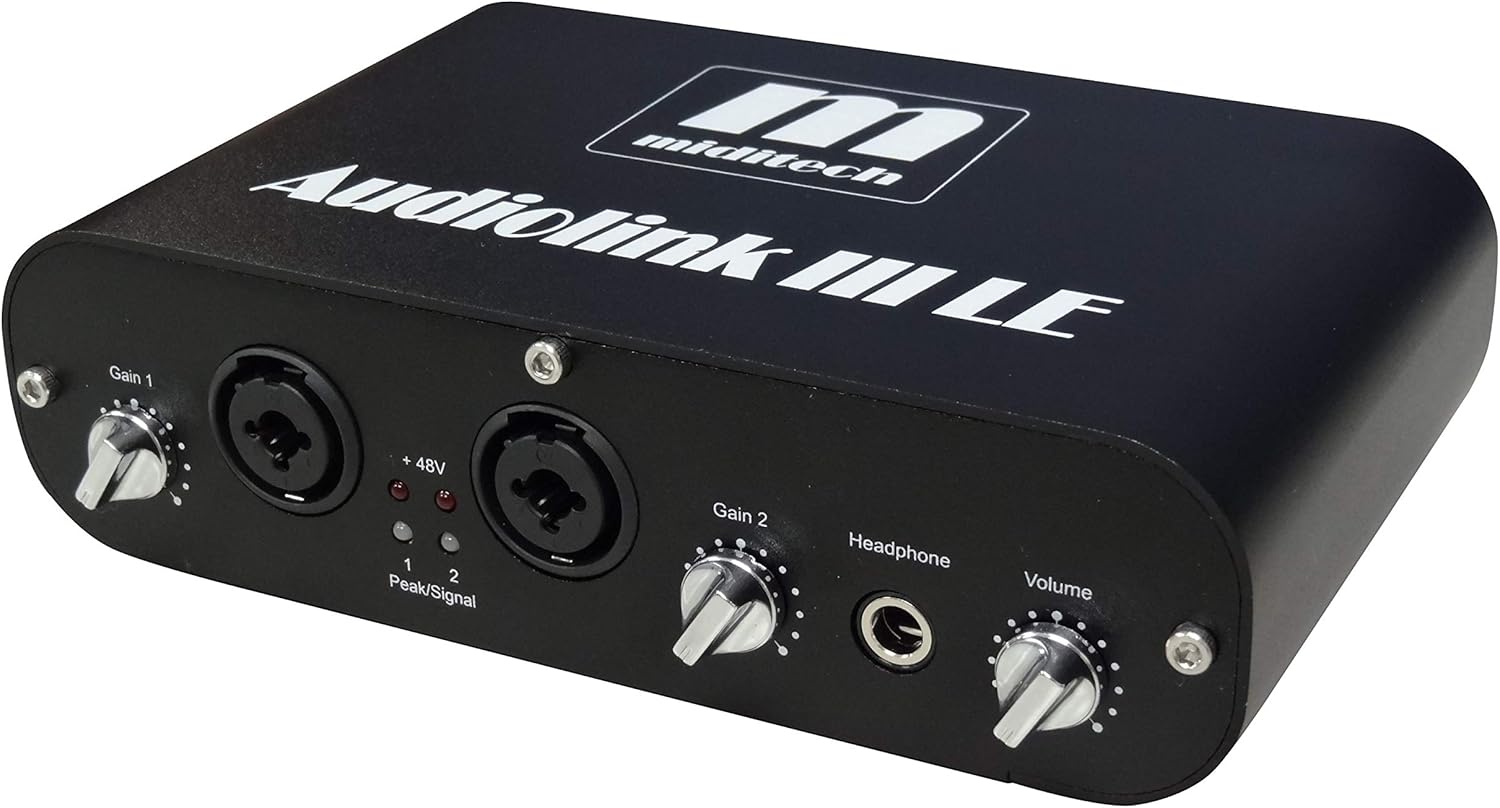
Малюнак 1: Спераду view of the Miditech Audiolink III, showing Gain controls, XLR/TRS combo inputs, +48V indicator, Peak/Signal LEDs, Headphone output, and Volume knob.
2. Настройка і ўстаноўка
The Audiolink III is a 'Class Compliant' USB audio interface, meaning it does not require specific driver installation for most modern operating systems. It works driverless with Mac OS/X, Windows XP SP2, Windows Vista, Windows 7, 8, and Windows 10.
2.1 Падключэнне да кампутара
- Locate the USB port on the rear panel of the Audiolink III.
- Connect one end of the provided USB cable to the Audiolink III and the other end to an available USB port on your computer.
- The device will be powered via the USB connection. No external power adapter is required.
- Your operating system should automatically detect and configure the Audiolink III as an audio device.
2.2 Падключэнне гукавых прылад
The Audiolink III offers various input and output options:
- Мікрафоны: Connect microphones to the XLR inputs on the front panel. If your microphone requires phantom power (e.g., condenser microphones), activate the +48V switch for the respective channel.
- Instruments (HI-Z): Connect guitars or basses directly to the 1/4-inch TRS inputs on the front panel. These inputs are designed for high-impedance instruments.
- Прылады лінейнага ўзроўню: Connect line-level sources (e.g., synthesizers, drum machines) to the 1/4-inch TRS inputs on the front panel. Ensure the LINE switch is engaged if available for optimal signal level.
- Выхады з лініі: Use the 'Line Out L' and 'Line Out R' 1/4-inch jacks on the rear panel to connect to studio monitors or an ampзадымнік.
- Навушнікі: Connect headphones to the 1/4-inch headphone jack on the front panel.

Малюнак 2: Задняя частка view of the Miditech Audiolink III, showing the USB port, +48V On/Off switches for channels 1 and 2, Monitor On/Off switch, Stereo/Mono switch, and Line Out jacks.
3. Інструкцыя па эксплуатацыі
3.1 Рэгуляванне ўваходнага ўзмацнення
Each input channel (Gain 1 and Gain 2) has a dedicated rotary knob on the front panel to adjust the input level. Turn the knob clockwise to increase gain and counter-clockwise to decrease it. Adjust the gain so that the 'Signal' LED illuminates consistently during input, and the 'Peak' LED only flashes occasionally during the loudest parts of your audio, avoiding constant illumination which indicates clipping.
3.2 Phantom Power (+48V)
For condenser microphones that require external power, activate the '+48V On/Off' switch located on the rear panel for the corresponding input channel. Ensure the microphone is connected before activating phantom power to prevent damage.
3.3 Маніторынг
The Audiolink III features a direct monitoring function. The 'Monitor On/Off' switch on the rear panel allows you to listen to your input signal directly through the headphone output and line outputs with minimal latency. The 'Stereo/Mono' switch allows you to monitor inputs in stereo (separate left/right channels) or summed to mono.
3.4 Выхад для навушнікаў
The 'Headphone' jack on the front panel provides a dedicated output for monitoring. The 'Volume' knob next to it controls the overall output level for the headphones.
4. Тэхнічнае абслугоўванне
To ensure the longevity and optimal performance of your Miditech Audiolink III, follow these maintenance guidelines:
- Уборка: Use a soft, dry cloth to clean the exterior of the device. Avoid using abrasive cleaners, solvents, or waxes, as these can damage the finish and internal components.
- захоўванне: Калі інтэрфейс не выкарыстоўваецца, захоўвайце яго ў прахалодным, сухім месцы, удалечыні ад прамых сонечных прамянёў, экстрэмальных тэмператур і высокай вільготнасці.
- Апрацоўка: Асцярожна звяртайцеся з прыладай. Пазбягайце падзення або моцных удараў.
- Вентыляцыя: Забяспечце належную вентыляцыю вакол прылады, каб прадухіліць перагрэў. Не блакуйце вентыляцыйныя адтуліны.
- Кабельнае кіраванне: Keep cables organized and avoid excessive bending or crimping, which can lead to damage.
5. Выпраўленне непаладак
If you encounter issues with your Audiolink III, refer to the following common problems and solutions:
| праблема | Магчымая прычына / рашэнне |
|---|---|
| No power / Device not recognized by computer |
|
| Няма гуку з уваходаў |
|
| No sound from headphones/line outputs |
|
| Distorted or noisy audio |
|
| Latency (delay) during monitoring |
|
6. Тэхнічныя характарыстыкі
The following are the technical specifications for the Miditech Audiolink III Audio Interface:
- Нумар мадэлі: AL3
- Раздзяленне гуку: 16 біт / 48 кГц
- Уваходы: 2 x XLR/TRS Combo (Mic/Line), 2 x HI-Z (Guitar/Bass)
- прэamps: 2 x Microphone Preamps with 48V Phantom Power
- Выхады: 2 x 1/4-inch TRS Line Outputs (L/R), 1 x 1/4-inch Headphone Output
- Падключэнне: USB (Class Compliant)
- Магутнасць: Харчаванне ад шыны USB
- Сумяшчальныя аперацыйныя сістэмы: Mac OS/X, Windows XP SP2, Windows Vista, Windows 7, 8, 10
- Памеры прадукту: 5.06 х 1.75 х 7.09 цалі (12.85 х 4.45 х 18 см)
- Вага прадмета: 1.14 фунта (0.52 кг)
7. Гарантыя і падтрымка
For detailed warranty information, please refer to the documentation included with your purchase or visit the official Miditech website. Miditech provides support resources and potential driver updates (if applicable) through their official channels.
Рэкамендуецца зарэгістраваць свой прадукт на сайце вытворцы webсайт для атрымання абнаўленняў і падтрымкі.