
1. Уводзіны
Thank you for choosing the Oreck Air Response Air Purifier. This manual provides essential information for the safe and efficient operation, maintenance, and troubleshooting of your device. Please read it thoroughly before use and retain it for future reference.
The Oreck Air Response Air Purifier is designed to improve indoor air quality by capturing airborne particles and neutralizing odors using a 2-stage filtration system. Its DustSense technology automatically monitors and responds to air quality changes, providing continuous clean air.
2. Важная інфармацыя па бяспецы
- Перад пачаткам працы прыбора прачытайце ўсе інструкцыі.
- Заўсёды адключайце ачышчальнік паветра ад сеткі перад чысткай, тэхнічным абслугоўваннем або калі ён не выкарыстоўваецца.
- Do not operate any appliance with a damaged cord or plug. If the cord or plug is damaged, contact customer service.
- Не выкарыстоўвайце на вуліцы або на вільготных паверхнях.
- Трымайце шнур сілкавання далей ад нагрэтых паверхняў.
- Не блакуйце паветраныя адтуліны і не кладзіце прыладу на мяккую паверхню, дзе яна можа быць заблакаваная.
- Do not insert any objects into openings.
- Гэты прыбор прызначаны толькі для хатняга выкарыстання.
- Do not use where flammable liquids or vapors are present.
- Заўсёды размяшчайце ачышчальнік паветра на цвёрдай роўнай паверхні.
3. Змесціва ўпакоўкі
- Oreck Air Response Air Purifier (Model WK16000)
- HEPA Media Filter (pre-installed)
- Фільтр з актываваным вуглём (папярэдне ўсталяваны)
- Кіраўніцтва карыстальніка
4. Настройка
- Распакуйце блок: Асцярожна дастаньце ачышчальнік паветра з упакоўкі. Пераканайцеся, што ўсе ўпаковачныя матэрыялы выдалены.
- Ўстаноўка фільтра: The HEPA Media and Activated Carbon filters are typically pre-installed. Before first use, open the filter compartment (usually located on the back or side panel) and ensure the filters are unwrapped from any protective plastic bags. Reinsert them correctly if removed.
- Размяшчэнне: Place the air purifier on a firm, level surface. Ensure there is adequate space (at least 6 inches) around the air intake and outlet vents for optimal airflow. This model is designed for small rooms such as bedrooms, dens, or nurseries.
- Падключэнне сілкавання: Падключыце шнур сілкавання да звычайнай электрычнай разеткі.

Малюнак 1: Спераду view of the Oreck Air Response Air Purifier.

Малюнак 2: Разарваны view illustrating the HEPA Media and Activated Carbon filters.
5. Інструкцыя па эксплуатацыі
Панэль кіравання размешчана ў верхняй частцы прылады.

Figure 3: Control panel with Auto, Light, Power, Speed, and Timer buttons.
- Кнопка харчавання (U): Націсніце, каб уключыць або выключыць прыладу.
- Кнопка хуткасці: Націсніце, каб пераключацца паміж хуткасцямі вентылятара: нізкая, сярэдняя, высокая.
- Аўтаматычны рэжым: Press the 'Auto' button to activate DustSense technology. In this mode, the air purifier automatically adjusts fan speed based on detected air quality.
- Светлавая кнопка: Press to turn the indicator lights ON or OFF.
- Кнопка таймера: Press to set the operating time (e.g., 2, 4, 8 hours). The unit will automatically shut off after the selected duration.
DustSense Technology and Air Quality Indicator Bar
The Air Response Air Purifier features DustSense technology, which continuously monitors the air for particles. The Air Quality Indicator Bar provides visual feedback on the current air quality:
- Сіні: Low particle count (Good air quality)
- фіялетавы: Medium particle count (Moderate air quality)
- Чырвоны: High particle count (Poor air quality)
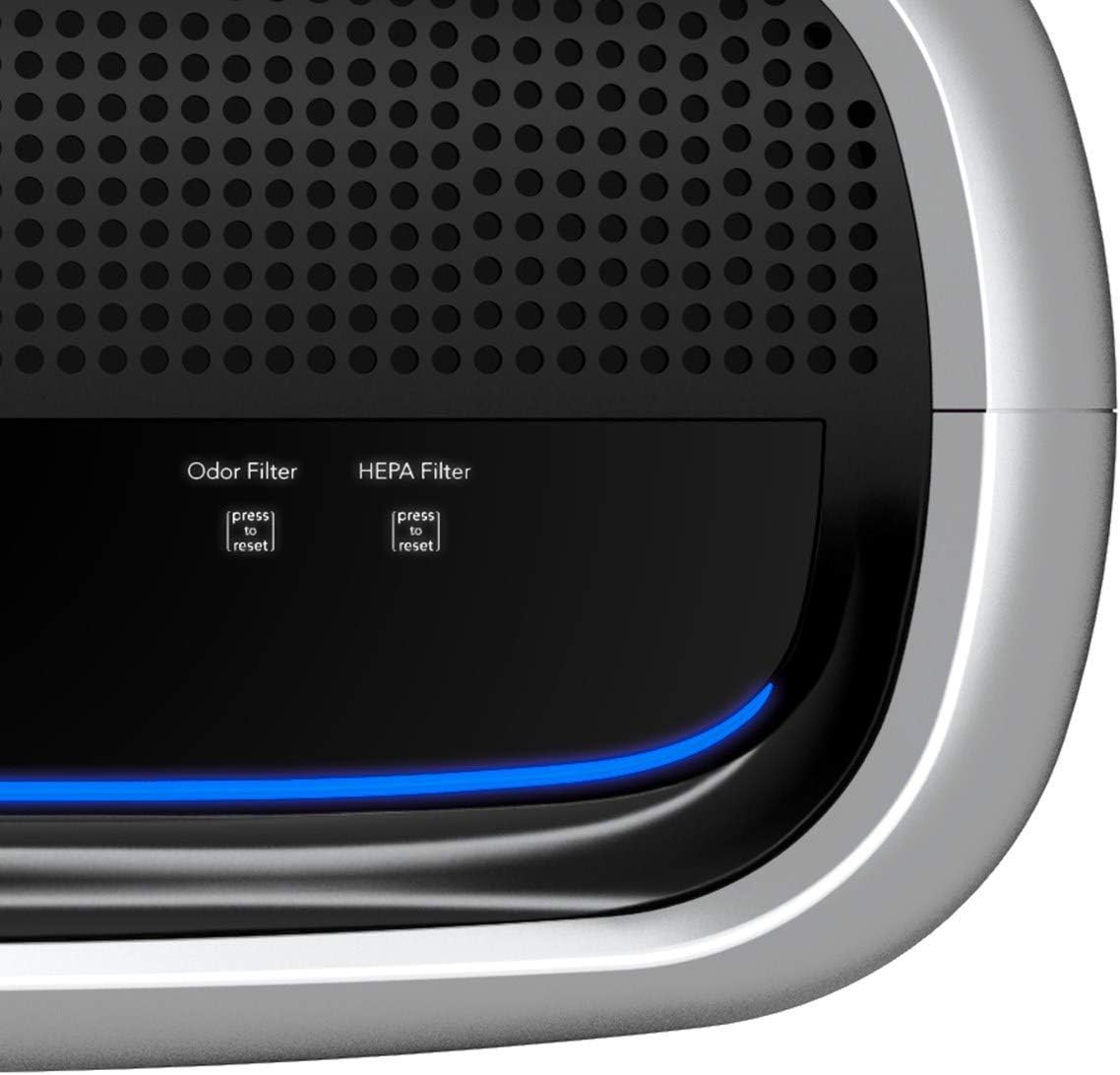
Figure 4: Air Quality Indicator Bar displaying various particle count levels.

Figure 5: Illustration of DustSense technology monitoring and responding to air particles.
6. Тэхнічнае абслугоўванне
Рэгулярнае абслугоўванне забяспечвае аптымальную прадукцыйнасць і падаўжае тэрмін службы вашага ачышчальніка паветра.
Замена фільтра
The Oreck Air Response Air Purifier uses a HEPA Media filter and an Activated Carbon filter. The unit features a replacement filter indicator to alert you when a filter change is needed.
- Адключыце прыладу: Always unplug the air purifier before attempting any maintenance.
- Фільтры доступу: Адкрыйце вечка адсека фільтра.
- Выдаліце старыя фільтры: Carefully remove the used HEPA Media and Activated Carbon filters. Dispose of them according to local regulations.
- Усталюйце новыя фільтры: Insert new genuine Oreck replacement filters, ensuring they are correctly oriented.
- Закрыць вокладку: Шчыльна зачыніце вечка адсека фільтра.
- Скінуць індыкатар фільтра: After replacing filters, press and hold the corresponding 'press to reset' button for the Odor Filter and HEPA Filter until the indicator light turns off.

Figure 6: Steps for replacing the air filters.
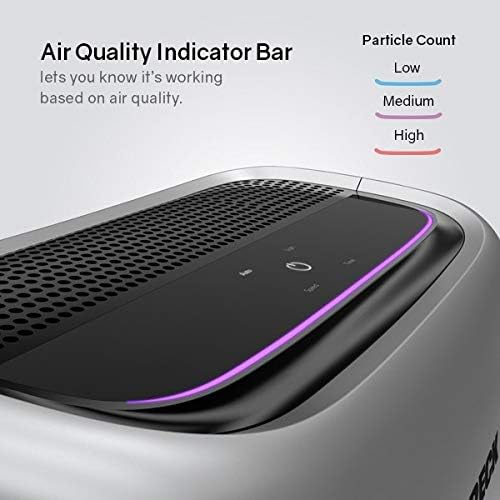
Figure 7: Filter reset buttons for Odor Filter and HEPA Filter.
Ачыстка экстэр'ера
Працярыце вонкавую частку ачышчальніка паветра мяккай, damp тканіна. Не выкарыстоўвайце абразіўныя ачышчальнікі або растваральнікі.
7. Выпраўленне непаладак
| праблема | Магчымая прычына | Рашэнне |
|---|---|---|
| Прылада не ўключаецца | Няма харчавання; шнур харчавання ненадзейна падключаны | Праверце разетку; пераканайцеся, што шнур харчавання цалкам устаўлены ў разетку. |
| Слабы струмень паветра | Filters are dirty or clogged; Air intake/outlet blocked | Replace filters; Ensure vents are clear of obstructions. |
| Незвычайны шум | Foreign object inside; Unit not on a level surface | Unplug and check for obstructions; Place on a stable, flat surface. |
| Air Quality Indicator always red/purple | High particle levels in the room; Sensor is dirty | Allow unit to run longer; Clean the sensor area (refer to full manual for sensor cleaning instructions). |
| Індыкатар фільтра працягвае гарэць пасля замены | Filter reset button not pressed | Press and hold the corresponding filter reset button until the light turns off. |
8. Тэхнічныя характарыстыкі
- мадэль: WK16000
- колер: Серабро
- Памеры прадукту: 10.5" Г x 16.5" Ш x 18.75" У
- Вага прадмета: 9.4 фунта
- Тып фільтрацыі: HEPA Media and Activated Carbon
- Тып кантролера: Кіраванне кнопкамі
- асаблівасць: DustSense Technology, Air Quality Indicator Bar, Timer
- UPC: 743808958134

Малюнак 8: Памеры вырабу.
9. Гарантыя і падтрымка
This Oreck Air Response Air Purifier comes with a Гарантыя 2 год. For warranty claims, technical support, or to purchase replacement parts and filters, please contact Oreck Customer Service.
Oreck Customer Service: Please refer to the contact information provided on the official Oreck webсайт або вашу рэгістрацыйную картку прадукту.
For additional information and support, visit the official Oreck webсайт: www.oreck.com