
Уводзіны
Дзякуй за пакупкуasing the Ezonetronics 1DIN Car Stereo, Model RM-CW9601. This unit features a 7-inch retractable touchscreen, Bluetooth connectivity, FM radio, and multimedia playback capabilities. This manual provides essential information for installation, operation, and maintenance to ensure optimal performance and user satisfaction. Please read this manual thoroughly before using the product.
Інфармацыя па бяспецы
- Не карыстайцеся прыладай такім чынам, каб гэта адцягвала вас ад кіравання. Заўсёды надавайце прыярытэт бяспецы дарожнага руху.
- Каб пазбегнуць пашкоджання прылады або аўтамабіля, пераканайцеся, што ўстаноўка выконваецца кваліфікаваным спецыялістам.
- Avoid exposing the unit to extreme temperatures, direct sunlight for prolonged periods, or moisture.
- Не спрабуйце разбіраць або мадыфікаваць прыладу. Гэта можа ануляваць гарантыю і стварыць пагрозу бяспецы.
- Падтрымлівайце гучнасць на ўзроўні, які дазваляе чуць знешнія гукі дарожнага руху.
Змест пакета
Праверце наяўнасць усіх прадметаў у камплекце:
- Ezonetronics 1DIN Car Stereo Unit (RM-CW9601)
- Жгут правадоў харчавання і дынамікаў
- Пульт дыстанцыйнага кіравання
- Кіраўніцтва карыстальніка (гэты дакумент)
- Mounting Accessories (brackets, screws)
- Optional: Rearview Camera (if included in your specific package)
Прадукт скончаныview
The Ezonetronics RM-CW9601 features a single DIN chassis with a motorized retractable 7-inch touchscreen display. The front panel includes essential controls and ports for easy access.

Малюнак 1: Фронт view of the Ezonetronics RM-CW9601 car stereo, illustrating the 7-inch screen in both retracted and extended positions, along with front panel controls and ports.
Элементы кіравання і парты на пярэдняй панэлі:
- Кнопка харчавання / рэжыму: Press to turn on/off, short press to change mode.
- Рэгулятар гучнасці: Павярніце, каб адрэгуляваць гучнасць. Націсніце, каб уключыць/выключыць гук.
- Порт USB: Для прайгравання медыяфайлаў з USB-назапашвальнікаў.
- Слот для SD-карты: For media playback from SD cards.
- Уваход AUX: 3.5-мм раз'ём для падлучэння знешніх аўдыёпрылад.
- Кнопка скіду: Small button to reset the unit (requires a pointed object).
- Screen Retract/Extend Button: Controls the motorized screen movement.
Настройка
1. Ўстаноўка
The RM-CW9601 is designed for a standard 1DIN car stereo opening. Professional installation is highly recommended. Ensure the vehicle's battery is disconnected before starting installation.
- Зніміце існуючую аўтамабільную стэрэасістэму з прыборнай панэлі.
- Connect the wiring harness to the vehicle's wiring.
- Замацуйце прыладу на прыборнай панэлі з дапамогай прадастаўленых мантажных кранштэйнаў і шруб.
- Зноў падключыце акумулятар аўтамабіля і праверце прыладу.
2. Схема падключэння (агульныя палажэнні)
Refer to the detailed wiring diagram included with your product packaging for specific connections. Below are common connections:
- Жоўты провад: Пастаяннае напружанне 12 В (батарэя)
- Чырвоны провад: Пераключаны 12 В (аксэсуары/запальванне)
- Чорны провад: зямля
- Аранжавы провад: Illumination (Optional)
- Сіні провад: Магутная антэна / AmpДыстанцыйнае ўключэнне lifier
- Правады акустычных сістэм: Connect to vehicle speakers (e.g., White/White-Black for Front Left, Grey/Grey-Black for Front Right, Green/Green-Black for Rear Left, Purple/Purple-Black for Rear Right).
- Уваход для камеры задняга віду: Connect to the rearview camera video output and reverse trigger wire.
- Уваход кіравання рулём: Connect to vehicle's steering wheel control wires (if applicable).

Малюнак 2: Illustration of USB connection points, relevant for media input and smartphone integration.
Інструкцыя па эксплуатацыі
1. Асноўная аперацыя
- Уключэнне/выключэнне харчавання: Націсніце кнопку харчавання на пярэдняй панэлі або пульце дыстанцыйнага кіравання.
- Рэгуляванне гучнасці: Rotate the volume knob or use the remote control.
- Выбар рэжыму: Short press the power/mode button to cycle through available modes (Radio, USB, SD, Bluetooth, AUX, CarPlay/Android Auto).
- Кіраванне экранам: Use the dedicated button to retract or extend the 7-inch display.
2. Функцыя Bluetooth
Прылада падтрымлівае Bluetooth для званкоў у рэжыме hands-free і бесправадной перадачы аўдыё.
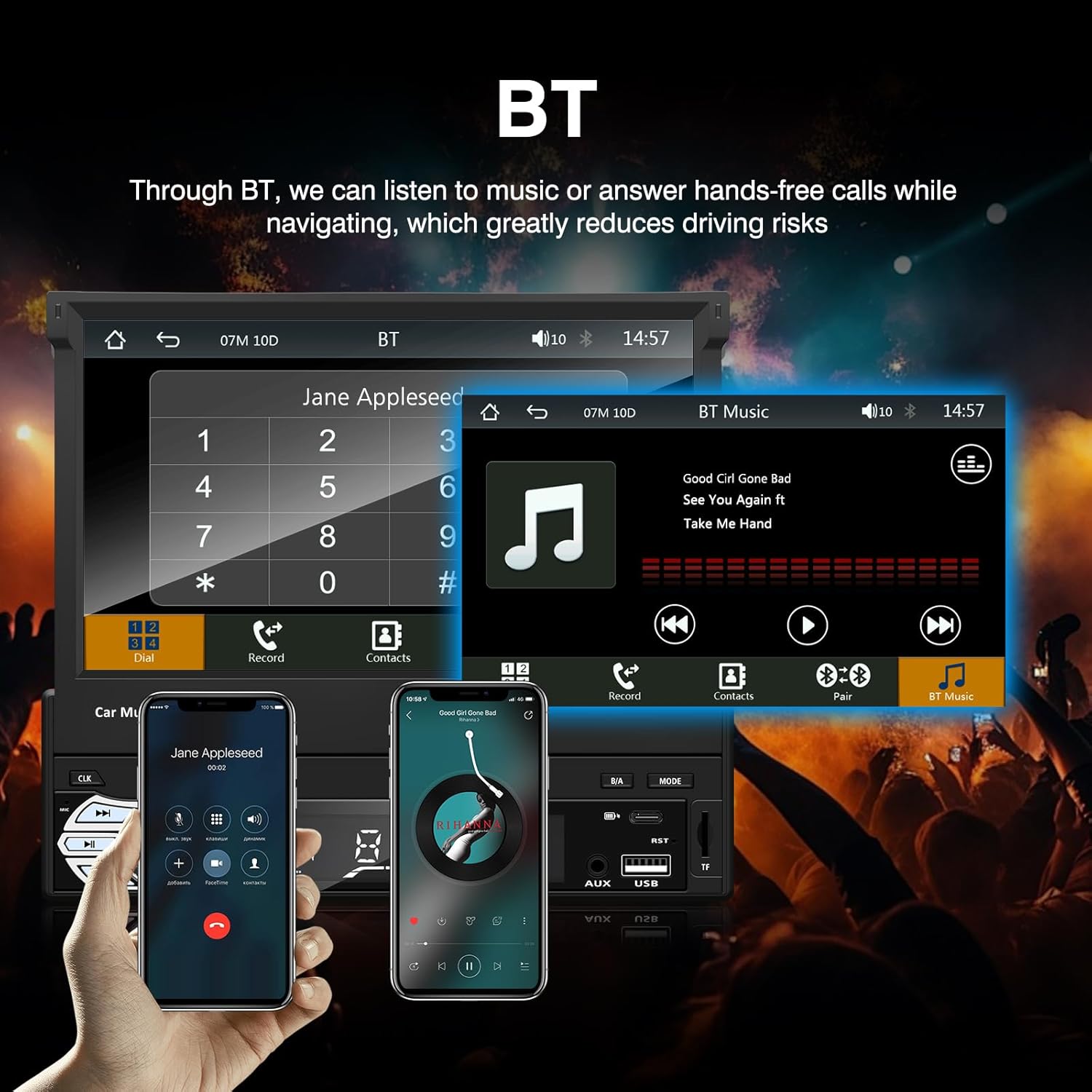
Малюнак 3: Bluetooth interface for hands-free calls and music streaming, showing a dial pad and music controls.
- Спалучэнне: Уключыце Bluetooth на мабільнай прыладзе. Пошук available devices and select "Ezonetronics" or similar. Enter PIN "0000" if prompted.
- Гучная сувязь: Once paired, you can make and receive calls directly through the car stereo. Use the touchscreen or remote to dial, answer, or end calls.
- Струменевая перадача аўдыё (A2DP): Play music from your paired device wirelessly. Control playback (play/pause, skip) from the car stereo or your device.
3. USB/SD Media Playback
Insert a USB drive or SD card into the respective slot. The unit will automatically switch to USB/SD mode and begin playing compatible media files.

Малюнак 4: Icons indicating support for Bluetooth, Auxiliary input, TF (SD) Card, and USB connections for media playback.
- Supported formats include RM, RMVB, ASF, MKV, DIVX, MPEG4, AVI, VOB for video, and MP3/MP4 for audio.
- Навігацыя па папках і files using the touchscreen interface.
4. FM-радыё
Access the FM radio mode to listen to local broadcasts.

Малюнак 5: FM Radio interface with frequency display and equalizer settings for audio customization.
- Аўтаматычнае сканаванне: Automatically search and save strong stations.
- Ручная настройка: Fine-tune frequencies using the touchscreen.
- Прэсеты: Save your favorite stations for quick access (up to 18 preset stations).
5. Apple CarPlay / Android Auto
Connect your compatible smartphone via USB to access Apple CarPlay or Android Auto features directly on the stereo's display.

Малюнак 6: Wired Apple CarPlay interface, displaying phone applications like navigation, music, and messages on the car stereo screen.

Малюнак 7: Wired Android Auto interface, displaying Android applications like Google Maps, Spotify, and phone calls on the car stereo screen.
- Ensure your phone has CarPlay or Android Auto enabled.
- Use a high-quality USB cable for a stable connection.
- Access navigation, music, messages, and other compatible apps safely while driving.
6. Зеркальная спасылка
Mirror Link allows you to display your smartphone's screen content directly onto the car stereo's display via a USB data cable.

Малюнак 8: Mirror Link function demonstrating a smartphone screen being projected onto the car stereo display.
- Connect your smartphone to the USB port using a data cable.
- Выконвайце падказкі на экране стэрэасістэмы і тэлефона, каб усталяваць злучэнне.
- Note: Functionality may vary depending on your smartphone model and operating system.
7. Задняяview Увод з камеры
When a rearview camera is connected and the vehicle is shifted into reverse, the stereo automatically displays the camera feed.

Малюнак 9: Reversing display showing the view from a rearview camera with parking assistance lines, providing an intuitive aid for parking.
- Забяспечыць тылview camera is properly installed and connected to the dedicated input.
- The display will automatically switch to the camera view when the reverse gear is engaged.
8. Кіраванне на рулі
The unit supports connection to your vehicle's existing steering wheel controls for convenient operation. Refer to your vehicle's manual and the stereo's wiring diagram for proper connection and configuration.
Тэхнічнае абслугоўванне
- Ачыстка экрана: Выкарыстоўвайце мяккую тканіну без ворса, каб акуратна працерці сэнсарны экран. Не выкарыстоўвайце абразіўныя ачышчальнікі або растваральнікі.
- Генеральная ўборка: Wipe the unit's exterior with a dry, soft cloth.
- Пазбягайце вадкасці: Не распыляйце вадкасці непасрэдна на прыладу.
- тэмпература: Avoid prolonged exposure to extreme heat or cold, which can affect the unit's lifespan.
Ліквідацыю непаладак
| праблема | Магчымая прычына | Рашэнне |
|---|---|---|
| Прылада не ўключаецца. | Няправільная праводка; перагарэлы засцерагальнік; праблема з акумулятарам аўтамабіля. | Check power connections (Yellow, Red, Black wires). Inspect vehicle fuses. Ensure battery is charged. |
| Няма гуку. | Занадта нізкі гук; уключаны гук без гуку; няправільная праводка дынамікаў. | Павялічце гучнасць. Праверце, ці ўключаны рэжым адключэння гуку. Праверце падключэнне дынамікаў. |
| Bluetooth не падключаецца. | Bluetooth not enabled on phone; Incorrect pairing process. | Ensure phone's Bluetooth is on and discoverable. Re-attempt pairing. |
| USB/SD media not playing. | Не падтрымліваецца file format; Corrupted media; Drive/card not inserted correctly. | Праверыць file formats. Try a different USB drive/SD card. Ensure proper insertion. |
| Тылview камера не адлюстроўвае. | Камера не падключана; провад запуску задняга ходу не падключаны. | Verify camera video input and reverse trigger wire connection. |
Калі праблемы не знікнуць, звярніцеся да кваліфікаванага тэхніка або ў службу падтрымкі кліентаў.
Тэхнічныя характарыстыкі
- Марка: EZoneTronics
- Нумар мадэлі: RM-CW9601
- колер: Чорны
- экран: 7-inch Capacitive Touchscreen, Retractable
- Тэхналогія падключэння: Bluetooth, USB, SD, AUX, RCA
- Bluetooth: Integrated Bluetooth 2.0 with A2DP/Hands-free
- Сумяшчальныя прылады: Смартфон
- Рэжым вываду гуку: Стэрэа
- Video Encoding Support: RM, RMVB, ASF, MKV, DIVX, MPEG4, AVI, VOB
- Падтрымка USB/SD: Up to 32GB max.
- Асаблівасці: Touchscreen, Steering Wheel Control Support, Rear Camera Input, Apple CarPlay, Android Auto, Mirror Link
- вытворца: Rhythm Electronics Limited
Гарантыя і падтрымка
This product comes with a limited manufacturer's warranty.
- Гарантыя на асноўны блок: 12 months for defective items (excluding damaged or misused items after receipt).
- Гарантыя на аксэсуары: 3 months for accessories.
For warranty claims or technical support, please contact your retailer or the manufacturer directly. Keep your purchase receipt as proof of purchase.