
SatLink WS-6933
SatLink WS-6933 DVB-S/S2 Satellite Meter Finder User Manual
Мадэль: WS-6933
1. Уводзіны
The SatLink WS-6933 is a compact, lightweight, and intuitive handheld digital satellite meter designed for the installation and verification of digital TV services in residential homes or multi-dwelling units. It is fully compliant with DVB-S/S2 standards and offers a rich set of features for efficient satellite signal acquisition and analysis.
2. Важныя інструкцыі па бяспецы
- Перад эксплуатацыяй прылады ўважліва прачытайце ўсе інструкцыі.
- Трымайце прыладу далей ад вады і вільгаці.
- Не спрабуйце разбіраць або рамантаваць прыладу самастойна. Звяртайцеся да кваліфікаванага персаналу па любыя паслугі па абслугоўванні.
- Use only the provided power adapter for charging to prevent damage.
- Забяспечце належную вентыляцыю падчас працы прылады.
- Пазбягайце ўздзеяння на прыладу экстрэмальных тэмператур або прамых сонечных прамянёў.
3. Распакоўка і змесціва ўпакоўкі
Carefully open the product packaging and ensure all items listed below are present. The device comes protected by a yellow silicone case for durability.
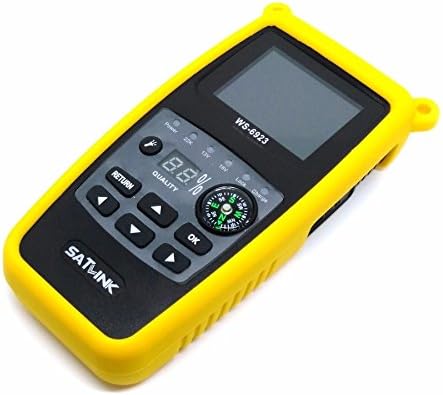
Figure 3.1: SatLink WS-6933 Satellite Meter Finder with its protective yellow silicone case.
Змест пакета:
- 1 x WS-6933 Satellite Finder
- 1 x Silicone Case (pre-installed)
- 1 x USB Upgrade Cable
- 1 x Power Adapter (AC/DC 12V/1A)
- 1 х Кіраўніцтва карыстальніка на англійскай мове
- 1 x Carrying Belt

Figure 3.2: The power adapter, USB cable, and carrying belt included with the device.
Відэа распакавання:
Video 3.1: An unboxing video demonstrating the contents of the SatLink WS-6933 package and initial device overview.
4. Прадукт скончыўсяview and Illustration
The WS-6933 features a 2.4-inch LCD screen, a built-in compass, and intuitive controls for easy operation.

Малюнак 4.1: Спераду view of the WS-6933, highlighting the screen, control buttons, and compass.
Асаблівасці пярэдняй панэлі:
- 2.4-цалевы ВК-экран: Displays menu, signal information, and settings.
- Кнопкі кіравання: Navigation (Up, Down, Left, Right), OK, Return.
- компас: Integrated for directional guidance during satellite alignment.
- Светавыя індыкатары: Display power status, 22KHz tone, 13V/18V LNB power, Lock, and Charge status.
- Quality Display: Digital percentage display for signal quality.

Малюнак 4.2: бок view of the WS-6933, showing the power switch, LNB input, USB port, and DC input.
Side and Rear Features:
- Выключальнік сілкавання: Пераключальнік уключэння/выключэння прылады.
- Уваход LNB: F-type connector for connecting to the LNB.
- Порт USB: For software upgrades and file transfer via PC.
- DC IN: Power input for charging the device.
- Ліхтарык: Integrated LED light for use in low-light conditions.

Малюнак 4.3: Назад view of the WS-6933, showing the flashlight and ventilation.
5. Настройка
- Зарадзіць прыладу: Before first use, fully charge the internal 7.4V/800mAh Li-Ion battery using the provided 12V/1A AC/DC adapter. Connect the adapter to the DC IN port on the side of the device and plug it into a power outlet. The 'Charge' indicator light will illuminate.
- Attach Carrying Belt (Optional): For convenience during outdoor work, attach the carrying belt to the designated loops on the device's silicone case.
- Уключэнне: Flip the power switch located on the side of the device to the 'ON' position. The SatLink logo will appear on the screen, followed by the main menu.
6. Інструкцыя па эксплуатацыі
The WS-6933 features a user-friendly interface with a main menu providing access to various functions. Use the navigation buttons (Up, Down, Left, Right) to move between options and the 'OK' button to select. Use the 'Return' button to go back to the previous screen.
Галоўнае меню скончанаview:
- Sat Setting: Configure satellite parameters.
- Signal Scan: Measure signal strength and quality.
- інструменты: Access calculation tools for satellite alignment.
- Sat Manage: Add, edit, or delete satellite entries.
- TP Manager: Add, edit, or delete transponder entries.
- Набор сістэмы: Adjust general device settings.
Падрабязныя функцыі:
- Sat Setting:
Navigate to 'Sat Setting' and press 'OK'. Here you can select the satellite name, LNB type, and input frequency parameters (Low Freq, High Freq, TP Num, Frequency). This is crucial for accurate signal detection.
- Signal Scan:
Select 'Signal Scan' from the main menu. This screen displays real-time signal strength (S) and quality (Q) percentages, along with other parameters like BER, PWR, S/N, and LNB power (13V/18V). The device also supports 22KHz tone and DISEQC 1.0/1.1 for multi-LNB setups. Sound and light alarms will indicate signal lock.
- інструменты:
Access 'Tools' for helpful calculations. This section provides information such as Satellite Name, Sat Longitude, Local Longitude, Local Latitude, Azimuth, Elevation, and Polarization, assisting in precise dish alignment.
- Sat Manage:
In 'Sat Manage', you can 'Add Satellite', 'Edit Satellite', or 'Delete Satellite' entries. This allows customization of the satellite list based on your specific needs and regional bands.
- TP Manager:
The 'TP Manager' allows you to 'Add Transponder', 'Edit Transponder', or 'Delete Transponder' entries. This is useful for managing specific transponder frequencies and symbol rates.
- Набор сістэмы:
Under 'System Set', you can configure various device preferences:
- Мова экраннага меню: Change the display language (default is English, other options available).
- Тон клавіш: Turn button press sounds ON/OFF.
- Lock TONE: Turn signal lock tone ON/OFF.
- Ліхтарык: Turn the built-in flashlight ON/OFF.
- Блок PWR: Adjust power unit display.
- Local Longitude/Latitude: Input local coordinates for accurate azimuth and elevation calculations.
Дэманстрацыйнае відэа аперацыі:
Video 6.1: A demonstration of the SatLink WS-6933's menu navigation and key functions, including signal scanning and system settings.
7. Тэхнічнае абслугоўванне
- Уборка: Для чысткі прылады выкарыстоўвайце мяккую сухую тканіну. Не выкарыстоўвайце вадкія ачышчальнікі або аэразолі.
- захоўванне: Захоўвайце прыладу ў прахалодным, сухім месцы, удалечыні ад прамых сонечных прамянёў і экстрэмальных тэмператур.
- Сыход за батарэяй: Каб падоўжыць тэрмін службы батарэі, пазбягайце частай поўнай разрадкі батарэі. Рэгулярна зараджайце прыладу, нават калі яна не выкарыстоўваецца працяглы час.
- Абнаўленні праграмнага забеспячэння: Перыядычна правярайце інфармацыю вытворцы website for software updates to ensure optimal performance and access to new features. Use the provided USB cable for updates.
8. Выпраўленне непаладак
| праблема | Магчымая прычына | Рашэнне |
|---|---|---|
| Прылада не ўключаецца. | Low battery or power switch is off. | Charge the device. Ensure the power switch is in the 'ON' position. |
| Сігнал не выяўлены. | Incorrect satellite settings, LNB not connected, or dish misalignment. | Verify satellite settings in 'Sat Setting'. Check LNB cable connection. Adjust dish alignment using the signal scan feature. |
| Signal quality is low. | Weak signal from LNB, cable issue, or minor dish misalignment. | Check LNB and cable for damage. Fine-tune dish alignment. |
| Экран не рэагуе. | Прылада замарожаная. | Power off the device, then power it back on. If the issue persists, contact support. |
9. Тэхнічныя характарыстыкі
| Асаблівасць | Спецыфікацыя |
|---|---|
| Нумар мадэлі | WS-6933 |
| Памеры прадукту | 6.3 х 3.15 х 1.57 цалі (16 х 8 х 4 см) |
| Вага прадмета | 1.34 фунта (610 грамаў) |
| Дысплей | ВК-экран 2.4 цалі |
| акумулятар | 7.4V/800mAh Li-Ion Battery (1 Lithium Ion battery required) |
| Электразабеспячэнне | 12V/1A AC/DC Adapter |
| DVB Compliance | DVB-S / S2 |
| DISEQC Support | DISEQC 1.0/1.1, 0/22KHz Tone |
| LNB Power Supply | 13V/18V (Max 300mA) |
| Сувязь | USB (for software upgrade and file перадача) |
| Дадатковыя магчымасці | Mechanical Compass, Beep Integrated, LNB short protect, Flashlight |
10. Гарантыя і падтрымка
For warranty information and technical support, please refer to the contact details provided on the product packaging or visit the official SatLink webсайт. Захоўвайце чэк аб куплі як пацвярджэнне пакупкі ў выпадку любых гарантыйных прэтэнзій.