
SHARP LC-40U45
SHARP AQUOS LC-40U45 40-inch 4K HDR LCD TV User Manual
Model: LC-40U45 | Brand: SHARP
1. Уводзіны
This manual provides essential information for the safe and efficient operation of your SHARP AQUOS LC-40U45 40-inch 4K HDR LCD TV. Please read these instructions thoroughly before using the product and retain them for future reference.
The LC-40U45 features a 4K low-reflection panel to minimize glare, 120-speed backlight technology for smooth motion, and the AQUOS 4K-Master Engine PRO II for high-definition image processing. Experience enhanced audio with the bass-reflex speaker box, Sound by ONKYO collaboration, and Eilex PRISM technology. The TV also includes a swivel stand for flexible viewныя вуглы.
2. Інфармацыя па бяспецы
Заўсёды выконвайце асноўныя меры бяспекі пры выкарыстанні гэтага тэлевізара, каб знізіць рызыку пажару, паражэння электрычным токам і траўмаў.
- Не падвяргайце тэлевізар уздзеянню дажджу або вільгаці.
- Не перакрывайце вентыляцыйныя адтуліны.
- Забяспечце належнае зазямленне вілкі харчавання.
- Адключайце тэлевізар ад сеткі падчас навальніцы або калі ён не выкарыстоўваецца працяглы час.
- Трымайце дробныя дэталі і батарэйкі ў месцах, недаступных для дзяцей.
3. Што ў скрынцы
Пераканайцеся, што ўсе наступныя рэчы ў камплекце з вашым тэлевізарам:
- SHARP AQUOS LC-40U45 4K HDR LCD TV
- Пульт дыстанцыйнага кіравання (з 2 батарэйкамі тыпу ААА)
- Шнур харчавання
- Настольная падстаўка (калі ёсць)
- AV Terminal Conversion Cable
- Кіраўніцтва карыстальніка (гэты дакумент)
4. Настройка
4.1 Фізічнае размяшчэнне і памеры
Ensure the TV is placed on a stable surface or mounted securely. The dimensions of the TV with the stand are approximately 90.1 cm (width) x 27.1 cm (depth) x 55.8 cm (height). The weight is approximately 20.5 kg.

Figure 4.1: TV dimensions (Width: 90.1cm, Height: 55.8cm, Depth: 27.1cm) and recommended viewing distance of approximately 150cm.
4.2 Падключэнне перыферыйных прылад
Your TV offers various connection ports on the rear panel for external devices.

Figure 4.2: Rear panel connections including HDMI inputs, USB ports, headphone jack, AV input, LAN port, and antenna inputs.
- Уваходы HDMI (x4): Connect Blu-ray players, game consoles, or other HDMI-compatible devices. Input 1 supports HDR.
- USB-парты (x2): Connect USB storage devices for media playback or external HDD for recording.
- PC Input (x1): Падключыце кампутар.
- LAN Port (10BASE-T/100BASE-TX): Для праваднога падключэння да Інтэрнэту.
- Headphone Jack (3.5mm stereo mini-jack): Для прыватнага праслухоўвання.
- AV-уваход: Use the provided AV terminal conversion cable for older devices.
- Уваходы антэны: Connect terrestrial digital and BS/CS digital antennas.
- B-CAS Card Slot: Insert the B-CAS card to decrypt digital broadcasts.
4.3 Сеткавае падключэнне
The TV supports both wired and wireless (Wi-Fi) network connections. Built-in Wi-Fi allows for easy connection to your home network.
4.4 Swivel Stand
The TV features a swivel stand that allows you to adjust the screen angle left and right by 30 degrees. This provides flexibility for optimal viewing from various positions in the room and makes accessing rear ports easier for cleaning or connecting devices.

Figure 4.3: The swivel stand allows for 30-degree left/right adjustment, simplifying cleaning and access to rear connections.
5. Кіраванне тэлевізарам
5.1 Функцыі дыстанцыйнага кіравання
Use the provided remote control to navigate menus, change channels, adjust volume, and access smart TV features. The remote includes dedicated buttons for popular streaming services.
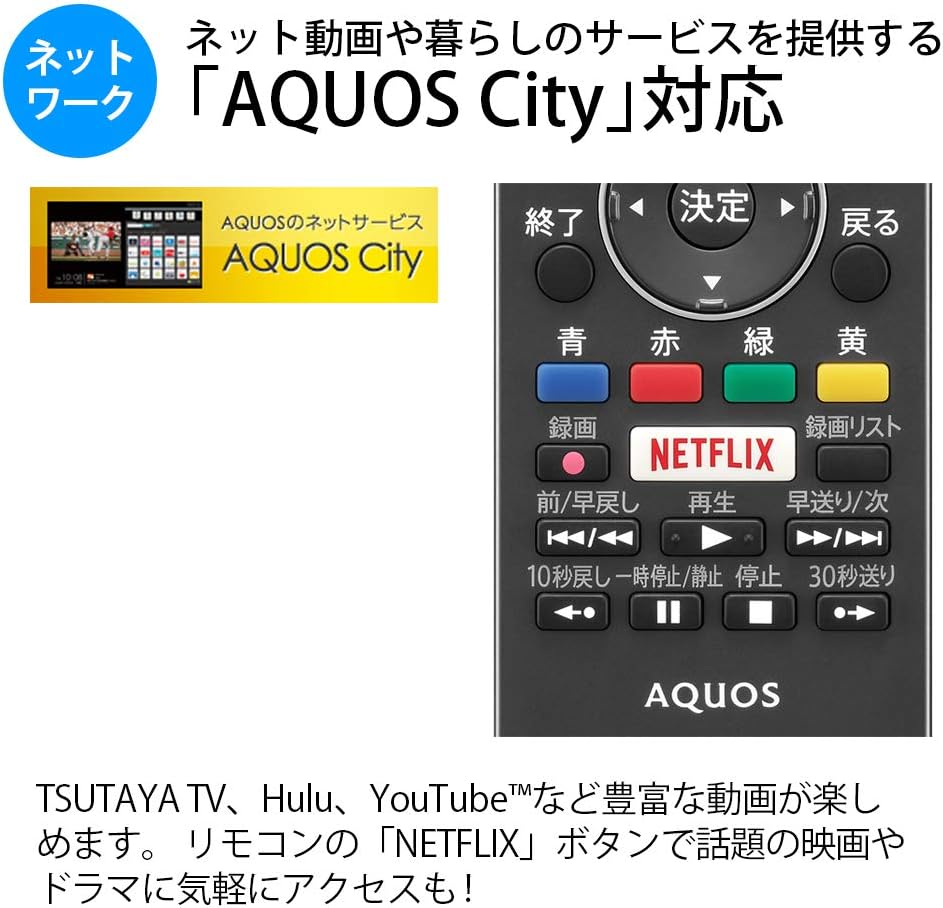
Figure 5.1: Remote control with a dedicated Netflix button and a view of the AQUOS City interface.
5.2 Smart TV Features (AQUOS City)
Your AQUOS TV supports "AQUOS City," providing access to various internet video services and lifestyle applications. Enjoy streaming content from platforms like NETFLIX, YouTube, Hulu, and TSUTAYA TV. Simply press the dedicated "NETFLIX" button on your remote for quick access.
5.3 4K Image Processing
The AQUOS 4K-Master Engine PRO II is a high-definition image processing circuit specifically designed for 4K LCD panels. It reduces noise and enhances contrast for a more immersive 4K viewвопыту.

Figure 5.2: The AQUOS 4K-Master Engine PRO II enhances 4K images by reducing noise and improving contrast.
5.4 Функцыі гуку
The TV is equipped with a bass-reflex type speaker box, developed in collaboration with ONKYO, to deliver high-quality sound with enhanced high-frequency pressure and rich bass. Eilex PRISM technology expands the listening position and creates a sense of audio depth.

Figure 5.3: Illustration of the bass-reflex speaker box, designed for superior sound quality.
5.5 Low-Reflection Panel
The 4K low-reflection panel minimizes reflections from room lighting and external light sources, ensuring clear and comfortable viewing even in bright environments.

Figure 5.4: Visual comparison demonstrating how the low-reflection panel reduces glare compared to a conventional LCD panel.
5.6 Video Mirroring (Fire TV)
You can mirror your smartphone screen to the TV using Fire TV mirroring. This allows you to display photos, videos, or smartphone apps on the large TV screen. To use this feature, connect a Fire TV device to one of the TV's HDMI ports and ensure both devices are on the same Wi-Fi network. Refer to your Fire TV device's manual for specific mirroring instructions.
6. Тэхнічнае абслугоўванне
Каб забяспечыць даўгавечнасць і аптымальную працу вашага тэлевізара, выконвайце наступныя рэкамендацыі па тэхнічным абслугоўванні:
- Ачыстка экрана: Акуратна працярыце экран мяккай тканінай без ворса. Для выдалення ўстойлівых плям злёгкуampПрацярыце тканіну вадой або спецыяльным сродкам для чысткі экранаў. Не распыляйце вадкасць непасрэдна на экран.
- Уборка шафы: Выкарыстоўвайце мяккую сухую тканіну для працірання корпуса тэлевізара. Пазбягайце выкарыстання абразіўных ачышчальнікаў або растваральнікаў.
- Вентыляцыя: Каб пазбегнуць перагрэву, пераканайцеся, што вентыляцыйныя адтуліны на тэлевізары не заблакаваныя.
- Шнур харчавання: Рэгулярна правярайце шнур харчавання на наяўнасць пашкоджанняў. У выпадку пашкоджання звярніцеся да кваліфікаванага абслугоўваючага персаналу.
7. Выпраўленне непаладак
Калі ў вас узніклі праблемы з тэлевізарам, звярніцеся да наступных распаўсюджаных праблем і іх рашэнняў:
| праблема | Магчымая прычына / рашэнне |
|---|---|
| Няма ўлады | Check if the power cord is securely plugged into the TV and the wall outlet. Press the power button on the remote or TV. |
| Няма выявы, але гук ёсць | Пераканайцеся, што выбрана правільная крыніца ўваходнага сігналу. Праверце падключэнне кабеляў да знешніх прылад. |
| Няма гуку, але выява ёсць | Check volume level and mute status. Ensure audio cables are correctly connected. |
| Пульт дыстанцыйнага кіравання не працуе | Замяніце батарэйкі. Пераканайцеся, што паміж пультам дыстанцыйнага кіравання і ІЧ-датчыкам тэлевізара няма перашкод. |
| Немагчыма падключыцца да Wi-Fi | Check your Wi-Fi router and network settings. Ensure the TV is within range of the router. |
8. Тэхнічныя характарыстыкі
| Асаблівасць | Спецыфікацыя |
|---|---|
| Памер экрана | 40 цаляў |
| Тэхналогія адлюстравання | ВК |
| дазвол | 3840 x 2160 (4K) |
| Падтрымка HDR | HDR compatible (HDMI Input 1) |
| Частата абнаўлення | 120 Hz (120 Speed backlight technology) |
| Цюнеры | Terrestrial Digital x3, BS/CS Digital x3 |
| Аўдыёвыхад | 20 Вт (10 Вт + 10 Вт) |
| Асаблівасці дынаміка | Bass-reflex type, Sound by ONKYO, Eilex PRISM |
| Парты HDMI | 4 |
| Парты USB | 2 (USB-HDD recording compatible) |
| Уваход з ПК | 1 |
| Падключэнне да сеткі | Wi-Fi built-in, LAN port |
| Бесправадны тып | Bluetooth, Wi-Fi, Miracast |
| Энергаспажыванне | Approx. 106W (Annual: 96Kwh/year) |
| Памеры (Ш х Г х У) | 90.1 х 27.1 х 55.8 см (з падстаўкай) |
| Вага | 20.5 кг |
| Стандарт мацавання VESA | 600 х 400 мм |
| Recommended Network Services | NETFLIX, YouTube, Hikari TV 4K, Hulu, TSUTAYA TV |
9. Гарантыя і падтрымка
For warranty information, please refer to the warranty card included with your product or visit the official SHARP website. For technical support, troubleshooting assistance, or service requests, please contact SHARP customer service. Contact details can be found on the official SHARP webсайце або ў дакументацыі да вашага прадукту.
Ask a question about this manual
Ask about setup, troubleshooting, compatibility, parts, safety, or missing instructions. Manuals+ will review the question and use this page’s manual context to help answer it.