
Уводзіны
This manual provides detailed instructions for the setup, operation, and maintenance of your Intex Wi-Fi HD Camera, model IT-101. Please read this manual thoroughly before using the device to ensure proper functionality and safety.
Прадукт скончаныview
The Intex Wi-Fi HD Camera IT-101 is a compact security camera designed for monitoring. It features HD video resolution, night vision capabilities, and Wi-Fi connectivity for remote access.
Асноўныя характарыстыкі:
- Раздзяленне HD відэа: Captures video at 1280x720 pixels (720p) with a frame rate of 25 frames per second.
- Шырокі аб'ектыў View: Features a 77-degree lens view angle for broader coverage.
- Начное бачанне: Equipped with Infrared LED illumination for clear night vision up to 10 meters.
- Падтрымка SD-карты: Supports up to 64GB SD card for local storage.
- Бесправаднае падключэнне: Connects via Wi-Fi for remote monitoring through mobile or computer applications.
- Сумяшчальнасць: Supports Android and iOS operating systems.
Змест пакета:
- Intex Wi-Fi HD Camera IT-101
- Адаптар сілкавання (DC 5V/1A)
- Кіраўніцтва карыстальніка (гэты дакумент)
- Аксэсуары для мантажу (калі ўваходзяць у камплект)
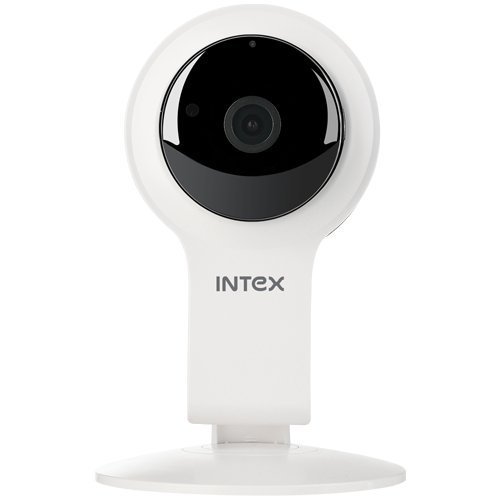
Малюнак 1: Спераду view of the Intex Wi-Fi HD Camera IT-101. This image shows the camera lens and the main body of the device.
Настройка
1. Уключэнне камеры:
- Connect the provided DC 5V/1A power adapter to the camera's power input port.
- Падключыце адаптар сілкавання да стандартнай электрычнай разеткі.
- The camera will power on, and an indicator light will illuminate (refer to the camera's physical indicators for specific light behavior).
2. Installing an SD Card (Optional):
To enable local video recording, an SD card (up to 64GB) can be installed.
- Locate the SD card slot on the camera (consult the camera's physical design for exact location).
- Gently insert the SD card into the slot with the contacts facing the correct direction until it clicks into place.
- Каб выняць, націсніце на SD-карту ўнутр, пакуль яна не выскочыць.
3. Connecting to Wi-Fi and Mobile App:
The camera requires a mobile application for initial setup and remote viewing. The specific app name is not provided in the product details, please refer to the packaging or a quick start guide for the correct app to download from your device's app store (Android/iOS).
- Download and install the designated mobile application on your smartphone or tablet.
- Open the application and create an account or log in if you already have one.
- Follow the in-app instructions to add a new device. This typically involves scanning a QR code on the camera or manually entering its device ID.
- Connect the camera to your home Wi-Fi network through the app. Ensure your Wi-Fi network is 2.4GHz, as 5GHz networks may not be supported.
- Once connected, the camera's indicator light will change (e.g., solid blue), and you should see the live feed in the app.
Інструкцыя па эксплуатацыі
жыць View:
Access the live video feed from your camera through the mobile application. This allows real-time monitoring of the camera's view.
Запіс:
- Ручная запіс: Most applications offer a manual record button to start and stop video recording directly to your phone or the installed SD card.
- Запланаваны запіс: Configure recording schedules within the app to automatically record at specific times.
- Запіс выяўлення руху: Enable motion detection in the app settings. The camera will automatically record when motion is detected within its field of view.
Прайграванне:
Запісана footage stored on the SD card can be accessed and played back through the mobile application. Navigate to the "Playback" or "History" section within the app.
Начное бачанне:
The camera automatically switches to night vision mode in low-light conditions. The Infrared LED illuminates the area, allowing for clear black and white video capture up to 10 meters.
Налады:
The mobile application provides various settings to customize your camera's operation, including:
- Video quality adjustment
- Адчувальнасць выяўлення руху
- Налады апавяшчэнняў
- Сінхранізацыя часу і даты
- SD card management (formatting, viewing storage)
Тэхнічнае абслугоўванне
- Уборка: Выкарыстоўвайце мяккую сухую тканіну для чысткі аб'ектыва і корпуса камеры. Пазбягайце выкарыстання агрэсіўных хімічных рэчываў або абразіўных матэрыялаў.
- Абнаўленні прашыўкі: Periodically check the mobile application for available firmware updates for your camera. Keeping the firmware updated ensures optimal performance and security.
- Кіраванне SD-картай: Regularly back up important recordings from your SD card. Consider formatting the SD card periodically through the app to maintain performance.
- Умовы навакольнага асяроддзя: Ensure the camera is operated within its specified temperature and humidity ranges. The camera is not water-resistant, so avoid exposure to moisture.
Ліквідацыю непаладак
Камера не ўключаецца:
- Ensure the power adapter is securely connected to both the camera and a working electrical outlet.
- Verify that the power adapter is the correct DC 5V/1A model.
Немагчыма падключыцца да Wi-Fi:
- Confirm your Wi-Fi network is 2.4GHz. The camera may not support 5GHz networks.
- Пераканайцеся, што камера знаходзіцца ў зоне дзеяння вашага Wi-Fi маршрутызатара.
- Праверце, ці правільны пароль Wi-Fi, уведзены ў дадатку.
- Restart your Wi-Fi router and the camera, then attempt to reconnect.
- If issues persist, try resetting the camera to factory defaults (refer to the camera's physical buttons or app for reset option).
Няма відэастужкі ў дадатку:
- Пераканайцеся, што камера ўключана і падключана да Wi-Fi.
- Check your internet connection on your mobile device.
- Close and reopen the mobile application.
- Ensure the camera's privacy mode (if available) is not activated.
SD Card Not Recording or Recognized:
- Ensure the SD card is correctly inserted.
- Verify the SD card is not full. Format it through the app if necessary (this will erase all data).
- Check if the SD card is damaged. Try a different compatible SD card.
- Confirm that recording settings (manual, scheduled, motion detection) are properly configured in the app.
Тэхнічныя характарыстыкі
| Асаблівасць | Дэталь |
|---|---|
| Назва мадэлі | ІТ-101 |
| Датчык выявы | H42 1/4 CMOS Sensor |
| Дазвол відэазахопу | 1280x720 Pixels (720p HD) |
| Частата кадраў | 25 кадраў у секунду |
| Аб'ектыў View Вугал | 77 градусаў |
| Тып аб'ектыва | 3.6 mm, Zoom |
| Тып фокусу | Аўтафокус |
| Дыстанцыя начнога бачання | 10 meters (Infrared LED Illumination) |
| Рэжым дзень/ноч | Так (аўтаматычнае пераключэнне) |
| Тэхналогія падлучэння | Бесправадная сувязь (Wi-Fi) |
| Падтрымка SD-карт | Да 64 ГБ |
| Video Supported Format | H.264, MP4 |
| Падтрымліваюцца фарматы выявы | JPEG |
| Сумяшчальнасць аперацыйнай сістэмы | Android, iOS |
| Электразабеспячэнне | Пастаянны ток 5 В/1 А |
| Вага брута | 260 г |
| Колер | Белы |
| Узровень воданепранікальнасці | Не воданепранікальны |
| Стабілізацыя выявы | няма |
Гарантыя і падтрымка
For warranty information and technical support, please refer to the documentation included with your purchase or visit the official Intex webсайт. Захоўвайце пацвярджэнне пакупкі для прэтэнзій па гарантыі.
вытворца: Intex
Марка: Intex