
Yaskawa CIMR-VU2A0006FAA
Yaskawa V1000 AC Drive Instruction Manual
Model: CIMR-VU2A0006FAA
1. Прадукт скончыўсяview
The Yaskawa V1000 is a compact, high-performance AC microdrive designed for a wide range of industrial applications. It offers precise motor control, energy efficiency, and ease of use. This manual provides essential information for the safe and effective operation of your V1000 AC Drive.
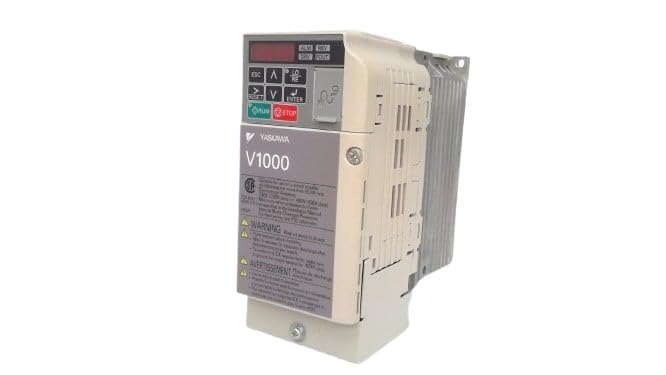
Малюнак 1: Спераду view of the Yaskawa V1000 AC Drive (Model CIMR-VU2A0006FAA). This image shows the drive's compact design, control panel with display and buttons, and ventilation fins on the side.
2. Інфармацыя па бяспецы
WARNING: Risk of electric shock. Ensure power is disconnected before installation or maintenance.
Read this manual thoroughly before installing, operating, or performing maintenance on the V1000 AC Drive. Failure to follow these instructions may result in serious injury or equipment damage.
2.1 Агульныя меры бяспекі
- Толькі кваліфікаваны персанал павінен усталёўваць, эксплуатаваць і абслугоўваць гэта абсталяванне.
- Do not operate the drive with damaged cables or if the enclosure is open.
- Забяспечце належнае зазямленне ў адпаведнасці з мясцовымі электрычнымі нормамі.
- Праверце ўвод тtage matches the drive's specifications.
- Не дакранайцеся да ўнутраных кампанентаў адразу пасля выключэння харчавання, бо рэшткавая тэмператураtage may be present. Wait for the charge lamp to extinguish.
2.2 Экалагічныя меркаванні
- Install the drive in a clean, dry, and well-ventilated area.
- Avoid direct sunlight, excessive dust, corrosive gases, and vibrations.
- Operating temperature range: 0°C to 50°C (32°F to 122°F).
3. Настройка
Proper installation and wiring are crucial for the safe and reliable operation of the V1000 AC Drive.
3.1 Мантаж
Mount the drive vertically on a flat, stable surface. Ensure adequate clearance for ventilation around the drive (minimum 50mm above and below, 25mm on sides).
3.2 Электраправодка
Refer to the wiring diagram provided in the full product manual for detailed connections. Key connections include:
- Уваходная магутнасць (R/L1, S/L2, T/L3): Connect the 3-phase 200-240V AC power supply.
- Выхад рухавіка (U, V, W): Падключыце да клем рухавіка.
- Ground (PE): Connect to a reliable earth ground.
- Тэрміналы кіравання: For external control signals (e.g., run/stop, speed reference, fault output).
Always use appropriate wire gauges and circuit protection devices as specified in local electrical codes and the drive's technical specifications.
4. Operating the V1000 AC Drive
The V1000 drive can be operated via its integrated control panel or external control signals.
4.1 Панэль кіравання скончанаview
Панэль кіравання мае лічбавы дысплей і некалькі кнопак:
- ESC: Escape/Back button.
- Стрэлкі УВЕРХ/УНІЗ: Navigate menus, adjust parameters.
- Стрэлкі НАЛЕВА/НАПРАВА: Shift cursor, change digits.
- УВОД: Confirm selection, enter parameter edit mode.
- РАБІЦЬ: Start motor operation.
- СТОП: Stop motor operation.
4.2 Асноўныя дзеянні
- Уключэнне: Apply power to the drive. The display will illuminate.
- Настройка параметраў: Configure essential parameters such as motor data (voltage, current, frequency), acceleration/deceleration times, and control mode (V/f, vector control). Refer to the parameter list in the detailed manual.
- Start Command: Націсніце БЕГАЦЬ button on the control panel or activate the external run command.
- Рэгуляванне хуткасці: Adjust the motor speed using the UP/DOWN arrows (if in local control mode) or via external speed reference.
- Stop Command: Націсніце СТОП button or deactivate the external stop command.
5. Тэхнічнае абслугоўванне
Regular maintenance ensures the longevity and optimal performance of your V1000 AC Drive.
5.1 Рэгулярныя праверкі
- штодня: Check for unusual noises, vibrations, or odors. Verify display for error codes.
- Штомесяц: Inspect cooling fans for proper operation and cleanliness. Clean dust from ventilation openings.
- Штогод: Check terminal connections for tightness. Inspect wiring for signs of wear or damage. Measure input/output voltagэс і плыні.
5.2 Ачыстка
Use a soft, dry cloth to clean the exterior of the drive. For internal cleaning (only by qualified personnel with power disconnected), use compressed air to remove dust from heat sinks and circuit boards.
Always disconnect power and wait for the charge lamp to extinguish before performing any maintenance.
6. Выпраўленне непаладак
This section provides common issues and their potential solutions. For complex problems, consult a qualified technician or Yaskawa support.
| праблема | Магчымая прычына | Рашэнне |
|---|---|---|
| Drive does not power on. | No input power; Blown fuse. | Check power supply; Replace fuse (after identifying cause). |
| Матор не працуе. | No run command; Incorrect wiring; Motor fault. | Verify run command; Check motor and drive wiring; Inspect motor. |
| Overcurrent fault (OC). | Motor overload; Short circuit; Rapid acceleration. | Reduce load; Check motor/cables for shorts; Increase acceleration time. |
| Аверволtage fault (OV). | Высокі аб'ём уваходуtage; Rapid deceleration. | Праверце ўвод абtage; Increase deceleration time; Install braking resistor if needed. |
7. Тэхнічныя характарыстыкі
Key technical specifications for the Yaskawa V1000 AC Drive (CIMR-VU2A0006FAA):
- мадэль: CIMR-VU2A0006FAA
- серыя: V1000 AC Drive
- Уваходны кнtage: 200-240V AC, 3-Phase
- Выхад Voltage: 240 В пераменнага току
- Намінальны выхадны ток: 6.0A (Heavy Duty) / 5.0A (Normal Duty)
- Намінальная магутнасць рухавіка: 1 л.с. (0.75 кВт)
- вытворца: YASKAWA ELECTRIC
- Дата першай даступнасці: 14 лютага 2025 г
8. Гарантыя і падтрымка
For detailed warranty information, please refer to the official Yaskawa warranty statement or contact your authorized Yaskawa distributor.
For technical support, service, or to obtain a full copy of the V1000 technical manual, please visit the official Yaskawa webсайт або звярніцеся ў іх аддзел абслугоўвання кліентаў.
Yaskawa Electric Corporation
Webсайт: www.yaskawa.com
Ask a question about this manual
Ask about setup, troubleshooting, compatibility, parts, safety, or missing instructions. Manuals+ will review the question and use this page’s manual context to help answer it.