
Уводзіны
Дзякуй за пакупкуasinг Чорныweb BWA16AA003 1000W HiFi Bluetooth Stereo System. This powerful audio system is designed to provide a rich and immersive sound experience with its front speakers and subwoofer. It features wireless Bluetooth connectivity, a digital FM radio, and a top-loading CD player, allowing you to enjoy your favorite music from various sources. This manual provides detailed instructions for setup, operation, maintenance, and troubleshooting to ensure optimal performance and longevity of your device.
Важная інфармацыя па бяспецы
Калі ласка, уважліва прачытайце ўсе інструкцыі па бяспецы і эксплуатацыі перад выкарыстаннем гэтага прадукта. Захоўвайце гэтыя інструкцыі для далейшага выкарыстання.
- Не падвяргайце гэты прыбор уздзеянню дажджу або вільгаці.
- Не блакуйце вентыляцыйныя адтуліны. Усталюйце ў адпаведнасці з інструкцыямі вытворцы.
- Не ўстанаўлівайце побач з крыніцамі цяпла, такімі як радыятары, абагравальнікі, пліты або іншыя прылады (у тым ліку ampLifiers), якія вырабляюць цяпло.
- Абараніце шнур харчавання ад хаджэння і зашчымлення, асабліва на вілках, зручных раздымах і месцы выхаду з прыбора.
- Выкарыстоўвайце толькі насадкі/аксэсуары, указаныя вытворцам.
- Адключайце прыладу ад сеткі падчас навальніцы або калі яна не выкарыстоўваецца на працягу доўгага часу.
- Звяртайцеся да кваліфікаванага абслугоўваючага персаналу. Тэхнічнае абслугоўванне патрабуецца, калі прылада была пашкоджана якім-небудзь чынам, напрыклад, пашкоджаны шнур сілкавання або вілка, была праліта вадкасць або ў прыладу ўпалі прадметы, прылада падвяргалася ўздзеянню дажджу або вільгаці, не працуе належным чынам , або быў адкінуты.
Змест пакета
Carefully unpack your stereo system and ensure all items are present. If any items are missing or damaged, please contact your retailer.
- Чорныweb BWA16AA003 Main Unit
- Левы дынамік
- Правы дынамік
- Сабвуфер
- Шнур харчавання
- Кіраўніцтва карыстальніка
Прадукт скончаныview
Familiarize yourself with the main unit's controls and features.
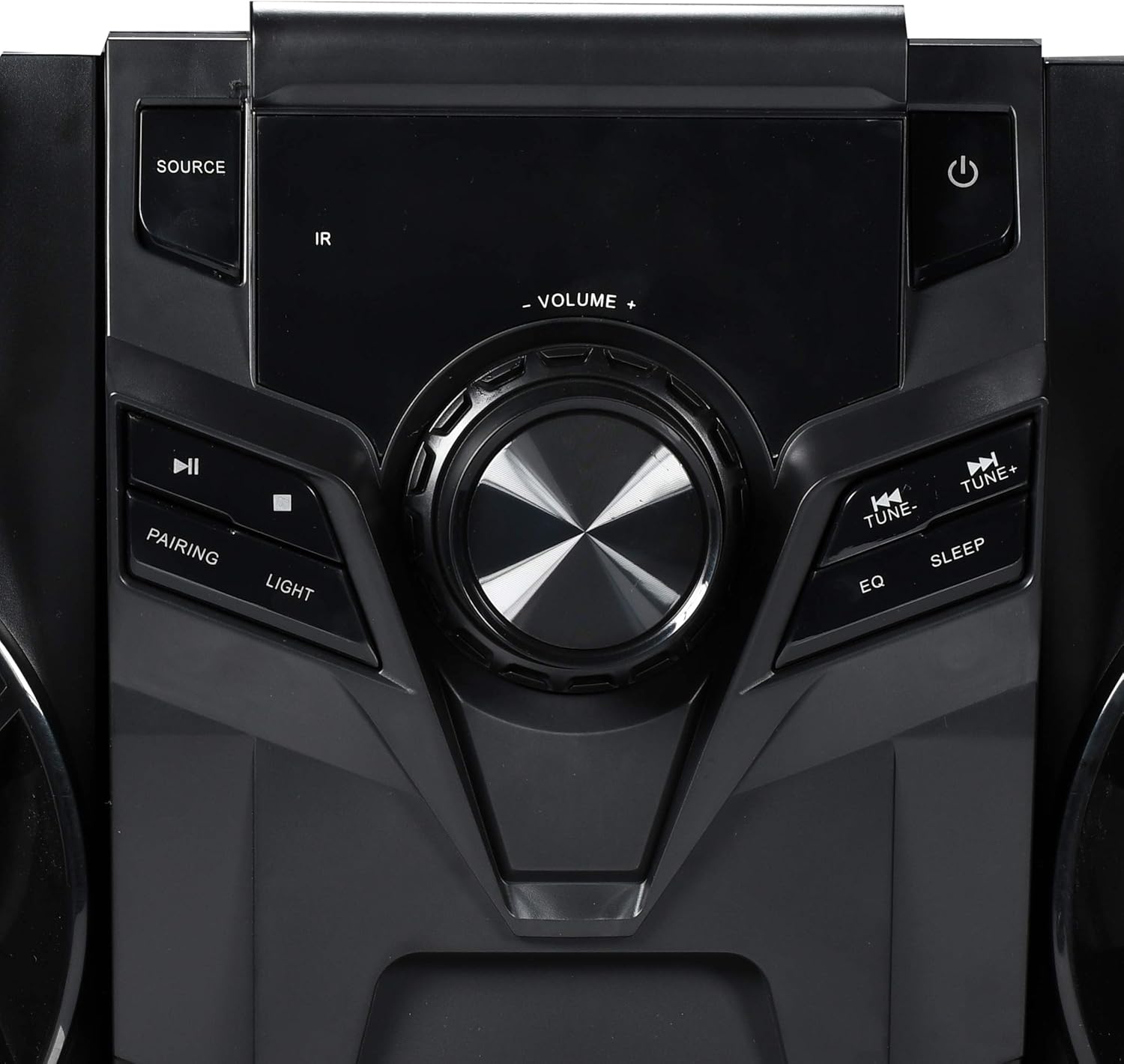
Малюнак 1: Элементы кіравання на пярэдняй панэлі
This image displays the central control panel of the Blackweb BWA16AA003 stereo system. Key controls visible include the large central volume knob, a "SOURCE" button on the upper left for input selection, and a power button (represented by the universal power symbol) on the upper right. Below the source button are playback controls: a play/pause button and a pairing button for Bluetooth. Below the power button are "TUNE-" and "TUNE+" buttons for radio tuning, along with "EQ" and "SLEEP" buttons. An "IR" sensor for remote control input is also visible.
Функцыі панэлі кіравання:
- Кнопка харчавання (⏻): Уключае або выключае сістэму.
- Кнопка SOURCE: Selects the input source (e.g., CD, Bluetooth, FM Radio).
- Ручка гучнасці: Рэгулюе агульны ўзровень гучнасці.
- Кнопка прайгравання/паўзы (⏸): Plays or pauses audio playback (CD/Bluetooth).
- PAIRING Button: Запускае рэжым спалучэння Bluetooth.
- Кнопка LIGHT: Controls the multi-color LED lighting effects on the speakers.
- TUNE- / TUNE+ Buttons: Tunes FM radio frequencies or navigates tracks/chapters.
- Кнопка эквалайзера: Пераключэнне паміж прадусталяванымі наладамі эквалайзера.
- Кнопка СОН: Усталёўвае таймер сну.
- ВК -датчык: Receives signals from a compatible remote control (note: remote control not included as per specifications).
- Порт USB: Located on the front or rear panel, used for charging compatible devices (charging cable sold separately).
- Латок для CD: Top-loading tray for inserting audio CDs.
Настройка
1. размяшчэнне
Place the main unit and speakers on a stable, flat surface. Ensure adequate ventilation around the unit to prevent overheating. For optimal sound, position the left and right speakers equidistant from the main unit and facing the listening area.
2. Падключэнне дынамікаў
Connect the speaker wires from the left and right speakers and the subwoofer to the corresponding speaker terminals on the rear of the main unit. Ensure correct polarity (positive to positive, negative to negative) for optimal sound quality.
3. Падключэнне сілкавання
Plug the power cord into the AC IN socket on the rear of the main unit, then plug the other end into a standard wall outlet (AC 120V~60Hz).
Інструкцыя па эксплуатацыі
Уключэнне/выключэнне харчавання
Націсніце Кнопка харчавання (⏻) on the front panel to turn the system on or off.
Выбар крыніцы
Націсніце Кнопка SOURCE repeatedly to cycle through available input modes: CD, Bluetooth, FM Radio.
Аперацыя Bluetooth
- Switch the system to Bluetooth mode using the Кнопка SOURCE. The display will indicate "BT" or "Bluetooth".
- The system will automatically enter pairing mode. If not, press the PAIRING Button. The Bluetooth indicator will flash.
- На прыладзе з падтрымкай Bluetooth (смартфоне, планшэце, ноўтбуку) уключыце Bluetooth і знайдзіце даступныя прылады.
- Выберыце «Чорны»web BWA16AA003" (or similar name) from the list of devices.
- Once paired, the Bluetooth indicator will stop flashing and remain solid. You can now play audio wirelessly from your device.
Прайграванне кампакт-дыскаў
- Switch the system to CD mode using the Кнопка SOURCE.
- Gently place an audio CD (CD or CD-R/RW) into the top-loading CD tray with the label side facing up.
- The system will automatically begin playing the CD. If not, press the Кнопка прайгравання/паўзы (⏸).
- Выкарыстоўвайце TUNE- / TUNE+ Buttons прапускаць трэкі.
Праца FM-радыё
- Switch the system to FM Radio mode using the Кнопка SOURCE.
- Extend the FM antenna fully for better reception.
- Націсніце TUNE- / TUNE+ Buttons to manually tune to a desired frequency.
- To auto-scan and save presets (if available), refer to the on-screen display or specific instructions for your model's auto-scan function.
USB-зарадка
Connect your compatible device's USB charging cable (sold separately) to the USB port on the stereo system to charge your device.
Упраўленне святлодыёдным святлом
Націсніце Кнопка LIGHT to cycle through different multi-color LED lighting effects on the speakers or to turn them off.
Рэгуляванне гучнасці
Павярнуць Ручка гучнасці па гадзіннікавай стрэлцы, каб павялічыць гучнасць, і супраць гадзіннікавай стрэлкі, каб паменшыць гучнасць.
Эквалайзер (эквалайзер)
Націсніце Кнопка эквалайзера to cycle through various preset equalizer modes (e.g., Rock, Pop, Jazz, Classic, Flat) to optimize sound for different music genres.
Таймер сну
Націсніце Кнопка СОН repeatedly to set a sleep timer (e.g., 15, 30, 60, 90 minutes). The system will automatically turn off after the selected time.
Тэхнічнае абслугоўванне
Уборка
Wipe the unit with a soft, dry cloth. Do not use abrasive cleaners, waxes, or solvents as they may damage the finish. Ensure the unit is unplugged before cleaning.
Захоўванне
If the unit is to be stored for an extended period, unplug it from the power outlet and store it in a cool, dry place, away from direct sunlight and extreme temperatures.
Ліквідацыю непаладак
Перад тым, як звяртацца ў службу падтрымкі кліентаў, азнаёмцеся з наступнай табліцай, каб азнаёміцца з распаўсюджанымі праблемамі і іх рашэннямі.
| праблема | Магчымая прычына | Рашэнне |
|---|---|---|
| Няма сілы | Шнур харчавання ненадзейна падключаны. Разетка не працуе. | Пераканайцеся, што шнур харчавання надзейна падключаны да прылады і разеткі. Праверце разетку з дапамогай іншай прылады. |
| Без гуку | Гучнасць занадта нізкая або выключаная. Выбрана няправільная крыніца. Speaker wires not connected properly. | Павялічыць гучнасць. Press the SOURCE button to select the correct input. Check speaker wire connections at both the unit and speakers. |
| Збой спалучэння Bluetooth | Bluetooth device is too far away. Bluetooth not enabled on your device. System is not in pairing mode. | Move your Bluetooth device closer to the stereo system. Пераканайцеся, што Bluetooth уключаны на вашай прыладзе. Press the PAIRING button on the stereo system. |
| CD Not Playing | Кампакт-дыск брудны або падрапаны. Кампакт-дыск устаўлены няправільна. Выбрана няправільная крыніца. | Clean the CD with a soft cloth. Re-insert the CD with the label side facing up. Націсніце кнопку SOURCE, каб выбраць рэжым CD. |
| Слабы прыём FM-сігналу | FM antenna not extended. Перашкоды ад іншых электронных прылад. | Цалкам выцягніце FM-антэну. Перамясціце прыладу далей ад іншых электронных прылад. |
Тэхнічныя характарыстыкі
| Марка | Чорныweb |
| мадэль | BWA16AA003 |
| Выхад ватtage | 1000 ват |
| Сумяшчальныя прылады | Смартфон, планшэт, ноўтбук |
| Тэхналогія падлучэння | Bluetooth, USB |
| Тып дынаміка | Stereo (with Subwoofer) |
| CD прайгравальнік | Yes (CD and CD-R/RW compatible) |
| FM-радыё | Yes (Digital FM with presets) |
| Порт USB | Yes (for device charging) |
| Святлодыёднае асвятленне | Multi-color LED speaker illumination |
| Памеры (Д х Ш х У) | 72.64 х 36.83 х 32.77 см (прыблізна 28.6 х 14.5 х 12.9 цалі) |
| Вага | 14.17 кг (прыбл. 31.24 фунта) |
Гарантыя і падтрымка
For warranty information or technical support, please refer to the documentation included with your purchase or contact Blackweb customer service. Keep your proof of purchase for warranty claims.