
Logitech 910-005235
Logitech Unifying Receiver Instruction Manual
Марка: Логітэк | мадэль: 910-005235
Уводзіны
The Logitech Unifying Receiver is a compact USB receiver designed to wirelessly connect multiple compatible Logitech devices, such as mice and keyboards, to your computer. It operates on 2.4 GHz wireless technology, providing a reliable connection up to 33 feet (10 meters) away. This manual provides detailed instructions for setting up, operating, and troubleshooting your Unifying Receiver.
This receiver is ideal for users who wish to connect a Logitech Flow or Easy-Switch mouse to a second computer, or to consolidate multiple Logitech wireless peripherals (up to six) using a single USB port.
Што ў скрынцы
- Прыёмнік Logitech Unifiing
- Кіраўніцтва карыстальніка (гэты дакумент)

Image: Logitech Unifying Receiver in its retail packaging.

Выява: Пад вуглом view of the compact Logitech Unifying Receiver.
Настройка
Initial Setup: Connecting the Receiver
The Logitech Unifying Receiver is designed for simple plug-and-play functionality. Follow these steps to connect it to your computer:
- Знайдзіце даступны порт USB тыпу A на вашым камп'ютары (ПК або Mac).
- Insert the Logitech Unifying Receiver firmly into the USB port.
- Ваша аперацыйная сістэма павінна аўтаматычна выявіць новае абсталяванне.

Выява: спераду view of the Logitech Unifying Receiver, showing the USB connector.
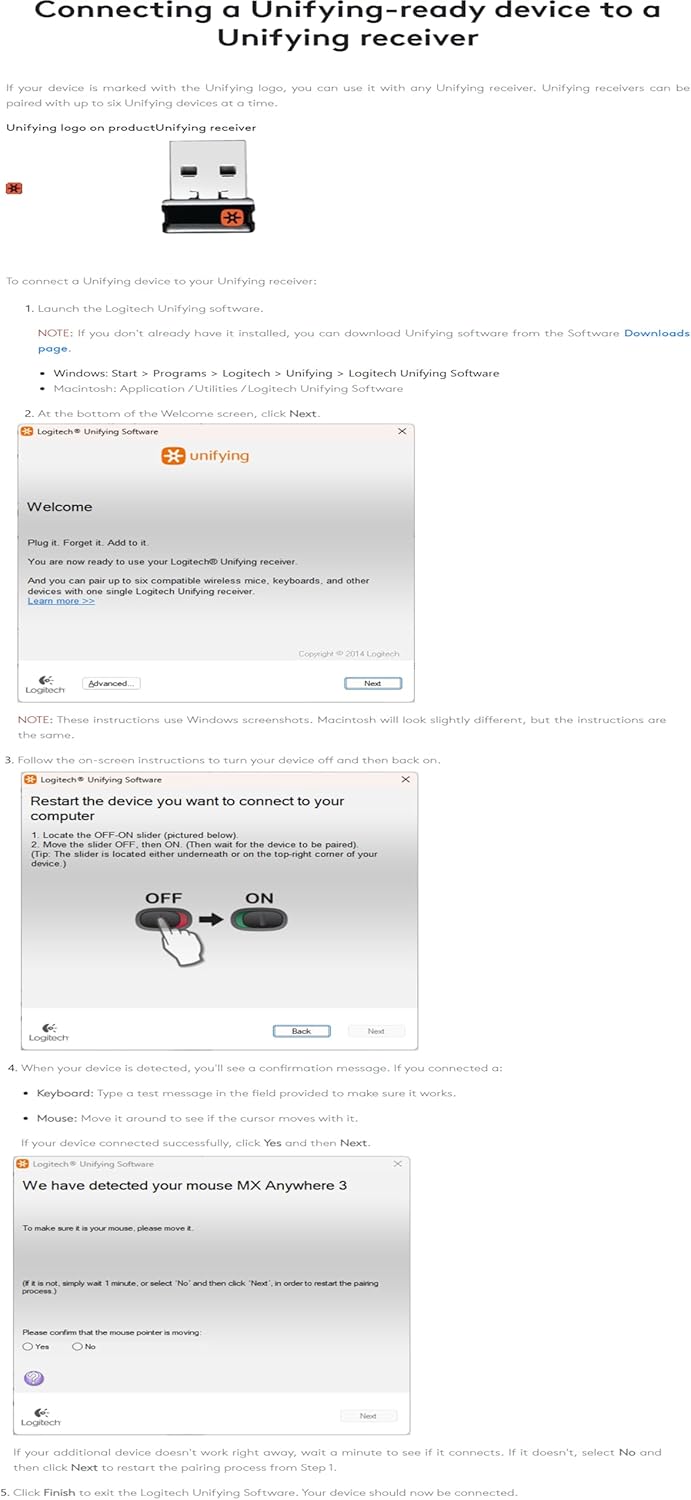
Image: The Unifying Receiver plugged into a laptop's USB port.
Installing Logitech Unifying Software
While the receiver may offer basic functionality upon plug-in, installing the Logitech Unifying Software is crucial for pairing new devices, managing existing ones, and ensuring optimal performance. This software allows you to pair up to six compatible Logitech devices with a single receiver.
- Download the Logitech Unifying Software from the official Logitech website. (A direct link is often provided in the physical user guide or on the product's support page.)
- Запусціце праграму ўстаноўкі і выконвайце падказкі на экране, каб завяршыць усталёўку.
- Once installed, launch the Logitech Unifying Software.
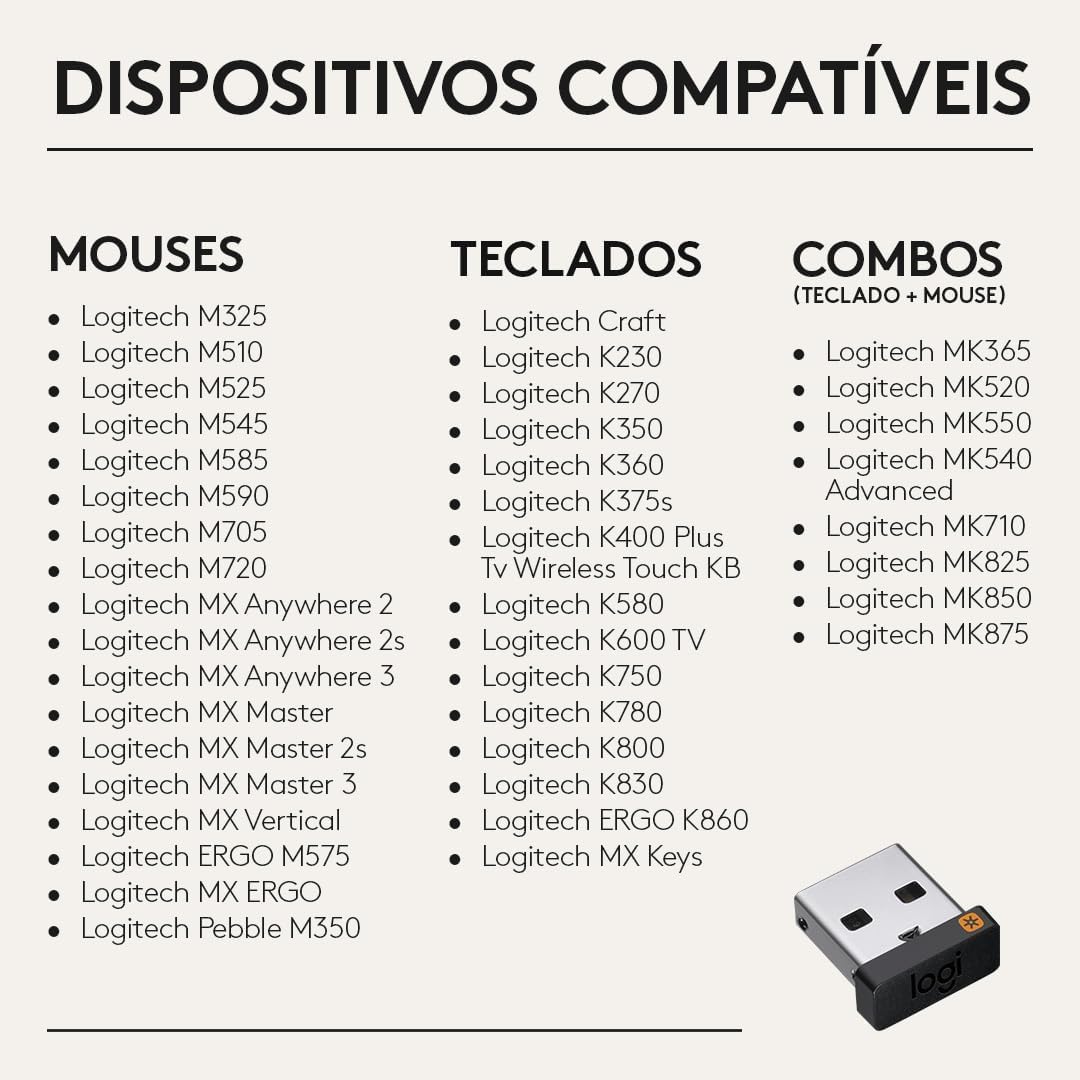
Image: Screenshot of the Logitech Unifying Software interface, guiding the user through the pairing process.
Інструкцыя па эксплуатацыі
Спалучэнне новых прылад
To pair a new Logitech Unifying-compatible mouse or keyboard:
- Пераканайцеся, што прыёмнік Logitech Unifying падключаны да кампутара.
- Open the Logitech Unifying Software.
- Follow the on-screen instructions to add a new device. This typically involves turning your device off and then on again, or pressing a connect button on the device.
- The software will detect your device and confirm successful pairing.

Image: Diagram illustrating how the Unifying Receiver connects up to six Logitech devices, such as a mouse and keyboard.
Using with Multiple Computers (Flow/Easy-Switch)
The Unifying Receiver is an essential component for Logitech Flow and Easy-Switch enabled devices, allowing seamless transitions between multiple computers:
- Logitech Flow: For Flow-enabled mice, you can use an extra Unifying Receiver plugged into a second computer. With Logitech Options+ App, you can seamlessly move your cursor, cut, paste, and move files between computers.
- Easy-Switch: For Easy-Switch devices, an additional Unifying Receiver allows you to connect your mouse or keyboard to a second computer and switch between them with the push of a button.
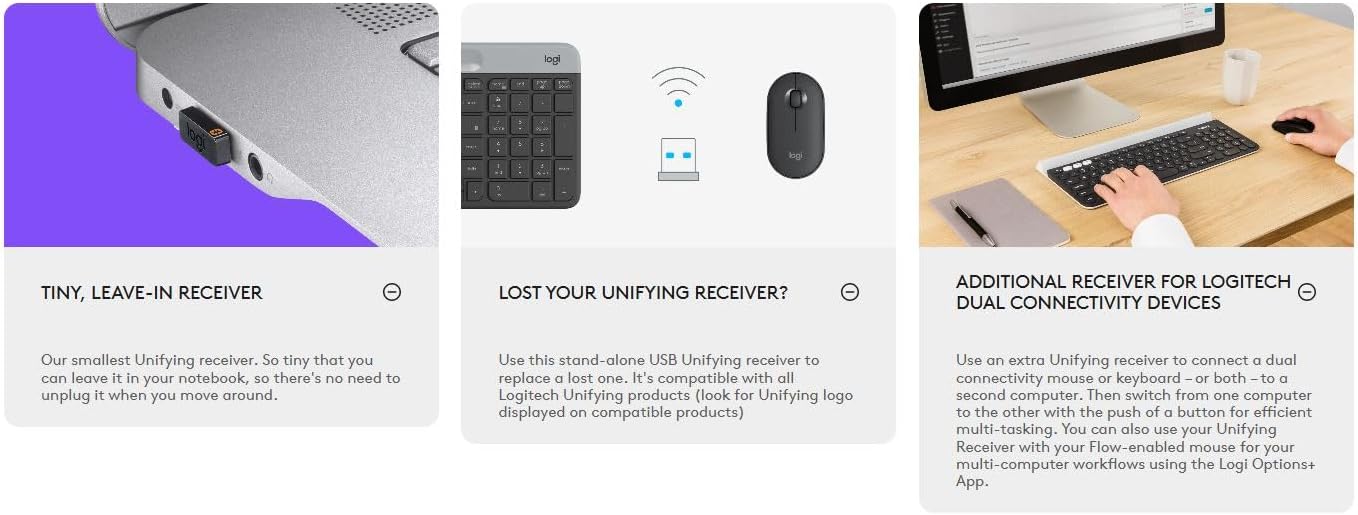
Image: Visual representation of the Unifying Receiver's benefits, including its tiny size, use as a replacement, and support for dual connectivity devices.
Сумяшчальныя прылады
The Logitech Unifying Receiver is compatible with a wide range of Logitech wireless mice and keyboards. Look for the orange Unifying logo (an orange starburst) on your Logitech device to confirm compatibility.
Compatible Mice
- MX Master 2S, MX Anywhere 2S, MX Master, MX Anywhere 2, MX Performance, MX Anywhere
- M720 Triathlon Multi-Device Mouse, M705 Marathon Mouse, Wireless Mouse M585 Multi-Device
- Wireless Trackball M570, M545 Wireless Mouse, M525 Wireless Mouse, M510 Wireless Mouse
- M325/M325c Wireless Mouse, M310 Wireless Mouse, M317 Wireless Mouse (M317c is not compatible)
- M187 Ultra Portable
Compatible Keyboards
- Illuminated Living-Room Keyboard K830, Wireless Illuminated Keyboard K800
- K780 Multi-Device Wireless Keyboard, Wireless Solar Keyboard K750, Wireless Solar Keyboard K750 for Mac
- Wireless Touch Keyboard k400 Plus, K400 Professional Wireless Touch Keyboard, Wireless Touch Keyboard k400
- K375s Multi-Device Wireless Keyboard and Stand Combo, K360 Compact and slim wireless keyboard
- K350 COMFORT WAVE, K270 Full-size wireless keyboard

Image: A visual list of various Logitech mice, keyboards, and combos compatible with the Unifying Receiver.
Ліквідацыю непаладак
Агульныя праблемы і рашэнні
- Device Not Connecting/Pairing:
- Ensure the Unifying Receiver is securely plugged into a working USB port.
- Verify that your Logitech device is turned on and has fresh batteries (if applicable).
- Open the Logitech Unifying Software and attempt the pairing process again. Make sure to follow the on-screen instructions precisely.
- Try plugging the receiver into a different USB port or a different computer to rule out port or computer-specific issues.
- Ensure you have the latest version of the Logitech Unifying Software installed. Check for updates within the software or on the Logitech support webсайт.
- Перарывістае падключэнне або затрымка:
- Move the Logitech device closer to the Unifying Receiver.
- Avoid placing the receiver near other electronic devices that might cause interference (e.g., Wi-Fi routers, cordless phones, microwave ovens).
- If using a USB hub, try connecting the receiver directly to the computer's USB port.
- Lost Unifying Receiver:
- A replacement Unifying Receiver can be purchased. Once you have a new receiver, use the Logitech Unifying Software to pair your existing compatible devices with the new receiver.
Тэхнічныя характарыстыкі
| Асаблівасць | Дэталь |
|---|---|
| Памеры прадукту | 0.35 х 0.23 х 0.59 цалі |
| Вага прадмета | 0.16 унцыі |
| ASIN | B072JW9LT8 |
| Нумар мадэлі тавару | 910-005235 |
| Вытворца | Logitech |
| Сумяшчальныя прылады | Персанальны кампутар |
| Канкрэтнае выкарыстанне прадукту | Асабістае, гульнявое, бізнес |
| Тып раздыма | USB тыпу A |
| Колер | Чорны |
| Дата першай даступнасці | 6 чэрвеня 2017 г |
Гарантыя і падтрымка
For detailed warranty information, technical support, and additional resources, please refer to the official Logitech support website or the comprehensive User Guide provided with your product.
You can download the official User Guide in PDF format here: Logitech Unifying Receiver User Guide (PDF)
Ask a question about this manual
Ask about setup, troubleshooting, compatibility, parts, safety, or missing instructions. Manuals+ will review the question and use this page’s manual context to help answer it.