
PatrolEyes PE-DV5-2
PatrolEyes PE-DV5-2 Body Camera User Manual
1296P HD 32GB GPS Auto IR Night Vision Police Body Camera
1. Уводзіны
Thank you for choosing the PatrolEyes PE-DV5-2 Body Camera. This device is designed for professional use, offering high-definition video recording, advanced night vision capabilities, and integrated GPS for reliable evidence collection. This manual will guide you through the setup, operation, and maintenance of your new body camera to ensure optimal performance and longevity.
2. Змесціва ўпакоўкі
Калі ласка, пераканайцеся, што ўсе прадметы прысутнічаюць у вашай упакоўцы:
- PatrolEyes PE-DV5-2 Body Camera
- Battery (Included Components)
- USB-кабель для зарадкі/дадзеных
- Зарадная прылада
- Мацаванне кліп
- Кіраўніцтва карыстальніка (гэты дакумент)
3. Часткі і элементы кіравання
Familiarize yourself with the various parts and controls of your PatrolEyes PE-DV5-2 body camera.

Малюнак 3.1: Фронт view of the PatrolEyes PE-DV5-2 body camera, highlighting the central camera lens, surrounding infrared (IR) lights for night vision, and the PatrolEyes logo at the bottom. The device has a rugged, black casing.

Малюнак 3.2: Front-side perspective of the PatrolEyes PE-DV5-2 body camera, providing a clearer view of the camera lens and the array of control buttons located on the side panel, including the yellow button at the top.

Малюнак 3.3: Збоку view of the PatrolEyes PE-DV5-2 body camera, prominently featuring the red record button and the covered USB port for charging and data transfer.
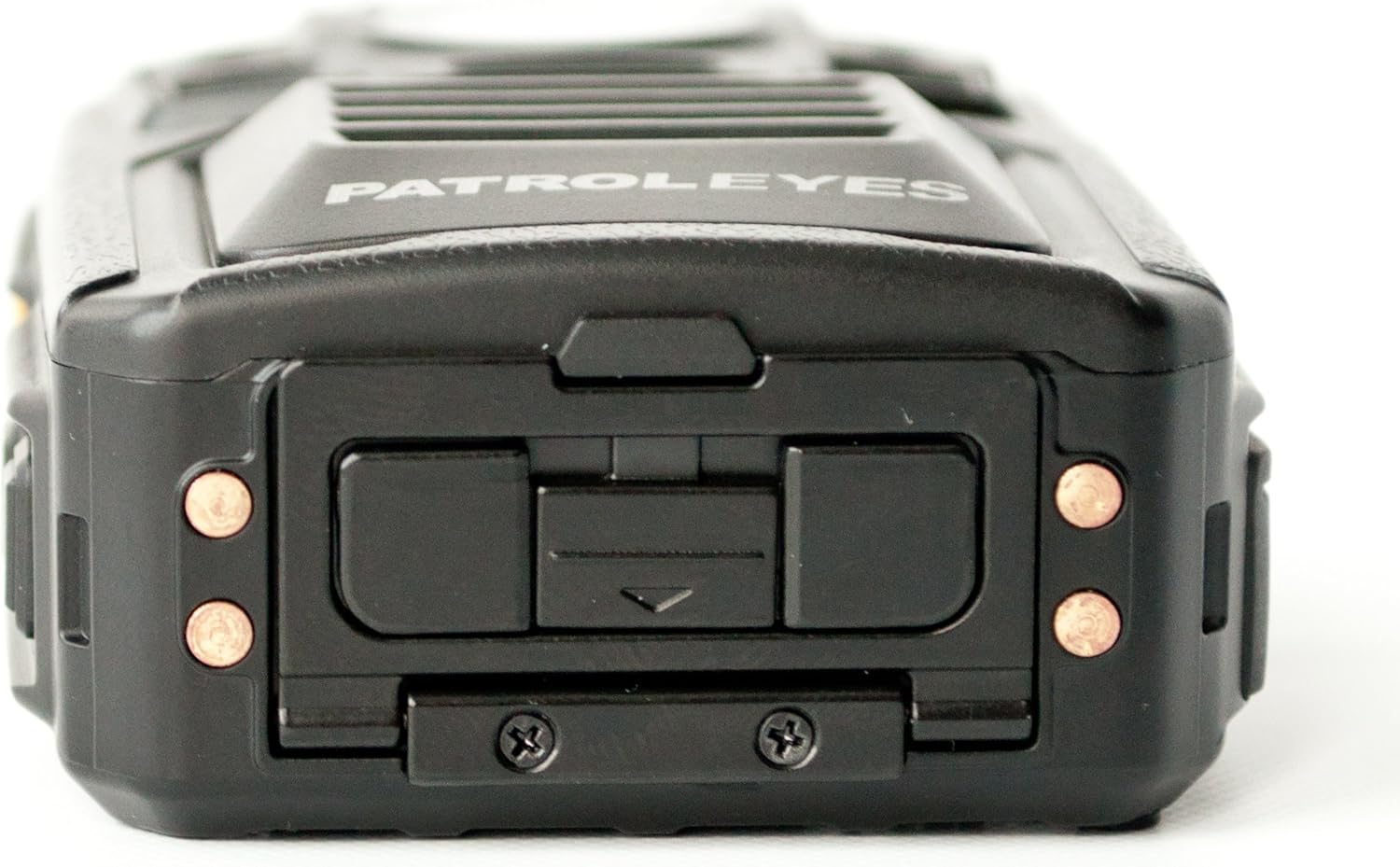
Малюнак 3.4: Топ view of the PatrolEyes PE-DV5-2 body camera, displaying the GPS indicator light and other top-mounted features.

Малюнак 3.5: Знізу view of the PatrolEyes PE-DV5-2 body camera, revealing the charging contacts designed for use with a docking station.
4. Пачатак працы
4.1. Зарадка акумулятара
Before first use, fully charge the camera's battery. The camera comes with a rechargeable battery.
- Connect the USB charging cable to the camera's USB port.
- Plug the other end of the USB cable into the wall charger and then into a power outlet.
- The charging indicator light will illuminate. It will change color or turn off once charging is complete.
Alternatively, use a compatible docking station (sold separately) for charging.
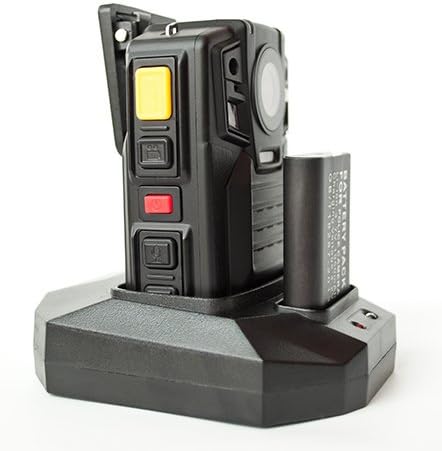
Малюнак 4.1: The PatrolEyes body camera securely placed in its docking station, which also features a dedicated slot for charging an additional battery pack.

Малюнак 4.2: Тыл view of the PatrolEyes docking station, clearly showing the power input port and the USB data port for connecting to a computer.
4.2. Уключэнне / выключэнне харчавання
- Каб уключыць: Press and hold the Power button for a few seconds until the device vibrates and the indicator lights turn on.
- Каб выключыць: Press and hold the Power button until the device vibrates and the indicator lights turn off.
4.3. Attaching the Mounting Clip
Attach the provided mounting clip to the back of the camera. This allows you to securely fasten the camera to your uniform or gear.
5. Кіраванне камерай
5.1. Запіс відэа
The camera supports video capture resolutions of 1080p, 480p, and 720p.
- Пераканайцеся, што камера ўключана.
- Націсніце спецыяльны Кнопка запісу (often red) once to start video recording. The recording indicator light will flash.
- Націсніце Кнопка запісу again to stop recording. The indicator light will stop flashing.
5.2. Фатаграфаванне
The camera has an effective still resolution of 33 MP.
- While in standby mode or during video recording, press the Кнопка фота once to capture a still image.
5.3. Night Vision (IR)
The camera features auto IR night vision with a range of 30 feet, utilizing infrared light sources.
- The camera is equipped with automatic infrared (IR) activation. In low-light conditions, the IR lights will automatically turn on to provide clear night vision footage.
5.4. Функцыянальнасць GPS
The integrated GPS module automatically records location data with your video footage. Ensure the camera has a clear view неба для аптымальнага атрымання сігналу GPS.
5.5. Прайграванне
Вы можаце паўторнаview recorded videos and photos directly on the camera's screen.
- Enter Playback mode via the menu or a dedicated button (refer to on-screen prompts).
- Перайсці праз files using the directional buttons.
- Press the OK/Select button to play a video or view фота.
5.6. Падключэнне да кампутара
Перадаць files, connect the camera to a computer using the provided USB cable.
- Уключыце камеру.
- Падключыце камеру да кампутара з дапамогай кабеля USB.
- Камера будзе адлюстроўвацца на вашым кампутары як здымны дыск.
- You can now access and transfer video and photo files.
6. Тэхнічнае абслугоўванне і догляд
6.1. Уборка
- Працярыце корпус камеры мяккай тканінайamp тканіна. Не выкарыстоўвайце агрэсіўныя хімікаты або абразіўныя ачышчальнікі.
- Для лінзаў выкарыстоўвайце спецыяльную сурвэтку і раствор для чысткі лінзаў, каб пазбегнуць драпін.
6.2. Захоўванне
- Захоўвайце камеру ў прахалодным, сухім месцы, удалечыні ад прамых сонечных прамянёў і экстрэмальных тэмператур.
- Ensure the battery is partially charged (around 50%) if storing for extended periods to preserve battery life.
6.3. Сыход за батарэяй
- Пазбягайце частай поўнай разрадкі акумулятара.
- Выкарыстоўвайце толькі арыгінальныя або зацверджаныя зарадныя аксэсуары.
7. Выпраўленне непаладак
| праблема | Магчымая прычына | Рашэнне |
|---|---|---|
| Камера не ўключаецца. | Нізкі зарад батарэі або яе адсутнасць. | Зарадзіце акумулятар цалкам. |
| Немагчыма запісваць відэа/рабіць фота. | Сховішча запоўнена. | Трансфер files to a computer and delete them from the camera. |
| Дрэнная якасць відэа/малюнкаў. | Dirty lens; low light conditions. | Clean the lens; ensure IR is active in low light. |
| GPS не ловіць сігнал. | Перашкаджалі view of sky; indoor use. | Перамясціцеся на адкрытую пляцоўку на вуліцы. |
| Кампутар не распазнае камеру. | Faulty USB cable; driver issue. | Try a different USB port/cable; ensure camera is powered on. |
8. Тэхнічныя характарыстыкі
| Асаблівасць | Дэталь |
|---|---|
| Нумар мадэлі | PE-DV5-2 |
| Дазвол відэазахопу | 1080p, 480p, 720p |
| Эфектыўнае рашэнне | 33 МП |
| Частата кадраў | 30 кадраў у секунду |
| Дыяпазон начнога бачання | 30 футаў |
| Тэхналогія падлучэння | Бесправадная сувязь (Wi-Fi) |
| Крыніца харчавання | Харчаванне ад батарэі |
| Уключаныя кампаненты | акумулятар |
| Міжнародны рэйтынг абароны | IP54 |
| Асаблівасці | Датчык руху, начное бачанне |
| Выкарыстанне ў памяшканні/на вуліцы | У памяшканні, на адкрытым паветры |
| Вытворца | PatrolEyes |
| Першая даступная дата | 14 мая 2017 г |
9. Інфармацыя аб гарантыі
PatrolEyes products typically come with a limited manufacturer's warranty. Please refer to the warranty card included with your purchase or visit the official PatrolEyes webпадрабязныя ўмовы гарантыі глядзіце на сайце. Захоўвайце пацвярджэнне пакупкі для прэтэнзій па гарантыі.
10. Падтрымка кліентаў
For technical assistance, troubleshooting beyond this manual, or inquiries about your PatrolEyes PE-DV5-2 body camera, please contact PatrolEyes customer support. Contact information can typically be found on the manufacturer's webсайце або на ўпакоўцы прадукту.
Інтэрнэт-рэсурсы: Visit the official PatrolEyes webсайт з часта задаванымі пытаннямі, абнаўленнямі праграмнага забеспячэння і дадатковымі матэрыяламі падтрымкі.