
DÖRR 204473
Dörr 204473 8 MP Snapshot IR TFT Trail Camera
Інструкцыя карыстальніка
Уводзіны
Thank you for choosing the Dörr 204473 8 MP Snapshot IR TFT Trail Camera. This camera is designed for versatile surveillance, offering high-quality images and videos both day and night. Its robust, weatherproof design makes it ideal for outdoor use, capturing wildlife or monitoring property with its motion detection capabilities. Please read this manual carefully before operating the camera to ensure proper use and to maximize its performance.
Інфармацыя па бяспецы
- Не падвяргайце камеру ўздзеянню экстрэмальных тэмператур або прамых сонечных прамянёў на працягу доўгага часу.
- Пераканайцеся, што батарэйны адсек шчыльна зачынены, каб забяспечыць воданепранікальнасць.
- Use only recommended battery types (AA batteries). Do not mix old and new batteries, or different types of batteries.
- Трымайце камеру далей ад моцных магнітных палёў.
- Не спрабуйце разбіраць або мадыфікаваць камеру. Гэта прывядзе да анулявання гарантыі.
- Утылізуйце батарэі і электронныя кампаненты адказна ў адпаведнасці з мясцовымі правіламі.
Прадукт скончаныview
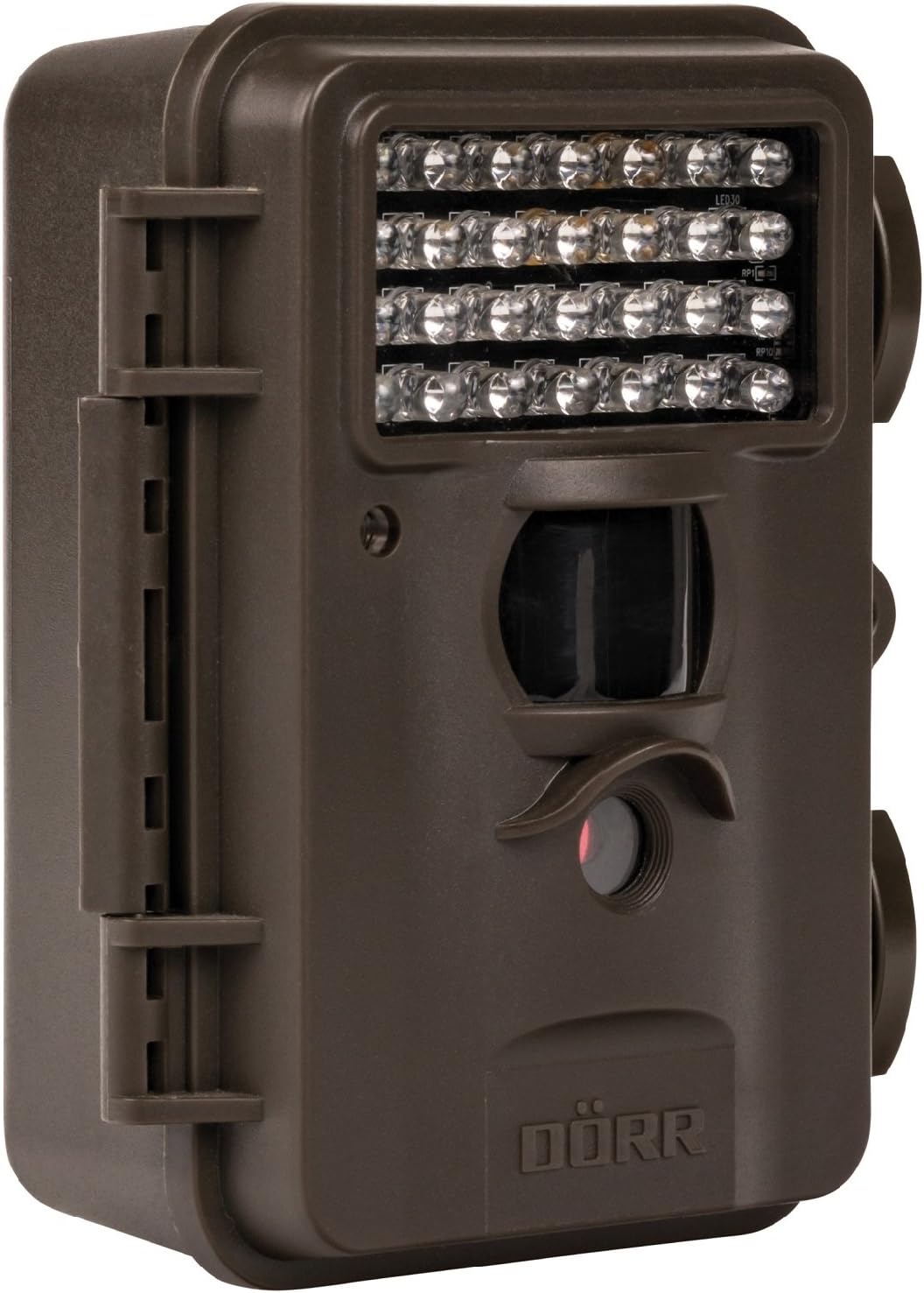
This image displays the front of the Dörr 204473 Trail Camera. Visible features include the array of 28 infrared LEDs at the top, the passive infrared (PIR) motion sensor below the LEDs, and the camera lens at the bottom. The camera has a rugged, dark brown, weatherproof casing with a latch on the left side.
The Dörr 204473 camera features a compact and durable design. Key components include:
- Інфрачырвоныя святлодыёды: 28 nearly invisible LEDs for night illumination up to 15 meters.
- Датчык руху PIR: Detects movement to trigger photo or video capture.
- Аб'ектыў камеры: Captures 8MP still images and video.
- TFT-дысплей: For menu navigation and viewing captured media (located inside the camera).
- Control Keypad: For setting up and operating the camera.
- Воданепранікальны корпус: Protects the camera from environmental elements.
Настройка
1. Устаноўка батарэі
- Open the camera housing latch on the side.
- Знайдзіце батарэйны адсек.
- Insert 4 or 8 AA batteries, ensuring correct polarity (+/-).
- Надзейна зачыніце крышку батарэйнага адсека.
2. Устаноўка SD-карты
- With the camera housing open, locate the SD/SDHC card slot.
- Insert an SD/SDHC memory card (up to 32 GB) into the slot until it clicks into place. Ensure the card is inserted in the correct orientation.
- Каб выняць, акуратна націсніце на карту, пакуль яна не выскочыць.
3. Мантаж камеры
The camera can be mounted using a strap or a wall mount. Ensure the camera is positioned to capture the desired area without obstructions. The mounting type is wall mount.
- Мацаванне рамянём: Thread the provided strap through the slots on the back of the camera and secure it around a tree or pole.
- Насценны мантаж: Use appropriate screws and anchors (not included) to secure the camera to a wall or flat surface.
Інструкцыя па эксплуатацыі
1. Уключэнне / выключэнне харчавання
- To power on, slide the power switch to the 'ON' position.
- Каб выключыць харчаванне, перавядзіце выключальнік у становішча «ВЫКЛ».
2. Навігацыя па меню
Once powered on, the TFT display will activate. Use the keypad buttons (UP, DOWN, LEFT, RIGHT, OK, MENU) to navigate through the settings menu. The menu is available in English and German.
3. Ўстаноўка даты і часу
- Enter the menu and navigate to 'Date/Time' settings.
- Use the navigation buttons to set the current date and time.
- Confirm with 'OK'. Each captured image will display the time, date, and temperature in °C.
4. Photo/Video Modes and Settings
The camera supports both still image and video capture. Adjust settings such as resolution, trigger interval, and burst mode via the menu.
- дазвол: Set to 8MP for still images.
- Trigger Time: The camera has a fast trigger time of 1.3 seconds.
- Выяўленне руху: Configure the sensitivity of the PIR sensor.
- Начное бачанне: The 28 IR LEDs automatically activate in low light conditions for night vision up to 15 meters.
5. Viewінж Files
Вы можаце view captured photos and videos directly on the camera's TFT display or by connecting the camera to a computer via USB (cable not included) or by inserting the SD card into a card reader.
Тэхнічнае абслугоўванне
- Уборка: Use a soft, dry cloth to clean the camera lens and housing. Do not use abrasive cleaners or solvents.
- Сыход за батарэяй: Выміце батарэйкі, калі камера не будзе выкарыстоўвацца працяглы час, каб прадухіліць іх уцечку.
- захоўванне: Захоўвайце камеру ў прахалодным, сухім месцы, удалечыні ад прамых сонечных прамянёў, калі яна не выкарыстоўваецца.
Ліквідацыю непаладак
| праблема | Магчымая прычына | Рашэнне |
|---|---|---|
| Камера не ўключаецца | Разраджаныя або нізкія батарэі; няправільная палярнасць батарэй. | Замяніце батарэйкі; пераканайцеся ў правільнай палярнасці. |
| Няма здымкаў/відэа | SD card full or not inserted correctly; motion sensor blocked or sensitivity too low. | Insert/replace SD card; format SD card; clear sensor path; increase sensor sensitivity. |
| Дрэнная якасць выявы ўначы | Subject too far from camera; IR LEDs obstructed. | Ensure subject is within 15m range; clear any obstructions from IR LEDs. |
| Camera not detecting motion | PIR sensor sensitivity too low; camera positioned incorrectly. | Increase PIR sensitivity; reposition camera for optimal detection angle. |
Тэхнічныя характарыстыкі
| Асаблівасць | Дэталь |
|---|---|
| Марка | ДЁРР |
| Нумар мадэлі | 204473 |
| Эфектыўнае рашэнне | 8 МП |
| Эфектыўнае дазвол відэа | 8 МП |
| Дыяпазон начнога бачання | 15 метраў |
| Колькасць ВК-святлодыёдаў | 28 |
| Час запуску | 1.3 секунд |
| Захоўванне | SD/SDHC Memory Card (up to 32 GB) |
| Крыніца харчавання | 4x or 8x AA Batteries |
| Колер | Чорны |
| Матэрыял | Метал |
| Памеры прадмета (Д х Ш х У) | 10 х 7 х 12.2 см |
| Узровень воданепранікальнасці | Воданепранікальны |
| Тып мацавання | Насценнае мацаванне |
| Рэкамендаваныя прыкладанні | Motion Detection, Night Vision |
Гарантыя і падтрымка
For warranty information and technical support, please refer to the documentation provided with your purchase or visit the official Dörr webсайт. Захоўвайце пацвярджэнне пакупкі для любых гарантыйных прэтэнзій.