
Alarm.com ADC-V723x
Alarm.com ADC-V723 Outdoor Wi-Fi Camera User Manual
Model: ADC-V723x
1. Прадукт скончыўсяview
The Alarm.com ADC-V723 is a high-definition 1080p outdoor Wi-Fi camera designed to provide reliable surveillance for your property. Featuring High Dynamic Range (HDR) and powerful Video Analytics, it can detect and alert you to people, vehicles, and animals. Its robust design ensures performance in various lighting conditions and environments. This manual provides comprehensive instructions for installation, operation, and maintenance.
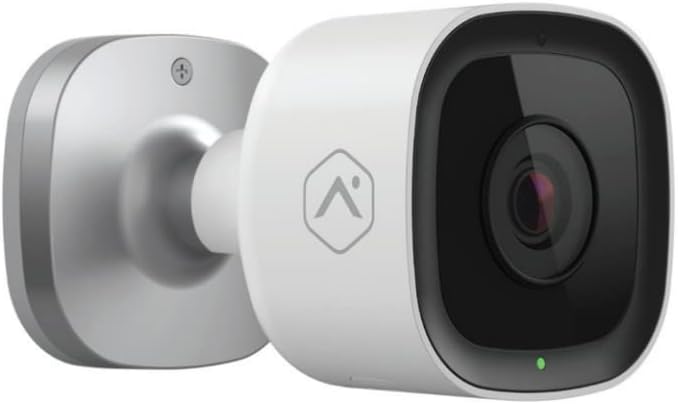
Выява: спераду view of the Alarm.com ADC-V723 Outdoor Wi-Fi Camera, showing its compact, bullet-style design and lens.
2. Інфармацыя па бяспецы
- Ensure the camera is installed in a location that complies with local building codes and regulations.
- Выкарыстоўвайце толькі адаптар сілкавання, які пастаўляецца з камерай.
- Не падвяргайце камеру ўздзеянню экстрэмальных тэмператур па-за межамі яе працоўнага дыяпазону.
- Пазбягайце размяшчэння камеры побач з крыніцамі моцных электрамагнітных перашкод.
- Адключыце электрычнасць перад чысткай або любым тэхнічным абслугоўваннем.
3. Змесціва ўпакоўкі
Праверце, ці ёсць усе прадметы ў вашай упакоўцы:
- Alarm.com ADC-V723 Outdoor Wi-Fi Camera
- Мантажная пласціна
- Мантажныя шрубы і насценныя анкеры
- Адаптар сілкавання
- Кіраўніцтва па ўстаноўцы (гэты дакумент)
4. Настройка і ўстаноўка
4.1 Выбар месца
Выберыце месца на адкрытым паветры, якое забяспечвае патрэбныя viewing angle and is within range of your Wi-Fi network. The camera is designed for outdoor use and is IP67 rated for weather resistance. Consider areas with good lighting or where the camera's night vision capabilities can be maximized.
4.2 Мантаж камеры
- Secure the mounting plate to the desired surface using the provided screws and wall anchors. Ensure the plate is level.
- Attach the camera to the mounting plate by aligning the camera with the plate and twisting until it locks securely.
- Adjust the camera's angle to achieve the optimal field of view.
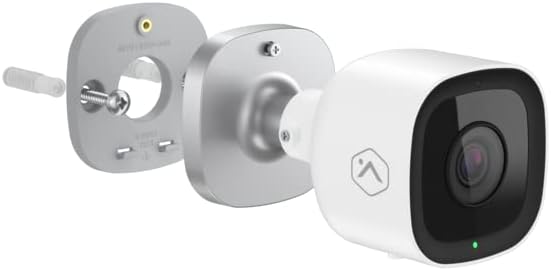
Выява: Разабраная view showing the Alarm.com ADC-V723 camera, its mounting plate, and a screw with wall anchor, illustrating the assembly process.
4.3 Powering On and Connecting to Wi-Fi
- Connect the power adapter to the camera and plug it into a suitable outdoor power outlet.
- Wait for the camera's LED indicator to show a specific status (refer to the LED status guide in Section 5.2).
- Download the Alarm.com mobile application from your device's app store.
- Follow the in-app instructions to add the ADC-V723 camera to your Alarm.com system and connect it to your Wi-Fi network. This typically involves scanning a QR code on the camera or entering its MAC address.
5. Кіраванне камерай
5.1 У прамым эфіры View і запіс
Access live video feeds and recorded clips through the Alarm.com mobile app or web portal. You can view у рэжыме рэальнага часу footage, initiate manual recordings, and review event-triggered clips.
5.2 святлодыёдныя індыкатары стану
The camera features an LED indicator that communicates its current status:
- Цвёрды зялёны: Connected to Wi-Fi and operating normally.
- Міргае зялёным: Attempting to connect to Wi-Fi.
- Суцэльны чырвоны: Not connected to Wi-Fi or an error has occurred.
- Мігае чырвоным: Firmware update in progress or factory reset.
5.3 Video Analytics and Alerts
The ADC-V723 supports advanced Video Analytics. Configure detection zones and rules within the Alarm.com app to receive specific alerts for people, vehicles, or animals entering designated areas. Alerts can be customized to send notifications to your mobile device.
5.4 Начное бачанне і HDR
The camera is equipped with infrared night vision, allowing clear video capture up to 40 feet in low-light conditions. High Dynamic Range (HDR) technology enhances video quality by balancing bright and dark areas, providing clearer images in challenging lighting environments.
6. Тэхнічнае абслугоўванне
- Рэгулярна чысціце аб'ектыў камеры мяккай губкайamp тканінай, каб забяспечыць выразную якасць выявы. Не выкарыстоўвайце агрэсіўныя хімічныя рэчывы.
- Periodically check the mounting hardware to ensure the camera remains securely fastened.
- Ensure the power cable is free from damage and properly secured.
- Keep the camera's firmware updated through the Alarm.com app to ensure optimal performance and access to new features.
7. Выпраўленне непаладак
| праблема | Магчымая прычына | Рашэнне |
|---|---|---|
| Камера не ўключаецца | Няма харчавання, няспраўны адаптар, дрэннае злучэнне. | Check power outlet, ensure connections are secure, try a different outlet. |
| Немагчыма падключыцца да Wi-Fi | Incorrect Wi-Fi password, camera too far from router, network interference. | Verify Wi-Fi password, move camera closer to router, reduce interference, restart router. |
| Дрэнная якасць відэа | Брудны аб'ектыў, нізкая прапускная здольнасць, дрэннае асвятленне. | Clean lens, check internet speed, ensure adequate lighting or rely on night vision. |
| Няма абвестак аб руху | Incorrect Video Analytics settings, notifications disabled. | Review and adjust Video Analytics rules in the app, enable notifications for the camera. |
8. Тэхнічныя характарыстыкі
| Асаблівасць | Дэталь |
|---|---|
| Нумар мадэлі | ADC-V723x |
| Дазвол відэазахопу | 1080p (1920x1080) |
| Сувязь | Wi-Fi |
| Крыніца харчавання | Правадная электрычная |
| Выкарыстанне ў памяшканні/на вуліцы | На адкрытым паветры |
| Viewing кут | 167 градусаў |
| Дыяпазон начнога бачання | 40 футаў |
| Матэрыял | Метал |
| Памеры (Д х Ш х У) | 2.5 х 2.5 х 4.5 цалі |
| Вага прадмета | 1.32 фунта |
| Міжнародны рэйтынг абароны | IP67 |
| Асаблівасць | Motion Sensor, HDR |
9. Гарантыя і падтрымка
For warranty information and technical support, please contact your Alarm.com service provider or visit the official Alarm.com webсайт. Не спрабуйце рамантаваць прыладу самастойна, бо гэта можа прывесці да анулявання гарантыі.
For additional resources and FAQs, please refer to the Alarm.com support portal.