
Thomson WHP5327
Thomson WHP5327 Wireless TV Headphones User Manual
Model: WHP5327
Уводзіны
This manual provides comprehensive instructions for the setup, operation, and maintenance of your Thomson WHP5327 Wireless TV Headphones. Designed for comfortable, high-quality audio listening from various sources like TVs, Hi-Fi systems, smartphones, tablets, and laptops, these over-ear headphones offer a wireless range of up to 20 meters and come with a convenient charging station.
Інфармацыя па бяспецы
Калі ласка, уважліва прачытайце ўсе інструкцыі па тэхніцы бяспекі перад выкарыстаннем прадукту. Захоўвайце гэтую інструкцыю для далейшага выкарыстання.
- Do not expose the headphones or charging station to extreme temperatures, humidity, or direct sunlight.
- Не кідайце прыладу і не падвяргайце яе моцным ударам.
- Не спрабуйце разбіраць або мадыфікаваць выраб. Гэта прывядзе да анулявання гарантыі.
- Выкарыстоўвайце толькі адаптар сілкавання і кабелі, якія ўваходзяць у камплект.
- Працяглае праслухоўванне на высокім узроўні гучнасці можа пашкодзіць слых. Адрэгулюйце гучнасць да камфортнага ўзроўню.
- Захоўваць у месцах, недаступных дзецям.
Змест пакета
Праверце наяўнасць усіх прадметаў у камплекце:
- 1x Thomson WHP5327 Wireless TV Headphones
- 1x Charging Station / Transmitter
- 1x адаптар сілкавання
- 2x Rechargeable Batteries (AA)
- 3x Audio Cables (e.g., 3.5mm Jack, RCA)
- 2x Audio Adapters (e.g., 6.3mm adapter)
- 1x Кіраўніцтва карыстальніка
Прадукт скончаныview
Familiarize yourself with the components of your wireless headphone system.
Навушнікі

Выява: Збоку view of the Thomson WHP5327 headphones, highlighting the integrated volume control and power button on the earcup.
- Рэгуляваная павязка на галаву: Для камфортнай пасадкі.
- Padded Earcups: Provide comfort during extended listening sessions.
- Рэгулятар гучнасці: Integrated on the earcup for easy adjustment.
- Кнопка/індыкатар харчавання: To turn the headphones on/off and show status.
- Кантакты для зарадкі: Located on the bottom of the headband for charging on the station.
- 3.5 мм аўдыяраз'ём: For optional wired connection to devices (cable may be required).
Зарадная станцыя / перадатчык
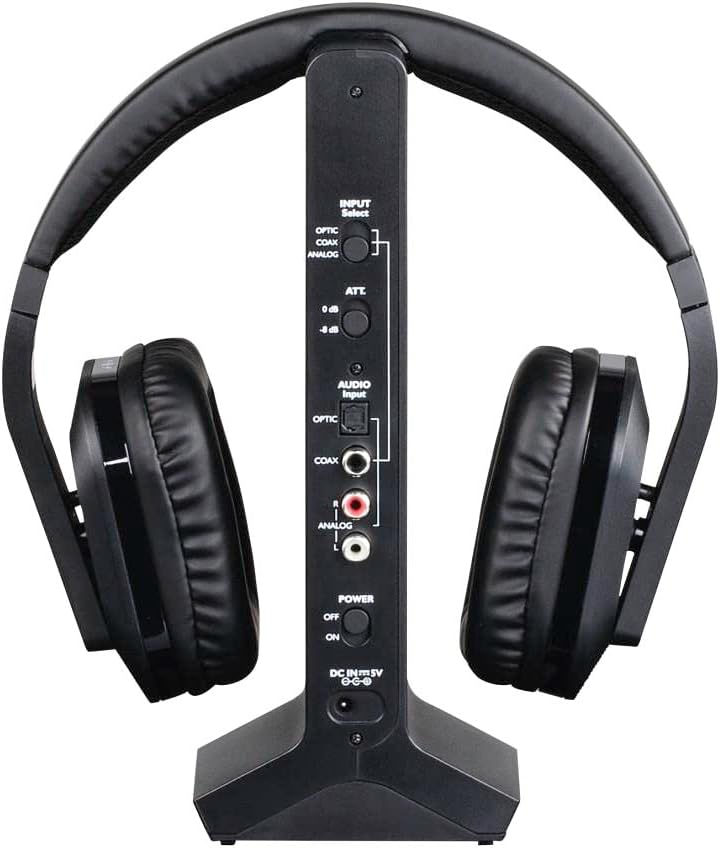
Выява: Задняя частка view of the Thomson WHP5327 charging station, displaying the various audio input ports (Optical, Coaxial, Analog) and power connection.
- Headphone Cradle: For storing and charging the headphones.
- Індыкатар зарада: Святлодыёдны індыкатар стану зарадкі.
- Індыкатар харчавання: Light indicating the station is powered on.
- Перамыкач выбару ўваходу: To choose between Optical, Coaxial, or Analog audio inputs.
- Порты аўдыёўваходу: Optical, Coaxial, and Analog (RCA) inputs for connecting to audio sources.
- Power Input (DC IN 5V): Для падлучэння адаптара сілкавання.
- Выключальнік сілкавання: To turn the charging station on/off.
Настройка
1. Зарадка навушнікаў
- Insert the provided rechargeable AA batteries into the headphone earcups, ensuring correct polarity.
- Connect the power adapter to the "DC IN 5V" port on the charging station and plug it into a wall outlet. The Power indicator on the station will light up.
- Place the headphones onto the charging station. Ensure the charging contacts align. The "CHARGE" indicator on the station will light up, indicating charging is in progress.
- Allow approximately 8 hours for the initial full charge. Subsequent charges may take less time.

Image: The Thomson WHP5327 headphones resting on their charging station, ready for use or charging.
2. Connecting the Charging Station to an Audio Source
The charging station acts as the transmitter. Choose the appropriate connection method for your audio source (TV, Hi-Fi, etc.).
- Optical Digital Audio (Recommended for TVs):
Connect an optical audio cable (not always included, check package contents) from your TV's "Optical Out" or "Digital Audio Out (Optical)" port to the "OPTIC" input on the charging station. Set the "INPUT Select" switch on the station to "OPTIC".
- Кааксіяльны лічбавы аўдыё:
Connect a coaxial audio cable from your audio source's "Coaxial Out" port to the "COAX" input on the charging station. Set the "INPUT Select" switch on the station to "COAX".
- Analog Audio (RCA or 3.5mm Jack):
Use the provided RCA audio cable to connect your audio source's "Audio Out" (red and white RCA jacks) to the "ANALOG" RCA inputs on the charging station. If your source has a 3.5mm headphone jack, use the provided 3.5mm to RCA adapter cable. Set the "INPUT Select" switch on the station to "ANALOG".
Ensure the power switch on the charging station is set to "ON" after connecting the audio source.
Інструкцыя па эксплуатацыі
Уключэнне/выключэнне
- To turn on the headphones, press and hold the Power button on the earcup until the indicator light illuminates.
- To turn off the headphones, press and hold the Power button again until the indicator light turns off.
Рэгулятар гучнасці
Adjust the listening volume using the integrated volume control dial/buttons located on the earcup of the headphones.

Image: A person comfortably wearing the Thomson WHP5327 headphones while watching television, demonstrating typical usage.
Аўтаматычнае адключэнне
The transmitter and headphones feature an automatic shut-off function. If no audio signal is detected for approximately 5 minutes, both the transmitter and headphones will automatically power down to conserve battery life.
Далёкасць бесправадной сувязі
The Thomson WHP5327 headphones offer a wireless range of up to 20 meters (approximately 65 feet) from the charging station/transmitter. Optimal range may vary depending on environmental factors such as walls, obstacles, and interference from other wireless devices.

Image: A diagram illustrating the wireless range between the headphones and the base unit, indicating a typical operational distance of 10-15 meters.
Wired Connection (Optional)
While primarily designed for wireless use, the WHP5327 headphones can also be used with a wired connection. Connect a 3.5mm audio cable (not always included) from your audio source (e.g., smartphone, tablet, laptop) to the 3.5mm audio jack on the headphone earcup. This allows for direct audio playback without the need for the charging station/transmitter.

Image: A person using the Thomson WHP5327 headphones connected via a cable to a smartphone, demonstrating the optional wired listening mode.
Тэхнічнае абслугоўванне
- Уборка: Use a soft, dry cloth to clean the headphones and charging station. Do not use liquid cleaners or abrasive materials.
- Замена батарэі: The headphones use rechargeable AA batteries. If the battery life significantly decreases, replace them with new rechargeable AA batteries of the same type and capacity. Ensure correct polarity when inserting.
- захоўванне: When not in use, store the headphones on the charging station to keep them charged and ready. If storing for an extended period, ensure batteries are fully charged and store in a cool, dry place.
Ліквідацыю непаладак
| праблема | Магчымая прычына | Рашэнне |
|---|---|---|
| Няма гуку з навушнікаў. | Headphones not turned on or not charged. Transmitter not powered or not connected to audio source. Incorrect input selected on transmitter. Гучнасць крыніцы гуку занадта нізкая або выключаная. | Ensure headphones are charged and turned on. Check power connection to transmitter and ensure it's ON. Verify audio cable connection from source to transmitter. Select correct input (Optical, Coaxial, Analog) on transmitter. Increase volume on audio source and headphones. |
| Гук скажоны або перарываецца. | Па-за дыяпазонам. Перашкоды ад іншых бесправадных прылад. Нізкі зарад батарэі ў навушніках. | Падыдзіце бліжэй да перадатчыка. Move transmitter away from other electronic devices (Wi-Fi routers, cordless phones). Recharge headphones. |
| Навушнікі не зараджаюцца. | Headphones not properly seated on charging station. Charging station not powered. Няспраўныя акумулятары. | Ensure headphones are correctly placed on the station, making good contact. Check power adapter connection and wall outlet. Замяніце батарэйкі, калі яны больш не трымаюць зарад. |
| Automatic shut-off occurs too quickly. | No audio signal or very low audio signal from source. | Increase the volume output from your audio source (e.g., TV). |
Тэхнічныя характарыстыкі
| Асаблівасць | Дэталь |
|---|---|
| мадэль | WHP5327 |
| Тып | Over-Ear, Circum-Aural, Wireless |
| Колер | Чорны |
| Матэрыял | Пластыкавыя |
| Перадача | Радыёчастота (РФ) |
| Апорная частата | 2400 МГц |
| АЧХ | 20 Гц - 22 кГц |
| Імпеданс | 24 Ом |
| Адчувальнасць | 120 дБ |
| Стаўленне сігнал / шум | 80 дБ |
| Distortion Rate (max.) | 1 % |
| Далёкасць бесправадной сувязі | Да 20 м (65 футаў) |
| Battery Life (average volume) | Да 8 гадзін |
| Крыніца харчавання | 2x AA Rechargeable Batteries (included) |
| Audio Inputs (Transmitter) | Optical, Coaxial, Analog (RCA) |
| Вага | 1.44 фунта (прыблізна 0.65 кг) |
Гарантыя і падтрымка
Thomson products are designed and manufactured to the highest quality standards. This product is covered by a limited warranty against defects in materials and workmanship. For detailed warranty terms and conditions, please refer to the warranty card included in your package or visit the official Thomson webсайт.
For technical support, troubleshooting assistance, or spare parts inquiries, please contact Thomson customer service. Contact information can typically be found on the product packaging or the official Thomson support webсайт.
Калі ласка, захавайце доказы пакупкі для прэтэнзій па гарантыі.
Ask a question about this manual
Ask about setup, troubleshooting, compatibility, parts, safety, or missing instructions. Manuals+ will review the question and use this page’s manual context to help answer it.