
1. Уводзіны
This manual provides essential information for the safe and effective use of your Vivibright GP90 UP Portable Video Projector. Please read it thoroughly before operating the device and retain it for future reference. The Vivibright GP90 UP is a portable video projector featuring an Android 4.42 operating system, 3200 lumens brightness, and 1280x800 native resolution, designed for multimedia entertainment and presentations.
2. Інструкцыі па тэхніцы бяспекі
- Не блакуйце вентыляцыйныя адтуліны. Забяспечце дастатковую цыркуляцыю паветра вакол праектара, каб пазбегнуць перагрэву.
- Не падвяргайце праектар уздзеянню дажджу або вільгаці, каб пазбегнуць паражэння электрычным токам або пажару.
- Пазбягайце глядзець прама ў аб'ектыў праектара, калі lamp уключаны, бо яркае святло можа пашкодзіць вочы.
- Размясціце праектар на ўстойлівай роўнай паверхні, каб прадухіліць яго падзенне.
- Выкарыстоўвайце толькі адаптар сілкавання, які пастаўляецца з праектарам.
- Не спрабуйце разбіраць або рамантаваць праектар самастойна. Звяртайцеся па любыя паслугі па абслугоўванні да кваліфікаванага персаналу.
- Трымайце праектар далей ад крыніц цяпла і прамых сонечных прамянёў.
3. Змесціва ўпакоўкі
Праверце наяўнасць усіх прадметаў у камплекце:
- Vivibright GP90 UP Projector
- Сілавы кабель
- Remote Control (may not be included with all models)
- Кіраўніцтва карыстальніка (гэты дакумент)
4. Прадукт скончыўсяview
Familiarize yourself with the projector's components and connection ports.
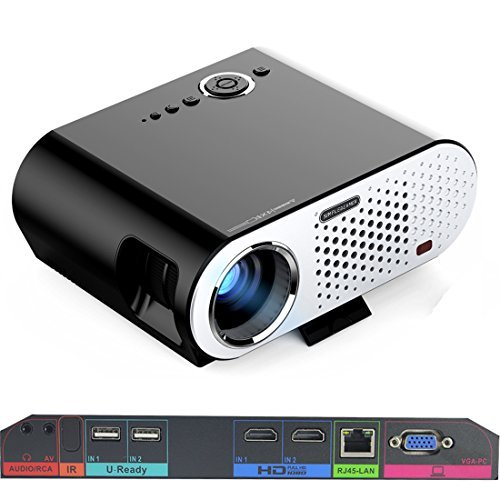
Image: The Vivibright GP90 UP projector showing its top controls, lens, and various input/output ports on the rear panel. The top features power and navigation buttons. The front has the projection lens. The rear panel includes Audio/RCA, IR receiver, two USB ports (U-Ready), two HDMI ports (HD), an RJ45-LAN port, and a VGA-PC port.
4.1 Пярэдняя панэль
- Праекцыйны аб'ектыў: Выпраменьвае выяву.
4.2 Верхняя панэль
- Кнопкі кіравання: Power, navigation, and menu access.
4.3 Rear Panel (Input/Output Ports)
- AUDIO/RCA: Audio output and composite video input.
- ВК: Інфрачырвоны прыёмнік для дыстанцыйнага кіравання.
- IN 1 / IN 2 (USB): Two USB ports for connecting USB storage devices.
- IN 1 / IN 2 (HDMI): Two HDMI inputs for digital video and audio sources.
- RJ45-LAN: Порт Ethernet для падлучэння да правадной сеткі.
- VGA-PC: VGA input for connecting to computers.
5. Настройка
5.1 Размяшчэнне
- Place the projector on a flat, stable surface or mount it on a ceiling or tripod.
- Ensure the projector is positioned directly in front of the screen or wall. Avoid angled placement as horizontal keystone correction is not available.
- The optimal projection distance ranges from 1.2m to 8.5m, producing screen sizes from 35 to 280 inches. For a 100-inch image, a distance of approximately 3 meters is recommended.
5.2 Падключэнне харчавання
- Падключыце кабель харчавання да ўваходу харчавання праектара.
- Plug the other end of the power cable into a suitable electrical outlet (90~240V/50~60Hz).
5.3 Падключэнне ўваходных прылад
- HDMI: Connect an HDMI cable from your source device (e.g., laptop, Blu-ray player, gaming console) to one of the projector's HDMI ports.
- USB: Insert a USB flash drive or external hard drive into a USB port to access media files.
- VGA: Connect a VGA cable from your computer to the projector's VGA-PC port.
- АВ: Use an RCA cable to connect older devices to the AV input.
- LAN: Connect an Ethernet cable to the RJ45-LAN port for a wired internet connection.
5.4 Рэгуляванне фокусу і трапецападобнага скажэння
- Фокус: Rotate the focus ring around the lens until the projected image is sharp and clear.
- Карэкцыя трапецеідальных скажэнняў: Use the manual vertical keystone correction feature (±15°) to adjust the image shape if the projector is not perfectly perpendicular to the screen. This corrects trapezoidal distortion.
6. Інструкцыя па эксплуатацыі
6.1 Уключэнне/выключэнне
- Уключэнне: Press the power button on the projector or the remote control. The indicator light will change, and the projector will start.
- Выключэнне: Press the power button again. Confirm shutdown if prompted. Allow the projector to cool down before unplugging.
6.2 Навігацыя па аперацыйнай сістэме Android
- The projector runs on Android 4.42. Use the remote control or connect a wireless mouse (recommended for easier navigation) to interact with the interface.
- Access pre-installed apps or download compatible applications from the app store. Note that some newer applications may not be compatible with Android 4.42.
6.3 Бесправадная праекцыя
- Wi-Fi: Connect to a wireless network via the settings menu. Supports dual-band Wi-Fi 2.4G.
- Bluetooth: Supports Bluetooth 4.0 for connecting wireless devices such as speakers. Note that Bluetooth audio output may only be available when using USB or Android sources, not HDMI.
- Wireless Push (EZCast / Miracast / Airplay): Use compatible apps on your smartphone or tablet to mirror your device's screen to the projector. Ensure your device and the projector are on the same Wi-Fi network.
6.4 Налады гуку
- The projector features built-in 4Ω, 5W stereo speakers with SRS sound technology.
- For enhanced audio, connect external speakers via the Audio Out port or wirelessly via Bluetooth (when using Android or USB sources).
7. Тэхнічнае абслугоўванне
7.1 Ачыстка
- Аб'ектыў: Выкарыстоўвайце мяккую тканіну без ворса, спецыяльна прызначаную для аптычных лінзаў. Не выкарыстоўвайце абразіўныя ачышчальныя сродкі.
- Casing: Працярыце знешнія паверхні праектара мяккай сухой тканінай. Для выдалення ўстойлівых забруджванняў выкарыстоўвайце злёгкуamp тканінай, а затым старанна высушыце.
- Вентыляцыйныя адтуліны: Перыядычна чысціце вентыляцыйныя адтуліны мяккай шчоткай або сціснутым паветрам, каб прадухіліць назапашванне пылу, які можа паўплываць на прадукцыйнасць і тэрмін службы.
7.2 Захоўванне
- Калі праектар не выкарыстоўваецца працяглы час, захоўвайце яго ў прахалодным, сухім месцы, удалечыні ад прамых сонечных прамянёў і экстрэмальных тэмператур.
- Cover the lens with its cap to protect it from dust and scratches.
8. Выпраўленне непаладак
| праблема | Магчымая прычына | Рашэнне |
|---|---|---|
| Няма праецыравання выявы | Power not connected; Input source not selected; Lens cap on | Check power connection; Select correct input source; Remove lens cap |
| Відарыс размыты | Фокус не адрэгуляваны; праектар занадта блізка/далёка | Adjust focus ring; Adjust projection distance |
| Выява мае трапецападобную форму | Праектар не перпендыкулярны экрану | Adjust vertical keystone correction; Reposition projector to be centered |
| Няма гуку | Volume too low; Muted; External speakers not connected/selected | Increase volume; Unmute; Check external speaker connections/settings |
| Wireless projection unstable | Weak Wi-Fi signal; Device incompatibility; Outdated Android OS | Ensure strong Wi-Fi signal; Check device compatibility with Miracast/Airplay; Consider wired connection if issues persist with older Android version. |
9. Тэхнічныя характарыстыкі
| Асаблівасць | Дэталь |
|---|---|
| Марка | Vivibright |
| мадэль | GP90 UP |
| Аперацыйная сістэма | Android 4.42 |
| Яркасць | 3200 Lumens (LED Luminous efficiency) |
| Роднае дазвол | 1280 x 800 (supports up to 1080P) |
| Каэфіцыент кантраснасці | 3000:1 (Dynamic up to 10,000:1) |
| Памер праекцыі | 35-280 цаляў |
| Адлегласць праекцыі | 1.2 м - 8.5 м |
| Каэфіцыент выкіду | 1.45:1 |
| Карэкцыя Keystone | Інструкцыя па вертыкалі ±15° |
| Жыццё крыніцы святла | Да 30,000 гадзін |
| Сувязь | Wi-Fi (2.4G), Bluetooth 4.0, 2x HDMI, 2x USB, VGA, AV, RJ45-LAN |
| Аўдыё | Built-in 4Ω, 5W stereo speakers with SRS sound |
| Электразабеспячэнне | 90~240В/50~60Гц |
| Памеры прадукту | 27 х 22 х 9 см |
| Вага прадмета | 3.17 кг |
10. Гарантыя і падтрымка
For warranty information and technical support, please refer to the documentation provided at the time of purchase or contact Vivibright customer service. Keep your purchase receipt as proof of purchase for warranty claims.