
1. Уводзіны
This manual provides essential information for setting up, operating, maintaining, and troubleshooting your Fossil Gen 3 Explorist Smart Watch, model FTW4002. Please read these instructions carefully to ensure proper use and longevity of your device.
Апісанне відэа: Надview of the Fossil Explorist FTW4002 Smart Watch, showcasing its design, touchscreen interface, and key features such as notifications, Google Maps, and activity tracking. The watch features a rose gold polished case and a blue leather strap.
2. Настройка
2.1 Распакоўка і першапачатковая аплата
Upon unboxing your Fossil Gen 3 Explorist Smart Watch, it is recommended to fully charge the device before first use. The watch comes with a magnetic charger. Connect the charger to a power source and place the watch onto the magnetic charging pad. Ensure the watch is securely seated for proper charging. A full charge may take approximately 4-5 hours.
2.2 Спалучэнне са смартфонам
To utilize the full functionality of your smartwatch, it must be paired with a compatible smartphone (Android OS or iOS). Ensure Bluetooth is enabled on your phone.
- Download the Wear OS by Google app from your phone's app store.
- Open the Wear OS app and follow the on-screen instructions to begin the pairing process.
- On your watch, select your preferred language and follow the prompts to connect to your phone.
- Пацвердзіце код спалучэння, які адлюстроўваецца на гадзінніку і тэлефоне.
2.3 Installing Wear OS App
The Wear OS by Google app is crucial for managing your watch settings, notifications, and installing additional applications. Ensure the app is always updated to the latest version for optimal performance.
3. Кіраванне разумным гадзіннікам
3.1 Асноўная навігацыя
Your Fossil Gen 3 Explorist features a responsive touchscreen and physical buttons for navigation.
- Сэнсарны экран: Правядзіце пальцам уверх, уніз, улева або ўправа, каб перамяшчацца па меню і апавяшчэннях. Націсніце, каб выбраць элементы.
- Кнопка кароны: Press the main crown button to return to the watch face or access the app drawer. Rotate the crown to scroll through lists.
- Наладжвальныя кнопкі: The two additional buttons can be customized to quickly launch your favorite apps or functions.

Апісанне малюнка: Пабочны прафесіяналfile of the Fossil Gen 3 Explorist Smart Watch, highlighting the rose gold case, the main rotating crown, and the two customizable push-buttons on the right side of the watch face.
3.2 Галасавыя каманды
The watch supports voice-activated Google Assistant. Simply say "Hey Google" or press and hold the main crown button to activate the assistant. You can ask questions, set reminders, or control smart home devices using your voice.
3.3 Апавяшчэнні
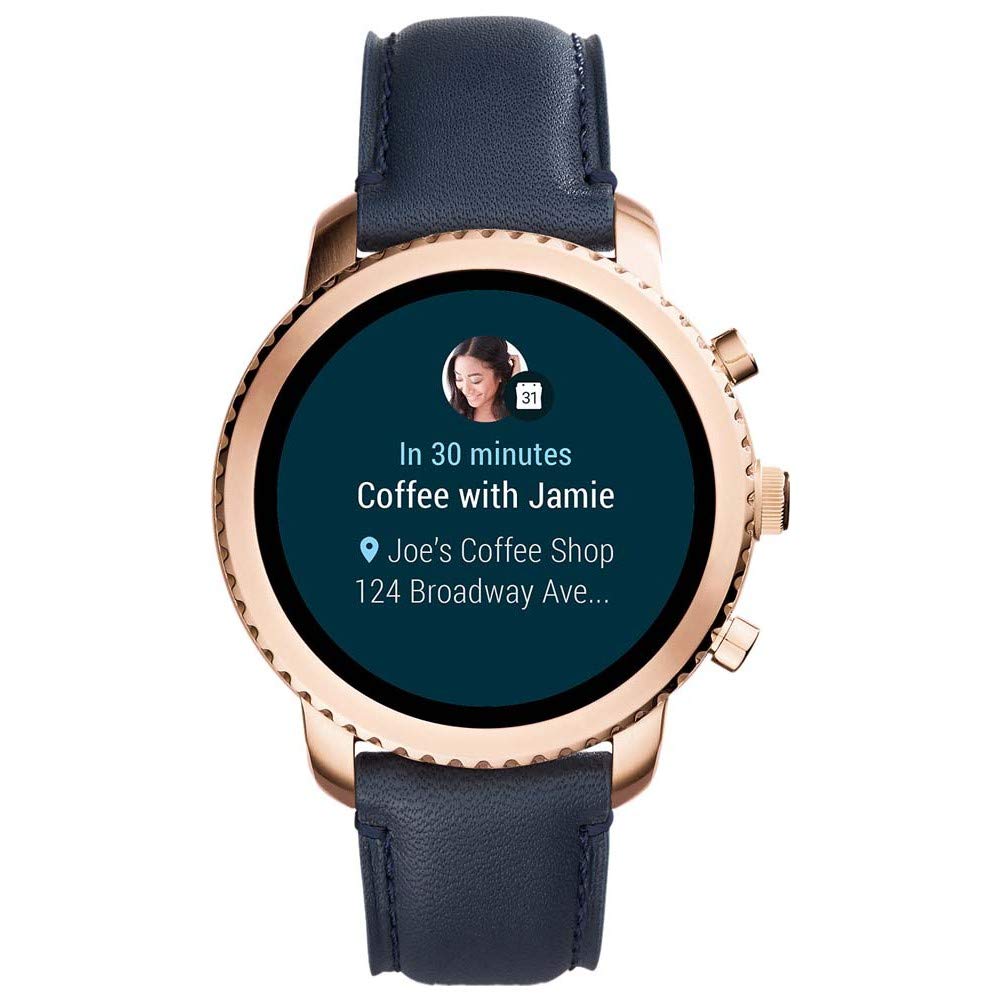
Receive social media alerts, text messages, emails, and app notifications directly on your watch. You can view and often respond to these notifications from your wrist.

Апісанне малюнка: The watch face showing a notification for an upcoming event: "In 30 minutes Coffee with Jamie" at "Joe's Coffee Shop".

Апісанне малюнка: The watch face indicating an incoming call from "Jamie calling phone" with options to accept or decline.

Апісанне малюнка: The watch face showing a message notification from "Jamie" stating "Just leaving. Meet you there!".
3.4 Адсочванне актыўнасці
The watch includes an activity tracker to monitor your daily steps and other fitness metrics. Use the pre-installed Google Fit app or other compatible fitness applications to track your progress.
3.5 Google Maps Navigation
Utilize Google Maps for turn-by-turn navigation directly on your wrist. This feature is particularly useful when walking or cycling, providing directions without needing to check your phone.
Апісанне малюнка: The watch face showing Google Maps navigation, indicating "20 min to Home" and "Light traffic on US-101 North".
3.6 Кіраванне музыкай
Control music playback on your paired smartphone directly from your watch. You can play, pause, skip tracks, and adjust media volume.

Апісанне малюнка: The watch face displaying music playback controls, showing the artist "Fitz and the Tantrums" and song "More Than Just a Dream", with play/pause, skip, and volume icons.
3.7 Кіраванне харчаваннем
- Уключэнне/выключэнне харчавання: Press and hold the main crown button to power the watch on or off.
- Restart/Reset: Access these options through the watch settings or by pressing and holding the main crown button for an extended period (typically 10-15 seconds for a forced restart).
4. Тэхнічнае абслугоўванне і догляд
4.1 Ачыстка
Каб пачысціць гадзіннік, працярыце корпус і раменьчык мяккай губкайamp cloth. Avoid using harsh chemicals or abrasive materials, as these can damage the finish. Ensure the watch is dry before charging.
4.2 Рэкамендацыі па воданепранікальнасці
The Fossil Gen 3 Explorist is water resistant. This means it can withstand splashes, rain, or brief immersion in shallow water. However, it is не suitable for swimming, diving, or high-pressure water activities. Avoid exposing the watch to hot water or steam.
4.3 Сыход за акумулятарам
To maximize battery life, avoid extreme temperatures. Charge the watch regularly and avoid letting the battery completely drain for extended periods. While charging, ensure the watch is placed on a stable, flat surface.

Апісанне малюнка: The underside of the Fossil Gen 3 Explorist Smart Watch, displaying the charging contacts, the Fossil logo, and the blue leather strap with a rose gold buckle.
5. Выпраўленне непаладак
5.1 Агульныя праблемы
- Хуткі разрад батарэі: This can be caused by frequent use of demanding apps, always-on display, or poor connectivity. Try reducing screen brightness, disabling unnecessary notifications, or turning off Wi-Fi when not needed.
- Праблемы з падключэннем: Ensure Bluetooth is active on both your watch and phone. Restart both devices and try re-pairing if issues persist. Check that the Wear OS app is running in the background on your phone.
- Нізкая прадукцыйнасць: If the watch feels sluggish, try restarting it. Close unused apps and ensure the Wear OS app on your phone is up to date.
5.2 Boot Loop Resolution
Some users may experience a boot loop issue where the watch continuously restarts. If this occurs:
- Press and hold the main crown button for approximately 10-15 seconds to force a restart.
- If the issue persists, try deactivating Google Assistant temporarily through the Wear OS app on your phone, then restart the watch.
- Ensure your watch's software is updated to the latest version.
- If all else fails, a factory reset may be necessary. Note that this will erase all data on your watch.
6. Тэхнічныя характарыстыкі
| Асаблівасць | Дэталь |
|---|---|
| Марка | Выкапні |
| мадэль | FTW4002 |
| Назва мадэлі | Fossil Explorist |
| Памеры прадукту | 8.6 х 11.6 х 11.6 см |
| Вага прадмета | 100 г |
| Аперацыйная сістэма | АС Android, iOS |
| Сумяшчальныя прылады | Смартфон |
| Тэхналогія адлюстравання | ВК |
| Памер пастаяннага экрана | 44 міліметраў |
| Тып дысплея | Аналога-лічбавы |
| Склад батарэі | Літый-палімерны |
| Бесправадны тып | Bluetooth |
| Тып раздыма | Bluetooth, WiFi |
| Інтэрфейс прылады - асноўны | Гузікі |
| Матэрыял | Нержавеючая сталь |
| Воданепранікальнасць | Yes (Splashes, rain, brief immersion) |
7. Інфармацыя аб гарантыі
Your Fossil Gen 3 Explorist Smart Watch comes with a Гарантыя ад вытворцы 2 год from the date of purchase. This warranty covers manufacturing defects under normal use. Please retain your proof of purchase for warranty claims. For detailed terms and conditions, refer to the warranty card included with your product or visit the official Fossil webсайт.
8. Падтрымка і абслугоўванне
For further assistance, technical support, or service inquiries, please visit the official Fossil support website or contact their customer service. You can find contact details and FAQs on the Fossil brand store page or in the documentation provided with your watch.