
1. Уводзіны
The Stealth Cam STC-PX14X is a high-performance hunting game and trail camera designed to capture images and videos of wildlife. Featuring a 10.0 Megapixel sensor and 14 IR emitters, it offers a 50-foot infrared range for clear night vision. The camera records HD video in 15-second clips at a 16:9 wide ratio and includes a burst mode that captures 1-6 images per triggering event. Recovery time can be set between 5-59 seconds or 5-59 minutes, allowing for flexible monitoring. This manual provides detailed instructions for setting up, operating, maintaining, and troubleshooting your STC-PX14X camera.
2. Настройка
2.1 Распакаванне
Carefully remove all components from the packaging. Ensure that the camera, mounting strap, and any included documentation are present. Inspect the camera for any signs of damage before proceeding with installation.
2.2 Устаноўка батарэі
The STC-PX14X camera requires 8 AA batteries for operation. To install batteries:
- Open the camera housing latch located on the side of the unit.
- Locate the battery compartment inside the camera.
- Insert 8 fresh AA batteries, ensuring correct polarity (+/-) as indicated within the compartment.
- Надзейна зачыніце крышку батарэйнага адсека.
2.3 Усталяванне SD-карты
A standard SD card (not included) is required to store captured images and videos. For optimal performance and to avoid potential issues, use a standard SD card. Avoid using Ultra, Pro, Max, or Extreme labeled SD cards, as these may cause compatibility problems.
- Адкрыўшы корпус камеры, знайдзіце слот для SD-карты.
- Устаўце SD-карту ў слот металічнымі кантактамі ўніз, пакуль яна не зафіксуецца на месцы.
- Каб выняць карту, акуратна націсніце на яе, пакуль яна не выскочыць.
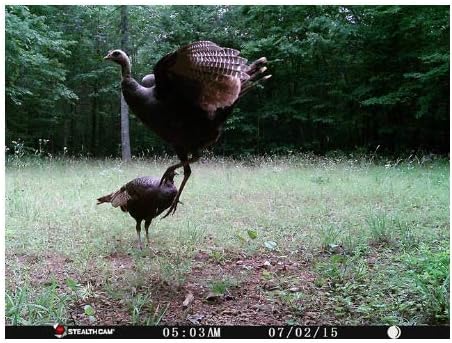
Image: The Stealth Cam STC-PX14X with its side compartment open, showing the internal control panel, screen, and battery/SD card access area.
2.4 Мантаж камеры
The STC-PX14X is designed for outdoor use and can be mounted using the included strap or a wall mount (not included).
- Select a suitable location that provides a clear view вобласці, якую вы хочаце кантраляваць.
- Прасуньце мантажны раменьчык праз адтуліны на задняй панэлі камеры.
- Securely fasten the camera to a tree or post, ensuring it is stable and pointed in the desired direction.
- Пры неабходнасці адрэгулюйце кут камеры.
3. Інструкцыя па эксплуатацыі
3.1 Уключэнне/выключэнне
To power on the camera, slide the power switch to the 'ON' position. The camera will perform a brief self-test. To power off, slide the switch to the 'OFF' position.
3.2 Асноўныя налады
Access the camera's menu using the control buttons inside the housing to adjust settings such as:
- рэжым: Select between Photo, Video, or Burst mode.
- дазвол: Set image resolution (up to 10 MP) or video resolution (1080p).
- Рэжым серыйнай здымкі: Configure the number of images (1-6) to capture per trigger.
- Час аднаўлення: Set the delay between triggered events (5-59 seconds or 5-59 minutes).
- Дата/час: Set the current date and time for accurate timestamps on captures.

Выява: спераду view of the Stealth Cam STC-PX14X camera, highlighting the lens and IR emitter array.
3.3 Фота- і відэаздымка
Once configured, the camera will automatically capture images or videos when motion is detected within its sensor range. The 14 IR emitters ensure effective capture even in low-light or nighttime conditions, with a range of up to 50 feet.

Выява: Былыample of a daytime photograph captured by the Stealth Cam STC-PX14X, showing a deer in a grassy field.
4. Тэхнічнае абслугоўванне
4.1 Ачыстка
To ensure optimal performance, periodically clean the camera's exterior, especially the lens and IR emitter area. Use a soft, dry cloth. For stubborn dirt, a slightly damp cloth can be used, but ensure no moisture enters the camera housing.
4.2 Замена батарэі
Replace all 8 AA batteries when the low battery indicator appears on the screen or when performance degrades. Always replace with a fresh set of high-quality alkaline or lithium batteries for best results.
4.3 Кіраванне SD-картай
Regularly check the SD card capacity. When the card is full, the camera will stop recording. Transfer captured media to a computer and format the SD card periodically to maintain performance. Always format the SD card using the camera's internal formatting function if available, or a computer, before reinserting it.
5. Выпраўленне непаладак
If you encounter issues with your Stealth Cam STC-PX14X, refer to the following common problems and solutions:
- Камера не ўключаецца:
- Ensure batteries are inserted correctly with proper polarity.
- Replace all 8 AA batteries with fresh ones.
- Check that the power switch is firmly in the 'ON' position. - Poor Picture/Video Quality:
- Ensure the camera lens is clean and free from dirt or condensation.
- Verify that you are using a standard SD card. High-speed cards (Ultra, Pro, Max, Extreme) may cause compatibility issues and result in poor image quality.
- Check lighting conditions. Extreme backlighting or very dark environments can affect quality. - No Night Photos/Videos:
- Check battery level; low batteries can affect IR emitter performance.
- Ensure the camera's IR settings are enabled (if configurable).
- Verify that the IR emitters are not obstructed. - Камера не спрацоўвае:
- Adjust the sensor sensitivity setting in the camera menu.
- Ensure the camera is positioned correctly, with no obstructions directly in front of the sensor.
- Check battery level. - Памылка SD-карты:
- Ensure the SD card is properly inserted.
- Try formatting the SD card using the camera's menu or a computer.
- Test with a different, known-good standard SD card.
6. Тэхнічныя характарыстыкі
| Назва мадэлі | STC-PX14X |
| Эфектыўнае рашэнне | 10 МП |
| Дазвол відэазахопу | 1080p |
| Даўжыня відэа | 15 seconds (16:9 wide ratio) |
| ВК-выпраменьвальнікі | 14 IR emitters |
| Далёкасць ВК | 50 футы |
| Серыйны рэжым | 1-6 images per triggering |
| Час аднаўлення | 5-59 seconds / 5-59 minutes |
| Рэйтынг воданепранікальнасці | IP54 |
| Крыніца харчавання | 8 AA batteries required (AC/DC optional) |
| Памеры | 1 х 1 х 1 цалі |
| Вага прадмета | 1.17 фунта |
| Тэхналогія падлучэння | Бесправадная сувязь, Wi-Fi |
| Выкарыстанне ў памяшканні/на вуліцы | На адкрытым паветры |
| Тып мацавання | Насценнае мацаванне |
7. Інфармацыя аб гарантыі
For detailed warranty information regarding your Stealth Cam STC-PX14X camera, please refer to the warranty card included with your product or visit the official Stealth Cam website. Warranty terms and conditions may vary and are subject to change by the manufacturer.
8. Падтрымка кліентаў
If you require further assistance or have questions not covered in this manual, please contact Stealth Cam customer support. You can typically find contact information, including phone numbers and email addresses, on the official Stealth Cam webсайт (www.stealthcam.com) or within the product packaging.