
Важныя інструкцыі па бяспецы
Please read and understand all safety instructions before using this product. Keep these instructions for future reference.
- Не выкарыстоўвайце гэты прыбор паблізу вады ці вільгаці.
- Чысціце толькі сухой анучай.
- Не блакуйце вентыляцыйныя адтуліны. Усталюйце ў адпаведнасці з інструкцыямі вытворцы.
- Не ўстанаўлівайце побач з крыніцамі цяпла, такімі як радыятары, абагравальнікі, пліты або іншыя прылады (у тым ліку ampLifiers), якія вырабляюць цяпло.
- Абараняйце сеткавы шнур ад наступання або заціскання, асабліва ў месцах вілкі, разеткі і месца выхаду з прылады.
- Выкарыстоўвайце толькі насадкі/аксэсуары, указаныя вытворцам.
- Адключайце гэты прыбор ад сеткі падчас навальніцы або калі ён не выкарыстоўваецца на працягу доўгага часу.
- Звяртайцеся да кваліфікаванага абслугоўваючага персаналу. Тэхнічнае абслугоўванне патрабуецца, калі прылада была пашкоджана якім-небудзь чынам, напрыклад, пашкоджаны шнур сілкавання або вілка, была праліта вадкасць або ў прыладу ўпалі прадметы, прылада падвяргалася ўздзеянню дажджу або вільгаці, не працуе належным чынам , або быў адкінуты.
Прадукт скончаныview
The AUNA Roadie KIDS Boombox is a versatile audio system featuring a top-loading CD player, Bluetooth connectivity, USB playback, AUX input, and AM/FM radio. It is designed for portable use with both AC power and battery options, and includes integrated LED lights.

Малюнак 1: Спераду view of the AUNA Roadie KIDS Boombox with active red LED lights.

Малюнак 2: Падрабязны пярэдні план view showing the display, USB port, and control panel.
Элементы кіравання і кампаненты
- Адсек для кампакт-дыскаў: Top-loading tray for audio CDs.
- Дысплей: LED screen showing track number, mode, and radio frequency.
- Кнопкі кіравання: Play/Pause, Stop, Skip Forward/Backward, Program, Album.
- Дакладчыкі: Integrated stereo speakers with LED illumination.
- Порт USB: Для прайгравання MP3/WMA files з флэшкі.
- Раз'ём AUX IN: 3.5-мм уваход для падлучэння знешніх аўдыёпрылад.
- Раз'ём для навушнікаў: Выхад 3.5 мм для прыватнага праслухоўвання.
- AM/FM антэна: Высуўная антэна для прыёму радыё.
- Рэгулятар гучнасці: Рэгулюе ўзровень гукавога выхаду.
- Пераключальнік рэжыму: Toggles between CD, USB, Bluetooth, AUX, AM, and FM modes.
- Выключальнік святла: Turns the LED speaker lights on or off.
- Раз'ём AC IN: Для падключэння адаптара пераменнага току.
- Батарэйны адсек: Located on the bottom for C-type batteries.
- Ручка для пераноскі: Для зручнасці пераноскі.
Настройка
Электразабеспячэнне
The AUNA Roadie KIDS Boombox can be powered by either the included AC power adapter or by batteries.
Падключэнне да сеткі пераменнага току
- Пераканайцеся, што бумбокс выключаны.
- Connect the small end of the AC power adapter to the AC IN jack on the back of the boombox.
- Plug the other end of the AC power adapter into a standard wall outlet (110-120V ~ / 50-60 Hz).

Малюнак 3: Задняя частка view with AC power input and antenna.
Ўстаноўка акумулятара
For portable use, the boombox requires 6 x C-type batteries (not included).
- Ensure the boombox is switched off and disconnected from AC power.
- Знайдзіце батарэйны адсек на ніжняй частцы прылады.
- Адкрыйце крышку батарэйнага адсека.
- Insert 6 C-type batteries, ensuring correct polarity (+/-) as indicated inside the compartment.
- Надзейна зачыніце крышку батарэйнага адсека.
Інструкцыя па эксплуатацыі
Агульная аперацыя
- Уключэнне/выключэнне харчавання: Use the main power switch located on the side of the unit.
- Рэгулятар гучнасці: Павярнуць АБ'ЁМ knob on the side of the unit to adjust the sound level.
- Выбар рэжыму: Выкарыстоўвайце РЭЖЫМ selector switch on the side to choose between CD/USB/BT/AUX and AM/FM radio functions.

Малюнак 4: бок view showing Volume and Mode controls.
Прайгравальнік кампакт-дыскаў
The boombox supports Audio CD, CD-R, CD-RW, and MP3-CDs.
- Пераключыць РЭЖЫМ селектар да CD.
- Gently press the 'OPEN' area on the CD compartment lid to open it.
- Пакладзеце кампакт-дыск на шпіндзель этыкеткай уверх.
- Close the CD compartment lid firmly until it clicks. The display will show 'CD' and then the total number of tracks.
- Націсніце ПРАЙГРАЦЬ/Паўза кнопку, каб пачаць прайграванне.
- Прэса ПРАЙГРАЦЬ/Паўза again to pause, and press СТОП каб завяршыць прайграванне.
- Выкарыстоўвайце ПЕРАХОДЗІЦЬ НАПЕРАД (>>|) або ПРАПУСК НАЗАД (|<) кнопкі для пераключэння паміж трэкамі.
- Запраграмаванае прайграванне: У рэжыме прыпынку націсніце кнопку ПРАГРАМА button. The display will show '01'. Use ПЕРАМОТАЦЬ ВПЕРЭД/НАЗАД каб выбраць трэк, затым націсніце ПРАГРАМА again to confirm. Repeat for up to 20 tracks (CD) or 99 tracks (MP3). Press ГУЛЬНЯ каб пачаць праграмаванае прайграванне.
- Функцыі паўтарэння: Падчас прайгравання націсніце Паўтор button to cycle through repeat modes (e.g., repeat one track, repeat all tracks, repeat folder for MP3 CDs).
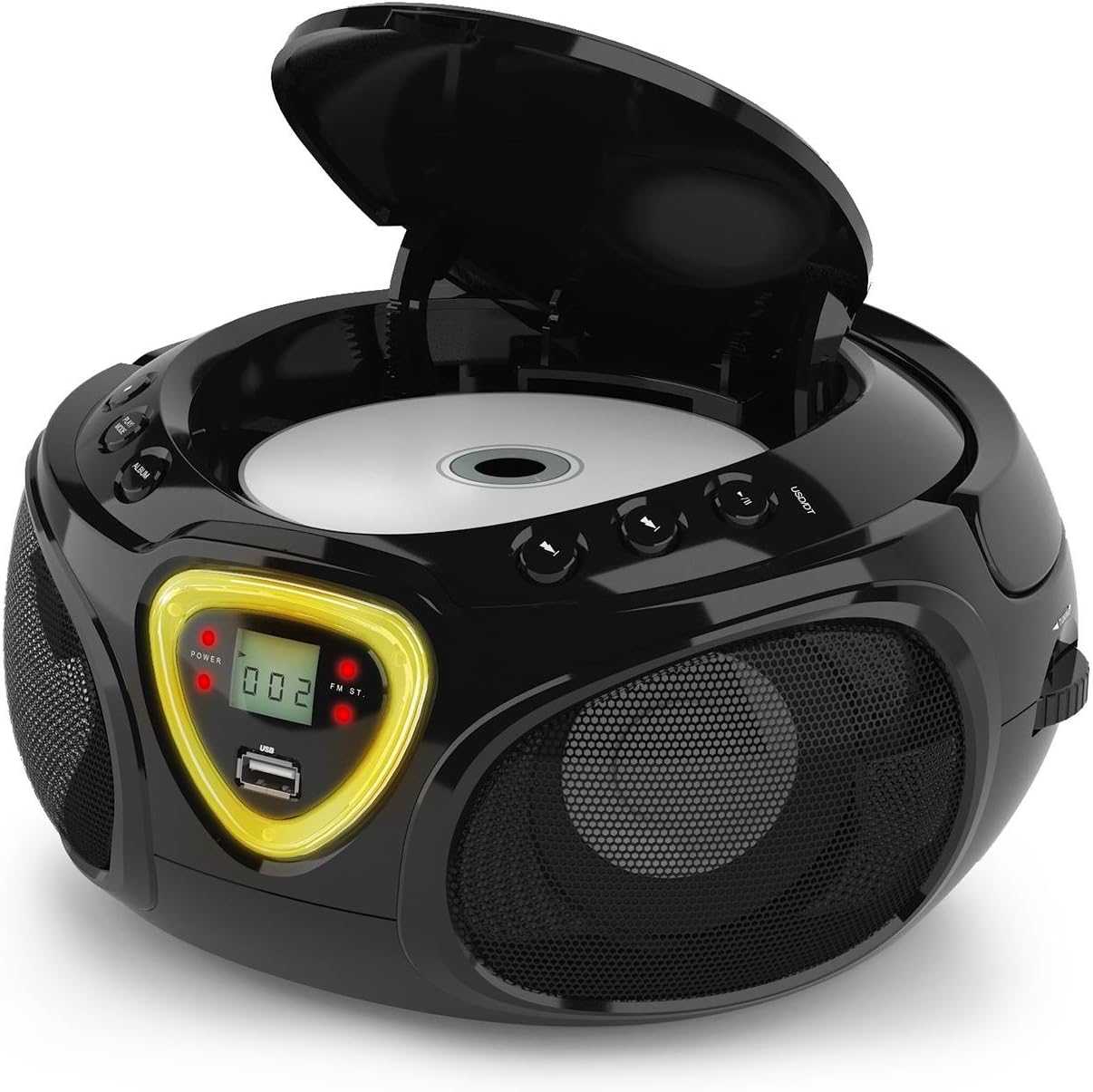
Малюнак 5: Адсек для кампакт-дыскаў адкрыты для ўстаўкі дыска.
Аперацыя Bluetooth
- Пераключыць РЭЖЫМ селектар да BT (Bluetooth). The display will show 'BT' and flash, indicating pairing mode.
- Уключыце Bluetooth на вашым смартфоне, планшэце або іншай прыладзе з падтрымкай Bluetooth.
- Пошук available devices and select 'AUNA Roadie' from the list.
- Once successfully paired, the 'BT' indicator on the boombox display will stop flashing and remain solid.
- You can now play audio from your connected device through the boombox. Use the controls on your device or the boombox's Play/Pause and Skip buttons to manage playback.
Прайграванне з USB
The boombox supports MP3 and WMA file formats from USB flash drives.
- Устаўце флэшку USB у USB port on the front of the boombox.
- Пераключыць РЭЖЫМ селектар да USB. The unit will automatically detect and begin playing compatible audio files.
- Выкарыстоўвайце ПРАЙГРАЦЬ/Паўза, СТОП, і ПЕРАМОТАЦЬ ВПЕРЭД/НАЗАД кнопкі для кіравання прайграваннем.
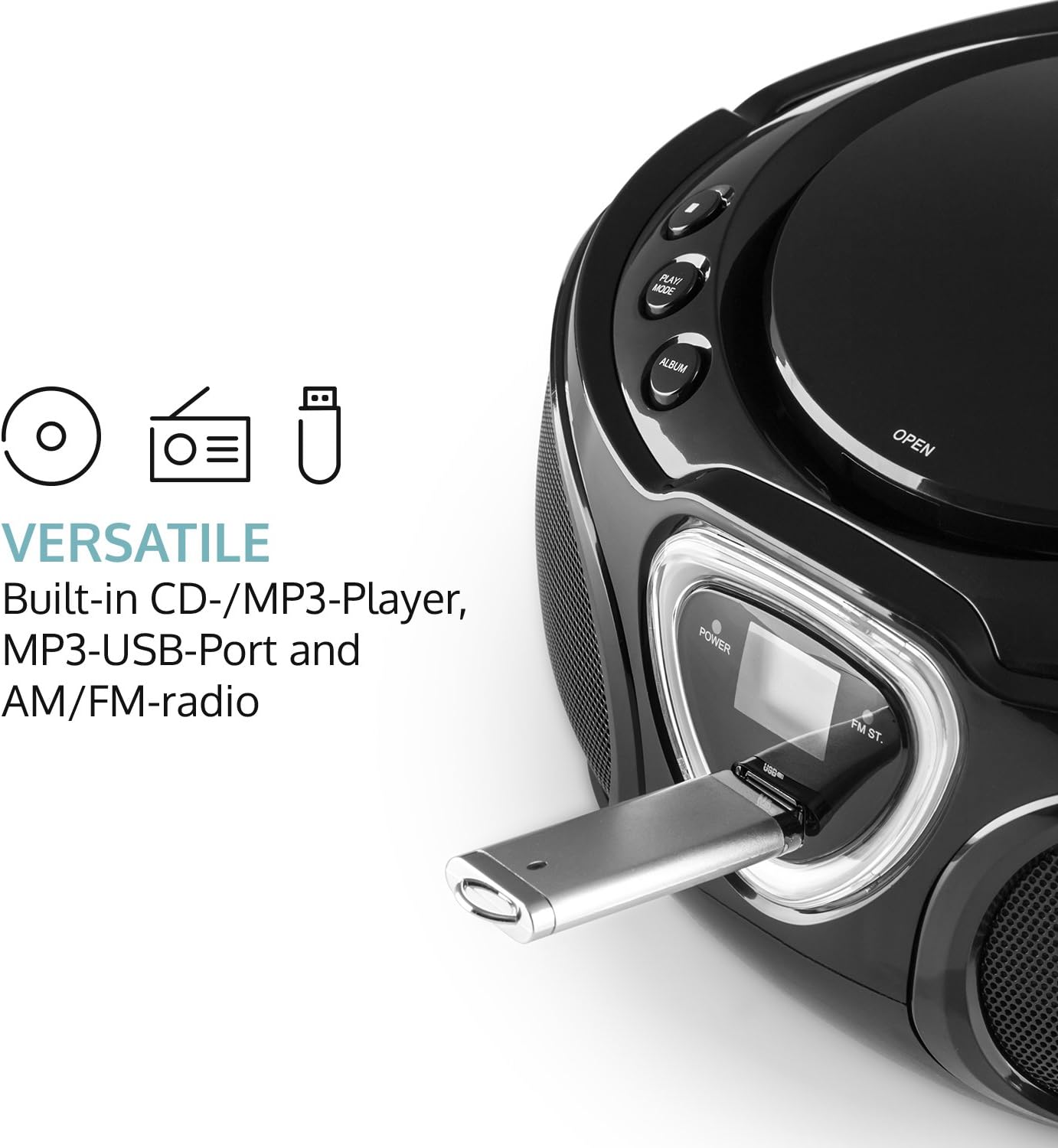
Figure 6: USB port with a flash drive inserted.
AUX ўваход
- Connect one end of a 3.5mm audio cable (not included) to the AUX IN jack on the boombox.
- Connect the other end of the audio cable to the headphone jack or audio output of your external audio device (e.g., MP3 player, smartphone).
- Пераключыць РЭЖЫМ селектар да ДАП.
- Control playback and volume directly from your external audio device.
Праца з радыё (AM/FM)
- Пераключыць РЭЖЫМ selector to either AM or FM.
- Для аптымальнага прыёму FM-дыяпазону выцягніце тэлескапічную антэну. Для прыёму AM-дыяпазону павярніце прыладу.
- Павярнуць ЦЮНІНГ dial on the side of the unit to scan for radio stations.

Малюнак 7: бок view with Tuning dial and Light switch.
Функцыя святлодыёднага святла
The boombox features multi-color LED lights that illuminate the speakers.
- Выкарыстоўвайце СВЯТЛО ВКЛ/ВЫКЛ switch on the side of the unit to turn the LED lights on or off.
- The lights will typically pulse and change color with the rhythm of the music when active.

Figure 8: Boombox with active LED lights.
Выкарыстанне навушнікаў
For private listening, connect any standard 3.5mm headphones (not included) to the НАВУШНІК jack. The main speakers will automatically mute when headphones are connected.
Тэхнічнае абслугоўванне
Ачыстка прылады
- Wipe the exterior of the boombox with a soft, dry cloth.
- Не выкарыстоўвайце абразіўныя ачышчальнікі, воск або растваральнікі, бо яны могуць пашкодзіць пакрыццё.
- For the CD lens, use a specialized CD lens cleaning kit if necessary. Avoid touching the lens directly.
Захоўванне
- Store the boombox in a cool, dry place away from direct sunlight and extreme temperatures.
- If storing for an extended period, remove the batteries to prevent leakage and damage to the unit.
Ліквідацыю непаладак
If you encounter any issues with your AUNA Roadie KIDS Boombox, please refer to the following common problems and solutions:
| праблема | Магчымая прычына | Рашэнне |
|---|---|---|
| Няма ўлады | AC adapter not connected, batteries depleted or incorrectly inserted. | Check AC adapter connection. Replace or correctly insert batteries. |
| Няма гуку | Volume too low, incorrect mode selected, headphones connected. | Increase volume. Select correct mode (CD, BT, USB, AUX, AM/FM). Disconnect headphones if using speakers. |
| Кампакт-дыск не прайграваецца | CD inserted incorrectly, CD dirty/scratched, incompatible CD format. | Ensure CD is label-side up. Clean CD. Use compatible CD format. |
| Bluetooth не падключаецца | Boombox not in BT mode, device too far, already paired to another device. | Switch to BT mode. Ensure device is within 10 meters. Disconnect from other devices. |
| Дрэнны прыём радыё | Antenna not extended/adjusted, weak signal. | Extend and adjust FM antenna. Rotate unit for AM. Try a different location. |
Тэхнічныя характарыстыкі
| Асаблівасць | Дэталь |
|---|---|
| Марка | АУНА |
| Тэхналогія падлучэння | Дапаможны, Bluetooth, USB |
| Колер | Чорны |
| Тып дынаміка | Стэрэа |
| Памеры прадмета (Д х Ш х У) | 7.9 х 9.5 х 5.2 цалі |
| Крыніца харчавання | AC (110-120V ~ / 50-60 Hz) or 6 x C-type batteries (9V DC) |
| Сумяшчальныя прылады | Ноўтбук, смартфон, планшэт |
| Ватtage | 3 watts (2 x 1.5W speakers) |
| Рэжым выхаду гуку | Стэрэа |
| Падтрымліваюцца аўдыяфарматы | CD, MP3, WMA |
| Версія Bluetooth | 2.1 + EDR (Profiles: A2DP, AVRCP) |
| Compatible CD Formats | Audio CD, CD-R, CD-RW, MP3-CDs |
| Programmable Playback | 20 tracks (CD), 99 tracks (MP3) |
| Вага прадмета | 3.4 фунта |
Гарантыя і падтрымка
This product comes with a manufacturer's warranty. For detailed warranty information, please refer to the documentation included with your purchase or visit the official AUNA website. If you require technical assistance, troubleshooting beyond this manual, or have questions regarding your product, please contact AUNA customer support.