
Уводзіны
This manual provides comprehensive instructions for the setup, operation, and maintenance of your NETUM NT-R3 Mini 1D CCD Bluetooth Barcode Scanner. Please read this guide thoroughly to ensure proper use and to maximize the performance of your device.
Змест пакета
Пасля распакавання пераканайцеся, што ўсе пералічаныя ніжэй прадметы наяўныя і знаходзяцца ў добрым стане:
- 1 x NETUM Mini Bluetooth Barcode Scanner (NT-R3)
- 1 х USB-кабель для зарадкі
- 1 х Кароткае кіраўніцтва
- 1 x 2.4 GHz Adapter
Прадукт скончаныview
The NETUM NT-R3 is a compact and versatile 1D CCD barcode scanner designed for portability and ease of use. Its ring-style design allows for comfortable wear, enhancing productivity in various environments.

Image: The NETUM NT-R3 Mini Barcode Scanner, a small black electronic device with a screen and button, designed to be worn on a finger with an adjustable ring structure.
Асноўныя характарыстыкі:
- Ring Design: Magnesium alloy casing and trigger for durability and ease of use.
- Паварот на 180°: Unique rotatable design for scanning from various angles.
- CCD Scanning: Reads 1D barcodes directly from LCD screens of computers or mobile devices, including poorly printed or damaged barcodes.
- Бесправаднае падключэнне: Supports Bluetooth (SPP, HID) and 2.4 GHz wireless connections.
- Шырокая сумяшчальнасць: Compatible with Windows XP/7/8/8.1/10, Google Android, iOS, and Mac OS X.
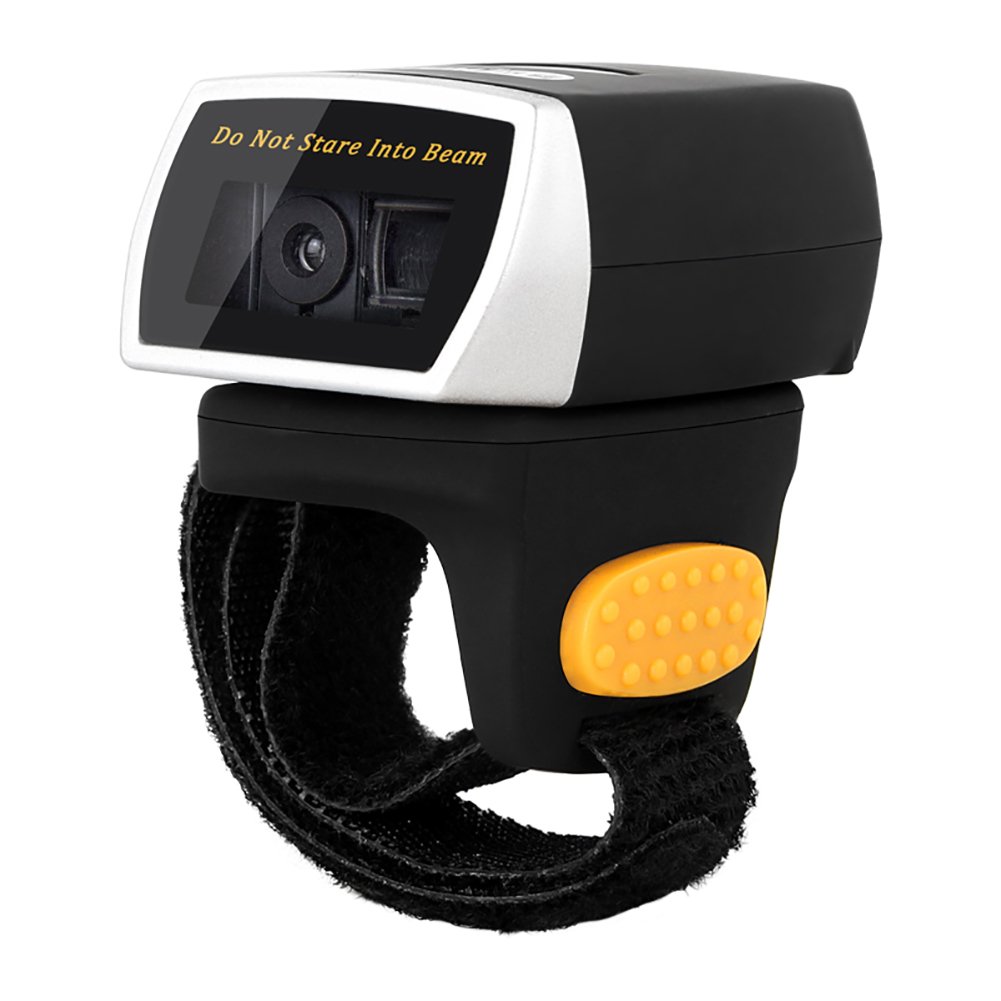
Image: The NETUM NT-R3 Mini Barcode Scanner demonstrating its 180-degree rotation design, allowing for flexible scanning angles.

Image: The NETUM NT-R3 Mini Barcode Scanner held in a hand, illustrating its compact dimensions (50mm x 44mm x 38mm) and light weight (50g), emphasizing its strong compatibility with various devices.
Настройка і падключэнне
1. Зарадка сканера
Before initial use, fully charge the scanner using the provided USB charging cable. Connect the small end of the USB cable to the scanner's charging port and the other end to a USB power source (e.g., computer, USB wall adapter). The charging indicator light will show the charging status.
2. Уключэнне / выключэнне харчавання
To power on the scanner, press and hold the trigger button for a few seconds until you hear a beep and see the indicator light. To power off, press and hold the trigger button again until the indicator light turns off.
3. Параметры падключэння
The NT-R3 scanner offers two primary connectivity methods:
Bluetooth Connection (HID Mode - Keyboard Emulation)
- Пераканайцеся, што сканер уключаны.
- Scan the "Bluetooth HID Mode" barcode (refer to the Quick Start Guide for specific barcodes).
- On your host device (smartphone, tablet, computer), enable Bluetooth and search for available devices.
- Select "NETUM Barcode Scanner" or a similar name from the list of devices.
- The scanner will beep to confirm successful pairing.
In HID mode, scanned barcodes are input directly as keyboard entries into any active text field.
Bluetooth Connection (SPP Mode - Serial Port Profile)
SPP mode is typically used for applications that require direct data communication with the scanner. This mode requires specific software on the host device to interpret the data. Refer to your application's documentation for SPP setup.
- Пераканайцеся, што сканер уключаны.
- Scan the "Bluetooth SPP Mode" barcode (refer to the Quick Start Guide).
- Follow the instructions provided by your specific application for connecting to an SPP device.
Бесправадное злучэнне 2.4 ГГц
- Plug the provided 2.4 GHz adapter into a USB port on your computer.
- Пераканайцеся, што сканер уключаны.
- Scan the "2.4G Wireless Mode" barcode (refer to the Quick Start Guide).
- The scanner will automatically connect to the adapter. A successful connection is indicated by a specific beep or light pattern (refer to the Quick Start Guide for details).
The 2.4 GHz connection offers a wireless range of up to 10 meters (30 feet).
Рэжымы працы
The NETUM NT-R3 scanner supports two data upload modes:
1. Рэжым імгненнай загрузкі
In this mode, scanned barcodes are immediately transmitted to your connected device. This is suitable for real-time data entry.
2. Рэжым захоўвання
The scanner can store up to 2000 barcodes in its built-in flash memory. This mode is useful when working out of range of your host device. Barcodes can be uploaded later when a connection is established.
Image: A visual representation of the two upload modes. Instant Upload Mode shows barcodes being sent directly to a device. Storage Mode shows barcodes being stored internally and then uploaded later.
To switch between modes, scan the corresponding configuration barcodes found in the Quick Start Guide.
Сканаванне штрых-кодаў
Каб сканаваць штрых-код:
- Трымайце сканер акном сканавання, накіраваным да штрых-кода.
- Press the trigger button. A red scanning line will appear.
- Align the red scanning line across the entire barcode.
- Once successfully scanned, the scanner will emit a beep, and the indicator light will flash.
The NT-R3 is capable of reading 1D barcodes from various surfaces, including:
- Друкаваныя этыкеткі
- LCD screens (computers, smartphones, tablets)
- Poorly printed or damaged barcodes
Тэхнічнае абслугоўванне
Сыход за батарэяй
- Каб падоўжыць тэрмін службы батарэі, пазбягайце частай поўнай разрадкі батарэі.
- Рэгулярна зараджайце сканер, нават калі ён не выкарыстоўваецца пастаянна.
- Захоўвайце сканер у прахалодным, сухім месцы, калі ён не выкарыстоўваецца працяглы час.
Уборка
- Выкарыстоўвайце мяккую, сухую тканіну без ворса для чысткі вонкавай паверхні сканера.
- Для акна сканавання выкарыстоўвайце сурвэтку для чысткі аб'ектыва або мяккую сурвэтку, злёгку працёртуюampвадой або мяккім неабразіўным ачышчальнікам.
- Не выкарыстоўвайце агрэсіўныя хімікаты, растваральнікі або абразіўныя матэрыялы, бо яны могуць пашкодзіць прыладу.
Ліквідацыю непаладак
| праблема | Магчымая прычына | Рашэнне |
|---|---|---|
| Сканер не ўключаецца. | Нізкі акумулятар. | Зараджайце сканер не менш за 2 гадзіны. |
| Сканер не падключаецца праз Bluetooth. | Incorrect mode selected; device not discoverable; out of range. | Ensure "Bluetooth HID Mode" or "SPP Mode" is scanned. Make sure Bluetooth is enabled on the host device and the scanner is within 10 meters. Try re-pairing. |
| Scanner does not connect via 2.4 GHz adapter. | Adapter not properly inserted; incorrect mode selected. | Ensure the 2.4 GHz adapter is securely plugged in. Scan the "2.4G Wireless Mode" barcode. |
| Сканер не счытвае штрых-коды. | Barcode is unreadable; scanner not aligned; scanner in storage mode. | Ensure the barcode is clear and well-lit. Align the red line across the entire barcode. If in storage mode, switch to instant upload mode or upload stored data. |
| Адсканаваныя дадзеныя адлюстроўваюцца няправільна. | Keyboard layout mismatch (for HID mode). | Scan the appropriate keyboard layout barcode (e.g., US, UK, French) from the Quick Start Guide. |
Тэхнічныя характарыстыкі
| Асаблівасць | Дэталь |
|---|---|
| Нумар мадэлі | NT-R3 |
| Тэхналогія сканавання | 1D CCD |
| Сувязь | Bluetooth (SPP, HID), 2.4 GHz Wireless, USB |
| Сумяшчальныя аперацыйныя сістэмы | Windows XP/7/8/8.1/10, Google Android, iOS, Mac OS X |
| Хуткасць сканавання | 260 сampменш за секунду |
| Ёмістасць захоўвання | Да 40 000 штрых-кодаў (у рэжыме захоўвання) |
| Тып батарэі | 1 літый-металічная батарэя (у камплекце) |
| Крыніца харчавання | Харчаванне ад батарэі |
| Аперацыйная Voltage | 5 вольт |
| Максімальная тэмпература захоўвання | 45 градусы па Цэльсіі |
| Сертыфікаты | CE, ISO, RoHS |
| Вытворца | Guangzhou Netum Electronic Technology Co.,Ltd. |
| Краіна паходжання | Кітай |
Гарантыя і падтрымка
Палітыка вяртання
This product is eligible for a refund or replacement within 30 days of purchase, in accordance with the seller's return policy.
Інфармацыя вытворцы
Manufacturer: Guangzhou Netum Electronic Technology Co.,Ltd.
For further assistance or technical support, please refer to the contact information provided in your Quick Start Guide or visit the official NETUM webсайт.
Note: Information regarding spare parts availability and guaranteed software updates is not available at this time.