
D-Link DCS-8000LH/E
D-Link DCS-8000LH mydlink Mini HD Wi-Fi Camera User Manual
Model: DCS-8000LH/E
1. Уводзіны
Thank you for choosing the D-Link DCS-8000LH mydlink Mini HD Wi-Fi Camera. This compact and powerful camera is designed to provide high-definition surveillance for your home or office, offering features like motion detection, night vision, and smart home integration. This manual will guide you through the setup, operation, and maintenance of your new camera.
Змест пакета
- D-Link Mini HD Camera (1 unit)
- Power Adapter (Electric Cable)
- Mounting Kit (for wall mounting)
- Кіраўніцтва па хуткай ўстаноўцы
2. Прадукт скончыўсяview
Familiarize yourself with the key components of your D-Link DCS-8000LH camera.
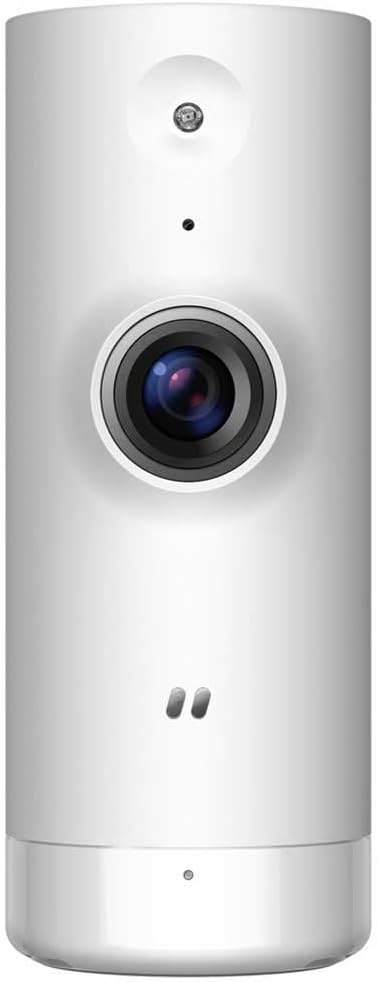
Малюнак 2.1: Фронт view of the D-Link DCS-8000LH camera, showing the lens, microphone, and status LED.

Малюнак 2.2: Назад view of the D-Link DCS-8000LH camera, highlighting the power input port.
3. Кіраўніцтва па наладцы
Follow these steps to set up your D-Link DCS-8000LH camera.
- Спампуйце праграму mydlink: Пошук "mydlink" on the App Store (iOS) or Google Play Store (Android) and install the application on your smartphone.
- Create a mydlink Account: Open the mydlink app and follow the on-screen instructions to create a new account or log in if you already have one.
- Уключыце камеру: Connect the provided power adapter to the camera's power port and plug it into a wall outlet. Wait for the camera's status LED to indicate it's ready for setup (usually blinking orange or green).
- Add Camera to mydlink App: In the mydlink app, tap the "Add Device" or "+" icon. Scan the QR code located on the camera or its packaging. Follow the app's prompts to connect the camera to your Wi-Fi network. Ensure your Wi-Fi network is 2.4 GHz.
- Размяшчэнне: Position the camera in your desired location. It supports desk or wall mounting. Ensure it has a clear line of sight to the area you wish to monitor and is within range of your Wi-Fi signal.
Note: For optimal performance, place the camera away from direct sunlight or strong light sources that could affect image quality.
4. Кіраванне камерай
Once set up, you can access and control your camera through the mydlink app.
Асноўныя характарыстыкі:
- HD Video Streaming: View live video in 720p HD resolution directly from your smartphone.
- Выяўленне руху: The camera can detect movement and send instant notifications to your phone. You can customize detection zones and sensitivity within the app.
- AI-based Person Detection: Distinguish between people and other moving objects to reduce false alarms.
- Начное бачанне: Equipped with infrared LEDs, the camera provides clear video up to 5 meters in low-light or complete darkness.
- Убудаваны мікрафон: Listen to audio from the camera's surroundings.
- Воблачнае сховішча: Securely store recorded video clips in the mydlink cloud (subscription may be required).
- Інтэграцыя разумнага дома: Compatible with Google Assistant, Amazon Alexa, and IFTTT for voice control and automation.
Using the mydlink App:
The mydlink app provides a comprehensive interface for managing your camera. From the app, you can:
- View live feed and playback recorded videos.
- Adjust video quality and settings.
- Configure motion detection alerts and schedules.
- Manage cloud recording settings.
- Access camera settings and firmware updates.
5. Тэхнічнае абслугоўванне
Правільнае абслугоўванне забяспечвае даўгавечнасць і аптымальную працу вашай камеры.
- Уборка: Use a soft, dry cloth to clean the camera lens and body. Do not use liquid cleaners or abrasive materials, as they may damage the camera.
- Абнаўленні прашыўкі: Regularly check for and install firmware updates through the mydlink app. Updates often include performance improvements and security enhancements.
- Умовы навакольнага асяроддзя: Ensure the camera is used within its specified operating temperature and humidity ranges. Avoid exposing it to extreme temperatures, direct water, or high humidity.
6. Выпраўленне непаладак
If you encounter issues with your D-Link DCS-8000LH camera, refer to the following common solutions.
- Камера ў аўтаномным рэжыме:
- Праверце, ці правільна ўключана камера, а адаптар сілкавання надзейна падключаны.
- Ensure your Wi-Fi router is working and the camera is within Wi-Fi range.
- Перазапусціце камеру, адключыўшы і зноў падключыўшы адаптар сілкавання.
- Перазапусціце свой Wi-Fi маршрутызатар.
- Дрэнная якасць відэа:
- Пераканайцеся, што аб'ектыў камеры чысты і без пылу або плям.
- Праверце хуткасць падключэння да Інтэрнэту. Павольнае падключэнне можа паўплываць на якасць трансляцыі.
- Adjust video resolution settings in the mydlink app.
- Выяўленне руху не працуе:
- Verify that motion detection is enabled in the mydlink app.
- Adjust motion detection sensitivity and detection zones.
- Пераканайцеся, што няма перашкод, якія блакавалі камеру view.
- Не магу падключыцца да Wi-Fi:
- Ensure you are connecting to a 2.4 GHz Wi-Fi network. The camera does not support 5 GHz networks.
- Двойчы праверце пароль ад Wi-Fi.
- Move the camera closer to your Wi-Fi router during setup.
- Perform a factory reset on the camera (refer to the Quick Installation Guide for instructions) and try setup again.
For more detailed troubleshooting or persistent issues, please refer to the D-Link support webсайт або звярніцеся ў службу падтрымкі.
7. Тэхнічныя характарыстыкі
| Асаблівасць | Дэталь |
|---|---|
| Нумар мадэлі | DCS-8000LH/E |
| Марка | D-Link |
| Колер | Белы |
| Тэхналогія падлучэння | Бесправадная сувязь (Wi-Fi) |
| Дазвол запісу відэа | 720p HD |
| Эфектыўнае дазвол відэа | 720 пікселяў |
| Частата кадраў | 30 кадраў у секунду |
| Viewing кут | 112 градусаў |
| Дыяпазон начнога бачання | 5 метраў |
| Асаблівасці | Motion Detector, HD Resolution |
| Выкарыстанне ў памяшканні/на вуліцы | У памяшканні |
| Сумяшчальныя прылады | Смартфон |
| Крыніца харчавання | Электрычны кабель |
| Памеры прадмета (Д х Ш х У) | 35 х 38 х 92 міліметраў (3.5 х 3.8 х 9.2 см) |
| Вага прадмета | 57.7 грамы (2.04 унцыі) |
| Тып мацавання | Wall Mount, Desk |
| Уключаныя кампаненты | D-Link Mini HD Camera (1) |
| Патрабуецца акумулятар | няма |
| Вытворца | D-LINK |
8. Гарантыя і падтрымка
For warranty information, please refer to the warranty card included with your product or visit the official D-Link website. D-Link provides technical support and resources to assist you with any questions or issues you may have.
- Інтэрнэт-падтрымка: Visit the D-Link support portal for FAQs, troubleshooting guides, and firmware downloads.
- Звязацца са службай падтрымкі: Contact D-Link customer service for direct assistance. Contact details can be found on the D-Link webсайт.
Disclaimer: The product originates from the European Economic Area (EEE). The product is genuinely sourced from manufacturer-authorized distributors.