
Propel Zipp Nano 2.0
Propel Zipp Nano 2.0 Drone User Manual
Model: Zipp Nano 2.0
Марка: Propel
1. Уводзіны
This manual provides essential information for the safe and effective operation of your Propel Zipp Nano 2.0 Drone. Please read this manual thoroughly before operating the drone to ensure proper usage and to prevent damage or injury.
The Propel Zipp Nano 2.0 is a high-performance 2.4 GHz indoor/outdoor drone designed for stable flight and exciting aerial maneuvers. It features a built-in 6-axis gyroscopic chip for stability, multiple speed settings, and the ability to perform 360-degree stunt rolls.
2. Тэхніка бяспекі
Always prioritize safety when operating the drone. Failure to follow these guidelines may result in injury or damage to the drone or property.
- Do not operate the drone near people, animals, or obstacles.
- Трымайце рукі, валасы і свабодную вопратку далей ад круцячыхся прапелераў.
- Перад кожным палётам пераканайцеся, што дрон цалкам зараджаны.
- Не лётайце пры моцным ветры або неспрыяльных умовах надвор'я.
- Supervise children during operation. This product contains small parts and is not suitable for children under 3 years due to choking hazard.
- Do not attempt to modify or repair the drone yourself. Contact customer support for assistance.

Image: Back of the product packaging, highlighting features and a warning about small parts.
3. Змесціва ўпакоўкі
Праверце, ці ёсць усе прадметы ў вашай упакоўцы:
- Propel Zipp Nano 2.0 Drone (Red)
- 2.4 GHz Digital Remote Control
- USB-кабель для зарадкі
- Spare Replacement Parts (Propellers)

Image: The Propel Zipp Nano 2.0 Drone and its remote control visible within the clear retail packaging.
4. Настройка
4.1 Зарадка акумулятара дрона
The drone is powered by an internal rechargeable battery. Use the provided USB charging cable to charge the drone.
- Connect the small end of the USB charging cable to the drone's charging port.
- Connect the large end of the USB charging cable to a USB power source (e.g., computer USB port, USB wall adapter).
- Індыкатар зарадкі на USB-кабелі будзе гарэць падчас зарадкі і згасне пасля поўнай зарадкі.
- Charging typically takes approximately 30-45 minutes. Do not overcharge.
4.2 Усталёўка батарэек у пульце дыстанцыйнага кіравання
The remote control requires 2 "AAA" batteries (not included).
- Знайдзіце батарэйны адсек на задняй частцы пульта дыстанцыйнага кіравання.
- Адкрыйце крышку батарэйнага адсека.
- Insert 2 "AAA" batteries, ensuring correct polarity (+/-).
- Надзейна зачыніце крышку батарэйнага адсека.

Image: The remote control for the Propel Zipp Nano 2.0 Drone, showing its various buttons and joysticks.
4.3 Спалучэнне дрона і пульта дыстанцыйнага кіравання
To establish a connection between the drone and the remote control:
- Пастаўце беспілотнік на роўную роўную паверхню.
- Turn on the drone by sliding the power switch. The drone's LED lights will flash.
- Уключыце пульт дыстанцыйнага кіравання.
- Націсніце левы джойсцік (дросель) цалкам уверх, затым пацягніце яго цалкам уніз.
- The drone's LED lights will turn solid, indicating successful pairing.
5. Кіраванне дронам
5.1 Кіраванне палётам
Азнаёмцеся з канструкцыяй і функцыямі пульта дыстанцыйнага кіравання:
- Левы джойсцік (дросель/рысканне):
- Push up to increase altitude (throttle).
- Push down to decrease altitude.
- Push left/right to rotate the drone (yaw).
- Правы джойсцік (тангаж/крэн):
- Push up/down to move forward/backward (pitch).
- Push left/right to move left/right (roll).
- Кнопка хуткасці: Cycles through 3 different speed settings (slow, medium, high).
- Stunt Button: Press to initiate 360-degree stunt rolls (see 5.4).
- T-Mode Button: Activates T-Mode for beginner pilots, providing more stable and controlled flight.
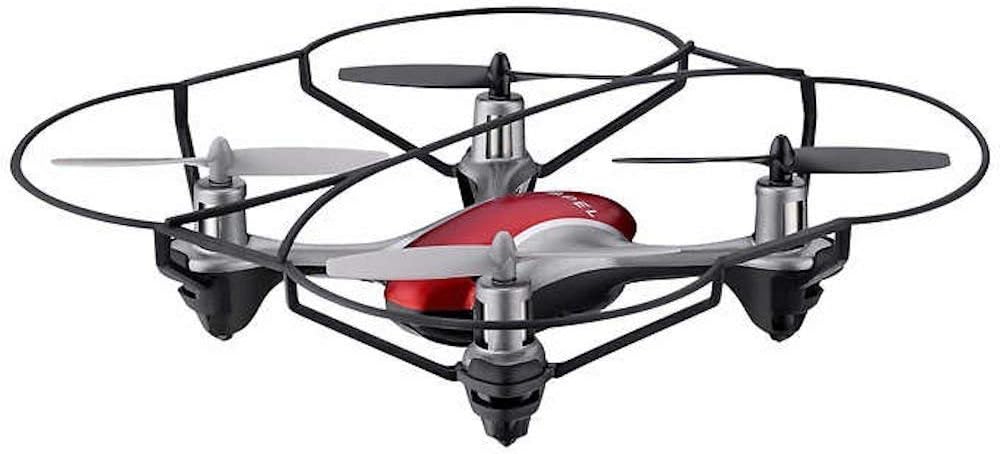
Image: The Propel Zipp Nano 2.0 Drone, showcasinдзякуючы кампактнай канструкцыі і ахоўным ахоўным прыладам прапелера.
5.2 Узлёт і пасадка
- Узлёт: After pairing, slowly push the left joystick (throttle) up to lift off.
- Пасадка: Slowly pull the left joystick (throttle) down until the drone lands gently.
5.3 Altitude Hold
The Zipp Nano 2.0 features an air pressure sensor that helps lock altitude in mid-air, making it easier to control and hover stably.
5.4 360-Degree Stunt Rolls
To perform a stunt roll:
- Ensure the drone is flying at a sufficient height (at least 6-8 feet).
- Press the dedicated Stunt Button on the remote control.
- Immediately push the right joystick in the desired direction (forward, backward, left, or right) to execute the roll.

Выява: Пад вуглом view of the Propel Zipp Nano 2.0 Drone, highlighting its sleek design and protective frame.
6. Тэхнічнае абслугоўванне
- Уборка: Use a soft, dry cloth to clean the drone and remote control. Do not use harsh chemicals or water.
- Замена прапелера: If propellers become damaged, replace them with the provided spare parts. Carefully remove the damaged propeller and snap the new one into place, ensuring correct orientation.
- захоўванне: When not in use, store the drone and remote control in a cool, dry place away from direct sunlight.
7. Выпраўленне непаладак
| праблема | Магчымая прычына | Рашэнне |
|---|---|---|
| Дрон не рэагуе на пульт дыстанцыйнага кіравання. | Not paired, low drone battery, low remote control batteries. | Re-pair the drone and remote. Charge drone battery. Replace remote control batteries. |
| Дрон ляціць хаатычна або дрэйфуе. | Not calibrated on a level surface, damaged propeller, strong wind. | Ensure drone is placed on a flat surface for pairing. Check for damaged propellers and replace if necessary. Fly in calm conditions. |
| Drone does not lift off. | Low drone battery, propellers not spinning correctly. | Charge drone battery fully. Check for obstructions around propellers. |
8. Тэхнічныя характарыстыкі
| Асаблівасць | Дэталь |
|---|---|
| Марка | Рухаць |
| Назва мадэлі | Propel 2.4 ghz (Zipp Nano 2.0) |
| Тэхналогія падлучэння | Радыёчастота (2.4 ГГц) |
| Аперацыйны дыяпазон | Да 200 футаў |
| Гіраскоп | Built-in 6-axis gyroscopic chip |
| Налады хуткасці | 3 (Slow, Medium, High) |
| Асаблівасці | 360-degree stunt rolls, Altitude Hold, T-Mode for beginners |
| Тып(ы) матэрыялу | Plastic, Carbon Fibre |
| Памеры прадукту | 13.97 х 3.81 х 13.97 см |
| Вага прадмета | 453.59 г (1 фунт) |
| Колер | Чырвоны |
| Узровень майстэрства | Пачатковец |
9. Гарантыя і падтрымка
Propel offers unlimited replacement parts for one year from the date of purchase. For warranty claims, technical support, or to order replacement parts, please refer to the contact information provided on the product packaging or the official Propel webсайт.
Захоўвайце чэк аб куплі ў якасці пацверджання пакупкі для мэт гарантыйнага абслугоўвання.
Ask a question about this manual
Ask about setup, troubleshooting, compatibility, parts, safety, or missing instructions. Manuals+ will review the question and use this page’s manual context to help answer it.