
Уводзіны
Thank you for choosing the Altec Lansing ALP-L2200PK Lightning Series Speaker. This powerful Bluetooth speaker is designed for both indoor and outdoor use, featuring a robust audio system, dynamic party lights, and a built-in media player. This manual provides essential information for setting up, operating, maintaining, and troubleshooting your speaker to ensure optimal performance and longevity.

Малюнак 1: Спераду view of the ALP-L2200PK speaker, showcasing the main woofer and integrated party lights.
Асаблівасці прадукту
- Ультрапартатыўны дызайн: Equipped with a built-in trolley handle and wheels for easy transport.
- Высокая выхадная магутнасць: Features 2,200 watts peak power with a 15-inch high excursion woofer and a 3.5-inch horn tweeter.
- Універсальнае падключэнне: Supports Bluetooth streaming with a range of up to 100 feet, USB and SD card media playback, FM radio, XLR, RCA, and AUX inputs.
- Dynamic Party Lights: User-controlled multi-color light show with 5 built-in modes to enhance your audio experience.
- Спалучэнне стэрэа: Ability to wirelessly pair with a second Lightning speaker for an immersive stereo sound experience.
- Аксэсуары ў камплекце: Comes with a microphone and speaker stand.
Кіраўніцтва па ўстаноўцы
1. Распакаванне
Carefully remove the speaker and all accessories from the packaging. Retain the packaging for future transport or storage.
2. Фізічнае размяшчэнне
- Place the speaker on a stable, flat surface. For optimal sound dispersion, consider using the included speaker stand.
- Забяспечце дастатковую вентыляцыю вакол дынаміка, каб прадухіліць перагрэў.
- The speaker is designed for both indoor and outdoor use, but it is not waterproof. Avoid exposure to rain or excessive moisture.
3. Падключэнне сілкавання
Connect the power cable to the AC input on the rear panel of the speaker and then to a standard electrical outlet.
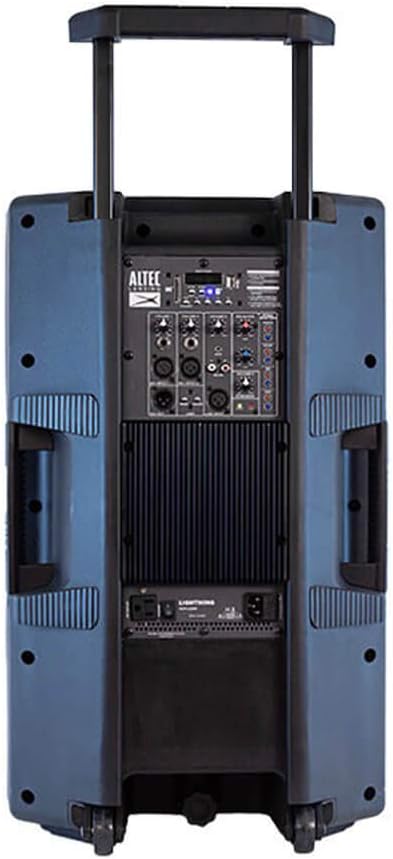
Figure 2: Rear panel of the ALP-L2200PK, illustrating the various input and output connections.
4. Пачатковае ўключэнне
Locate the power switch on the rear panel and turn the speaker ON. The display will illuminate, indicating the speaker is ready for operation.
Інструкцыя па эксплуатацыі
1. Спарванне Bluetooth
- Ensure the speaker is powered on and in Bluetooth mode (usually indicated on the display).
- На мабільнай прыладзе (смартфоне, планшэце, ноўтбуку) уключыце Bluetooth і знайдзіце даступныя прылады.
- Select "ALP-L2200PK" from the list of devices. Once connected, a confirmation sound may play.
2. Media Player (USB/SD Card)
Insert a USB drive or SD card containing audio files into the respective slot on the control panel. The speaker will automatically detect the media and begin playback. Use the control panel buttons to navigate tracks and adjust volume.
3. FM-радыё
Switch to FM radio mode using the mode button on the control panel. Use the tuning controls to scan for and select radio stations.
4. Wired Audio Inputs (XLR, RCA, AUX)
- Уваход XLR: For professional audio equipment like microphones or mixers.
- Уваход RCA: For connecting devices with RCA outputs (e.g., DVD players, older audio equipment).
- Уваход AUX: For connecting devices with a 3.5mm audio jack (e.g., smartphones, MP3 players).
Connect your audio source to the appropriate input on the rear panel. Select the corresponding input mode on the speaker's control panel.
5. Stereo Pairing (BT-LINK)
To create a wireless stereo pair with another Altec Lansing Lightning Series speaker (e.g., GSP-L2200PK), ensure both speakers are powered on and in Bluetooth mode. Follow the BT-LINK instructions provided with your second speaker to establish the connection. Once paired, audio will play in stereo across both units.
6. Кіраванне святочным асвятленнем
Use the dedicated light control buttons on the speaker's panel to cycle through the 5 built-in light modes, adjust colors, or turn the lights off. The lights can pulse with the beat of the music or maintain a steady glow.
7. Выкарыстанне мікрафона
Connect the included microphone to the designated microphone input on the rear panel. Adjust the microphone volume using the dedicated control.
Тэхнічнае абслугоўванне
- Уборка: Выкарыстоўвайце мяккую сухую тканіну для чысткі вонкавага боку дынаміка. Не выкарыстоўвайце абразіўныя ачышчальнікі, воск або растваральнікі.
- захоўванне: Калі дынамік не выкарыстоўваецца працяглы час, захоўвайце яго ў прахалодным, сухім месцы, удалечыні ад прамых сонечных прамянёў і экстрэмальных тэмператур.
- Вентыляцыя: Ensure the speaker's vents are not blocked during operation to prevent overheating.
- Шнур харчавання: Рэгулярна правярайце шнур харчавання на наяўнасць пашкоджанняў. У выпадку пашкоджання спыніце выкарыстанне і звярніцеся ў службу падтрымкі кліентаў.
Ліквідацыю непаладак
| праблема | Магчымая прычына | Рашэнне |
|---|---|---|
| Няма ўлады | Power cable not connected; Power switch off; Blown fuse; Power outlet issue. | Ensure power cable is securely connected. Turn power switch ON. Check the fuse (refer to specifications for type). Test the power outlet with another device. |
| Няма гуку | Volume too low; Incorrect input mode selected; Audio source issue; Damaged speaker component. | Increase master volume and input volume. Select the correct input mode (Bluetooth, AUX, USB, etc.). Verify audio source is playing. If only tweeter works and subwoofer does not, contact customer support. |
| Памылка спалучэння Bluetooth | Speaker not in pairing mode; Device too far; Interference; Device's Bluetooth off. | Ensure speaker is in Bluetooth pairing mode. Move device closer to speaker. Avoid strong electromagnetic interference. Turn Bluetooth on/off on your device. |
| Не працуе святочнае святло | Lights turned off; Mode selected does not show lights. | Press the light control button to cycle through modes or turn lights on. |
| Перагрэў дынаміка | Blocked ventilation; Prolonged high volume use. | Ensure vents are clear. Reduce volume and allow speaker to cool down. If issue persists, discontinue use and contact customer support. |
Тэхнічныя характарыстыкі

Figure 3: Dimensions of the ALP-L2200PK speaker.
| Асаблівасць | Дэталь |
|---|---|
| Назва мадэлі | ALP-L2200PK |
| Марка | Альтэк Лансінг |
| Тып дынаміка | Woofer (15 Inches), Horn Tweeter (3.5 Inches) |
| Пікавая выхадная магутнасць | 2200 ват |
| Тэхналогія падлучэння | Bluetooth, USB, SD Card, XLR, RCA, AUX |
| Дыяпазон Bluetooth | Да 100 футаў |
| Рэжым выхаду гуку | Stereo (with BT-LINK pairing) |
| Памеры (Д х Ш х У) | 36 Г х 43 Ш х 71 В сантыметраў (14.17 Г х 16.93 Ш х 27.95 В цаляў) |
| Вага прадмета | 20 кг (44.09 фунтаў) |
| Матэрыял | АБС |
| Колер | Blue (referring to woofer color) |
| Уключаныя кампаненты | Speaker, Microphone, Speaker Stand |
| Рэкамендуемае выкарыстанне | У памяшканні, на адкрытым паветры |
| Воданепранікальны | няма |
Гарантыя і падтрымка
For detailed warranty information, please refer to the warranty card included with your product or visit the official Altec Lansing webсайт.
If you encounter any issues not covered in the troubleshooting section or require further assistance, please contact Altec Lansing customer support. Contact details can typically be found on the product packaging or the official brand webсайт.
Altec Lansing Official Webсайт: https://alteclansing.com/