
1. Уводзіны
Welcome to the user manual for your Sades S-16 Gunblade Gaming Mouse. This high-performance wired gaming mouse is designed to provide precision, comfort, and customization for an enhanced gaming experience. Please read this manual carefully to ensure proper setup and operation of your device.
2. Змесціва ўпакоўкі
Калі ласка, пераканайцеся, што ўсе прадметы прысутнічаюць у вашай упакоўцы:
- Sades S-16 Gunblade Gaming Mouse
- Кіраўніцтва па эксплуатацыі
- Дыск з драйверам
3. Асаблівасці прадукту
- Avago Optical Sensor: Provides accurate and reliable tracking for precise control.
- Рэгуляваныя ўзроўні DPI: Cycle through 4 preset DPI settings to match your gaming style and preference.
- 7 Кнопкі кіравання: Includes programmable buttons for enhanced functionality.
- Наладжвальнае святлодыёднае асвятленне: Features 8 customizable LED color options for personalized aesthetics.
- Эрганамічны дызайн: Shaped for comfortable use during extended gaming sessions.
- Трывалая канструкцыя: Пабудаваны з якасных матэрыялаў для даўгавечнасці.
4. Настройка
4.1 Падключэнне мышы
To connect your Sades S-16 Gunblade Gaming Mouse:
- Знайдзіце даступны USB-порт на вашым кампутары.
- Шчыльна ўстаўце USB-раз'ём мышы ў USB-порт.
- Ваш камп'ютар павінен аўтаматычна распазнаць мыш.
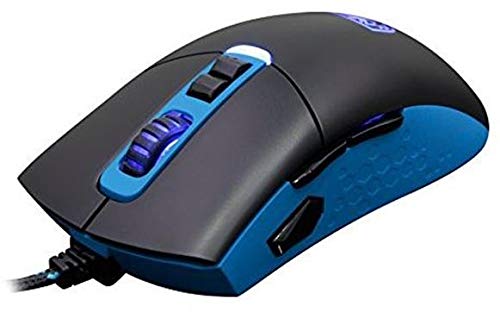
Figure 1: Sades S-16 Gunblade Gaming Mouse connected to a computer.
4.2 Ўстаноўка драйвера
For full customization and advanced features, driver installation is recommended:
- Insert the provided Driver CD into your computer's optical drive.
- Follow the on-screen instructions to install the Sades S-16 software.
- If you do not have an optical drive, or for the latest version, visit the official Sades website to download the drivers.
Заўвага: Some users may experience compatibility issues with the included software on newer operating systems. The mouse functions as a standard plug-and-play device without the software, but customization of buttons and LEDs requires the software. The mouse features an in-built memory module to save configurations.
5. Інструкцыя па эксплуатацыі
5.1 Функцыі кнопак
The Sades S-16 Gunblade Gaming Mouse features 7 control buttons:
- Левая кнопка мышы: Першаснае дзеянне.
- Правая кнопка мышы: Дадатковае дзеянне/кантэкстнае меню.
- Кола пракруткі: Scrolls content up/down. Also functions as a clickable middle button.
- DPI Up Button: Павялічвае адчувальнасць DPI.
- DPI Down Button: Зніжае адчувальнасць DPI.
- Forward Side Button: Перамяшчаецца наперад web браўзеры або праграмы.
- Backward Side Button: Пераходзіць назад у web браўзеры або праграмы.
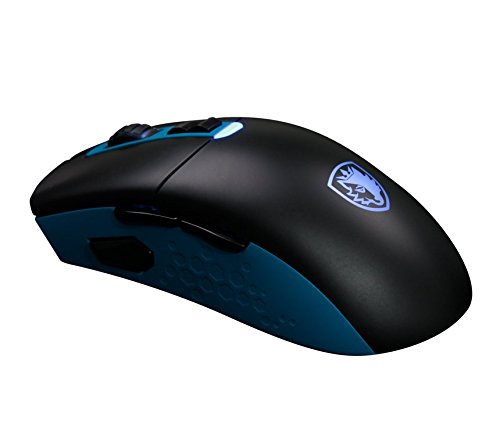
Малюнак 2: бок view illustrating the forward and backward thumb buttons.
5.2 Рэгуляванне DPI
Use the dedicated DPI Up and DPI Down buttons, typically located below the scroll wheel, to cycle through the 4 available DPI sensitivity levels. The mouse's LED lighting may change to indicate the currently selected DPI setting.
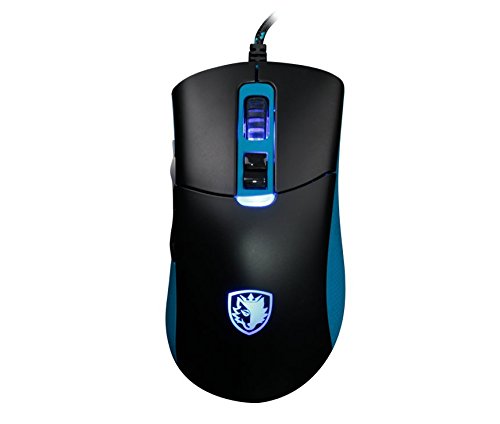
Малюнак 3: Верх view highlighting the scroll wheel and DPI adjustment buttons.
5.3 LED Customization
If the Sades S-16 software is installed, you can customize the LED lighting effects and choose from 8 different colors. Refer to the software's interface for detailed instructions on personalization.
5.4 Эрганоміка і счапленне
The Sades S-16 is designed with an ergonomic shape. It is a relatively large mouse, which may be particularly comfortable for users with larger hands or those who prefer a fingertip grip style.
6. Тэхнічнае абслугоўванне
6.1 Ачыстка
- Use a soft, dry, lint-free cloth to clean the surface of the mouse.
- For the optical sensor, gently clean with a cotton swab lightly dampened with isopropyl alcohol. Ensure no liquid enters the mouse.
- Пазбягайце выкарыстання агрэсіўных хімічных рэчываў або абразіўных матэрыялаў, бо яны могуць пашкодзіць пакрыццё мышы.
6.2 Storage and Cable Care
- Store the mouse in a clean, dry environment away from extreme temperatures when not in use.
- Avoid sharp bends, kinks, or excessive pulling on the USB cable to prevent internal wire damage.
7. Выпраўленне непаладак
7.1 Мыш не рэагуе
- Пераканайцеся, што кабель USB надзейна падключаны да спраўнага порта USB на вашым кампутары.
- Паспрабуйце падключыць мыш да іншага порта USB.
- Перазагрузіце кампутар.
7.2 Jerky Movement or Inaccurate Tracking
- Check the underside of the mouse for any plastic protectors on the mouse skates and remove them if present.
- Пераканайцеся, што аптычны датчык на ніжняй частцы мышы чысты і без пылу або смецця.
- Use the mouse on a clean, uniform surface or a high-quality mouse mat.
7.3 Праблемы з праграмным забеспячэннем
- Verify that you have installed the correct drivers for your operating system.
- If experiencing issues on newer Windows versions, try running the software in compatibility mode.
- Check the official Sades website for updated software or firmware.
7.4 Scroll Wheel Issues
- If the scroll wheel feels loose or unresponsive, inspect it for any obstructions or debris that might be affecting its movement.
8. Тэхнічныя характарыстыкі
| Марка | Sades |
| мадэль | S-16 |
| Сувязь | Правадной (USB) |
| Тып датчыка | Optical (Avago Sensor) |
| Ўзроўні DPI | 4 наладжвальныя ўзроўні |
| Гузікі | 7 кнопкі кіравання |
| Святлодыёднае асвятленне | Customizable (8 colors) |
| Сумяшчальнасць аперацыйнай сістэмы | Linux, Windows 7, Windows XP (і больш новыя версіі) |
| Апаратная платформа | Ноўтбук, персанальны кампутар |
9. Гарантыя і падтрымка
The Sades S-16 Gunblade Gaming Mouse comes with a standard manufacturer's warranty. Please refer to the warranty card included in your product packaging for detailed terms and conditions, or visit the official Sades webсайт для атрымання дадатковай інфармацыі.
For technical support, troubleshooting assistance, or any other inquiries, please contact Sades customer service through their official webсайт або прызначаныя каналы падтрымкі.