
Edifier DA5100
Кіраўніцтва карыстальніка для дынамікаў Edifier DA5100 5.1
Ваша поўнае кіраўніцтва па ўсталёўцы, эксплуатацыі і абслугоўванні.
Уводзіны
Дзякуй за пакупкуasing the Edifier DA5100 5.1 multimedia speaker system. This manual provides detailed instructions to help you set up, operate, and maintain your speakers for optimal performance and longevity. Please read this manual thoroughly before using the product.
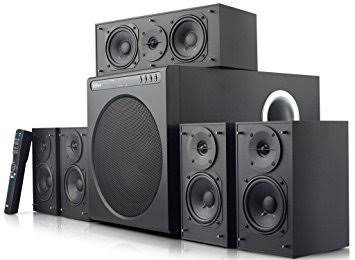
Змест пакета
Перад тым, як працягнуць, пераканайцеся, што ўсе кампаненты прысутнічаюць у вашай упакоўцы:
- Блок сабвуфера
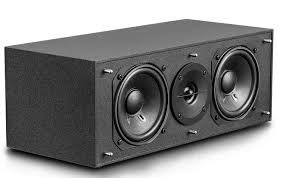
- Цэнтральны дынамік
- Front satellite speakers (2)
- Rear satellite speakers (2)
- Пульт дыстанцыйнага кіравання
- Audio input cables (RCA to RCA, 3.5mm to RCA)
- Speaker connection cables
- Кіраўніцтва карыстальніка (гэты дакумент)
Важныя меры бяспекі
Каб забяспечыць бяспечную працу і прадухіліць пашкоджанні, калі ласка, выконвайце наступнае:
- Не падвяргайце прыладу ўздзеянню дажджу або вільгаці.
- Do not open the speaker enclosures; there are no user-serviceable parts inside.
- Place the unit on a stable, level surface to prevent tipping.
- Ensure adequate ventilation around the speakers and subwoofer.
- Disconnect from power during lightning storms or when unused for long periods.
- Захоўваць удалечыні ад крыніц цяпла і прамых сонечных прамянёў.
- Выкарыстоўвайце толькі пазначаную крыніцу харчавання і аксэсуары.
Кіраўніцтва па ўстаноўцы
1. Размяшчэнне дынамікаў
Proper speaker placement is crucial for optimal 5.1 surround sound experience.
- Цэнтральны дынамік: Place directly in front of the listening position, typically above or below your display.
- Пярэднія дынамікі (левы/правы): Position equidistant from the listening position, forming an equilateral triangle with the listener.
- Rear Speakers (Left/Right): Place behind the listening position, slightly to the sides, at ear level or slightly above.
- сабвуфер: Can be placed anywhere in the room, but corner placement often enhances bass. Experiment for best results.
2. Падключэнне дынамікаў
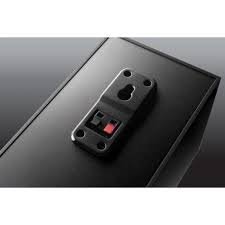
Connect the satellite speakers to the subwoofer unit using the provided speaker cables. Ensure correct polarity (red to red, black to black) for each connection.
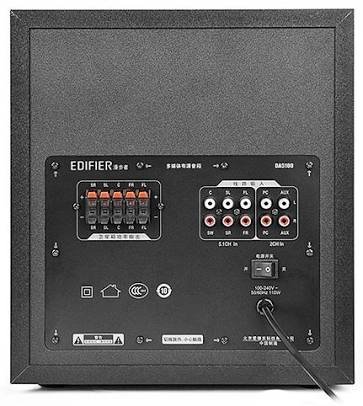
- Identify the speaker output terminals on the rear of the subwoofer. These are typically labeled for Front Left (FL), Front Right (FR), Center (C), Surround Left (SL), and Surround Right (SR).
- Connect each satellite speaker to its corresponding terminal on the subwoofer.
3. Падключэнне крыніц гуку
The DA5100 offers multiple input options. Choose the one that best suits your audio source.
- Уваход 5.1 канала: For true 5.1 surround sound, connect your DVD player, Blu-ray player, or sound card's 5.1 analog outputs to the corresponding 5.1 input jacks on the subwoofer (FL, FR, C, SL, SR, SW).
- Уваход ПК: Use the 3.5mm to RCA cable to connect your computer's audio output to the "PC" input jacks.
- Уваход AUX: Use the RCA to RCA cable to connect other stereo audio devices (e.g., TV, game console) to the "AUX" input jacks.
4. Падключэнне сілкавання
After all audio and speaker connections are made, connect the power cord to the subwoofer and then to a wall outlet. Ensure the power switch on the rear of the subwoofer is in the "OFF" position before plugging in.
Інструкцыя па эксплуатацыі
1. Уключэнне / выключэнне харчавання
Locate the power switch on the rear panel of the subwoofer. Flip it to the "ON" position to power on the system. Flip it to "OFF" to power off.
2. Выбар уводу
Use the "Input" button on the remote control or the control panel on the subwoofer to cycle through the available audio inputs: 5.1, PC, AUX.
3. Рэгулятар гучнасці
Use the "Volume +" and "Volume -" buttons on the remote control or the main volume knob on the subwoofer to adjust the overall system volume.
4. Individual Channel Volume Adjustment
The remote control allows for individual adjustment of the center, surround, and subwoofer volumes to fine-tune your sound experience.
- Press the "Center", "Surround", or "Subwoofer" button on the remote.
- Use the "Volume +" or "Volume -" buttons to adjust the level for that specific channel.
5. Функцыя адключэння гуку
Press the "Mute" button on the remote control to temporarily silence the audio. Press it again to restore the sound.
Тэхнічнае абслугоўванне і догляд
To keep your Edifier DA5100 speakers in optimal condition:
- Уборка: Use a soft, dry cloth to wipe down the speaker surfaces. Do not use liquid cleaners or abrasive materials.
- Вентыляцыя: Ensure that the subwoofer's heat sink and ventilation ports are not obstructed.
- захоўванне: Калі вы збіраецеся захоўваць дынамікі працяглы час, адключыце іх ад сілкавання і захоўвайце ў прахалодным, сухім месцы.
- Кабельнае кіраванне: Keep cables tidy and avoid sharp bends or kinks to prevent damage.
Ліквідацыю непаладак
If you encounter issues with your Edifier DA5100 system, refer to the table below for common problems and solutions.
| праблема | Магчымая прычына | Рашэнне |
|---|---|---|
| Няма гуку | Power off; incorrect input selected; loose cables; muted. | Check power switch; select correct input; re-connect all cables securely; un-mute. |
| Скажоны гук | Volume too high; poor audio source quality; incorrect cable connection. | Reduce volume; try a different audio source; check cable connections and polarity. |
| Пульт дыстанцыйнага кіравання не працуе | Dead batteries; obstruction between remote and sensor. | Replace batteries; ensure clear line of sight to the subwoofer's IR sensor. |
| Only some speakers producing sound | Incorrect 5.1 setup; loose speaker cables; audio source not 5.1. | Verify 5.1 input connections; check individual speaker cables; ensure audio source is outputting 5.1. |
Калі праблема не знікне, звярніцеся ў службу падтрымкі кліентаў Edifier.
Тэхнічныя характарыстыкі
The following are the general specifications for the Edifier DA5100 5.1 speaker system. Specifications are subject to change without notice.
- Выходная магутнасць: RMS 8W x 5 + 38W (THD+N=10%)
- АЧХ: R/L/C/SL/SR: 150Hz-20KHz | SW: 20Hz-130Hz
- Уваходная адчувальнасць: 5.1CH: L/R: 450mV+/-50mV; SW: 150mV+/-50mV | PC: 700mV+/-50mV | AUX: 350mV+/-50mV
- Тып ўводу: 5.1 Channel, PC, AUX
- Бас-блок: 8 цалі (210mm)
- Mid-range Unit: 3 цалі (78mm)
- Адзінка высокіх частот: 1 цалі (25mm)
- Памеры (сабвуфер): 270 мм x 300 мм x 435 мм (Ш x В x Г)
- Dimensions (Satellite): 130 мм x 160 мм x 100 мм (Ш x В x Г)
Інфармацыя аб гарантыі
Edifier products come with a limited warranty. Please refer to the warranty card included with your product or visit the official Edifier webпадрабязныя ўмовы гарантыі для вашага рэгіёна глядзіце на сайце. Захоўвайце чэк аб куплі як пацвярджэнне пакупкі для прэтэнзій па гарантыі.
Падтрымка кліентаў
For further assistance, technical support, or service inquiries, please contact Edifier customer support through their official webсайт або кантактную інфармацыю, указаную на ўпакоўцы прадукту.
Edifier Official Webсайт: www.edifier.com
Ask a question about this manual
Ask about setup, troubleshooting, compatibility, parts, safety, or missing instructions. Manuals+ will review the question and use this page’s manual context to help answer it.