
1. Уводзіны
The KIIROO Onyx 2 is an interactive male masturbator designed to provide automated pleasure. It features a SuperSkin Kiiroo insert and is capable of reaching up to 140 strokes per minute. The device is designed for discreet use and portability.
This manual provides essential information for the safe and effective use, maintenance, and troubleshooting of your Onyx 2 device. Please read it thoroughly before first use.
2. Змесціва ўпакоўкі
- KIIROO Onyx 2 Device
- SuperSkin Kiiroo Insert (pre-installed)
- Зарадны кабель (USB)
- Кіраўніцтва карыстальніка (гэты дакумент)

Figure 1: KIIROO Onyx 2 device shown alongside its retail packaging.
3. Прылада скончанаview

Малюнак 2: бок view of the Onyx 2, highlighting the power button, indicator light, and control buttons.
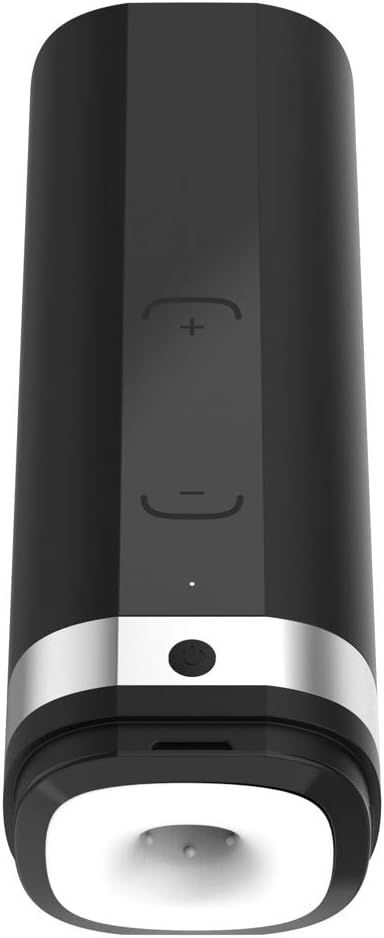
Малюнак 3: Зверху ўніз view of the Onyx 2, showing the sleeve opening, power button, and control buttons.

Малюнак 4: Унутраны view of the Onyx 2, illustrating the sleeve and the automated thrusting mechanism.
4. Настройка
4.1 Першапачатковая зарадка
- Locate the charging port on the device (refer to Figure 2).
- Connect the provided USB charging cable to the device and a compatible USB power source (e.g., computer, wall adapter).
- The indicator light will illuminate to show charging status. A full charge typically takes approximately 2-3 hours.
- Ensure the device is fully charged before first use for optimal battery performance. The device operates solely on battery power and cannot be used while charging.
4.2 Preparing the Sleeve
- Before each use, ensure the SuperSkin Kiiroo insert is clean and dry.
- Apply a water-based lubricant to the entrance and interior of the sleeve for comfortable use.
5. Інструкцыя па эксплуатацыі
5.1 Уключэнне/выключэнне
- To power on the device, press and hold the power button (refer to Figure 2) for approximately 2 seconds until the indicator light illuminates.
- Каб выключыць прыладу, зноў націсніце і ўтрымлівайце кнопку харчавання, пакуль індыкатар не пагасне.
5.2 Adjusting Stroke Speed
- Once powered on, the device will begin its automated thrusting motion.
- Use the '+' and '-' buttons (refer to Figure 2) to increase or decrease the stroke speed. The device can reach up to 140 strokes per minute.
5.3 Interactive Mode (If Applicable)
The Onyx 2 is designed for interactive experiences. To utilize this feature:
- Download the KIIROO application from your device's app store.
- Follow the in-app instructions to pair your Onyx 2 device via Bluetooth.
- Once paired, you can explore interactive content and synchronize the device with compatible videos or partners.
6. Тэхнічнае абслугоўванне
6.1 Ачыстка прылады
- Перад чысткай адключыце прыладу.
- Carefully remove the SuperSkin Kiiroo insert from the main unit.

Figure 5: Illustration of removing the internal sleeve for cleaning.
- Wash the SuperSkin Kiiroo insert thoroughly with warm water and a mild, toy-safe soap. Rinse completely.

Малюнак 6: Буйны план view of the SuperSkin Kiiroo insert, showing its texture.
- Працярыце знешнія паверхні асноўнага блока рэкламайamp cloth and mild soap. Do not submerge the main unit in water.
- Allow all components to air dry completely before reassembly or storage.
6.2 Захоўванне
Store the Onyx 2 in a clean, dry place, away from direct sunlight and extreme temperatures. Ensure the device is fully charged before long-term storage to preserve battery health.
7. Выпраўленне непаладак
| праблема | Магчымая прычына | Рашэнне |
|---|---|---|
| Прылада не ўключаецца і не рэагуе. | Акумулятар разраджаны. | Charge the device fully using the provided USB cable. Ensure the charging cable and port are clean and undamaged. |
| Прылада перастае працаваць падчас выкарыстання. | Нізкі акумулятар. | Recharge the device. The device cannot be operated while charging. |
| Motor jams or motion is inconsistent. | Sleeve obstruction or improper insertion. | Ensure the sleeve is correctly seated and free from debris. Avoid excessive pressure that might impede the mechanism. |
| Difficulty connecting to the app/interactive content. | Bluetooth not enabled, app issues, or device not in pairing mode. | Ensure Bluetooth is enabled on your smart device. Restart the Onyx 2 and the KIIROO app. Follow in-app pairing instructions carefully. |
| Sleeve tears easily or does not fit comfortably. | Improper handling or size incompatibility. | Handle the sleeve gently during removal and cleaning. Ensure adequate lubrication is used. Note that product dimensions may not be suitable for all users. |
8. Тэхнічныя характарыстыкі
| Асаблівасць | Дэталь |
|---|---|
| Нумар мадэлі | 05902310000 |
| Марка | KIIROO |
| Памеры прадукту | 5.6 х 3.9 х 12 цалі |
| Вага прадмета | 2.87 фунта |
| Тып батарэі | 1 літый-палімерная батарэя (у камплекце) |
| Max Stroke Speed | Up to 140 strokes per minute |
| Узровень воданепранікальнасці | Waterproof (for cleaning, not submersion of main unit) |
| Колер | Multicolor, White (referring to sleeve and device body) |
9. Гарантыя і падтрымка
Information regarding specific warranty terms for the KIIROO Onyx 2 is not provided in the available product data. For warranty claims, technical support, or further assistance, please contact KIIROO customer service directly through their official webсайт або прадаўца, у якога быў набыты тавар.
Please note that some retailers or manufacturers may have a no-return policy for personal care items.