
Уводзіны
Thank you for choosing the SKMEI SkmeiMW53 Digital Sports Watch. This manual provides detailed instructions for the proper setup, operation, and maintenance of your watch. Please read this manual carefully to ensure optimal performance and longevity of your device.
Прадукт скончаныview
The SKMEI SkmeiMW53 watch features a digital display with multiple functions. Familiarize yourself with the buttons and their functions:
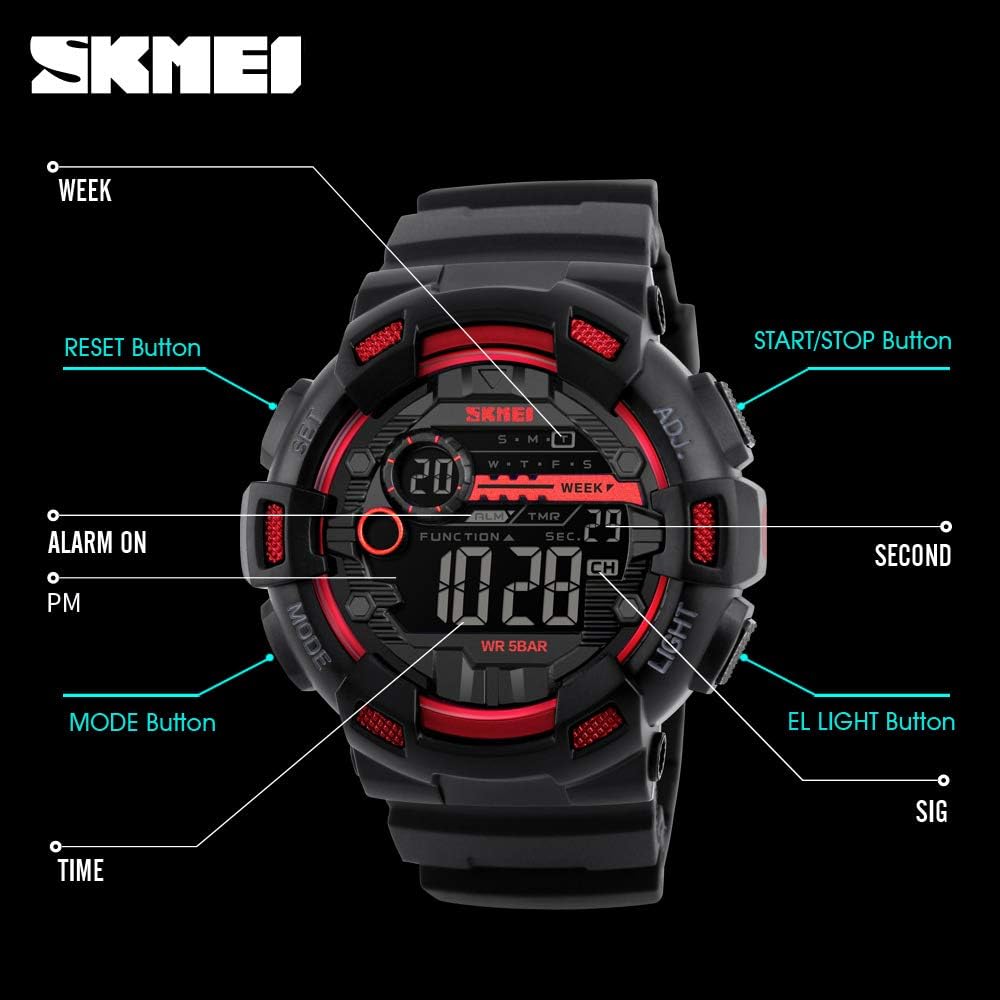
выява: Фронт view of the SKMEI SkmeiMW53 watch with key buttons and display indicators labeled for easy identification. This includes the SET, MODE, LIGHT, and ADJ buttons, along with indicators for Alarm, PM, Seconds, Signal, and Time.
- Кнопка MODE: Cycles through different modes (Time, Stopwatch, Alarm, Dual Time, Countdown).
- Кнопка LIGHT: Уключае святлодыёдную падсветку для паляпшэння бачнасці ў цёмных умовах.
- ADJ (Adjust) Button: Выкарыстоўваецца для ўваходу і выхаду з рэжымаў наладкі, а таксама для пацверджання выбару.
- Кнопка SET: Used to select items for adjustment within a setting mode.
- Кнопка START/STOP: Used to start/stop stopwatch, countdown, and adjust values.
- Кнопка скіду: Used to reset stopwatch or countdown, and adjust values.
Інструкцыя па наладзе
1. Налада часу і даты
- У звычайным рэжыме адлюстравання часу націсніце РЭЖЫМ Тры разы націсніце кнопку, каб увайсці ў рэжым усталявання часу. Секунды будуць міргаць.
- Націсніце НАБОР для пераключэння паміж элементамі налады: Секунды → Гадзіна → Хвіліна → Месяц → Дата → Дзень тыдня.
- Пакуль элемент міргае, выкарыстоўвайце ПУСК/СТОП or СКІД кнопка для рэгулявання значэння.
- To switch between 12-hour and 24-hour format, adjust the hour while it is flashing.
- Пасля завяршэння ўсіх налад націсніце кнопку прым кнопку для выхаду з рэжыму налад.
2. Налада сігналізацыі
- З звычайнага адлюстравання часу націсніце кнопку РЭЖЫМ двойчы націсніце кнопку, каб увайсці ў рэжым налады будзільніка. Пачне міргаць паказчык гадзіны.
- Націсніце НАБОР кнопку для пераключэння паміж устаноўкай гадзін і хвілін.
- Выкарыстоўвайце ПУСК/СТОП or СКІД button to adjust the hour and minute values.
- Націсніце прым кнопку для выхаду з рэжыму налады будзільніка.
- Каб уключыць/выключыць будзільнік, у рэжыме будзільніка націсніце кнопку ПУСК/СТОП кнопка. З'явіцца/знікне значок сігналізацыі.
Інструкцыя па эксплуатацыі
1. Функцыя секундамера
- З звычайнага адлюстравання часу націсніце кнопку РЭЖЫМ адзін раз націсніце кнопку, каб перайсці ў рэжым секундамера.
- Націсніце ПУСК/СТОП кнопку, каб запусціць секундамер.
- Націсніце ПУСК/СТОП зноў націсніце кнопку, каб спыніць секундамер.
- Націсніце СКІД кнопку, каб скінуць секундамер да нуля.
2. Таймер зваротнага адліку
- З звычайнага адлюстравання часу націсніце кнопку РЭЖЫМ чатыры разы націснуць кнопку, каб перайсці ў рэжым адліку часу.
- Націсніце прым button to enter setting mode. The hour will flash.
- Націсніце НАБОР button to cycle through setting hours, minutes, and seconds.
- Выкарыстоўвайце ПУСК/СТОП or СКІД кнопка для рэгулявання значэнняў.
- Націсніце прым кнопку, каб выйсці з рэжыму налад.
- Націсніце ПУСК/СТОП button to start the countdown. Press again to pause.
- Націсніце СКІД кнопку, каб скінуць адлік часу да першапачаткова ўсталяванага часу.
3. Святлодыёдная падсвятленне
Націсніце СВЯТЛО button at any time to illuminate the display. The backlight will remain active for a few seconds.
4. Dual Time Display
This watch supports a dual time display feature, allowing you to view a second time zone. To access and set the dual time:

выява: The watch face showing two distinct time displays, illustrating the dual time function. This feature is useful for tracking time in different zones.
- З звычайнага адлюстравання часу націсніце кнопку РЭЖЫМ button five times to enter dual time mode.
- Націсніце прым button to enter setting mode. The hour will flash.
- Націсніце НАБОР кнопку для пераключэння паміж устаноўкай гадзін і хвілін.
- Выкарыстоўвайце ПУСК/СТОП or СКІД button to adjust the hour and minute values for the second time zone.
- Націсніце прым button to exit dual time setting mode.
Кіраўніцтва па воданепранікальнасці
The SKMEI SkmeiMW53 watch is water-resistant up to 50 meters (5 ATM). This means it is suitable for everyday use, including splashes, rain, and brief immersion in water. However, it is не рэкамендуецца для:
- Hot water activities (e.g., showering, sauna), as steam can penetrate seals.
- Pressing buttons underwater, as this can compromise the water resistance.
- Deep diving or prolonged underwater activities.
Always ensure the crown (if applicable) is pushed in completely after setting the time to maintain water resistance.
Тэхнічнае абслугоўванне
- Уборка: Рэгулярна працірайце гадзіннік мяккай сухой тканінай. Для выдалення ўстойлівага бруду злёгкуamp можна выкарыстоўваць тканіну, а затым высушыць.
- Пазбягайце хімічных рэчываў: Не падвяргайце гадзіннік уздзеянню моцных хімічных рэчываў, растваральнікаў або мыйных сродкаў, бо яны могуць пашкодзіць корпус, раменьчык або ўшчыльняльнікі.
- Экстрэмальныя тэмпературы: Avoid exposing the watch to extreme temperatures (hot or cold) for extended periods, as this can affect battery life and internal components.
- Уплыў: Абараняйце гадзіннік ад моцных удараў або падзенняў.
- Замена батарэі: When the display becomes dim or functions are erratic, the battery may need replacement. It is recommended to have this done by a professional to ensure proper sealing and water resistance.
Ліквідацыю непаладак
- Дысплей пусты або цьмяны: Магчыма, батарэя разраджаная або разраджаная. Заменіце батарэю.
- Час няправільны: Re-set the time following the 'Time and Date Setting' instructions. Ensure 12/24-hour format is correctly selected.
- Кнопкі не рэагуюць: Check if the watch is in a specific mode that locks button functions. Try pressing the MODE button to cycle through modes. If the issue persists, a battery replacement might be needed.
- Вада ўнутры гадзінніка: If condensation or water appears inside the watch, stop using it immediately and take it to a professional for inspection and repair. Water damage is typically not covered under warranty if proper water resistance guidelines were not followed.
Тэхнічныя характарыстыкі

выява: Збоку view of the SKMEI SkmeiMW53 watch with key dimensions highlighted, showing a case diameter of 51mm and a width of 50mm.
| Асаблівасць | Дэталь |
|---|---|
| Нумар мадэлі | SkmeiMW53 |
| Тып дысплея | Лічбавы |
| Рух | Кварц |
| Матэрыял корпуса | Нержавеючая сталь |
| Дыяметр корпуса | 46 мм |
| Матэрыял гурта | Гумавая |
| Шырыня паласы | 30 мм |
| Глыбіня воданепранікальнасці | 50 метраў (5 атм) |
| Тып батарэі | 1 літый-іённы (у камплекце) |
| Асаблівасці | Alarm, Backlight, Stopwatch, Countdown, Dual Time, 12/24H Format, Date, Day |
Гарантыя і падтрымка
Гэты гадзіннік SKMEI пастаўляецца з 6-месячная гарантыя вытворцы ад вытворчых дэфектаў. Калі ласка, захавайце чэк аб куплі як пацвярджэнне пакупкі для прэтэнзій па гарантыі.
Гарантыя не распаўсюджваецца на:
- Damage resulting from improper use or negligence.
- Normal wear and tear of the case, strap, or glass.
- Замена акумулятара.
- Water damage if the watch was exposed to conditions beyond its specified water resistance or if buttons were pressed underwater.
For support or warranty inquiries, please contact your retailer or the official SKMEI service center.