
1. Уводзіны
This manual provides comprehensive instructions for the safe and efficient installation, operation, and maintenance of your ONKRON Full Motion TV Wall Mount, model M4-WHT. Please read all instructions carefully before installation to ensure proper setup and to prevent damage or injury.
2. Важная інфармацыя па бяспецы
- Ёмістасць вагі: Do not exceed the maximum weight capacity of 77 lbs (35 kg). Exceeding this limit may result in serious injury or property damage.
- Памер экрана: Гэта мацаванне прызначана для тэлевізараў з дыяганаллю ад 32 да 65 цаляў.
- Сумяшчальнасць VESA: Ensure your TV's VESA pattern (100x100mm to 400x400mm) is compatible with this mount.
- Тып сцяны: This mount is suitable for installation on solid concrete walls, brick walls, and wood stud walls. Do not install on drywall alone.
- Прафесійная ўстаноўка: If you have any doubts about the installation process or the suitability of your wall, consult a qualified professional.
- інструменты: Use appropriate tools and follow all safety precautions when drilling and tightening fasteners.
- дзеці: Трымайце дзяцей далей ад зоны ўстаноўкі падчас усталёўкі.
3. Змесціва ўпакоўкі
Verify that all components are present and undamaged before beginning installation. If any parts are missing or defective, contact ONKRON customer support.
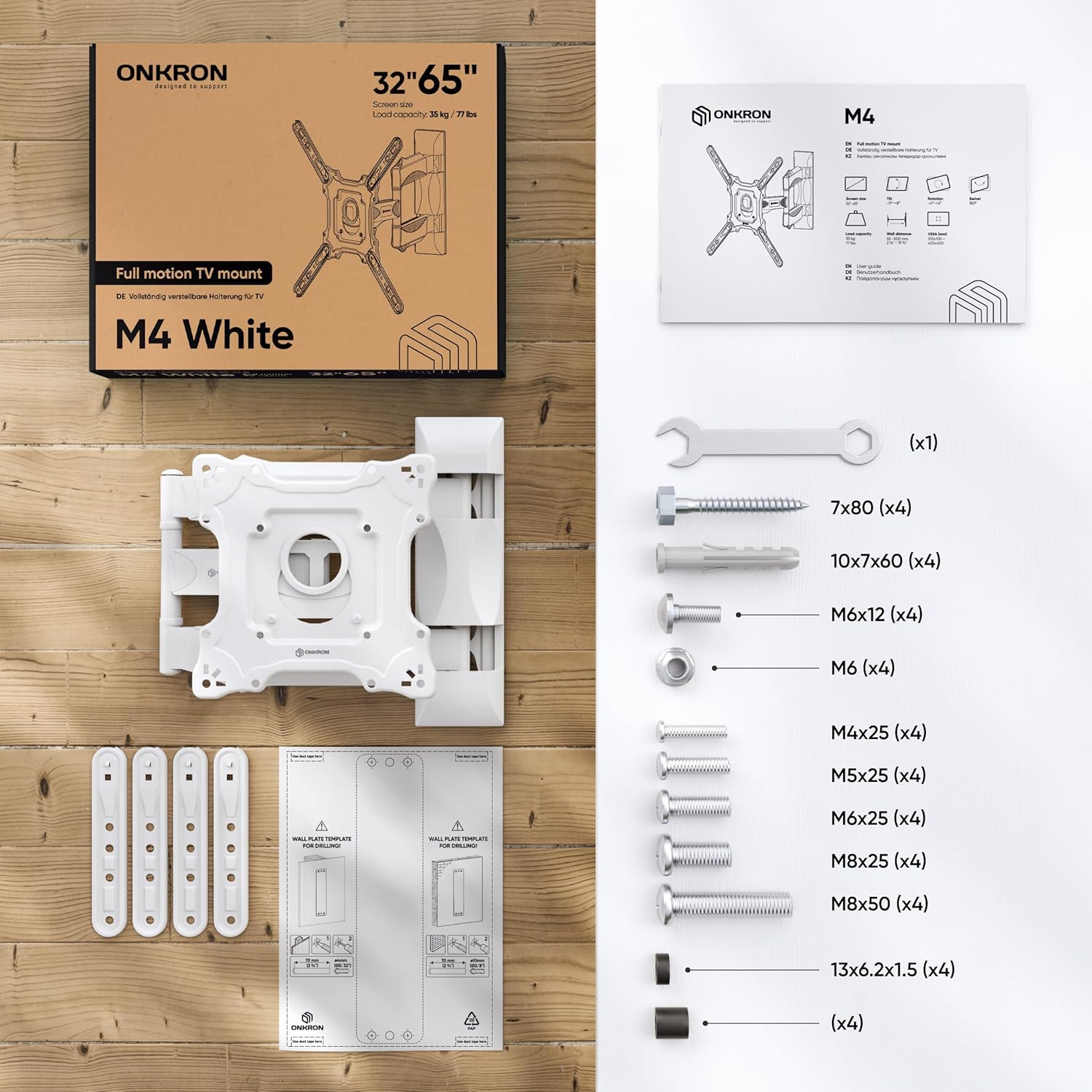
Figure 1: All necessary fasteners and a clear manual are included in the TV mounting kit.
- Wall Plate Assembly (pre-assembled)
- Панэль VESA
- VESA Extenders (4 pieces)
- Plastic Covers for cable management
- Hardware Kit (various screws, washers, anchors, wrench)
- Шаблон свідравання
4. Неабходныя інструменты (не ўваходзяць у камплект)
- Аловак
- Малаток
- Выкрутка для галоўкі Філіпс
- Электрычная дрыль
- Drill Bits (specific sizes depending on wall type)
- Узровень
- Пошукавікі для стойк (для ўстаноўкі драўляных стойк)
5. Кіраўніцтва па ўстаноўцы
Watch the official ONKRON M4 Assembly and Configuration Instructions video for a visual guide:
Video 1: ONKRON M4 Assembly and Configuration Instructions. This video demonstrates the step-by-step process of installing the M4 TV wall mount.
5.1. Prepare the Mount
- Use the provided wrench to unscrew the nuts and detach the VESA panel from the main mount assembly.
- Carefully detach the plastic covers from the mount arms. These will be reattached later for cable management.
5.2. Mark Drill Holes on the Wall
Determine your desired TV height and position on the wall.
- Для драўляных сцен з каркасамі:
- Use a stud finder to locate the center of a wood stud.
- Place the drilling template against the wall at the desired height, ensuring it is level.
- Mark the drill hole locations with a pencil.
- Drill pilot holes with a 5/32" (4mm) drill bit to a minimum depth of 3.1" (80mm). No dowels are needed for wood studs.
- Для бетонных/цагляных сцен:
- Place the drilling template against the wall at the desired height, ensuring it is level.
- Mark the drill hole locations with a pencil.
- Drill holes with a 3/8" (10mm) drill bit to a minimum depth of 3.1" (80mm).
- Insert the provided concrete anchors (dowels) into the drilled holes. Tap gently with a hammer until flush with the wall.
5.3. Усталюйце насценную пласціну
- Align the main wall plate assembly with the drilled holes.
- Secure the wall plate to the wall using the appropriate screws and washers from the hardware kit. Tighten firmly with the wrench.
5.4. Attach VESA Panel to TV
The ONKRON M4-WHT supports VESA patterns from 100x100mm to 400x400mm.

Figure 2: The VESA panel can be extended to fit larger VESA patterns.
- Place your TV face down on a soft, clean surface to prevent scratches.
- Identify your TV's VESA mounting holes.
- If your TV's VESA pattern is 100x100, 100x200, or 200x200, you may not need the VESA extenders. Attach the VESA panel directly to the TV using the correct screws and plastic spacers (if needed to compensate for bolt length or curved screens).
- If your TV's VESA pattern is larger (e.g., 200x300, 200x400, 300x200, 300x300, 300x400, 400x200, 400x300, 400x400), attach the VESA extenders to the VESA panel first, then secure the entire assembly to the TV using the appropriate screws and spacers.
- Шчыльна зацягніце ўсе шрубы, але не перацягвайце.
5.5. Hang Your TV onto the Mount
- With assistance, carefully lift your TV and align the VESA panel (attached to the TV) with the mounting plate on the wall arm.
- Hook the VESA panel onto the mount.
- Secure the TV to the mount by tightening the safety screws located on the VESA panel.
5.6. Кіраванне кабелем
- Route your TV cables through the designated channels on the mount arms.
- Reattach the plastic covers to conceal the cables and provide a clean appearance.
6. Operating the TV Mount
The ONKRON M4-WHT offers versatile adjustments for optimal viewінж.
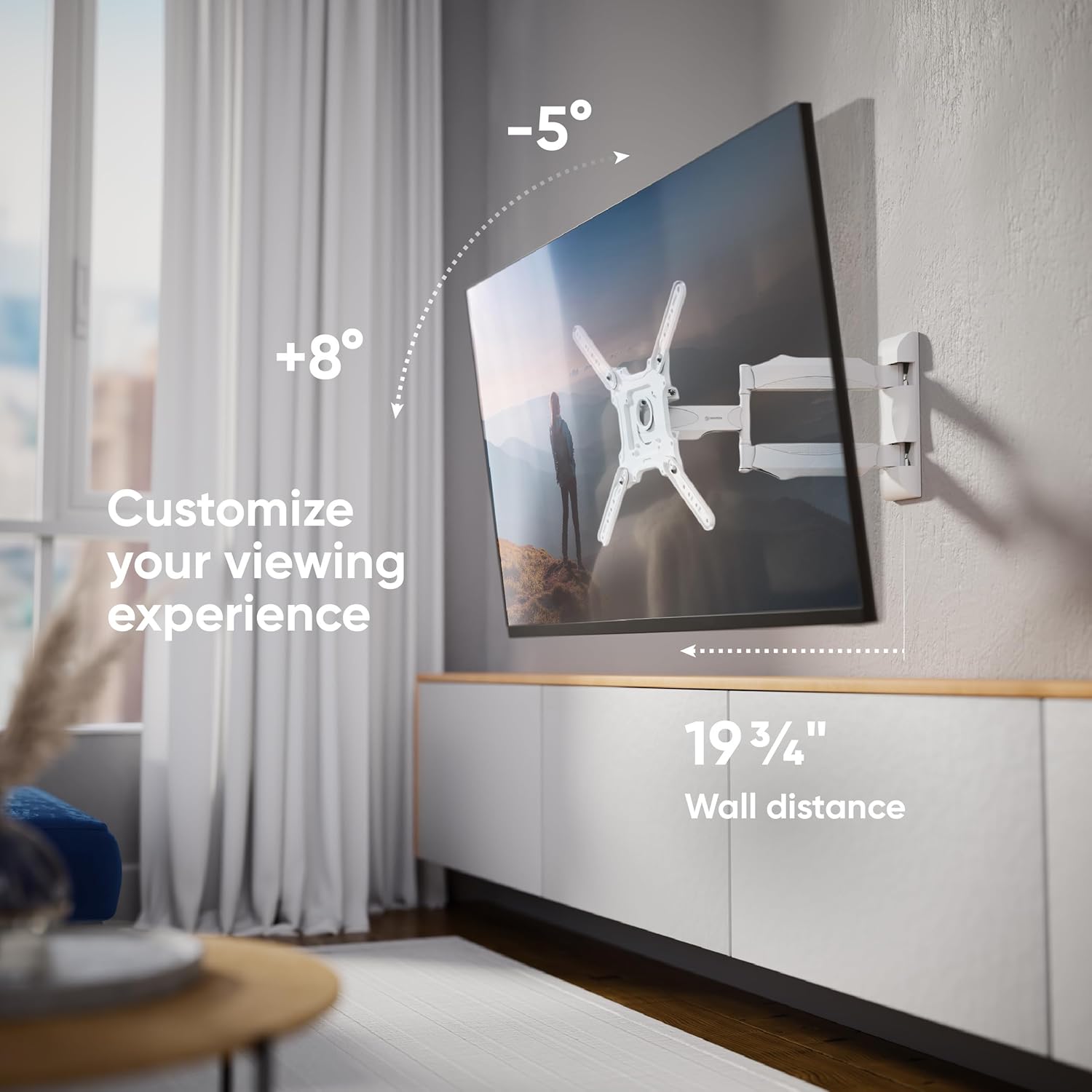
Малюнак 3: Наладзьце свой viewing experience with tilt and extension.
- Рэгуляванне нахілу: The mount allows for a tilt range of -5° to +8°. Loosen the tilt adjustment screws on the VESA panel, adjust the screen to your desired angle, and then re-tighten the screws to secure the position.
- Рэгуляванне павароту: The articulating arm allows the TV to swivel up to 180° (depending on TV size and wall distance). Gently push or pull the TV to achieve the desired viewкут нахілу.
- Пашырэнне: The mount can extend from a minimum distance of 2.1 inches (55mm) from the wall to a maximum of 19.7 inches (500mm).
- Выраўноўванне экрана: After installation, the screen can be aligned horizontally by slightly rotating the VESA panel before tightening the final screws.

Figure 4: Achieve a perfect view from anywhere with the 180-degree swivel.
7. Тэхнічнае абслугоўванне
- Уборка: Чысціце мацаванне мяккай сухой тканінай. Пазбягайце абразіўных ачышчальнікаў або растваральнікаў.
- Перыядычная праверка: Перыядычна правярайце ўсе шрубы і злучэнні, каб пераканацца, што яны зацягнуты і надзейна закручаныя. Пры неабходнасці падцягвайце.
- Рухомыя часткі: The articulating arms are designed for smooth movement. No lubrication is typically required.
8. Выпраўленне непаладак
- Тэлевізар не роўныя: If the TV appears unlevel after installation, slightly loosen the screws connecting the VESA panel to the mount, adjust the TV to be level, and then re-tighten the screws.
- Маунт адчуваецца свабодным: Check all wall mounting screws and TV attachment screws. Ensure they are securely tightened. If the issue persists, re-evaluate your wall type and installation method.
- Difficulty Adjusting Tilt/Swivel: Ensure no cables are obstructing movement. For tilt, loosen the adjustment screws before attempting to change the angle, then re-tighten.
9. Тэхнічныя характарыстыкі
| Асаблівасць | Спецыфікацыя |
|---|---|
| Нумар мадэлі | M4-WHT |
| Сумяшчальнасць з памерам экрана | 32 - 65 цалі |
| Максімальная грузападымальнасць | 77 фунтаў (35 кг) |
| Сумяшчальнасць VESA | 100x100 мм да 400x400 мм |
| Кут нахілу | -5° да +8° |
| Кут павароту | Up to 180° (screen size dependent) |
| Пашырэнне ад сцяны | ад 2.1 цалі (55 мм) да 19.7 цалі (500 мм) |
| Матэрыял | Легаваная сталь |
| Колер | Белы |
| Памеры прадукту | 16 х 13 х 3 цалі (у складзеным выглядзе) |
| Вага прадмета | 8.1 фунта |
10. Гарантыя і падтрымка
ONKRON products undergo multi-stage quality control. For any questions, technical assistance, or warranty claims, please contact ONKRON customer support. Refer to your product packaging or the official ONKRON webсайт для атрымання самай актуальнай кантактнай інфармацыі.
All necessary fasteners and a clear manual are included in the TV mounting kit. ONKRON full motion TV wall mounts undergo multi-stage quality control and feature sturdy packaging, with expert support ready to assist when needed.